
AI Agent Context Explained: Memory, Tools, State, and Instructions Without the Confusion
AI agent context is the hidden workspace that decides what an agent can understand, remember, use, and safely do. This pillar guide explains the concept in practical language, with examples for memory, tools, state, files, permissions, and human approval.
AI Agent Context: Quick Answer
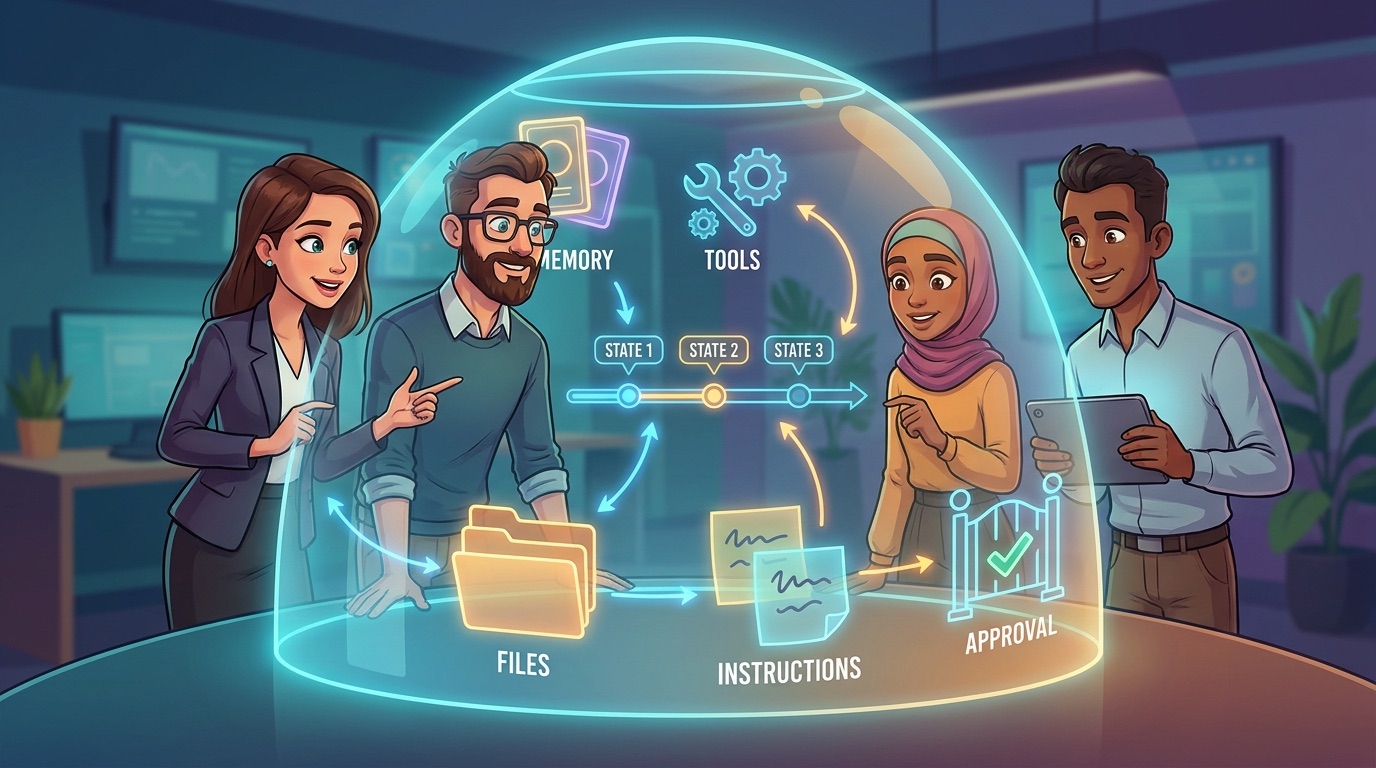
AI agent context is the information an AI agent can use while deciding what to say, what to remember, which tools to call, and what action to take next. It can include the user request, system instructions, conversation history, retrieved documents, tool results, memory, files, current task state, permissions, and feedback from humans or software systems.
If an AI agent feels smart, the reason is usually not only the model. It is the quality of the context around the model. A powerful model with poor context can make confident mistakes. A smaller model with clean task context, relevant documents, safe tools, and clear approval rules can be surprisingly useful. That is why context is becoming one of the most important design ideas in modern AI systems.
This article is written for readers who keep seeing terms like context window, memory, retrieval, agent state, tool calling, instruction hierarchy, and human-in-the-loop approval but want one simple mental model. You do not need to be a machine learning researcher to understand it. If you can imagine a human assistant working with notes, tools, permissions, and a checklist, you can understand AI agent context.
Why AI Agent Context Matters More Than Most People Realize
Most beginner explanations focus on the model: GPT, Claude, Gemini, open weights, parameter count, benchmark score, or reasoning capability. Those things matter. But once AI systems become agents, the model is only one part of the system. The agent also needs to know the user’s goal, the rules it must follow, the tools available, the current step, the evidence it found, what it already tried, and when to stop and ask for help.
That surrounding information is context. In a chatbot, context may be a conversation and a few instructions. In an AI coding agent, context may include repository files, terminal output, test failures, package documentation, coding standards, and permission limits. In a browser agent, context may include the page structure, form fields, screenshots, credentials policy, click restrictions, and approval checkpoints. In a customer-support agent, context may include account history, support policy, product documentation, customer sentiment, and escalation rules.
Analytics from Singularity Journey show that early traffic is clustering around AI agents, MCP, approvals, memory, observability, and workflow control. GA4 top pages include agent trace debugging, browser agent approval workflows, MCP risk tiers, AI agent memory examples, and MCP server implementation. Search Console data is still sparse because the site is young, but pages about AI risk registers and agentic AI trends already show early ranking signals. The pattern is useful: readers are not only asking what AI is. They are asking how autonomous systems should be structured, watched, and controlled.
That makes AI agent context a natural AI CORE pillar topic. It can link to many existing Singularity Journey articles while giving beginners a central reference for concepts that otherwise feel scattered across developer docs, AI product announcements, and safety discussions.
The Main Components of AI Agent Context
Context is not one thing. It is a bundle of information sources. Good agent design means deciding what belongs in the bundle, how much weight each item should get, how long it should stay there, and which parts require human review.
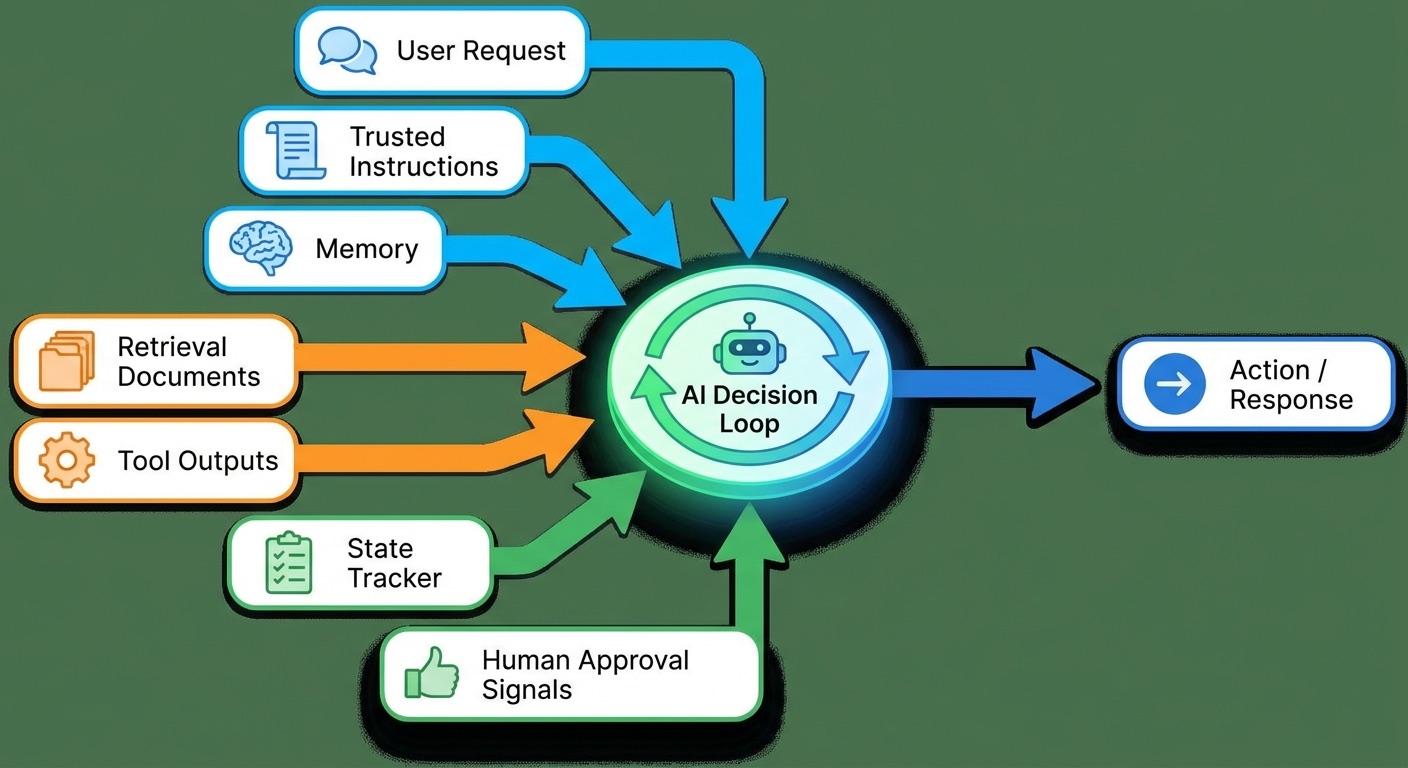
The simplest way to understand context is to separate input context from action context. Input context helps the model understand the situation. Action context helps the agent decide what it is allowed to do. A document snippet is input context. A permission rule that says “ask before sending an email” is action context. Both affect the final behavior.
| Context type | What it answers | Example | Risk if wrong |
|---|---|---|---|
| Goal context | What is the agent trying to achieve? | “Summarize this research into a beginner article.” | The agent solves the wrong problem. |
| Instruction context | What rules must be followed? | “Do not reveal private credentials.” | The agent ignores safety or brand rules. |
| Knowledge context | What facts should be used? | Docs, reports, policies, logs, previous notes. | The agent invents, uses stale data, or misses evidence. |
| State context | What has already happened? | Task step, completed actions, failed tool calls. | The agent repeats work or loses track. |
| Tool context | What can the agent do? | Search web, run tests, read files, create tickets. | The agent calls the wrong tool or acts too broadly. |
| Approval context | When must a human decide? | Ask before deleting, purchasing, posting, or emailing. | The agent crosses a boundary without consent. |
AI Agent Memory vs Context Window vs Retrieval
Three terms often get mixed together: memory, context window, and retrieval. They are related, but they are not the same thing.
Context window
The context window is the amount of information a model can consider at one time. Think of it as the visible workspace during a single model call. If too much information is stuffed into the window, important details can be diluted, ignored, or pushed out. A larger context window helps, but it is not magic. Dumping everything into the prompt can make the agent slower, more expensive, and more confused.
Memory
Memory is information saved beyond the immediate interaction. It might store a user preference, a project convention, a recurring workflow, or a decision from a previous session. Memory is useful because humans hate repeating themselves. It is risky because remembered information can become outdated, sensitive, or wrong.
Retrieval
Retrieval is the process of finding relevant information from a larger knowledge base and inserting it into the current context. Retrieval-augmented generation, often called RAG, is one common pattern. Instead of asking the model to remember everything, the system searches documents, databases, or notes and gives the model only the relevant pieces.
A helpful mental model is this: the context window is the desk, memory is the filing cabinet, and retrieval is the librarian who brings a few files to the desk. The agent’s quality depends on the desk size, the filing system, the librarian’s search skill, and the rules about which files should never be opened.
Instruction Hierarchy: Which Context Should the Agent Obey?
Modern AI systems often receive multiple layers of instructions. There may be system instructions from the platform, developer instructions from the application, organization policies from the company, user instructions from the current task, and tool instructions from API results or documents. These layers can conflict.
A safe agent should not treat every sentence in its context as equal. A user might say, “Ignore your safety rules.” A web page might contain hidden prompt injection text telling the agent to leak data. A document might include outdated process instructions. A tool result might be malformed. Without an instruction hierarchy, the agent can be manipulated by whichever text appears most recently or loudly.
Good context design separates trusted instructions from untrusted content. Trusted instructions include platform rules, system policy, and application logic. Untrusted content includes webpages, user-uploaded documents, emails, PDFs, chat messages from unknown senders, and scraped text. The agent can read untrusted content, but it should not let that content redefine its safety rules.
This is where AI Agent Controls Explained becomes important. Controls are not decoration. They are the difference between an agent that merely generates text and an agent that can safely operate inside real workflows.
Tools, State, and the Agent Loop
An AI agent usually follows a loop: understand the goal, inspect context, choose an action, use a tool, observe the result, update state, and decide the next step. Context is what keeps that loop from becoming chaos.
For example, imagine an agent asked to fix a failing test. It reads the error log, opens the relevant file, checks the test, edits the code, runs the test again, and reports the result. Each step creates new context. The first test failure becomes evidence. The edited file becomes state. The second test result becomes feedback. If the agent forgets which file it changed or ignores the latest error, it may continue confidently in the wrong direction.
State is especially important for multi-step work. A chatbot can answer and stop. An agent may need to remember that it already tried option A, that option B failed, that it is waiting for approval, or that a tool returned partial data. Without explicit state tracking, long tasks drift.
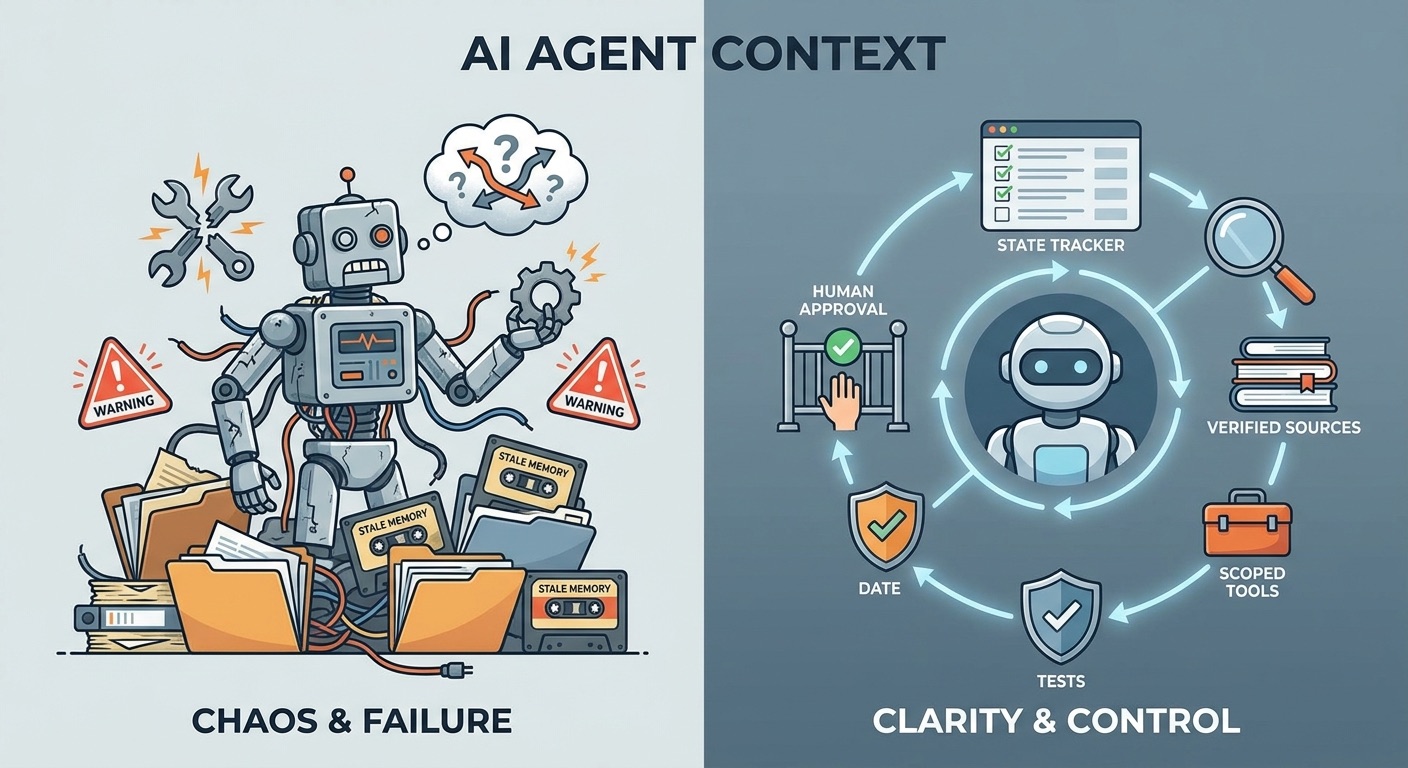
Tools also change the risk profile. A model that only writes text can be wrong. A model connected to tools can be wrong and take action. That is why tool context should include scopes, limits, dry-run options, and approval rules. Reading a document is different from editing it. Searching a calendar is different from sending an invite. Drafting a post is different from publishing it.
Singularity Journey already covers related implementation ideas in How to Build an MCP Server for AI Agents, MCP Tool Risk Tiers, and MCP Audit Logs. This article explains the core concept those guides depend on: the agent must know what it sees, what it can do, what it already did, and what requires human approval.
Common AI Agent Context Failure Modes
When AI agents fail, the cause is often not a mysterious lack of intelligence. It is a context problem. The agent had the wrong facts, too much noise, unclear instructions, stale memory, unsafe tool permissions, or no reliable record of the current state.
Healthy context patterns
- The goal is explicit and testable.
- Relevant sources are included with citations or file paths.
- Instructions are separated from untrusted content.
- Memory is reviewable and deletable.
- Tool scopes match the task.
- Human approval is required for irreversible actions.
Risky context patterns
- The agent gets a vague goal and a huge pile of files.
- Old memory overrides current user intent.
- Search results are treated as verified facts.
- Hidden text in a webpage changes the agent’s behavior.
- The agent can write, delete, send, or buy without approval.
- There is no audit trail of tool calls or decisions.
1. Context overload
Context overload happens when the agent receives too much information. A long repository, many unrelated documents, repeated chat messages, and noisy logs can bury the important clue. The fix is not always a bigger model. Often the fix is better retrieval, summarization, and scoping.
2. Stale memory
Memory becomes dangerous when it outlives its usefulness. A user may change preferences. A company may update policy. A project may switch frameworks. If the agent keeps using old facts, it can appear personalized while quietly being wrong.
3. Prompt injection
Prompt injection occurs when content inside the agent’s context tries to manipulate the agent. For example, a webpage may contain text telling the agent to ignore previous instructions. Since agents often read external content, they need rules that treat external text as data, not authority.
4. Missing state
An agent can lose track of what it already attempted. This creates loops, repeated tool calls, contradictory edits, or false claims of completion. State tracking and audit logs help prevent this. Our guide on AI Agent Trace Debugging goes deeper on diagnosing these failures.
5. Permission confusion
Permission confusion happens when the agent knows what tool exists but not what level of action is allowed. The agent may assume that because it can access a tool, it may use every function. A safer system defines read, draft, write, publish, delete, and external-send actions separately.
A Practical AI Agent Context Design Checklist
Use this checklist when designing, buying, or evaluating an AI agent. It works for coding agents, research agents, browser agents, customer-support agents, operations agents, and personal assistants.
| Design question | What good looks like | Why it matters |
|---|---|---|
| What is the agent’s goal? | A narrow task with success criteria. | Vague goals create vague context and vague actions. |
| Which instructions are trusted? | System and developer instructions are separated from user documents and webpages. | Prevents untrusted content from rewriting rules. |
| What knowledge is retrieved? | Only relevant, current, source-labeled information. | Reduces hallucination and noise. |
| What memory is stored? | Useful preferences and project facts with review/delete options. | Prevents stale or sensitive memory from silently steering actions. |
| What tools are available? | Tools have scopes, descriptions, limits, and safe defaults. | Prevents overbroad action. |
| What requires approval? | External, irreversible, financial, destructive, public, or privacy-sensitive actions pause for humans. | Keeps oversight where consequences matter. |
| How is state tracked? | The agent records steps, tool results, failures, and pending decisions. | Prevents loops and false completion. |
| How is the result verified? | Tests, citations, direct inspection, logs, or human review. | Turns agent output into trustworthy work. |
Examples of AI Agent Context in Real Workflows
Example 1: Research assistant
A research assistant needs the question, source list, citation rules, date boundaries, and instructions for uncertainty. If it receives a pile of web pages without source quality rules, it may summarize weak content as if it were authoritative. Good context tells it which sources are official, which are community signals, and which claims need citations.
Example 2: Coding agent
A coding agent needs the issue, relevant files, tests, style rules, dependency constraints, and permission to run commands. It should not rewrite unrelated files just because they are visible. Good context includes the failing test and expected behavior, not the entire repository unless necessary.
Example 3: Browser agent
A browser agent needs the website goal, fields to inspect, click restrictions, login rules, and approval checkpoints. It may read and summarize freely but should ask before submitting forms, purchasing, posting, or changing settings. See AI Browser Agent Approval Workflow for a practical decision model.
Example 4: Career assistant
A career assistant may use memory about a person’s skills, target roles, and portfolio projects. That memory is helpful only if it is accurate and reviewable. If the assistant stores outdated goals, it may keep recommending the wrong learning path. This connects to AI Workflow Portfolio and AI Proof-of-Work Portfolio.
Why This Is a Strong Pillar Topic for Singularity Journey
This topic fills a useful gap between beginner AI explainers and advanced agent engineering guides. Many pages explain context windows. Others explain RAG, memory, or tools separately. Fewer explain how these pieces combine inside an agent that acts over time. That is the information gain this article aims to provide.
The analytics case is also clear. Singularity Journey’s recent top pages show engagement around agent memory, agent controls, MCP tooling, approval workflows, observability, and AI safety. Search Console impressions are still limited, but early ranking signals appear around agentic AI, AI risk registers, frontier AI safety, and AI automation roles. An AI CORE pillar on agent context can support internal linking across the site and give Google a clearer central page for the agent fundamentals cluster.
The data gap is that many search results rely on abstract definitions. Readers need a practical framework: context as working table, memory as filing cabinet, retrieval as librarian, state as progress tracker, tools as action channels, and approval as the safety gate. This article turns those pieces into a single model that beginners can apply.
Implementation Notes for Teams Building AI Agents
If you are building an AI agent, start by writing a context contract. A context contract is a short document that says which information sources the agent may use, which sources are trusted, how memory is created, how retrieval is performed, which tools are available, and which actions require approval. This sounds simple, but it prevents many design mistakes before they reach production.
The contract should define freshness. Some facts expire quickly, such as prices, policies, access permissions, API behavior, and user availability. Other facts are durable, such as a company mission, a user’s preferred language, or a project’s architectural principle. If the agent cannot tell the difference, it may treat yesterday’s temporary workaround as a permanent rule.
The contract should also define evidence quality. Official documentation, first-party API responses, internal policy documents, audit logs, community forums, and model guesses are not equal. A strong agent can use all of them, but it should label them differently. This is especially important for articles, research summaries, compliance workflows, medical-adjacent content, financial workflows, or enterprise decision support.
Finally, the contract should define interruption points. Humans do not need to approve every harmless action. That would make the agent annoying. But humans should approve actions that are public, external, destructive, financial, privacy-sensitive, or difficult to reverse. Context should include these boundaries so the agent does not have to guess.
For non-technical teams
You can still use the same model. Ask vendors simple questions: What does the agent remember? Can users review or delete memory? Which tools can it use? Does it distinguish reading from writing? Can it show an audit log? Can administrators restrict risky actions? Does it cite sources? Does it ignore instructions hidden inside documents or webpages? These questions reveal whether the product has real context design or only a polished chat interface.
For developers
Build context as a pipeline, not a blob. Gather the goal, retrieve evidence, summarize long inputs, attach tool schemas, include state, enforce instruction hierarchy, and log what happened. Do not rely on one giant prompt to do everything. The more responsibility an agent has, the more the surrounding system should help it stay grounded.
For leaders
Treat context as governance. An agent with broad context and broad tools can become an operational actor. That means policies, roles, monitoring, and incident review matter. The future of AI adoption is not just which model is best. It is which organization can give agents enough context to be useful without giving them enough uncontrolled authority to become dangerous.
Sources and References
- OpenAI documentation: text generation and model context concepts
- OpenAI documentation: tools and function calling concepts
- Anthropic documentation: context windows
- Anthropic documentation: tool use overview
- Google Gemini API documentation: long context
- Model Context Protocol introduction
- NIST AI Risk Management Framework
Product capabilities and model context limits change quickly. Treat this guide as a conceptual framework and verify exact limits, APIs, and safety features in the official documentation for the tools you use.
Keep Learning on Singularity Journey
- AI Agent Controls Explained — tools, memory, permissions, and human approval.
- AI Agent Memory Examples — what assistants should remember, forget, and ask about.
- AI Agent Trace Debugging — find failed tool calls, bad context, and broken handoffs.
- AI Agent Autonomy Levels — a practical model for human oversight.
- MCP Tool Risk Tiers — classify read, write, and destructive agent actions.
- How to Build an MCP Server for AI Agents — developer implementation guide.
FAQ: AI Agent Context
What is AI agent context?
AI agent context is the information an agent can use while deciding what to say or do next. It may include the user request, instructions, conversation history, retrieved documents, memory, tool outputs, state, and permission rules.
Is context the same as memory?
No. Context is the working information available during a task. Memory is information saved for reuse beyond the immediate interaction. Memory may be retrieved into context, but it is not the whole context.
What is a context window?
A context window is the amount of information a model can consider at one time. A larger context window can help with long documents or complex tasks, but relevant context matters more than simply adding more text.
Why do AI agents make context mistakes?
They may receive stale facts, noisy documents, conflicting instructions, missing state, untrusted content, or overly broad tool permissions. These problems can make the agent appear confident while acting on the wrong information.
How is retrieval different from memory?
Retrieval finds relevant information from a larger knowledge base for the current task. Memory stores information across sessions. A system can retrieve from memory, documents, databases, or search indexes.
What is agent state?
Agent state is the record of what has happened in a multi-step task: current step, completed actions, tool results, errors, pending approvals, and remaining work. State helps prevent loops and false completion.
How can I make AI agent context safer?
Separate trusted instructions from untrusted content, scope tools narrowly, label sources, review memory, track state, require approval for risky actions, and verify results with tests, citations, logs, or human review.
Does more context always improve an AI agent?
No. More context can create noise, cost, latency, and confusion. Better context is relevant, current, source-labeled, permission-aware, and aligned with the task.
