
AI Workflows vs AI Agents: The Simple Difference That Decides What to Build
Most confusion about agentic AI starts with one blurred line: a workflow follows a designed path, while an agent can choose the path. This guide explains the difference in plain English, shows where orchestration fits, and gives you a practical decision model for building safer, simpler AI systems.
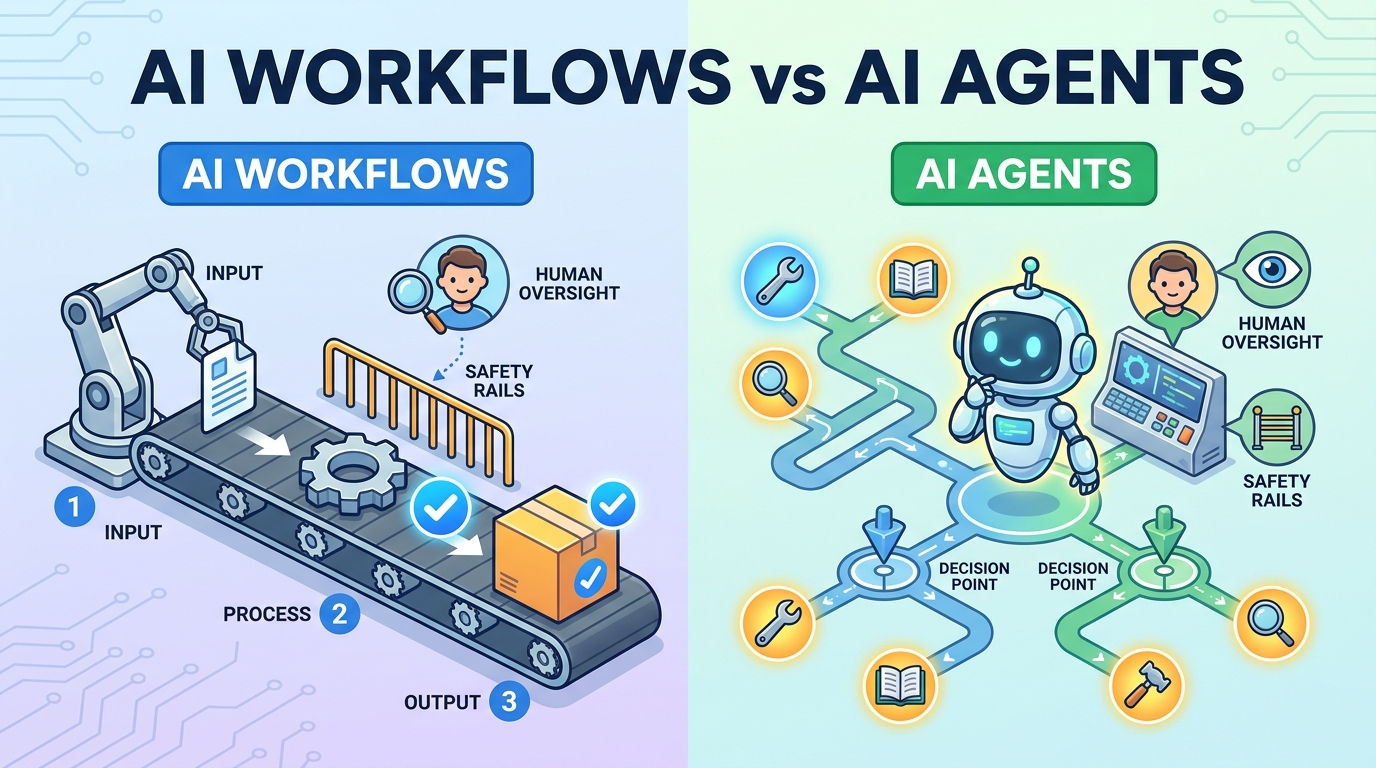
AI Workflows vs AI Agents: Quick Answer
AI workflows are predefined processes that use AI inside a planned sequence of steps. A human designs the path first: receive an input, classify it, summarize it, route it, draft a response, ask for approval, and send it. The AI may make individual steps smarter, but the workflow itself remains controlled and predictable.
AI agents are systems that receive a goal, decide which steps to take, choose tools, inspect results, revise plans, and keep going until they reach a stopping condition. A human may set rules and approvals, but the agent has more freedom to decide how the task gets done.
This difference matters because autonomy changes everything: cost, latency, debugging, security, reliability, user trust, and how much human oversight you need. Many teams say they want agents when they actually need a workflow with one or two LLM steps. That is not a downgrade. In production, the simplest system that solves the problem is usually the strongest system.
Singularity Journey’s analytics also support this topic choice. Recent GA4 data shows the site already gets meaningful engagement on AI agent explainers, evaluation, context, safety, and enterprise-agent pages. Search Console visibility is still early, but indexed pages around agents and AI safety are appearing for exact or near-exact concepts. That means the best AI Core pillar right now is not another broad “what are agents” article. It is a clearer bridge article that helps readers understand the architecture underneath the buzzwords.
Why AI Workflows and AI Agents Get Confused
The terms are confusing because both systems can use the same ingredients. A workflow and an agent can both call an LLM. Both can retrieve documents. Both can call tools. Both can summarize, classify, write code, search a knowledge base, update a ticket, and ask a human for approval. From the outside, both can look like “AI automation.”
The difference is not the presence of an LLM. The difference is who controls the process. In a workflow, the process is mostly encoded in the application logic. In an agent, the model has more control over planning and tool use. Anthropic’s engineering guidance draws this distinction clearly: workflows orchestrate LLMs and tools through predefined code paths, while agents dynamically direct their own processes and tool usage. That framing is useful because it moves the conversation away from hype and toward architecture.
Vendor pages and social posts often blur the boundary because “agent” sounds more exciting than “workflow.” A support-ticket classifier becomes an agent. A Zapier automation with an AI summary step becomes an agent. A chatbot with tool access becomes an agent. Sometimes that language is harmless marketing. But for builders, it creates real risk. If you design a predictable workflow as though it is a fully autonomous agent, you may add unnecessary complexity. If you deploy a flexible agent as though it is a predictable workflow, you may underinvest in approvals, evaluation, and monitoring.
There is also a psychological reason for the confusion. Humans describe tasks by outcomes: “answer the customer,” “fix the bug,” “research the market,” “schedule the meeting.” Software needs a process. The core question is whether that process should be fixed, flexible, or somewhere in between.
What Is an AI Workflow?
An AI workflow is a structured sequence of steps where one or more steps use AI. The steps may include rules, triggers, database calls, human review, API actions, and LLM prompts. The important part is that the workflow path is planned in advance. The system knows what step comes next, what conditions matter, what outputs are expected, and where a human should intervene.
Imagine a customer support intake process. A ticket arrives. The workflow detects language, classifies urgency, summarizes the issue, checks whether the user is a paid customer, drafts a suggested response, and sends it to a human support agent for approval. AI is doing useful work. But the AI is not deciding the entire process. The software is following a defined route.
Workflows are especially strong when the task is repeatable, the decision points are known, the cost of mistakes is high, or the organization needs auditability. They are easier to debug because each step has a name, an input, an output, and a log. If the classification step fails, you can inspect the classification step. If the routing rule is wrong, you can change the routing rule. That transparency is a major advantage.
Common AI workflow patterns
Notice the pattern: the workflow makes the process legible. You can map it. You can test it. You can add dashboards. You can define service-level expectations. That is why AI workflows are often the better first step for teams that are new to agentic systems.
What Is an AI Agent?
An AI agent is a system that can pursue a goal by planning, choosing tools, using context, observing results, and adapting its next action. Instead of simply executing a fixed chain, the agent participates in deciding the chain. It may search, inspect files, call APIs, ask clarifying questions, create a plan, revise the plan, and stop when it believes the task is complete.
A coding agent is a useful example. You might say, “Find why this test fails and propose a fix.” The agent may inspect the failing test, open related files, read logs, identify a recent change, edit a function, run the test again, and explain the result. You did not specify every step. The agent chose a route through the environment.
This flexibility is powerful, but it is not free. Agents can be slower because they take multiple steps. They can cost more because each step may call a model, tool, or retrieval system. They can be harder to debug because the path may change from run to run. They can also be riskier because a tool-using system can affect real resources if permissions are too broad.
At Singularity Journey, many existing posts already cover parts of that control layer: AI agent context, tool context, human-in-the-loop approvals, and agent evaluation. This article connects those ideas back to the first design decision: do you need a workflow, an agent, or a hybrid?
The Practical Difference: Workflow, Agent, and Hybrid
The most useful way to compare the options is not “old automation versus new AI.” It is control versus flexibility. Workflows give you control and predictability. Agents give you flexibility and adaptation. Hybrids use a controlled workflow around an agent-like step, or use an agent inside a bounded workflow segment.
| Dimension | AI workflow | AI agent | Hybrid system |
|---|---|---|---|
| Who defines the path? | Mostly the human designer and application code. | The model chooses many steps dynamically. | The workflow sets boundaries; the agent handles flexible parts. |
| Best for | Repeatable tasks with known rules and clear decision points. | Open-ended tasks where the route is uncertain. | Business tasks that need flexibility but also governance. |
| Predictability | High. Similar inputs usually follow similar paths. | Lower. The path may vary by context and model behavior. | Medium to high if boundaries are well designed. |
| Debugging | Easier because each step can be inspected separately. | Harder because planning and tool choice may shift. | Manageable with traces, checkpoints, and approvals. |
| Cost and latency | Usually easier to estimate. | Can grow with tool loops, retries, and context size. | Depends on how tightly the agent portion is scoped. |
| Human oversight | Can be placed at known approval points. | Needs policy, permissions, and uncertainty triggers. | Strong if the workflow wraps agent actions with review gates. |
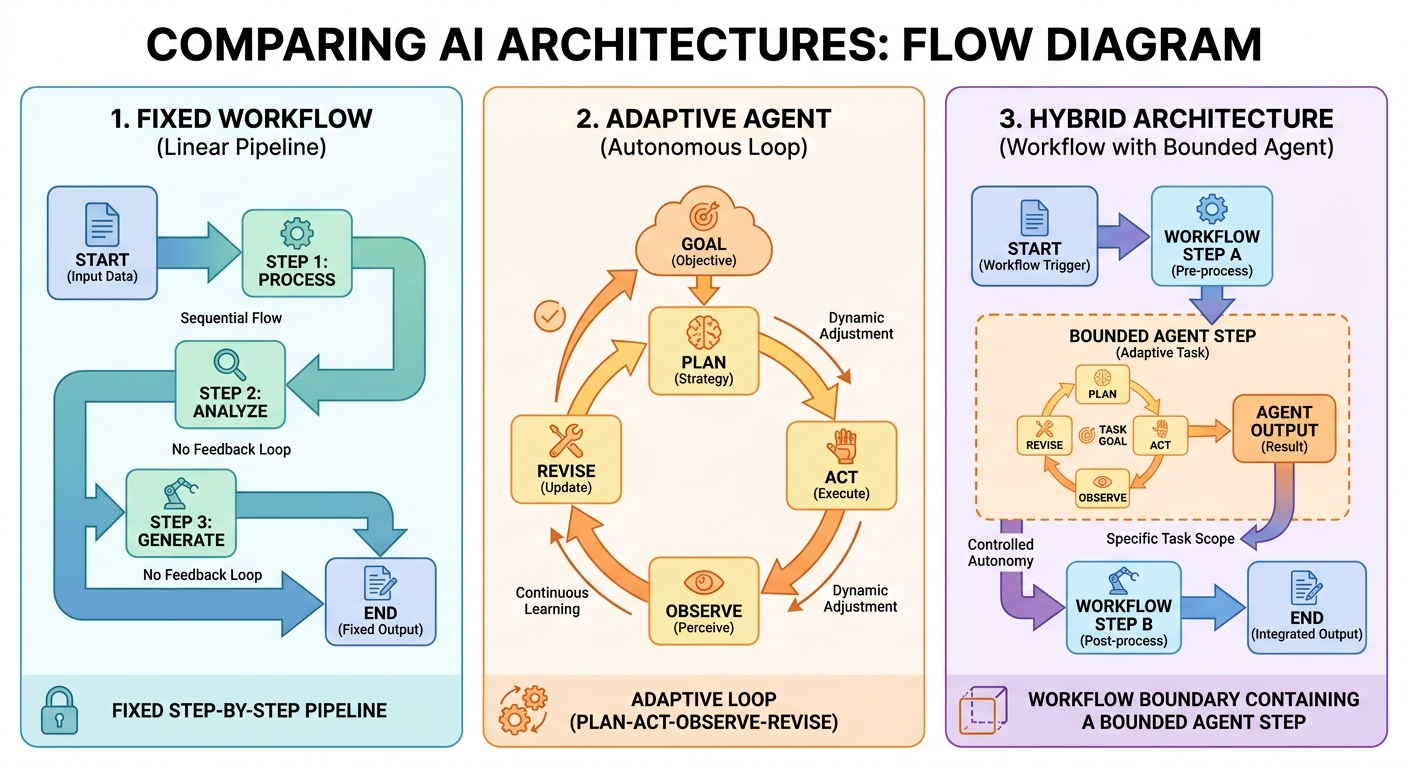
In practice, many useful systems are hybrids. A travel assistant might use a workflow for identity checks, budget constraints, and approval, but use an agent to compare flight options. A coding platform might use a workflow for test execution and pull request creation, but use an agent to investigate the root cause of a bug. A research assistant might use a workflow for source validation, but use an agent to explore candidate sources.
Where AI Agent Orchestration Fits
AI agent orchestration is the coordination layer that manages how agents, tools, workflows, memory, retrieval, approvals, and humans work together. IBM describes agent orchestration as coordinating specialized agents in a unified system to achieve complex goals. That definition is helpful, but beginners should not jump to orchestration before understanding the smaller pieces.
Orchestration becomes important when one agent is not enough, or when a system needs multiple specialized roles. For example, a research system might have a search agent, a source-checking agent, a summarization agent, and a human editor. A customer operations system might have an intake workflow, a billing agent, a knowledge-base retrieval step, a risk classifier, and a manager approval gate.
The mistake is treating orchestration as a synonym for “make it more advanced.” Orchestration is useful when coordination is the bottleneck. If the real problem is a simple document summary, orchestration adds noise. If the real problem is a multi-step business process with branching, approvals, retries, and multiple tools, orchestration may be exactly what you need.
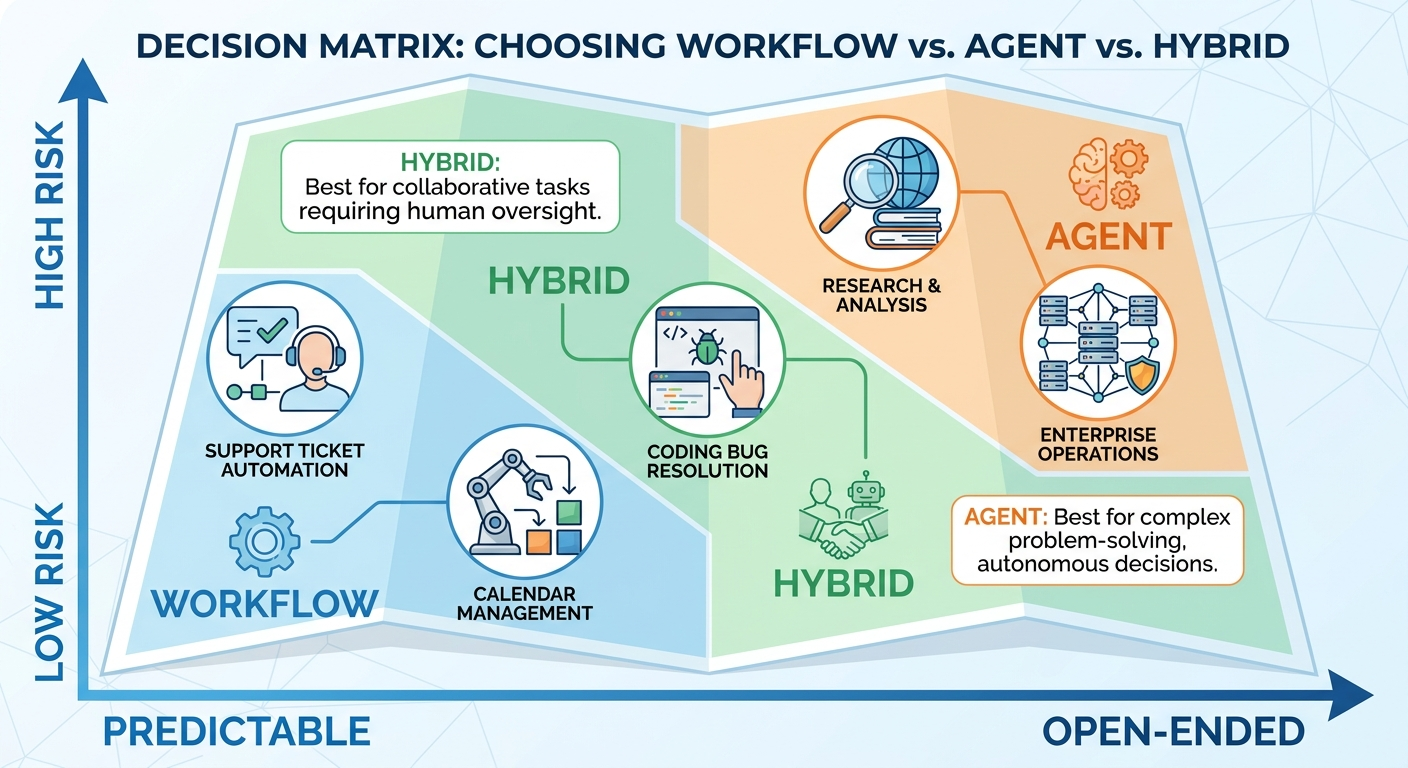
Decision Matrix: Should You Build a Workflow or an Agent?
Use this decision matrix before building. It is intentionally practical. The goal is not to win a terminology debate. The goal is to avoid overbuilding an autonomous system when a reliable workflow would work better, and to avoid underbuilding a flexible system when the task genuinely requires adaptation.
| Question | If yes, prefer workflow | If yes, consider agent |
|---|---|---|
| Is the process already known? | The steps are stable and can be mapped. | The right steps vary by case. |
| Are mistakes expensive? | You need deterministic gates and human approval. | You can sandbox actions and evaluate before release. |
| Does the task require exploration? | No; it mostly transforms, classifies, routes, or drafts. | Yes; it must investigate, compare, debug, or plan. |
| Can you test each step easily? | Yes; each step has a clear expected output. | Not fully; success depends on multi-step judgment. |
| Does the system need tool freedom? | No; tools can be called in known places. | Yes; the system must choose which tool to use next. |
| Do users need predictability? | Yes; consistency matters more than adaptability. | Adaptability matters enough to accept variability. |
If most answers fall on the left, build a workflow. If most fall on the right, consider an agent. If the answers are mixed, build a hybrid: a workflow shell with one controlled agent step. That usually gives teams the best balance of safety and usefulness.
Real-World Examples
Example 1: Support ticket triage
A support ticket arrives with a long customer complaint. The system summarizes the ticket, classifies urgency, detects product area, and sends it to the right queue. This is an AI workflow. The route is known. AI improves the classification and summary, but it does not need full autonomy.
If the system also investigates the customer account, checks order history, proposes a refund, drafts a reply, and asks for approval only when the refund is above a threshold, you are moving toward a hybrid. If it can decide its own troubleshooting path and call tools dynamically, it becomes more agent-like.
Example 2: Coding bug investigation
A workflow can run tests, summarize errors, and create a checklist. An agent can inspect files, form hypotheses, edit code, run tests again, and revise. For simple failures, the workflow may be enough. For unclear failures across multiple files, an agent may save real time.
Example 3: Research assistant
A workflow can search a list of approved sources, summarize each result, and produce a table. An agent can explore unfamiliar sources, refine search queries, reject weak evidence, compare conflicting claims, and ask follow-up questions. The agent is more useful when the research path is not obvious.
Example 4: Personal productivity automation
Calendar cleanup, reminder creation, and email labels often work better as workflows because the rules are known and mistakes can be annoying. A personal assistant agent becomes useful when the goal is ambiguous: “plan a realistic trip,” “prepare me for this meeting,” or “find the best option based on my constraints.” Even then, approvals should guard external actions.
Example 5: Enterprise operations
Enterprise systems often need hybrids. A workflow handles identity, policy, logging, approvals, and audit trails. Agents handle investigation, recommendations, and flexible tool use inside those boundaries. This is why agent control planes, observability, and evaluation matter for larger organizations.
How to Choose the Right Architecture
Here is the practical build sequence I recommend for most teams and solo builders.
1. Start with the job, not the label
Write the user job in plain language. What does the user need done? What input arrives? What output matters? What would count as success? Avoid starting with “we need an agent.” Start with the work.
2. Map the safest known path
If you can draw the process as a clear set of steps, build that first. Use AI only where it improves a step: summarization, classification, extraction, drafting, search, or explanation. This gives you something testable before autonomy enters the system.
3. Identify the uncertainty zones
Look for parts where fixed rules break down. Does the system need to investigate? Does it need to choose tools? Does it need to recover from partial failure? Does it need to create a plan? Those are candidate areas for agent behavior.
4. Bound the agent
If you add an agent, narrow its tool access, memory, context, and permission scope. Give it a clear goal, explicit stop conditions, and human approval for risky actions. A bounded agent is not less advanced. It is more deployable.
5. Log everything important
Workflows need step logs. Agents need traces. You should be able to answer: what did the system know, what did it decide, what tool did it call, what changed, and why did it stop? Without logs, you cannot evaluate reliability.
6. Evaluate before scaling
Create test cases. Include easy examples, edge cases, ambiguous inputs, adversarial instructions, and failure scenarios. If the system touches customers, money, private data, or production environments, evaluation is not optional.
7. Prefer hybrid by default for business use
Many serious applications should use a workflow shell with bounded agent steps. The workflow provides reliability. The agent provides adaptability. Humans remain in the loop where judgment or accountability matters.
Workflow strengths
- Predictable and easier to debug.
- Better for compliance, approvals, and audit trails.
- Often cheaper and faster for repeatable tasks.
- Easier to explain to users and stakeholders.
Agent strengths
- Better for exploration and changing paths.
- Can handle incomplete instructions and uncertain tasks.
- Can choose tools dynamically.
- Can reduce manual coordination in complex work.
Why This Article Fits Singularity Journey Now
The current blog data points toward a clear editorial opportunity. GA4 shows that homepage traffic is strong relative to individual posts, but several agent-related articles are already receiving engaged visits: enterprise AI agents, agent evaluation, agent controls, trace debugging, portfolio projects, and safety frameworks. That suggests the site is building a recognizable topic cluster around AI agents, control, evaluation, and practical autonomy.
Search Console data is still sparse, with low total impressions and early positions on a few indexed pages. That is normal for a young content library. The useful signal is not a single query winner yet; it is the cluster direction. Existing pages can internally link to this pillar, and this pillar can link back to deeper articles about context, tools, memory, approvals, and evaluation.
The search-gap research supports the same conclusion. Current SERP results answer parts of the question, but many are product-led, video-heavy, or too advanced for beginners. A neutral AI Core guide can win by giving a simple mental model, a decision matrix, practical examples, and safety-aware next steps.
Sources and References
- Anthropic Engineering: Building effective agents
- IBM: What is AI agent orchestration?
- Retool: AI workflows vs agents
- Prompt Engineering Guide: AI workflows vs AI agents
- Orkes: Agentic AI explained — workflows vs agents
The article also used Singularity Journey GA4 and Google Search Console reports for recent performance, indexed-page visibility, and internal linking direction. No unsupported statistics are invented.
Keep Learning on Singularity Journey
- AI Agents Explained — the beginner foundation for agents, tools, memory, and failure modes.
- AI Agent Context Explained — understand memory, tools, state, and instructions.
- AI Agent Tool Context — how to give agents tools without confusing them.
- Human-in-the-Loop AI Agents — approval patterns for safer autonomy.
- AI Agent Evaluation Framework — how to test tool calls, traces, memory, and production behavior.
FAQ: AI Workflows vs AI Agents
What is the main difference between an AI workflow and an AI agent?
An AI workflow follows a predefined path designed by humans. An AI agent can choose steps dynamically while pursuing a goal. The difference is process control, not simply whether the system uses an LLM.
Are AI agents just advanced workflows?
Not exactly. Some agents include workflows, and some workflows include agent-like steps. But agents have more autonomy over planning and tool use, while workflows keep the process mostly fixed.
When should I use an AI workflow instead of an agent?
Use an AI workflow when the steps are known, the task is repeatable, mistakes are costly, or you need clear logs and approvals. Workflows are often better for classification, routing, extraction, summarization, and draft-review systems.
When should I use an AI agent?
Use an AI agent when the task is open-ended, the path changes by case, the system must choose tools, or exploration is part of the work. Debugging, research, planning, and multi-step problem solving are common agent use cases.
What is a hybrid AI system?
A hybrid AI system combines a workflow shell with agent-like behavior inside bounded steps. This is often the best production pattern because it balances reliability and flexibility.
Is AI agent orchestration the same as an AI workflow?
No. Orchestration is a coordination layer for agents, workflows, tools, memory, and approvals. A workflow is one route through a process; orchestration manages how multiple routes or actors work together.
Why not build everything as an agent?
Agents can be slower, more expensive, less predictable, and harder to debug. If a simple workflow solves the problem, adding autonomy may create risk without adding value.
Do AI agents always need human approval?
Not always, but risky actions should require approval. Agents that can spend money, change production systems, message customers, delete data, or publish content need strong human-in-the-loop controls.
Can a chatbot be an AI agent?
A chatbot becomes agent-like when it can plan, use tools, remember context, and take actions toward a goal. A chatbot that only answers questions from a fixed knowledge base is usually not a full agent.
