
AI Agent Tool Context: How to Give Agents the Right Tools Without Confusing Them
Tool access is where an AI agent stops being a clever chatbot and starts affecting real systems. This guide explains how to design the tool context an agent sees so it can choose the right tool, pass the right arguments, understand the result, and know when to ask a human first.
AI Agent Tool Context: Quick Answer
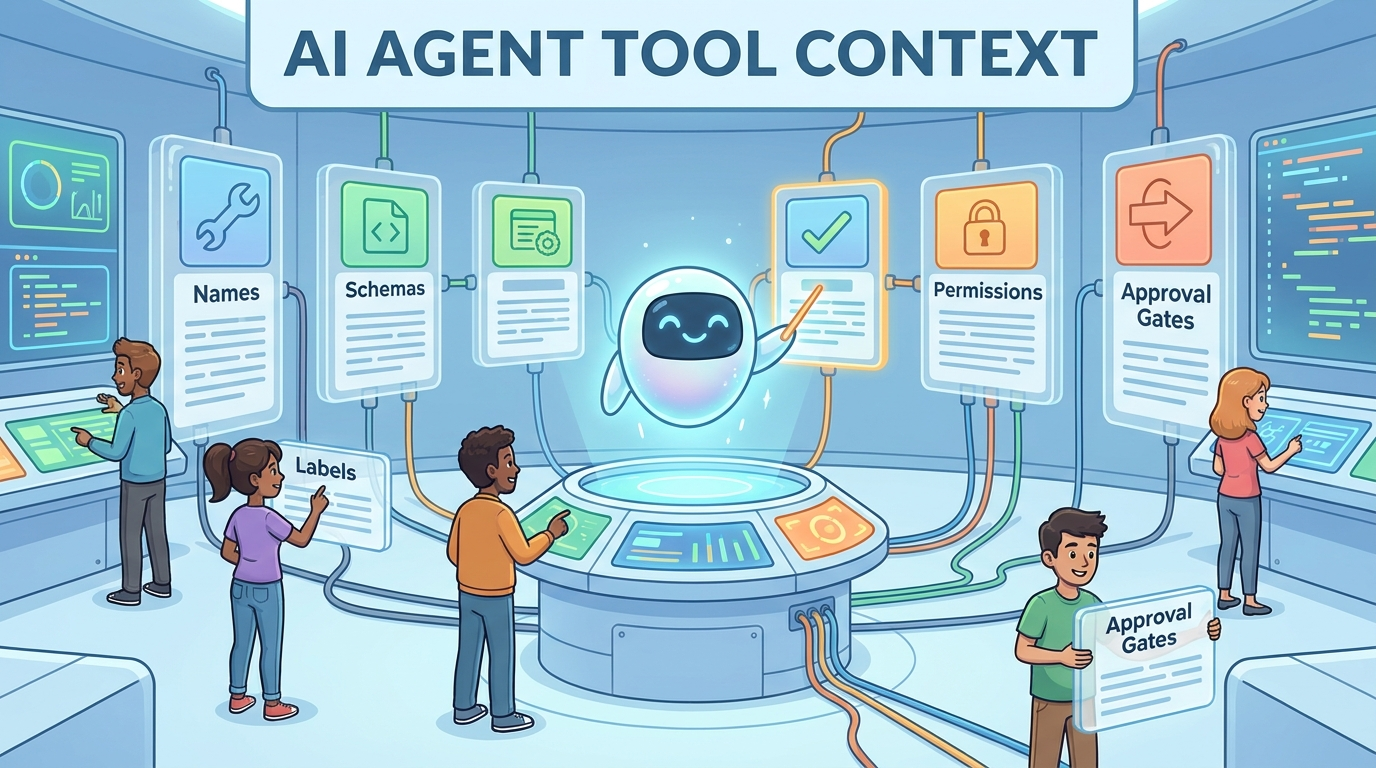
AI agent tool context is the information an agent receives about the tools it can use: tool names, descriptions, input schemas, permissions, examples, limits, approval rules, and the meaning of tool results. It is the bridge between a language model that can reason in text and a system that can actually search, retrieve, click, write, calculate, book, send, or change something.
The simple version is this: an agent does not automatically understand your tools just because you exposed them. It chooses tools from the context you provide. If the tool list is vague, overloaded, insecure, stale, or missing examples, the agent may pick the wrong tool, pass the wrong arguments, trust the wrong result, or keep retrying when it should ask a human.
This article supports the broader pillar guide, AI Agent Context Explained: Memory, Tools, State, and Instructions Without the Confusion. The pillar explains the whole context stack. This cluster article zooms into one narrow layer: how tools appear inside that stack, and how to design them so agents can use them without getting lost.
Why Tool Context Matters More Than the Tool Itself
A tool can be perfectly engineered and still fail inside an agent workflow if the model sees the wrong context. A database search endpoint may be fast, a calendar API may be reliable, and a browser automation function may be powerful, but the agent only sees what the interface tells it. In many systems, the model does not inspect your source code. It sees a short name, a description, a schema, and sometimes previous examples or tool results.
That creates a strange but important design problem. You are not only designing software for humans. You are designing software that must be legible to a probabilistic model deciding whether this is the right action at this moment. The agent needs enough information to choose correctly, but not so much information that the tool list becomes noisy and expensive. It needs constraints, but not so many hidden rules that it learns them only through failure.
Anthropic's engineering guidance on agents makes a useful distinction between predictable workflows and more flexible agents. Their advice is to keep systems simple and use agentic complexity only when it is worth the cost and latency. That applies directly to tool context. If a task is predictable, a fixed workflow may be safer than letting an agent choose from twenty tools. If a task is open-ended, the tool context becomes the map the agent uses to navigate.
The Model Context Protocol also makes this concrete. MCP servers expose tools with names, descriptions, input schemas, and results. The protocol allows models to discover and invoke tools, while the implementation can add human approval and interface safeguards. That means tool context is no longer a private implementation detail. It is becoming a standard part of how AI applications connect language models to external systems.
The core failure pattern
Most tool-context failures follow the same pattern: the agent's internal interpretation of a tool does not match the system's actual behavior. The agent thinks search_docs searches all company knowledge, but it only searches public docs. It thinks send_message creates a draft, but it sends immediately. It thinks lookup_user can accept an email address, but the schema expects an internal ID. The result is not mysterious AI behavior. It is an interface contract problem.
The Seven Parts of Useful AI Agent Tool Context
Good tool context is not just a list of functions. It is a compact explanation of what the agent can do, when it should do it, and what boundaries apply. For beginner-friendly systems, seven parts matter most.
If a tool is low-risk and simple, this context can be short. A calculator tool may only need a clear schema and output. A tool that sends emails, edits files, updates customer records, or posts publicly needs much richer context because mistakes have external consequences.
| Tool context part | What it answers | Common mistake |
|---|---|---|
| Name | What action does this tool perform? | Using vague names like run, execute, or process. |
| Description | When should the agent use it? | Describing implementation details instead of user-facing purpose. |
| Schema | What exact arguments are valid? | Accepting free text where enums, formats, or required fields are safer. |
| Result | What should the agent believe after the call? | Returning unstructured text with no status, confidence, or next-step signal. |
| Permissions | How risky is this action? | Mixing read-only and write actions under one ambiguous tool. |
| Examples | What does correct use look like? | Only showing happy paths, never edge cases. |
| Approval | When is human confirmation required? | Relying on the model to infer risk from the tool name alone. |
Bad Tool Context vs Good Tool Context
The easiest way to understand tool context is to compare two versions of the same tool. Imagine an agent has access to a tool that can search a company's internal knowledge base.
Weak version
{
  "name": "search",
  "description": "Searches stuff",
  "inputSchema": {
    "query": "string"
  }
}
This may technically work, but it leaves the model guessing. What does it search? Public web pages, internal documents, customer tickets, files, product docs, or all of them? Should the query be a full sentence or keywords? Does it return exact facts or candidate snippets? Is the data current? Can it expose private information?
Stronger version
{
  "name": "search_internal_knowledge_base",
  "description": "Searches approved internal help docs, engineering notes, and support articles. Use this when the user asks about company-specific procedures, product behavior, or documented troubleshooting steps. Do not use it for personal data, private customer records, or open-web research.",
  "inputSchema": {
    "type": "object",
    "properties": {
      "query": {"type": "string", "description": "Specific search query in natural language"},
      "section": {"type": "string", "enum": ["all", "product", "support", "engineering", "policy"]},
      "max_results": {"type": "integer", "minimum": 1, "maximum": 5}
    },
    "required": ["query"]
  },
  "resultGuidance": "Treat results as candidates, cite the source title, and say when no reliable answer was found."
}
The stronger version does not make the model perfect. It gives the agent a much better contract. It says what the tool does, what it does not do, what arguments are valid, and how results should be interpreted. That is the entire point of tool context: reduce the amount of guessing inside the agent loop.
How Tool Context Works Inside the Agent Loop
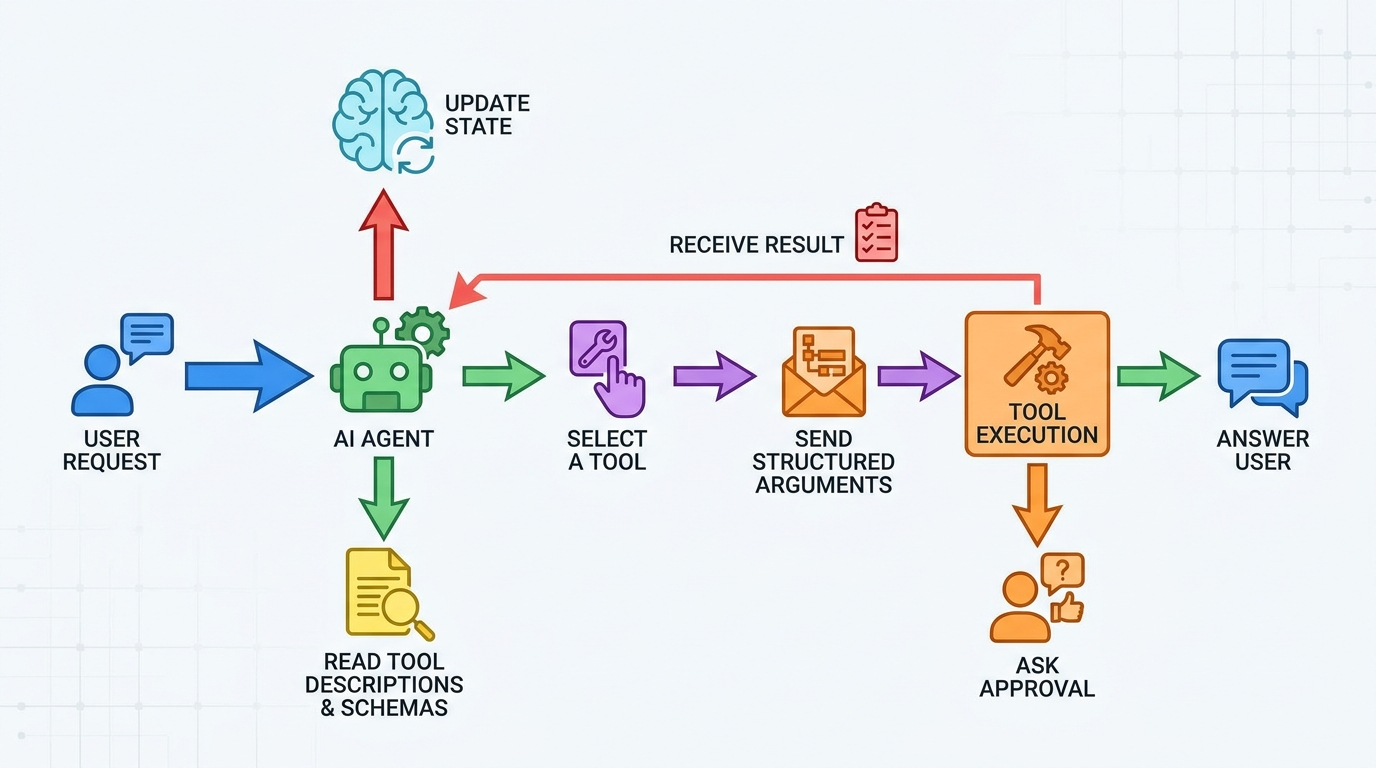
An agent usually does not use a tool once and finish. It loops. The model reads the user's request, considers available context, chooses a tool, passes arguments, receives the result, updates its working state, and decides whether to answer, call another tool, ask a question, or stop.
That loop makes tool context different from a normal API reference. A human developer can read a long documentation page, remember caveats, inspect error logs, and debug. A model works from the active context it receives in the moment. If the loop hides important state, the agent may repeat the same failed call. If the result is ambiguous, it may over-trust weak evidence. If a write tool looks similar to a read tool, it may take an action too early.
A practical five-step loop
- Intent recognition: the agent identifies what the user wants and whether a tool is needed.
- Tool selection: it compares available tool descriptions and chooses the most relevant one.
- Argument construction: it fills the input schema using the user request, memory, retrieved facts, and current state.
- Result interpretation: it reads the output, checks status, and updates its answer or next action.
- Control decision: it answers, calls another tool, asks for clarification, requests approval, or stops.
Every stage can fail if the context is weak. Tool selection fails when names overlap. Argument construction fails when schemas are loose. Result interpretation fails when outputs are unstructured. Control decisions fail when approval rules are missing. That is why tool context deserves its own design pass instead of being treated as boilerplate.
Tool Permissions Are Part of Context, Not Just Security
Permissions are usually discussed as a security feature, and they are. But for agents, permissions are also part of comprehension. A human user understands that "delete invoice" is more serious than "search invoice." A model may understand the general risk, but the system should make the difference explicit.
The MCP tools specification says tools are model-controlled and can be discovered and invoked by language models, while also emphasizing human-in-the-loop controls for trust and safety. This is a useful design stance: let the agent discover capability, but make exposed tools clear to the user, show when tools are invoked, and confirm operations that require human approval.
| Tool risk level | Examples | Recommended context rule |
|---|---|---|
| Read-only, low sensitivity | Search public docs, calculate values, fetch weather | Agent may call directly if relevant. |
| Read-only, sensitive | Search internal files, fetch customer notes, inspect private logs | Limit scope, disclose source, avoid exposing unnecessary details. |
| Drafting write action | Create email draft, prepare report, propose database update | Agent may draft but must not send or apply without confirmation. |
| External write action | Send message, publish post, book meeting, create ticket | Require user confirmation with a clear preview. |
| Destructive or financial action | Delete data, make purchase, revoke access, run production change | Require strong approval, logging, and often a separate privileged workflow. |
The best systems make this visible both to the model and to the user. The model gets rules such as "ask before sending." The user sees a confirmation prompt explaining what will happen. The server enforces the final boundary even if the model makes a bad decision.
A Practical Tool Context Design Checklist
Use this checklist when adding a new tool to an agent. It is intentionally practical rather than theoretical.
1. Split tools by intent and risk
Do not combine read, draft, send, update, and delete behavior into one flexible super-tool. Super-tools are convenient for developers and confusing for agents. A safer pattern is to expose smaller tools with clear purpose: search_docs, create_email_draft, send_approved_email, update_ticket_status. The agent can reason about these names more reliably.
2. Write descriptions for model choice, not marketing
A tool description should answer: use this when, do not use this when, required assumptions, risk level, and how to handle uncertainty. Avoid vague descriptions like "manages documents" or "handles user data." The model needs decision context.
3. Use schemas to prevent ambiguous arguments
Where possible, use enums, booleans, date formats, bounded integers, and required fields. If the agent must provide a user ID, say whether it is an email, UUID, database ID, or username. If a date must be ISO format, say so. Loose schemas transfer validation work from software into the model, which is usually the wrong direction.
4. Return structured status, not just prose
Tool results should tell the agent whether the call succeeded, failed, partially succeeded, needs approval, or found no reliable data. A paragraph of text may be easy for humans, but structured outputs reduce misinterpretation. Useful fields include status, summary, source, confidence, requires_user_confirmation, and next_allowed_actions.
5. Include examples for edge cases
Examples teach the model the shape of correct calls. Include one normal example, one no-result example, one permission-denied example, and one approval-required example. This matters especially for tools that can return partial data or require follow-up.
6. Keep stale tools out of the active context
If a tool is unavailable, deprecated, slow, or not relevant to the user's task, do not expose it by default. Tool overload creates choice fatigue for the model. It also increases prompt size and makes debugging harder. Good context engineering is partly the art of not showing the model everything.
7. Log tool calls for evaluation
You cannot improve tool context if you never inspect failed tool calls. Log which tool was selected, what arguments were passed, what result came back, whether the user accepted the outcome, and whether a human correction was needed. These logs become a goldmine for improving descriptions, schemas, and approval rules.
Common AI Agent Tool Context Failure Modes
Tool failures often look like model failures, but many are context design failures. The table below can help teams debug what went wrong.
| Failure mode | What it looks like | Likely context fix |
|---|---|---|
| Wrong tool selected | The agent searches tickets when it should search docs. | Rename tools, clarify descriptions, reduce overlapping tools. |
| Bad arguments | The agent passes a username where an ID is required. | Strengthen schema descriptions and validation errors. |
| Over-trusted result | The agent treats a partial search result as final truth. | Add status, source, confidence, and no-answer guidance. |
| Repeated retries | The agent keeps calling the same failing tool. | Return clear error categories and next allowed actions. |
| Unsafe action | The agent sends, publishes, deletes, or updates too early. | Separate draft vs execute tools and require confirmation. |
| Tool overload | The agent picks randomly among many similar tools. | Expose fewer tools based on task, role, and state. |
| Hidden permission mismatch | The model assumes it can access data the server denies. | Tell the agent the scope it has before it attempts the call. |
Notice the pattern: most fixes are not "make the model smarter." They are interface fixes. Better names, better schemas, better result contracts, better approval rules, and better visibility often do more than switching models.
Three Beginner-Friendly Examples of Tool Context
Example 1: Research assistant
A research assistant has tools for web search, internal document retrieval, and citation formatting. Good tool context tells the agent that web search is for current public information, internal retrieval is for company-approved material, and citation formatting should only format sources already found. Without that distinction, the agent may invent citations or use internal material when the user asked for public sources.
Example 2: Calendar assistant
A calendar assistant has tools to check availability, create a draft event, and send invitations. The tool context should make the approval boundary obvious. Checking availability is read-only. Creating a draft event is reversible. Sending invitations affects other people. The agent should show the meeting title, attendees, time zone, duration, and message before sending.
Example 3: Coding agent
A coding agent may read files, run tests, edit files, and open pull requests. Tool context should separate inspection from modification. Reading a file is safe. Editing a file should be scoped. Running tests may be allowed. Opening a pull request should include a summary and require final confirmation in sensitive repositories. This is why agent observability and trace debugging matter: you need to know which tool produced which change.
Good tool context helps agents
- Choose fewer wrong tools.
- Pass cleaner arguments.
- Understand result quality.
- Ask before risky actions.
- Recover from errors instead of looping.
Weak tool context causes
- Tool confusion and random selection.
- Schema mismatch errors.
- Overconfident answers from partial data.
- Unexpected writes or sends.
- Hard-to-debug agent traces.
How Tool Context Fits With Memory, State, and Instructions
Tool context is only one part of agent context. It interacts with memory, state, retrieval, and instructions in ways that can either help or confuse the agent.
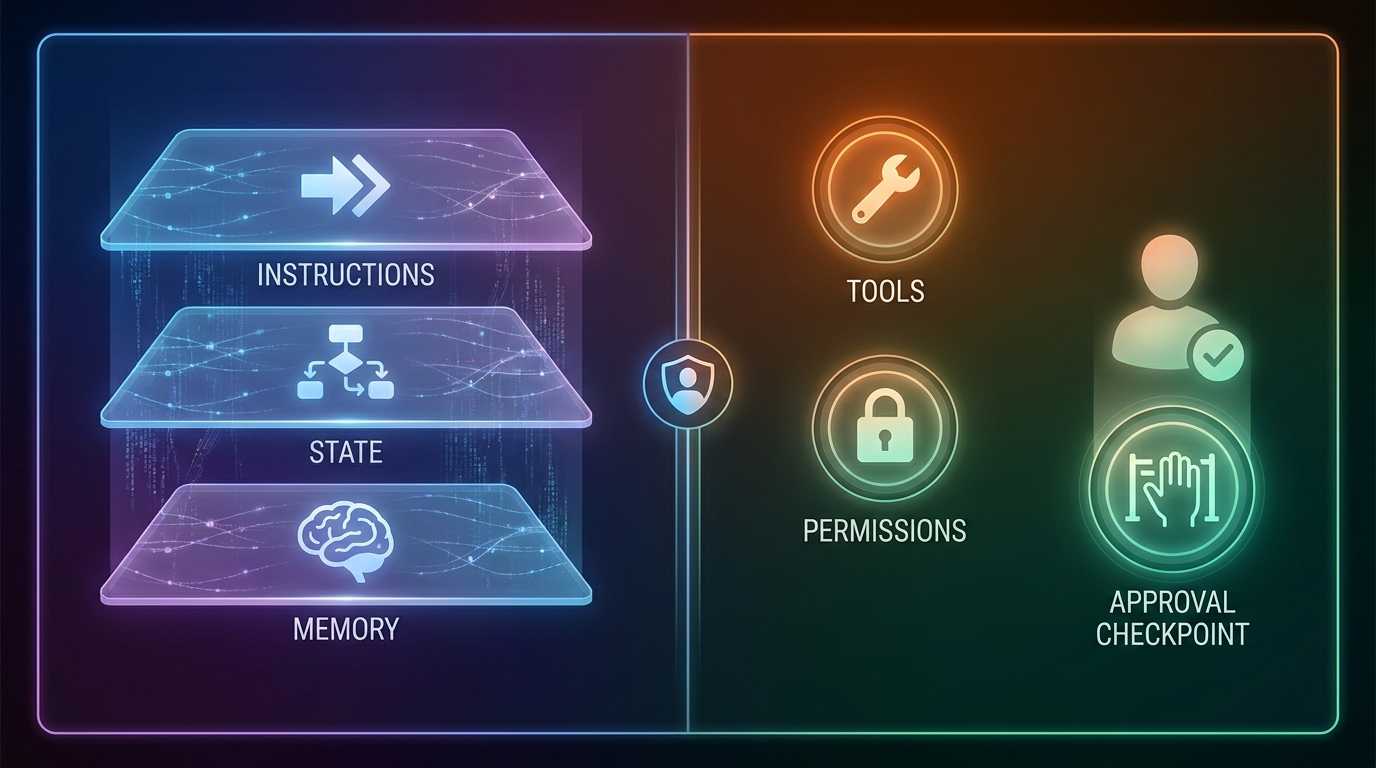
Memory can tell the agent a user's preferences, such as "always draft emails before sending." But memory should not override system-level tool permissions. State tells the agent what has already happened in the workflow, such as "the user approved this specific draft." Without state, the agent may ask again or act on old approval. Instructions define priorities, tone, and boundaries. Tool context should align with those instructions instead of creating conflicting rules.
This is why the source pillar article matters. In AI Agent Context Explained, the bigger lesson is that agents act from the context they can see. Tool context is the action layer of that idea. It tells the agent not just what to know, but what it can do next.
Implementation Notes for Teams Building Agents
If you are building an agent product, start with the smallest useful tool set. Add one tool, observe how the agent uses it, then improve the contract before adding more. A tool catalog with thirty vague tools is usually worse than five excellent tools with clear schemas and approval rules.
Prefer capability routing over full exposure
Instead of exposing every tool to every conversation, route tools based on user role, task type, workspace, data sensitivity, and current state. A user asking for a definition does not need write tools. A user asking to schedule a meeting may need calendar read and draft tools, but not billing tools. This reduces risk and improves model focus.
Make validation errors instructive
When a tool call fails, return errors that help the agent recover. "Invalid input" is weak. "Missing required field customer_id; use lookup_customer_by_email first if only an email is available" is much better. The result becomes context for the next step.
Evaluate tool context, not only final answers
Agent evaluation should inspect tool choice and argument quality, not just the final response. A final answer can look good even if the agent used the wrong source. Conversely, a final answer can be cautious because the tool context correctly told the agent that evidence was incomplete. Look at the trace.
Keep human approval meaningful
Approval prompts should not be vague buttons that say "continue." They should preview the actual action: who receives the message, what content will be sent, what record will be changed, what amount will be charged, or what file will be edited. Human-in-the-loop is only useful when the human can understand the consequence.
Sources and References
- Anthropic Engineering: Building Effective Agents
- Model Context Protocol: Architecture Overview
- Model Context Protocol Specification: Tools
- OpenAI API Docs: Agents SDK
- OpenAI API Docs: Using Tools
- IBM Think: What Are AI Agents?
External documentation changes over time. Use these references as starting points, then verify the current behavior of your chosen agent framework, model provider, and tool protocol before shipping production workflows.
Keep Learning on Singularity Journey
- AI Agent Context Explained — the source pillar article for this cluster.
- AI Agent Trace Debugging — find failed tool calls, bad context, and broken handoffs.
- AI Agent Observability — trace, evaluate, and debug production agents.
- AI Agent Memory Examples — what assistants should remember, forget, and ask about.
- AI Agent Memory Controls — decide what to store, forget, and review.
- Human-in-the-Loop AI Agents — approval patterns for safer autonomy.
FAQ: AI Agent Tool Context
What is AI agent tool context?
AI agent tool context is the information an agent receives about available tools, including names, descriptions, input schemas, permissions, examples, outputs, and approval rules. It helps the model decide which tool to use and how to use it.
How is tool context different from tool calling?
Tool calling is the mechanism that lets a model invoke a function or external capability. Tool context is the information that describes those capabilities to the model so it can choose and use them correctly.
Why do AI agents choose the wrong tool?
Agents often choose the wrong tool because tool names overlap, descriptions are vague, schemas are underspecified, too many tools are exposed, or the current task state is missing from context.
Should every agent tool require human approval?
No. Low-risk read-only tools can often run directly. Tools that send, publish, delete, purchase, change permissions, or affect other people should usually require human confirmation and server-side enforcement.
What should a good tool description include?
A good tool description should explain what the tool does, when to use it, when not to use it, what assumptions apply, what risk level it has, and how the agent should interpret uncertainty.
Can tool descriptions prevent unsafe actions?
Tool descriptions can guide model behavior, but they are not enough as a security boundary. Risky tools still need authentication, authorization, validation, logging, approval flows, and backend enforcement.
How many tools should an AI agent see at once?
As few as necessary for the current task. Exposing too many tools can confuse the model, increase prompt size, and make debugging harder. Route tools based on user role, task type, and state.
How do tool results become context?
After a tool call, the result is fed back into the agent loop. The model uses it to answer, call another tool, ask for clarification, or stop. Structured results help the agent interpret outcomes more reliably.
