
MCP Audit Logs: What to Capture for Secure Agent Tool Calls
Secure MCP servers need more than schemas and approvals. They need audit logs that can explain who asked, what the model tried, which policy allowed or blocked it, what changed, and how an incident can be reconstructed later.
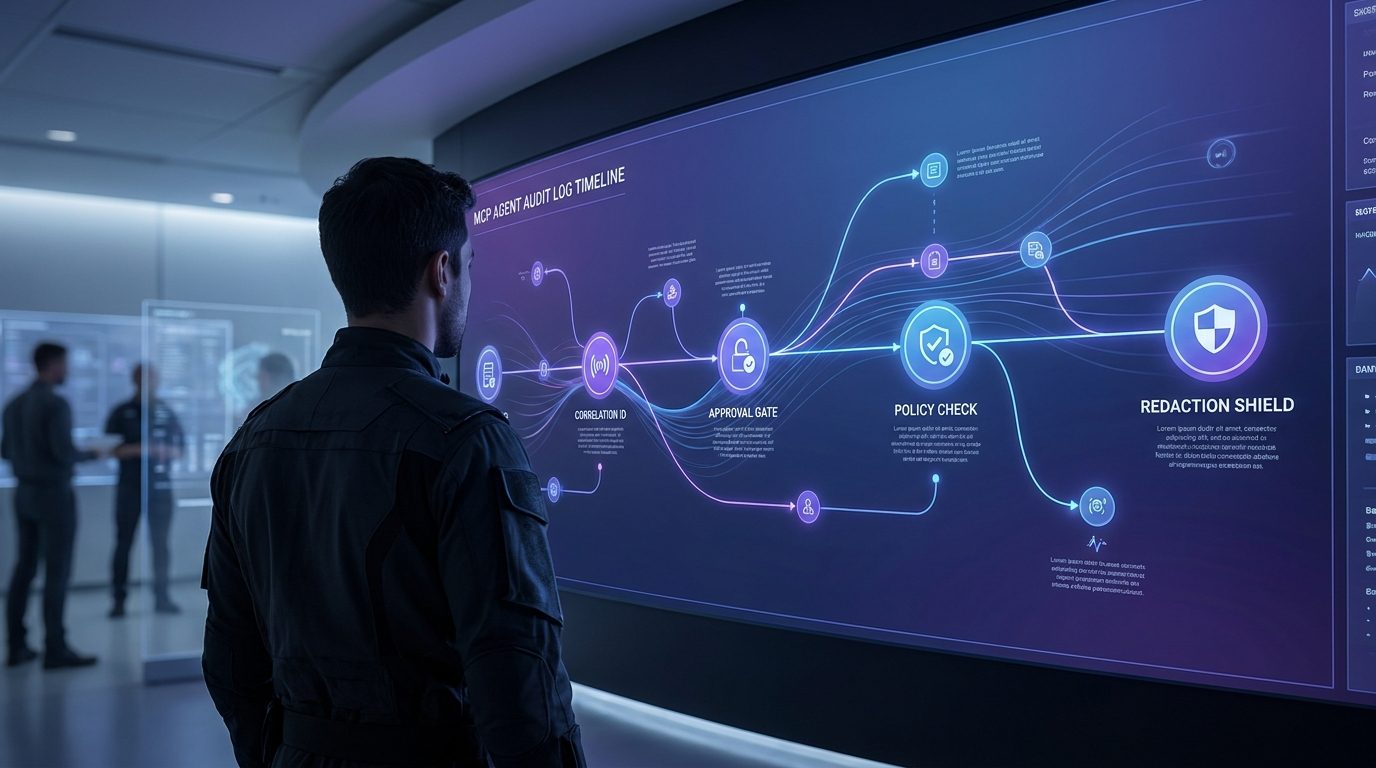
MCP Audit Logs: Quick Answer
The source pillar, How to Build a Secure MCP Server, explains the full architecture: tools, permissions, validation, human approval, and production guardrails. This cluster article goes narrower. It answers one operational question: what should an MCP server log when an AI agent calls a tool?
A good MCP audit log should capture the user, session, client, tool name, risk tier, input summary, authorization decision, approval status, downstream resource touched, result, error, latency, and redaction policy. It should also connect the user request, model step, tool call, approval record, backend API call, and final response with correlation IDs.
Why MCP Tool Calls Need Their Own Audit Trail
MCP tools are different from ordinary backend endpoints because they may be selected by a language model inside an AI host. The official Model Context Protocol tools specification describes tools as model-controlled capabilities that can interact with external systems such as databases, APIs, and computations. It also recommends visible tool indicators and confirmation prompts for sensitive operations.
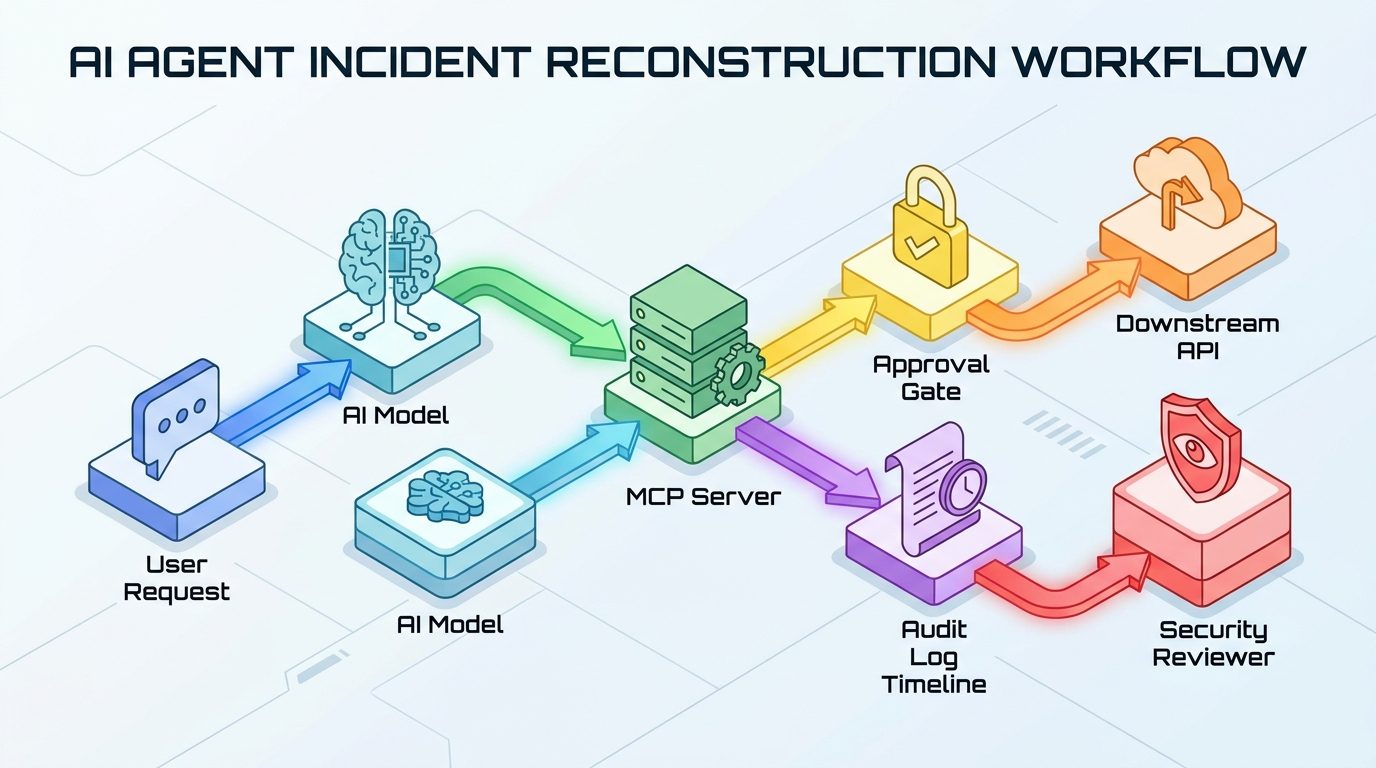
That creates a practical audit problem. If a user asks an agent to update a customer record, the final backend write is only one part of the story. You also need to know which AI client was connected, what tool was exposed, what arguments the model proposed, whether policy allowed the call, whether a human approved it, what resource changed, and what the server returned to the model.
Without that chain, production incidents become guesswork. A support team may see a bad email sent, a duplicate refund, a deleted file, or an unexpected permission change. If the logs only say POST /tool/call 200, you cannot tell whether the model generated the wrong argument, the approval UI hid an important detail, the token was over-scoped, the retry duplicated the action, or the backend accepted a request it should have denied.
Audit Logs Are Not the Same as Debug Traces
Debug traces help engineers diagnose code behavior. Audit logs help a team answer accountability and security questions. In an MCP server, both matter, but they should not have the same storage, retention, access policy, or data shape.
| Log type | Main purpose | Typical contents | Risk |
|---|---|---|---|
| Debug trace | Fix implementation bugs and performance issues | Stack traces, request timing, SDK details, temporary state | Can accidentally capture sensitive input if too verbose |
| Audit log | Prove what happened and support review | User, tool, risk tier, permission decision, approval ID, result, resource ID | Can become a privacy risk if it stores raw prompts or secrets |
| Security event | Detect and investigate abuse | Denied calls, suspicious retries, scope mismatch, policy violation, anomaly flag | Can be ignored if not routed to alerting or review queues |
The safest pattern is to keep audit logs structured and boring. Store normalized fields, stable IDs, hashes, enums, and short summaries. Store raw payloads only when there is a clear need, a retention rule, and a redaction layer.
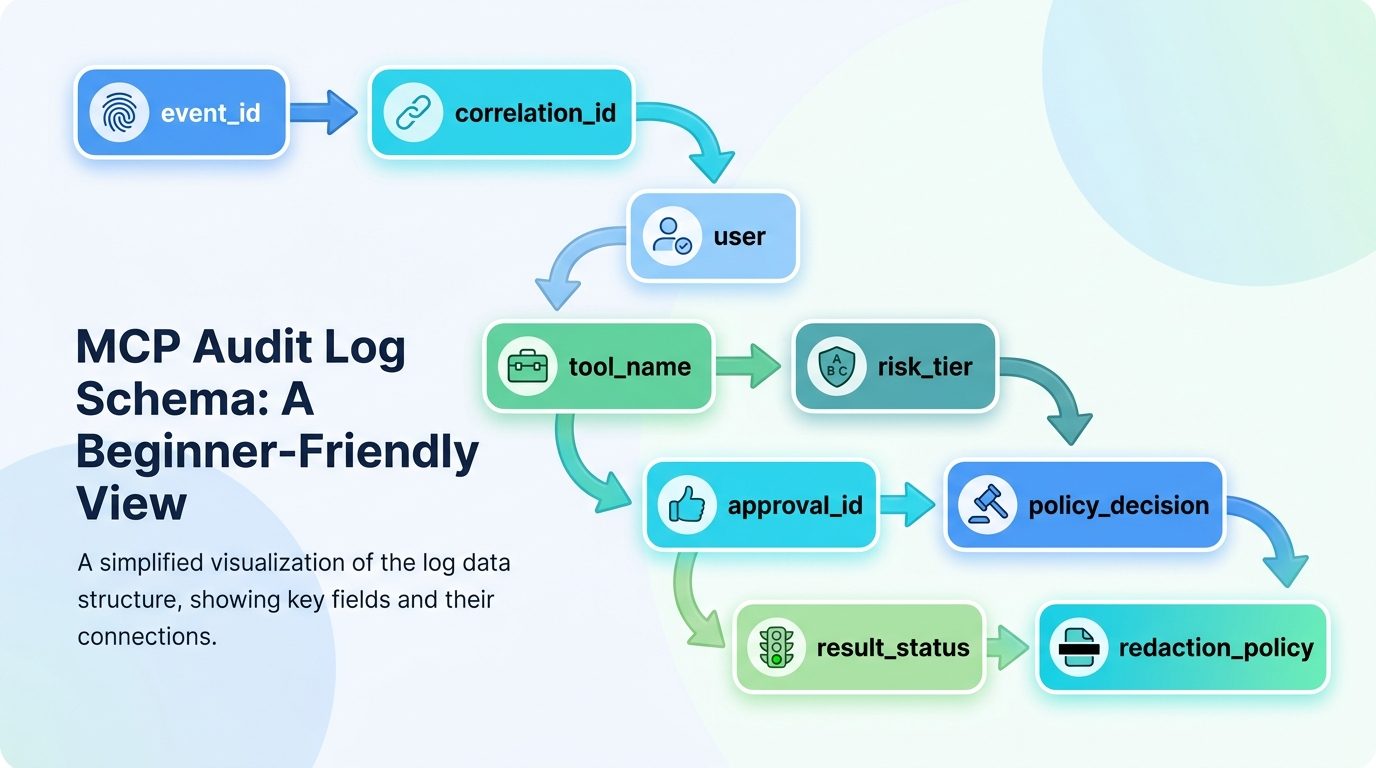
The MCP Audit Log Field Matrix
Use this table as a starting schema. You can add product-specific fields, but do not skip identity, authorization, approval, result, and redaction context.
| Field | Example | Why it matters |
|---|---|---|
event_id | evt_01j... | Unique audit event for deduplication and investigation. |
correlation_id | corr_support_8421 | Links user request, model step, tool call, approval, downstream API, and response. |
timestamp | 2026-05-30T02:30:44Z | Supports incident timelines and ordering. |
user_id / tenant_id | usr_42, acme | Shows who initiated the workflow and which data boundary applied. |
client_id / host | desktop-client, ide | Identifies which MCP client or host environment invoked the tool. |
tool_name | refund_payment | Names the capability that was requested. |
risk_tier | Tier 4 | Connects the call to default controls and review expectations. |
input_summary | customer_id=cus_88, amount=49.00 | Preserves useful context without dumping the full prompt or payload. |
scope_required / scope_present | payments:refund_limited | Shows whether authorization matched the operation. |
policy_decision | allow, deny, needs_approval | Explains what the server decided before execution. |
approval_id | appr_912 | Links the tool call to human review when needed. |
downstream_resource | stripe_refund=re_123 | Shows what external or internal system was touched. |
result_status | succeeded, blocked, failed | Distinguishes attempts from completed actions. |
redaction_policy | pii_minimized_v2 | Documents what was removed or summarized. |
This is the narrow implementation detail many broad MCP security guides skip. The log should not merely say that a tool ran. It should explain the decision path around the tool.
Use Risk Tiers to Decide Log Depth
If every MCP call gets the same log depth, you either under-log dangerous actions or over-collect harmless ones. The companion cluster article on MCP tool risk tiers explains how to classify read, write, external, and destructive actions. Use that tier in the audit event.
| Tier | Example tool | Minimum audit detail |
|---|---|---|
| Tier 0 | Public docs search | Tool name, timestamp, client, latency, result status. |
| Tier 1 | Private account lookup | User, tenant, scope, fields returned, redaction policy. |
| Tier 2 | Create internal ticket | Input summary, resource ID, before/after where relevant. |
| Tier 3 | Send customer email | Recipient, preview hash, approval ID, approver, final send status. |
| Tier 4 | Refund, delete, deploy, permission change | Step-up approval, exact scoped permission, idempotency key, rollback reference, immutable/tamper-resistant storage. |
This keeps safe work fast while making risky work reviewable. It also prevents confirmation fatigue: users should not approve every harmless read call, but they should have a clear record when an agent sends, charges, deletes, deploys, or changes permissions.
What Not to Log: Redaction and Privacy Rules
The easiest way to make MCP audit logs dangerous is to store everything. Raw prompts, full tool arguments, access tokens, cookies, customer messages, private files, and payment details may be useful during debugging, but they can also become a concentrated privacy and security liability.
For example, instead of storing a full customer email draft in the audit log, store the recipient ID, message template ID, content hash, approval ID, and a pointer to the approved draft in the system that already governs message access. If a reviewer needs the full content, they should fetch it through the product’s normal permission layer, not from a broadly accessible log stream.
Approval Events Should Be First-Class Log Records
Human approval is only useful if the approval record is precise. A vague event such as approved=true does not show what the human saw. For Tier 3 and Tier 4 MCP tools, log the approval prompt version, the exact fields displayed, the approver identity, timestamp, decision, and whether the executed action matched the approved preview.
Useful approval fields include:
approval_idandapproval_versionapprover_user_idand approver role- Displayed recipient, amount, target resource, environment, or permission change
- Preview hash or draft ID
- Decision: approved, rejected, expired, escalated
- Execution match: whether the final tool call matched the approved details
For deeper approval design, pair this article with Human Approval for AI Agents: Review Queues, Risk Tiers, and Escalation UX. Approval UX and audit logging should be designed together, not bolted on separately.
Incident Review: Questions Your Logs Must Answer
Design audit logs backwards from the incident questions you will eventually face. If a risky tool misfires, you should be able to reconstruct the path quickly.
| Incident question | Log fields needed |
|---|---|
| Who initiated the action? | user_id, tenant_id, session_id, client_id |
| Did the model choose the right tool? | tool_name, model_step_id, input_summary, risk_tier |
| Was the user allowed to do this? | scope_required, scope_present, policy_decision, authorization_reason |
| Did a human approve it? | approval_id, approver, prompt version, preview hash, decision |
| What actually changed? | downstream_resource, result status, before/after summary, rollback ID |
| Was prompt injection involved? | Tool output source, content type, sanitization flag, suspicious-output signal |
MCP tool poisoning and indirect prompt injection make this last question important. If a tool result can carry hostile instructions back into the model context, your logs should help reviewers identify the source, the output type, and whether the server sanitized or labeled it as untrusted data. For the attack pattern, see MCP Tool Poisoning: How Developers Can Detect and Defend Against Malicious Tool Metadata.
Implementation Pattern: Log Around the Policy Layer
The cleanest MCP server design logs around policy, not only inside handlers. A request enters the server. The server validates schema, authenticates identity, checks scope, classifies risk, checks approval, executes the handler, records the result, and returns structured output.
tool_call_received
  → validate_schema
  → authenticate_user
  → authorize_scope
  → classify_risk_tier
  → require_or_verify_approval
  → execute_handler
  → sanitize_output
  → audit_result
Here is a simplified pseudocode pattern:
async function callTool(ctx, toolName, args) {
  const corr = ctx.correlationId ?? createCorrelationId();
  const tool = registry.get(toolName);
  const input = validate(tool.schema, args);
  const user = authenticate(ctx);
  const policy = authorize({ user, tool, input });

  audit.write({
    event: "mcp.tool.policy_decision",
    correlation_id: corr,
    user_id: user.id,
    tenant_id: user.tenant,
    tool_name: tool.name,
    risk_tier: tool.riskTier,
    input_summary: summarize(input),
    scope_required: tool.scope,
    policy_decision: policy.decision,
    redaction_policy: "pii_minimized_v2"
  });

  if (policy.decision === "deny") return blocked(policy.safeReason);
  if (policy.decision === "needs_approval") return approvalRequired(policy.preview);

  const result = await tool.handler(input);
  audit.write({
    event: "mcp.tool.result",
    correlation_id: corr,
    tool_name: tool.name,
    result_status: result.status,
    downstream_resource: result.resourceId,
    latency_ms: result.latency,
    output_summary: summarize(result.output)
  });
  return sanitizeForModel(result.output);
}
The important part is not the specific language. It is the placement. Audit before and after execution, log denied attempts, connect approval records, and summarize sensitive values instead of dumping raw data.
Retention, Access, and Tamper Resistance
Not every audit event needs the same retention period. A public documentation search may need short operational retention. A production deployment, payment refund, permission change, or customer communication may need longer retention because it affects security, compliance, or customer trust.
- Use retention tiers based on action risk and data sensitivity.
- Restrict audit log access separately from normal application logs.
- Protect high-risk logs from silent modification or deletion.
- Record log schema versions so old events remain interpretable.
- Test that redaction still works when tools return errors, stack traces, or unexpected free text.
Source-Backed Design Principles
- The MCP tools specification describes tools as model-controlled capabilities and recommends human-in-the-loop confirmation, visible tool indicators, schemas, and caution around untrusted annotations.
- The MCP security best-practices documentation highlights authorization and confused-deputy risks in MCP proxy/server designs.
- The OWASP Authorization Cheat Sheet recommends least privilege, deny by default, permission validation on every request, logging, and authorization tests.
- The OWASP Logging Cheat Sheet separates operational and security use cases and emphasizes event attributes, data exclusion, verification, and protection.
Keep Learning on Singularity Journey
- How to Build a Secure MCP Server — source pillar for the full tools, permissions, and approval architecture.
- MCP Tool Risk Tiers — how to classify read, write, external, and destructive agent actions.
- MCP Authorization — user scopes, tokens, and remote server access boundaries.
- MCP Tool Poisoning — detection and defense against malicious tool metadata or outputs.
FAQ: MCP Audit Logs
What should an MCP server log?
An MCP server should log event ID, correlation ID, user and tenant, client or host, tool name, risk tier, input summary, required scope, policy decision, approval status, result status, downstream resource, error state, latency, and redaction policy.
Should MCP audit logs include prompts?
Not by default. Raw prompts may contain private user data, secrets, or confidential business context. Prefer prompt hashes, message IDs, short summaries, or references protected by your normal product permissions.
What is the difference between observability and audit logging?
Observability helps engineers understand system behavior, performance, and failures. Audit logging helps teams reconstruct who did what, what policy allowed it, what changed, and whether sensitive actions were approved.
How do MCP audit logs help with prompt injection?
They can show which tool output entered the workflow, whether it was structured or free text, whether it was sanitized, and which subsequent tool calls happened after that output.
How long should MCP audit logs be retained?
Retention depends on risk, data sensitivity, and legal or compliance requirements. Low-risk read events may be short-lived; high-risk payment, deployment, permission, or external communication events often need longer protected retention.
Conclusion: Make Tool Actions Explainable
A secure MCP server should not be a black box. When an agent uses a tool, your team should be able to explain the user intent, model-selected capability, permission decision, approval record, backend effect, and final result. That does not require logging everything. It requires logging the right structured fields with the right redaction rules.
If you are still designing the overall architecture, start with the source pillar: How to Build a Secure MCP Server: Tools, Permissions, and Human Approval. Then use this article’s field matrix as the audit layer for every tool you expose.
