
MCP Tool Risk Tiers: How to Classify Read, Write, and Destructive Agent Actions
If your MCP server exposes ten tools, not all ten deserve the same permission, confirmation screen, token scope, or audit log. This guide gives developers a practical risk-tier system for safe agent actions.
MCP Tool Risk Tiers: Quick Answer
The companion pillar guide, How to Build a Secure MCP Server, explains the full architecture: tools, permissions, validation, human approval, and production safeguards. This cluster article goes narrower. It focuses on one implementation decision developers often postpone until too late: how risky is each MCP tool, and what control should that risk trigger?
The mistake is treating every tool as either “allowed” or “blocked.” A tool that reads a public product FAQ is different from a tool that exports customer records. A tool that drafts an email is different from one that sends it. A tool that stages a deployment is different from one that applies it to production.
Why MCP Tool Risk Tiers Matter
MCP tools are model-controlled capabilities. The official MCP tools specification says tools can be discovered and invoked by language models, while applications should provide clear indicators and confirmation prompts for sensitive operations. That means your server should not rely on the model’s good intentions alone. The server needs deterministic policy.
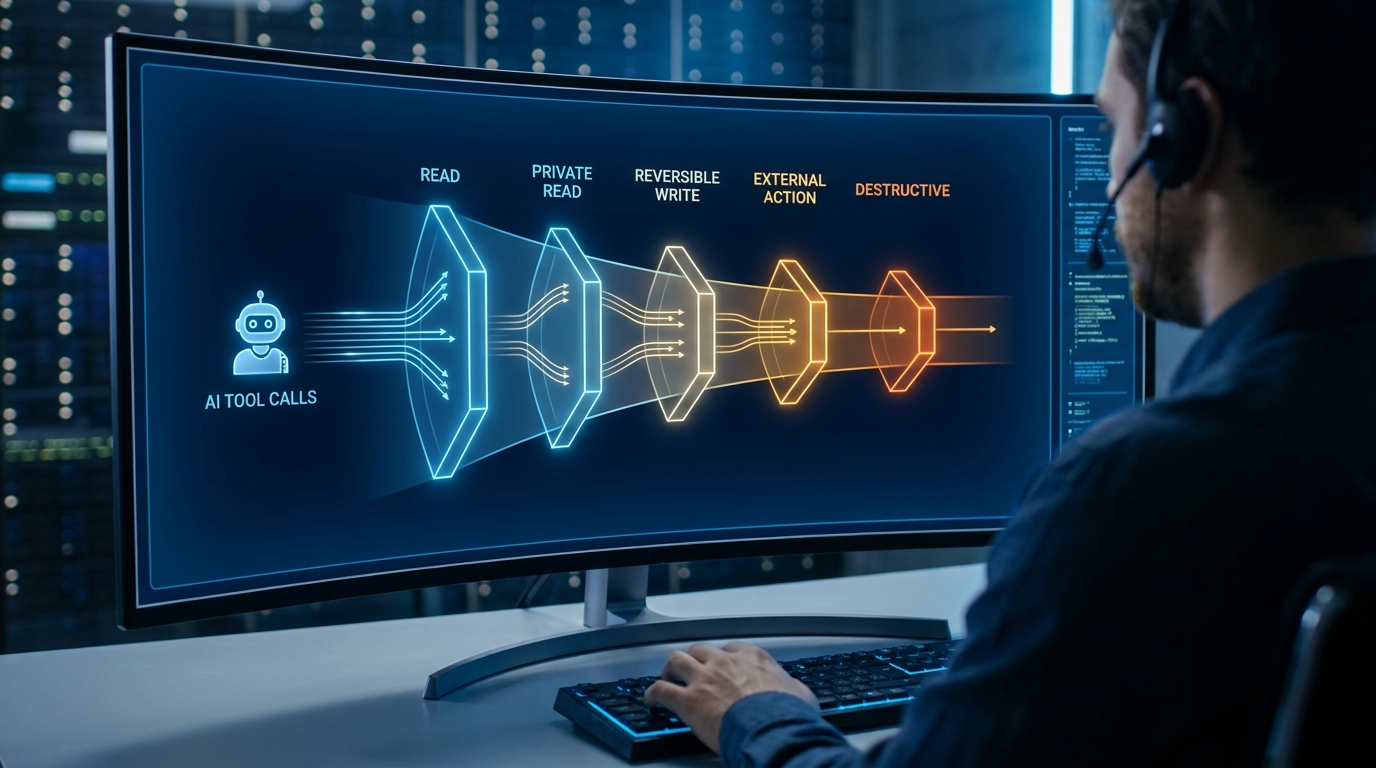
Risk tiers give that policy a shape. Instead of debating every tool call individually, you define categories such as read-only, low-risk write, external communication, financial action, privileged admin action, and destructive action. Each category gets a default control set.
The Five Practical MCP Tool Risk Tiers
Use this as a starting matrix. Adjust it for your product, compliance needs, and user trust model.
| Tier | Tool action | Examples | Default control |
|---|---|---|---|
| Tier 0 | Public or harmless read | Search public docs, fetch weather, read static help content | Allow with schema validation and basic logs |
| Tier 1 | Private read | Read tickets, inspect calendar events, query internal docs | Require user/session identity, least-privilege token, redaction |
| Tier 2 | Reversible write | Create draft, add label, open ticket, save note | Allow after intent match; log before/after state |
| Tier 3 | External or reputation-impacting action | Send email, post message, contact customer, publish content | Human approval with exact preview and recipient visibility |
| Tier 4 | Privileged, costly, or destructive action | Delete data, charge card, deploy production, change permissions | Step-up approval, narrow token scope, idempotency key, rollback plan |
Map MCP Tool Annotations to Real Policy
The MCP specification includes optional tool annotations that describe behavior. Common patterns include whether a tool is read-only, destructive, idempotent, or open-world. These annotations are useful for clients and UX, but the specification also warns that clients must treat annotations as untrusted unless they come from trusted servers.
That warning is important. Tool metadata should help explain behavior, not replace enforcement. Your MCP server should still validate inputs, enforce access controls, rate-limit calls, sanitize outputs, and log tool usage.
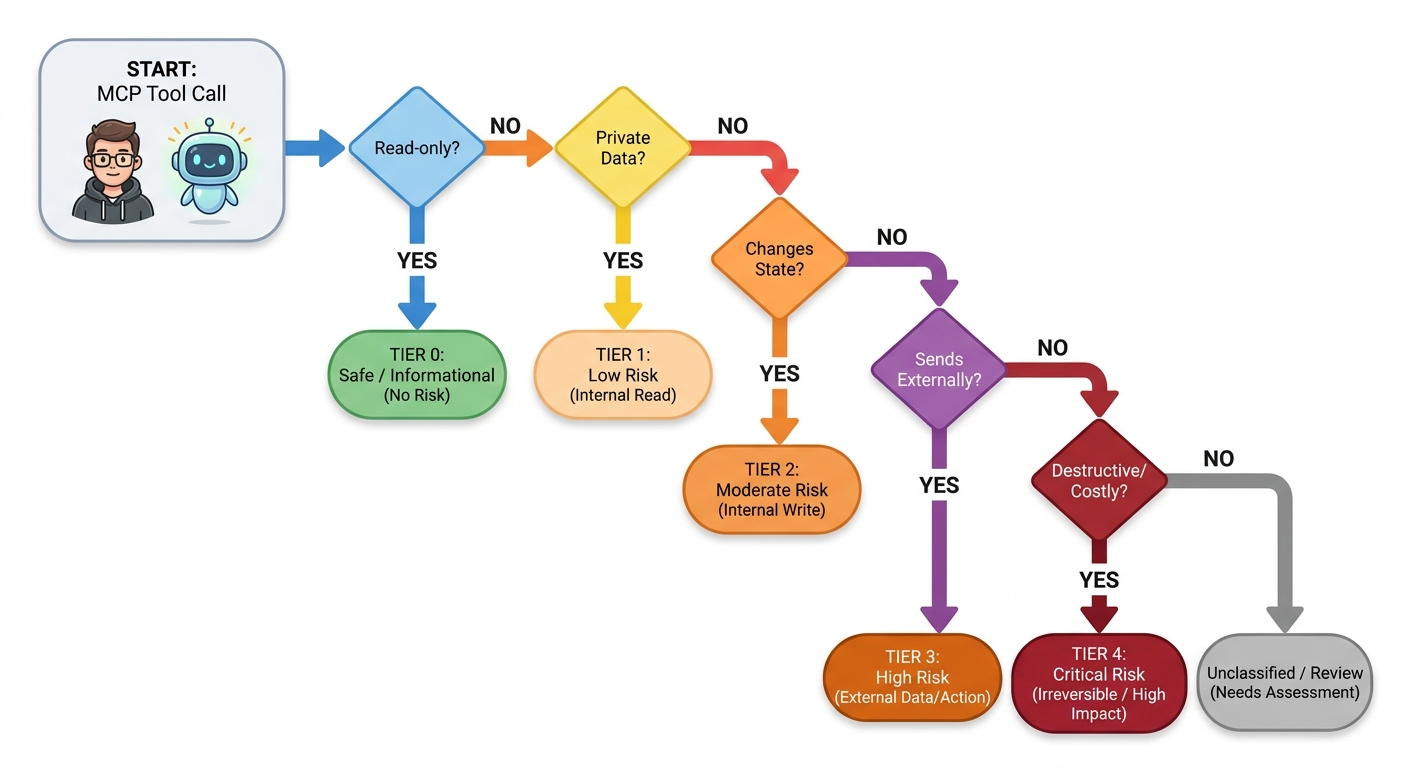
A Builder-Friendly Risk Classification Checklist
Before you expose a tool, answer these questions. If any answer moves the action into a higher tier, design for the higher tier.
Example: Classifying a Customer Support MCP Server
Imagine a support MCP server with five tools:
| Tool | Risk tier | Why | Control |
|---|---|---|---|
search_help_center | Tier 0 | Reads public content | Allow with input length limits |
get_customer_profile | Tier 1 | Reads private customer data | User-scoped token and field redaction |
create_support_ticket | Tier 2 | Creates an internal record | Allow if user intent is clear; log ticket ID |
send_customer_reply | Tier 3 | Sends external communication | Approval screen with full message and recipient |
refund_payment | Tier 4 | Moves money and affects revenue | Step-up confirmation, refund cap, audit trail |
This approach keeps safe automation fast while forcing slower review only where it matters. That is better than asking users to approve every read-only call until they become numb to confirmations.
Approval UX Should Match the Risk Tier
Human approval is not a single checkbox. For Tier 3 and Tier 4 tools, the approval prompt should show exactly what will happen: the target account, recipient, amount, resource name, environment, irreversible effects, and the arguments the model generated. A vague prompt such as “Allow tool?” is not enough.
For destructive actions, consider a two-step pattern: first prepare the action, then execute it only after confirmation. For example, prepare_delete_user can return a deletion summary and impact preview. execute_delete_user should require a confirmation token or approval record that the server validates.
Implementation Pattern: Policy Before Handler
A clean MCP server separates policy from execution. The request enters the server, the policy layer identifies the tool and tier, validates identity and scope, checks whether approval is required, then passes only approved calls to the handler.
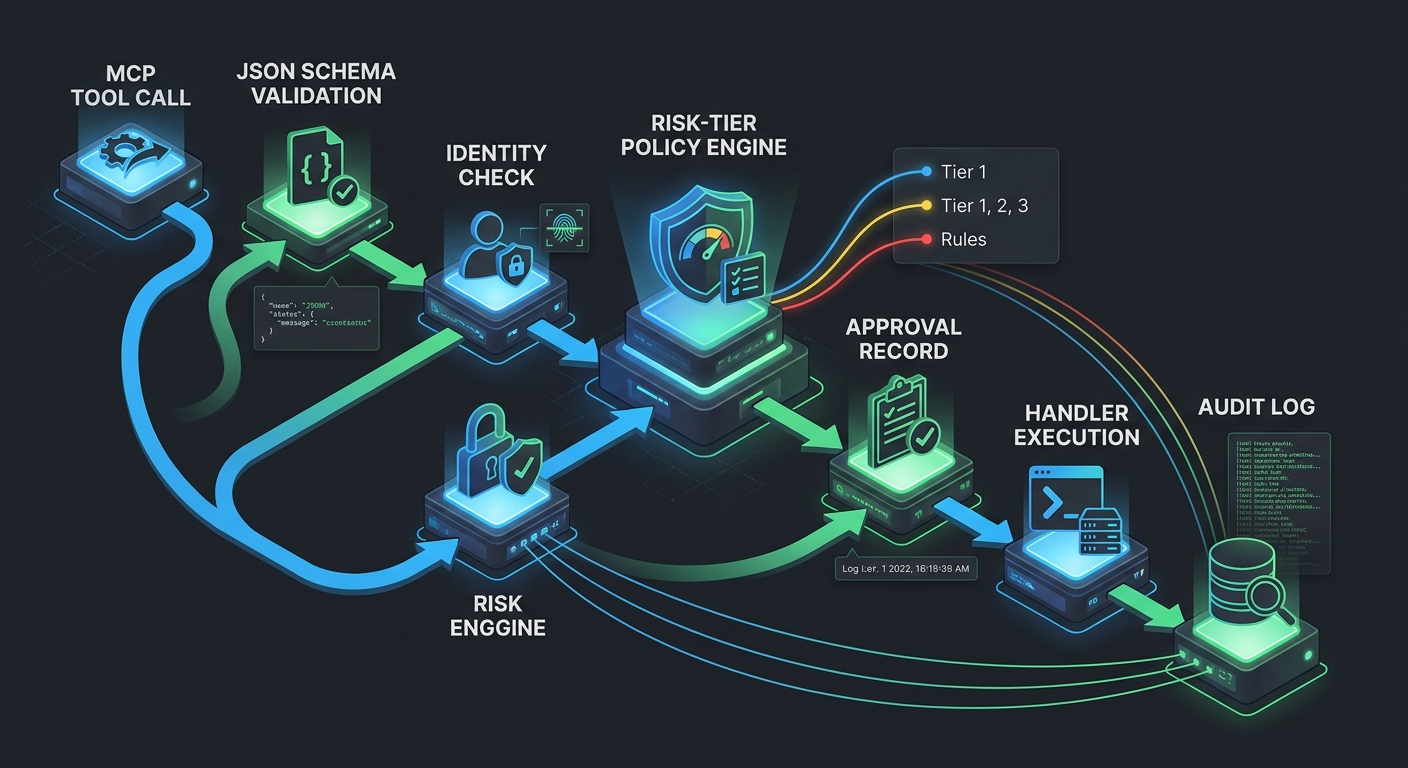
tool_call → schema validation → identity check → risk tier policy → approval check → handler → structured result → audit logFor a secure default, deny unknown tools, reject unknown arguments, require explicit scopes, and record enough context to investigate later: user, tool name, arguments summary, approval ID, result status, latency, and downstream resource IDs.
Common Mistakes When Classifying MCP Tools
- Using one “admin” backend credential for every tool. This makes every tool Tier 4 in practice, even if the UI says otherwise.
- Trusting tool descriptions as policy. Descriptions help the model choose tools; they do not enforce permissions.
- Skipping output sanitization. Tool results can contain hostile text, hidden instructions, or data that should not be passed back into the model unchanged.
- Approving too much at once. Broad “approve all future actions” flows erase the value of risk tiers.
- Forgetting idempotency. Agent retries can duplicate tickets, emails, payments, or deployments unless the server deduplicates requests.
Source-Backed Design Principles
- The MCP tools specification states that servers must validate tool inputs, implement access controls, rate-limit tool invocations, and sanitize outputs.
- The same MCP tools guidance recommends human confirmation for sensitive operations and visible indicators when tools are invoked.
- The MCP authorization specification bases HTTP transport authorization on OAuth 2.1-related standards and protected resource metadata.
- The MCP security best practices highlight authorization attack patterns such as confused deputy risks in proxy-style servers.
Keep Learning on Singularity Journey
- How to Build a Secure MCP Server — source pillar for the full tools, permissions, and approval architecture.
- MCP Authorization: How to Scope Users, Tools, and Tokens for Remote Servers
- MCP Tool Poisoning: How Developers Can Detect and Defend Against Malicious Tool Metadata
- Human Approval for AI Agents: Review Queues, Risk Tiers, and Escalation UX
FAQ: MCP Tool Risk Tiers
What is an MCP tool risk tier?
An MCP tool risk tier is a classification that maps a tool’s possible impact to default controls such as identity checks, token scopes, human approval, rate limits, audit logs, and rollback requirements.
Do read-only MCP tools need approval?
Public read-only tools usually do not need approval, but private read tools still need identity, authorization, field minimization, and logging because they may expose sensitive data.
Are MCP tool annotations enough for security?
No. Tool annotations can describe expected behavior, but the server must still enforce schema validation, access control, rate limits, output sanitization, and approval rules.
Which MCP tools should require human approval?
Require human approval for tools that send external messages, publish content, move money, delete data, change permissions, deploy to production, or perform actions that are difficult to reverse.
Conclusion: Make the Risk Boundary Boring
A secure MCP server should feel predictable. Low-risk tools should work quickly. Risky tools should pause with a clear explanation. Destructive tools should require narrow scopes, explicit approval, and strong logs. If you want the full architecture around this matrix, read the source pillar: How to Build a Secure MCP Server: Tools, Permissions, and Human Approval.
