
AI Agent Memory Examples: What Assistants Should Remember, Forget, and Ask About
Most AI memory advice is either too abstract or too product-specific. This guide gives concrete AI agent memory examples so you can decide what an assistant should remember, what it should forget, and when it should ask before saving anything.
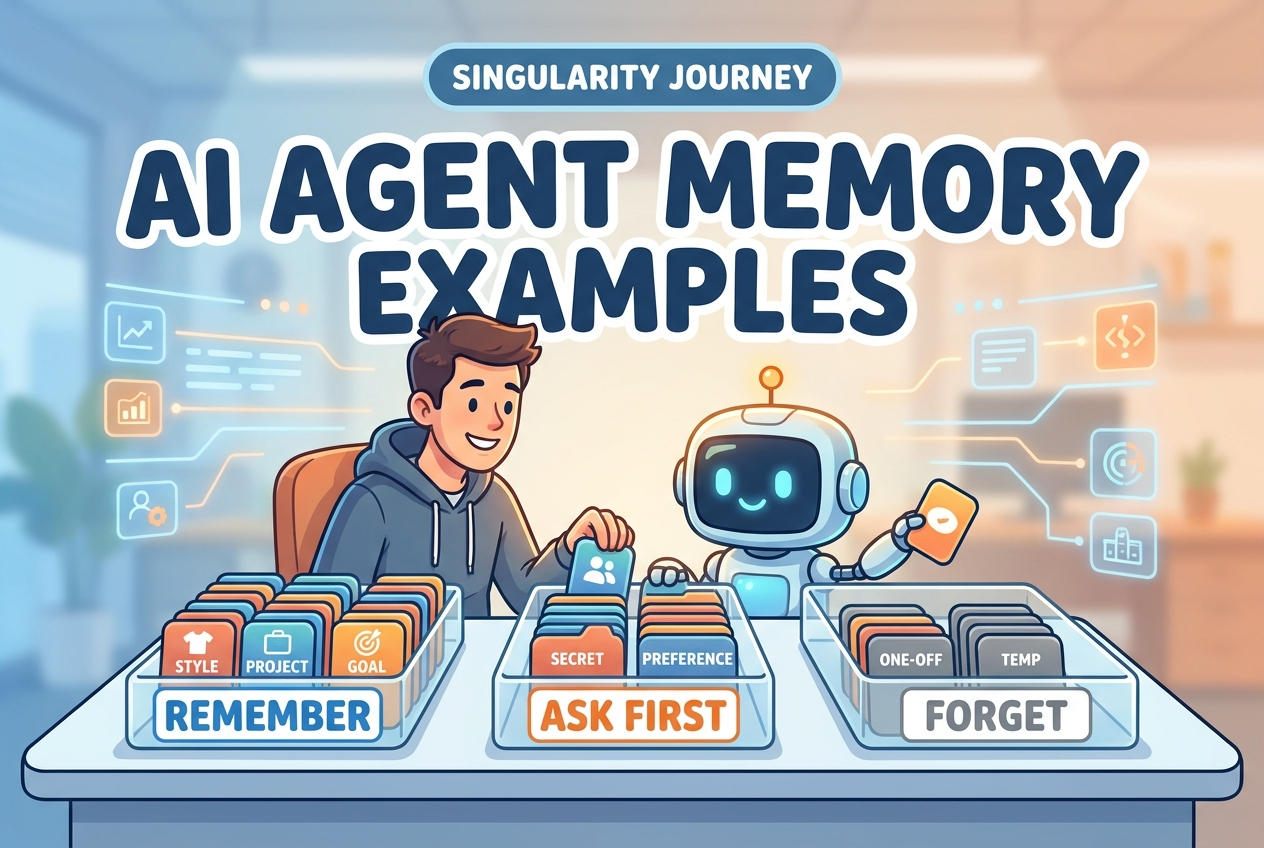
Quick answer: what should an AI agent remember?
An AI agent should remember stable, useful, low-risk information that improves future help without surprising the user. Good examples include preferred writing style, recurring project context, accessibility needs, harmless formatting preferences, and long-running goals the user has explicitly confirmed. Weak examples include one-off instructions, outdated project details, guesses about the user, sensitive secrets, private health or financial information, and anything the user did not expect to become persistent.
This cluster article supports the broader pillar guide AI Agent Memory Explained. The pillar explains how agent memory works. This guide narrows the question to practical judgment: when a smart assistant sees a fact, preference, instruction, or personal detail, should it store it, use it only for the current task, ask permission, or ignore it?
That sounds obvious until you design a real assistant. A user might say, “I hate long answers,” “Use my company tone,” “My investor update is due every Friday,” or “Here is the production API key.” All four statements are useful context, but they should not be handled the same way. One is a harmless preference. One may be team-specific. One is a recurring workflow. One is a secret that should not become conversational memory.
The goal is not to make AI agents remember everything. The goal is to make memory feel helpful, predictable, editable, and safe. A good memory system reduces repetition without creating the uncomfortable feeling that the assistant is silently building a profile the user cannot inspect or correct.
Why AI agent memory examples matter more than definitions
Definitions are useful, but memory decisions are made in messy moments. An assistant sees a sentence, an uploaded file, a project note, a tool result, or a correction from the user. The system must decide whether that information belongs in short-term context, long-term memory, a project file, a task record, or nowhere at all. This is where many AI memory explanations become too vague.
Official product documentation already explains that memory can personalize responses and that users should have controls to manage it. Developer documentation explains the difference between short-term thread memory and long-term cross-session memory. Security frameworks warn that generative AI and agentic systems introduce risks that need mitigation. But a beginner still needs examples: what does a “good memory” look like in a writing assistant, coding agent, learning coach, or business workflow bot?
Memory examples also prevent two bad extremes. The first extreme is forgetful AI: every session starts from zero, so the user keeps repeating the same preferences, project names, audience, tools, and constraints. The second extreme is sticky AI: the assistant remembers too much, including stale facts, accidental comments, sensitive details, and wrong inferences. Good design lives between those extremes.
Think of memory as a small, editable notebook, not a hidden surveillance archive. The best entries are concise, user-serving, and easy to review. They should answer: “Will remembering this make future help noticeably better, and would the user be comfortable seeing this memory written down?” If the answer is no, the information probably belongs in temporary context or should not be stored.
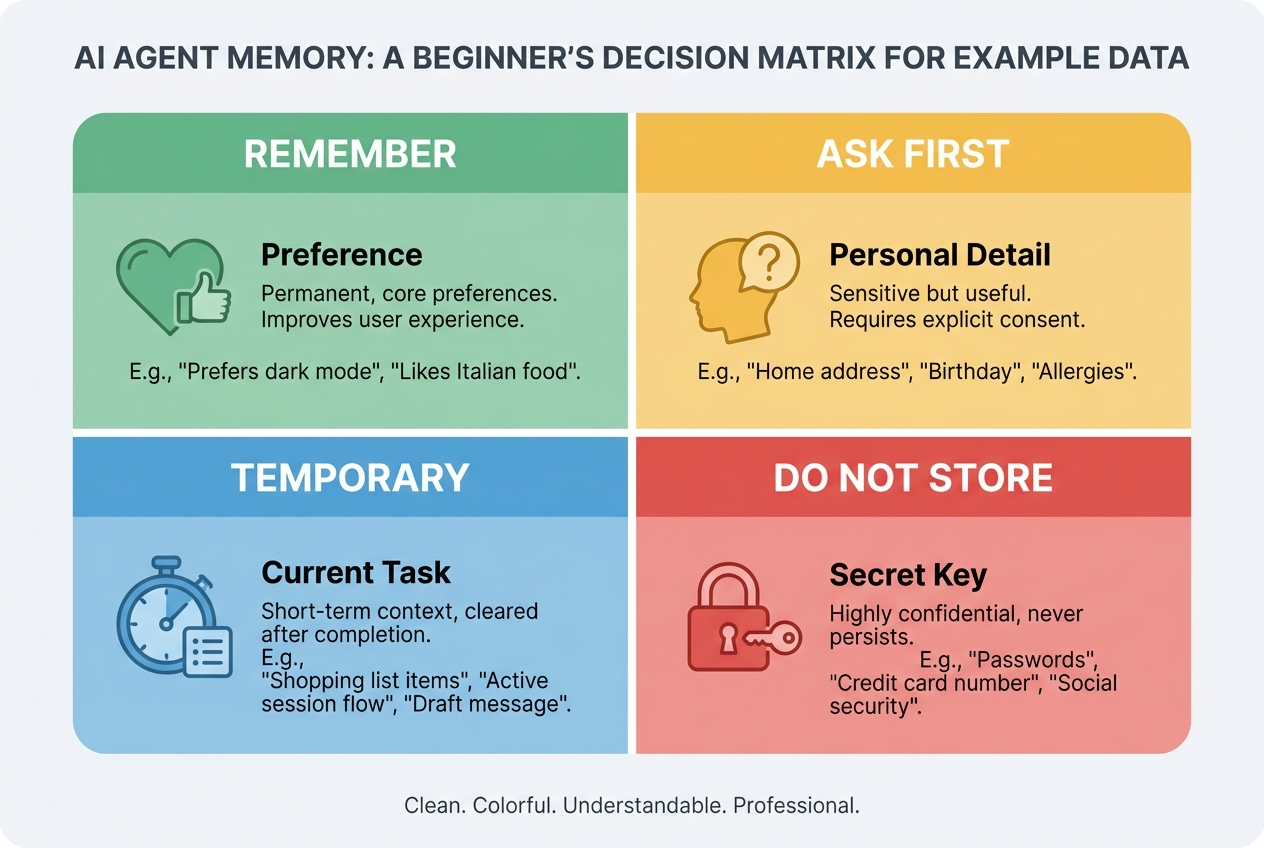
The memory decision rule: remember, ask, forget, or keep temporary
A practical AI agent memory system needs more than a save button. It needs a decision rule. The most useful rule has four outcomes:
| Outcome | Use it when | Example |
|---|---|---|
| Remember | The information is stable, useful, low-risk, and expected to matter again. | “Prefer concise bullet points when explaining code.” |
| Ask first | The information is personal, sensitive, high-impact, inferred, or could surprise the user if stored. | “You are applying for a new job while still employed.” |
| Keep temporary | The information matters for this session or project but should not become global memory. | “For this article, use a playful tone and avoid tables.” |
| Forget / do not store | The information is secret, accidental, outdated, irrelevant, or unsafe to reuse. | “Here is my password/API key/private token.” |
This rule works because it separates usefulness from persistence. Many details are useful right now but dangerous or annoying later. A flight number matters until the trip ends. A temporary writing style matters until the draft is finished. A debugging log matters until the bug is fixed. Saving all of that as long-term memory pollutes the assistant’s future behavior.
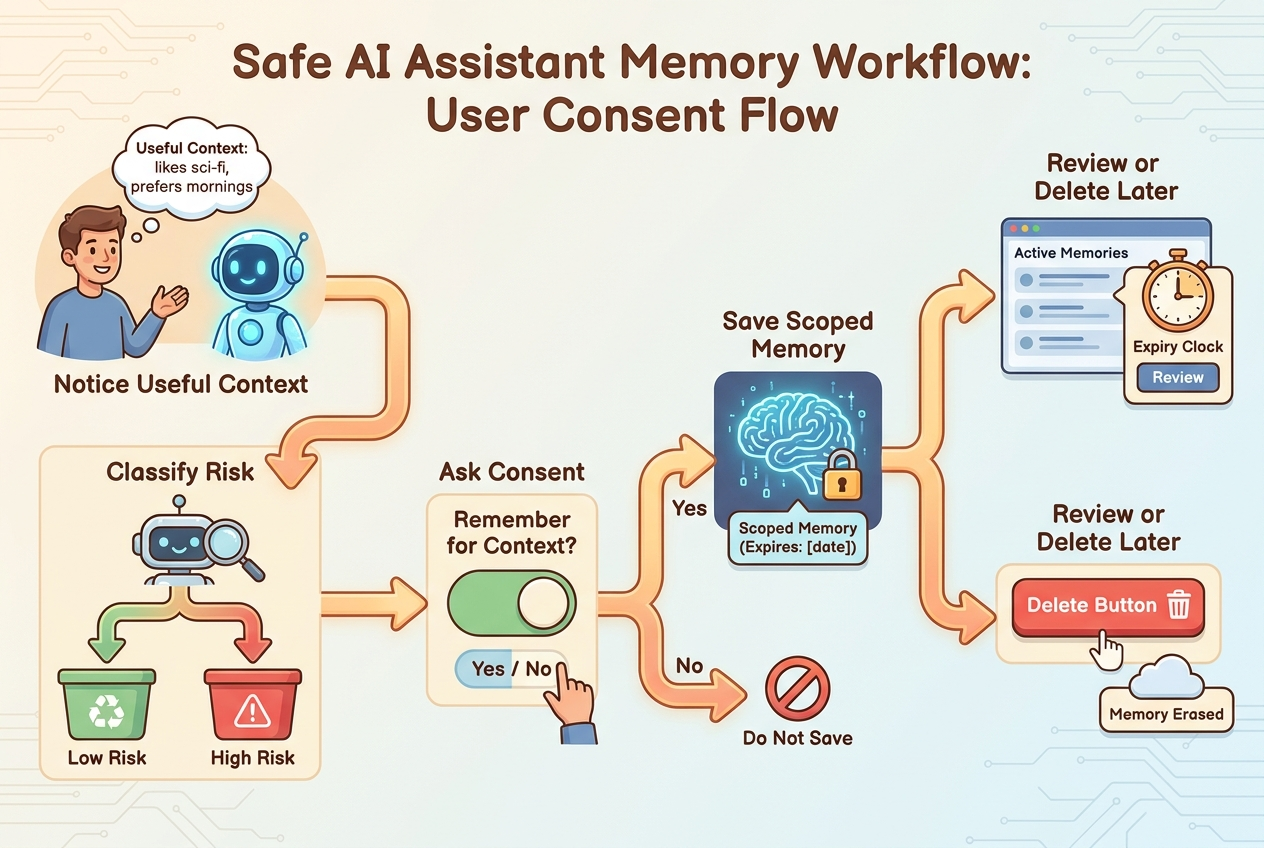
The rule also makes consent practical. Instead of asking permission for every harmless preference, the assistant can automatically remember low-risk preferences and ask before saving sensitive or ambiguous details. The user should still be able to inspect, edit, and delete memory. But the agent should not offload all judgment to the user with constant popups.
Examples of good AI agent memories
Good memories are usually boring. That is a feature, not a flaw. The safest useful memories often describe how the user wants work delivered, what recurring context matters, or which constraints should be respected. They help the assistant start closer to the user’s preferred answer without guessing too much.
Notice how these memories are short, practical, and easy to verify. They do not try to infer personality. They do not store secrets. They do not make claims the user has not confirmed. They help the assistant deliver better work, but they remain editable if the user changes their mind.
A useful test is whether the memory can be written as a neutral sentence. “The user prefers short summaries” is better than “The user is impatient.” “Use American English for this client” is better than “The user is bad at spelling.” Memory should avoid turning behavior into judgment. The assistant should remember instructions, not stereotype the person.
Examples where an AI agent should ask before remembering
Some information may be genuinely useful but still too sensitive to save automatically. In those cases, the assistant should ask a clear question and explain the benefit. The wording matters. A good memory prompt is specific, not creepy.
Ask before remembering personal identity details, career plans, medical or financial context, relationship information, workplace conflicts, location patterns, political or religious preferences, and anything that could create harm if reused in the wrong situation. Also ask before saving inferred memories. If the user says, “Make this warmer,” that does not mean they always prefer a warm tone. It may only apply to the current email.
Here are common ask-first examples:
- “You are preparing for machine learning interviews while working full-time.”
- “Your manager prefers one-page decision memos.”
- “You are anxious about public speaking and want practice sessions to be gentle.”
- “Your startup is fundraising and your pitch deck audience is seed-stage investors.”
- “You prefer not to discuss a certain topic unless you bring it up first.”
These memories could improve future assistance, but they are personal enough that saving them silently may violate user expectations. Asking first turns memory from hidden profiling into user-controlled personalization.
Examples an AI assistant should forget or never store
Some information should not become memory even if it appears useful. Secrets are the clearest case. Passwords, API keys, private tokens, recovery phrases, session cookies, bank details, government IDs, and private access credentials should never be saved as conversational memory. If an assistant needs to use a secret for a task, it should handle it through a secure secret manager or approved tool flow, not a memory note.
The same caution applies to accidental personal disclosures. If a user pastes a document that contains private addresses, salary details, medical notes, or legal information, the assistant can help with the current task but should not turn those details into long-term memory. “Useful” is not the same as “appropriate to remember.”
| Do not store | Why | Safer behavior |
|---|---|---|
| Passwords, keys, tokens | High-risk secrets | Tell the user not to share them and use a secure secret flow. |
| One-off task constraints | Likely to become stale | Keep inside the current chat or project only. |
| Unverified guesses | Can create wrong personalization | Ask or wait for repeated confirmation. |
| Sensitive personal data | Could harm privacy or trust | Ask first or avoid persistent storage entirely. |
| Old project facts | May mislead future answers | Add expiration dates or review reminders. |
There is also a quality reason to forget: stale memory makes AI agents worse. A memory that was helpful last month can become wrong after a project changes, a company pivots, or the user updates their preferences. Good memory systems need pruning, expiration, and review. Forgetting is not a failure. It is part of keeping the assistant accurate.
AI agent memory examples by assistant type
Writing assistant
A writing assistant can remember the user’s default tone, preferred outline format, banned phrases, reading level, citation style, and recurring audience. It should keep article-specific instructions temporary unless they repeat over time. For example, “Use simple headings and avoid hype” is a strong memory if it applies broadly. “Mention the product launch in paragraph two” should stay temporary.
Coding agent
A coding agent can remember repository conventions, test commands, package manager preferences, branch naming rules, review style, and preferred logging format. It should not remember credentials, private environment values, or old stack traces. A good coding memory says, “This project uses uv and pytest.” A bad memory says, “The staging database password is...”
Customer support agent
A support agent can remember a customer’s plan type, communication preference, open issue history, and accessibility needs if the business has a lawful and transparent reason to store them. It should avoid saving frustration labels like “difficult customer.” It should remember facts that help service, not emotional judgments that bias future interactions.
Learning assistant
A learning assistant can remember skill level, goals, preferred explanation style, topics already covered, and mistakes the learner wants to practice. It should be careful with labels. “Needs more practice with recursion examples” is useful. “Bad at programming” is harmful and imprecise.
Business operations agent
An operations agent can remember approval thresholds, standard report sections, recurring stakeholders, document templates, and non-sensitive workflow preferences. It should ask before saving sensitive business strategy, legal details, HR issues, or financial information. For high-impact workflows, pair memory with human approval instead of relying on memory alone.
How to write a good memory entry
A good memory entry should be short, specific, sourced from user behavior or explicit instruction, and easy to delete. It should avoid emotional labels and broad assumptions. Use this format:
Examples:
- “When summarizing AI articles, use bullet points with a short ‘why it matters’ section.”
- “For Singularity Journey articles, use beginner-friendly explanations, practical examples, and avoid unsupported AGI timelines.”
- “When helping with code in this workspace, use uv commands instead of bare pip.”
- “For meeting notes, structure output as decisions, action items, owners, and open questions.”
Bad memory entries are vague or judgmental: “User likes AI,” “User is busy,” “User hates long content,” or “User is a beginner.” Better entries convert observations into actionable preferences: “When explaining new AI terms, define the term first, then give one concrete example.”
The assistant should also track memory provenance when possible. Was the memory explicitly requested? Inferred from repeated behavior? Imported from a profile? Extracted from a file? The more sensitive the memory, the more important provenance becomes. If the assistant cannot explain why it remembers something, the user will not trust it.
AI agent memory checklist
Use this checklist before saving any long-term memory:
- Useful: Will this clearly improve future responses?
- Stable: Is it likely to remain true beyond this conversation?
- Expected: Would the user be unsurprised to see this in a memory list?
- Low-risk: Could storing or reusing it cause privacy, security, legal, or emotional harm?
- Specific: Is the memory written as a concrete preference or fact rather than a broad personality judgment?
- Editable: Can the user inspect, correct, or delete it?
- Scoped: Should it apply globally, only to one project, or only to one thread?
- Fresh: Does it need an expiration date or review reminder?
If the answer is weak on usefulness, keep it temporary. If the answer is weak on expectedness, ask first. If the answer is weak on risk, do not store it. If the answer is weak on freshness, add expiration or review.
Good memory behavior
- Remembers user-confirmed preferences.
- Keeps one-off task details temporary.
- Asks before saving sensitive context.
- Shows memories in a reviewable list.
- Deletes or updates stale memory.
Bad memory behavior
- Saves secrets or credentials.
- Infers personal traits from one message.
- Uses old project facts without checking.
- Stores emotional judgments.
- Hides memory from the user.
How this fits with the AI agent memory pillar
The broader AI Agent Memory Explained pillar gives the mental model: context windows, working memory, episodic memory, semantic memory, procedural memory, retrieval, RAG, risks, controls, and evaluation. This article is the supporting field guide. It helps readers turn that mental model into everyday decisions.
If you are new to the concept, read the pillar first. If you are building or evaluating an assistant, use this article as a practical memory policy starter. The next step is to connect examples with controls: review screens, consent prompts, retention periods, audit logs, and human approval for high-impact actions.
Sources and references
- OpenAI Help Center: Memory FAQ
- LangChain/LangGraph documentation: Memory overview
- Model Context Protocol documentation: Resources and context
- OWASP Top 10 for Large Language Model Applications / GenAI Security Project
- NIST AI Risk Management Framework
This article is educational and does not replace legal, privacy, security, or compliance advice. For production assistants, align memory behavior with your privacy policy, security model, and applicable regulations.
Keep learning on Singularity Journey
- AI Agent Memory Explained — the source pillar for this cluster article.
- AI Agent Memory Controls — practical controls for storing, reviewing, and deleting memory.
- AI Agent Evaluation — how to test whether agent behavior is reliable.
- Human Approval for AI Agents — when memory-informed actions should require review.
FAQ: AI agent memory examples
What are simple examples of AI agent memory?
Simple examples include a preferred writing tone, recurring report format, project name, package manager preference, accessibility need, or standard meeting-note structure. These are useful, stable, and usually low-risk.
What should an AI agent not remember?
An AI agent should not remember passwords, API keys, private tokens, accidental sensitive disclosures, one-off task instructions, unverified guesses, or stale project facts that could mislead future work.
When should an AI assistant ask before saving memory?
It should ask before saving personal, sensitive, inferred, workplace, financial, health, legal, or high-impact information. It should also ask when the user might be surprised that the detail is becoming persistent.
Is AI agent memory the same as chat history?
No. Chat history is usually short-term context inside a conversation. Long-term memory is selected information that can influence future conversations or tasks across sessions.
How can I tell if a memory is good?
A good memory is useful, stable, expected, low-risk, specific, editable, properly scoped, and fresh. If it fails those checks, keep it temporary, ask first, or do not store it.
Should an AI agent remember user preferences automatically?
Low-risk preferences can often be remembered automatically if the user has memory enabled and can review/delete memories. Sensitive or surprising preferences should require confirmation.
