
FUTURE CAREERSPillar GuideAI Agents
AI Workflow Portfolio: How to Prove You Can Work With AI Agents
The fastest way to sound replaceable in the AI era is to say, “I know how to use AI.” The fastest way to look valuable is to show a documented workflow where you used AI agents to save time, improve quality, reduce risk, or create a result that a reviewer can inspect.

An AI workflow portfolio is not a folder of clever prompts. It is not a certificate badge. It is not a screenshot of a chatbot producing a paragraph. It is a proof system. It shows that you can take a messy real-world task, break it into steps, assign the right parts to AI, keep human judgment in charge, evaluate the output, and explain the business result in plain language.
That distinction matters because AI is moving from “tool I ask questions” toward “agent I supervise.” Microsoft’s Work Trend Index describes emerging organizations as human-led and AI-operated, with hybrid teams of people and agents handling work together. The World Economic Forum’s Future of Jobs research points to AI, big data, technological literacy, cybersecurity, creative thinking, resilience, flexibility, and agility as skills rising in importance. Those trends create a practical career question: how do you prove you have these skills before someone hires or promotes you?
This guide gives you a direct answer. You will learn what an AI workflow portfolio is, why it is stronger than a normal resume claim, which projects to build, what evidence to capture, how to measure results, how to avoid unsafe “AI theater,” and how to present the portfolio to managers, recruiters, clients, or collaborators.
Why an AI workflow portfolio matters more than another skills list
Most AI career advice still reads like a grocery list: learn prompting, learn automation, learn data, learn strategy, learn ethics. Lists can be useful, but they do not prove judgment. A hiring manager cannot tell whether you can handle a real customer escalation, research problem, product decision, compliance concern, or content operation just because you wrote “AI tools” on your resume.
AI agents make this gap bigger. A simple chatbot answer is easy to generate. A reliable workflow is harder. Workflows require you to define success, decide what context the AI needs, choose the correct handoff points, evaluate outputs, log mistakes, protect private information, and know when a human should override the system. These are career skills, not just software tricks.
That is why a portfolio is so powerful. It turns vague fluency into visible evidence. Instead of saying “I am good with AI,” you can show a mini case study: a support triage process, a research assistant workflow, a meeting-to-action pipeline, a competitor monitoring system, a sales proposal assistant, a documentation refresh process, or a personal learning agent. Each project becomes a concrete signal that you can work in human-AI teams.
For Singularity Journey readers, this also connects to the broader agent stack. If you have already read about AI agent controls, AI agent alignment, and AI agent observability, the career version is simple: your portfolio should prove you can use those ideas at work, even if your role is not engineering.
What an AI workflow portfolio actually includes
An AI workflow portfolio is a curated set of projects that demonstrate your ability to improve work with AI while keeping humans responsible. The word “workflow” is important. You are not just showing outputs. You are showing how work moves from problem to decision.
A strong portfolio has five layers. First, it explains the business or personal problem. Second, it shows the baseline process before AI. Third, it documents the AI-assisted workflow, including prompts, agent instructions, tools, source inputs, and human review points. Fourth, it measures outcomes using time saved, quality improvement, error reduction, consistency, throughput, or decision clarity. Fifth, it reflects on risk: what could go wrong, how you checked the work, and what you refused to automate.
| Portfolio layer | What to show | Why it matters |
|---|---|---|
| Problem | The real task, audience, constraints, and reason it matters. | Proves you start from work value, not tool hype. |
| Baseline | How the task was done before AI, including time, friction, and quality issues. | Creates a fair before-and-after comparison. |
| Workflow | Steps, agent roles, prompts, inputs, outputs, approval gates, and handoffs. | Shows process design and agent supervision skill. |
| Measurement | Time saved, defects caught, turnaround improvement, coverage, or reviewer rating. | Turns the project into credible evidence. |
| Risk control | Privacy limits, fact-checking, access boundaries, escalation rules, and audit notes. | Shows maturity and trustworthiness. |
The best portfolios are not huge. Three to five excellent workflow case studies are better than twenty shallow experiments. Each case study should be short enough to skim and detailed enough to inspect. Think of it as a product demo for your judgment.
The career shift: from prompt user to agent supervisor
The most important career move is mental. Stop positioning yourself as a “prompt user.” That phrase is already too small. The more durable role is agent supervisor, workflow designer, AI operations partner, or human-in-the-loop decision maker. Different industries will use different titles, but the pattern is similar: humans define goals, constraints, and accountability; AI agents help execute repeatable cognitive work; humans review exceptions, make judgment calls, and improve the system.
Microsoft’s frontier firm framing is useful here because it describes work as hybrid teams of humans and agents. In that world, the valuable employee is not the person who blindly accepts AI output. It is the person who can ask: What should the agent do? What should it never do? What information is safe to use? What does good output look like? How do we know when the agent is wrong? When should the workflow stop and ask a human?
Your portfolio should make that shift visible. Do not only include polished final outputs. Include the operating model behind them. Show the agent instruction, the review checklist, the escalation rule, and the improvement log. A manager should be able to look at your work and think, “This person can be trusted near an AI-enabled process.”
Five portfolio projects that prove AI agent skills
You can build an AI workflow portfolio without waiting for permission from a company. Use public information, synthetic examples, personal productivity tasks, open datasets, or anonymized workflows. Never upload confidential data into tools just to create a portfolio. If a project touches sensitive work, recreate it with fake data and clearly say so.
1. Research brief agent workflow
This project shows that you can turn scattered information into a decision-ready brief. Choose a topic related to your field: market entry, customer complaints, policy changes, competitor positioning, vendor comparison, technical trend, or hiring landscape. Build a workflow where AI helps gather, summarize, compare, and structure information, but you verify sources and write the final recommendation.
Your portfolio artifact should include the research question, source list, AI role, verification process, final brief, and a “what I rejected” section. That last section is surprisingly powerful. It proves you did not just paste AI output. You evaluated it.
2. Meeting-to-action operating system
Every organization loses value between conversation and execution. Build a workflow that turns meeting notes into decisions, owners, deadlines, risks, and follow-up messages. You can use sample meeting transcripts or your own non-confidential notes.
Show the before state: messy notes, missing owners, unclear next steps. Then show the AI-assisted process: transcript cleanup, action extraction, risk detection, stakeholder summary, and human approval before sending anything. Measure the result by time saved per meeting or reduction in missed follow-ups across a sample set.
3. Customer support triage assistant
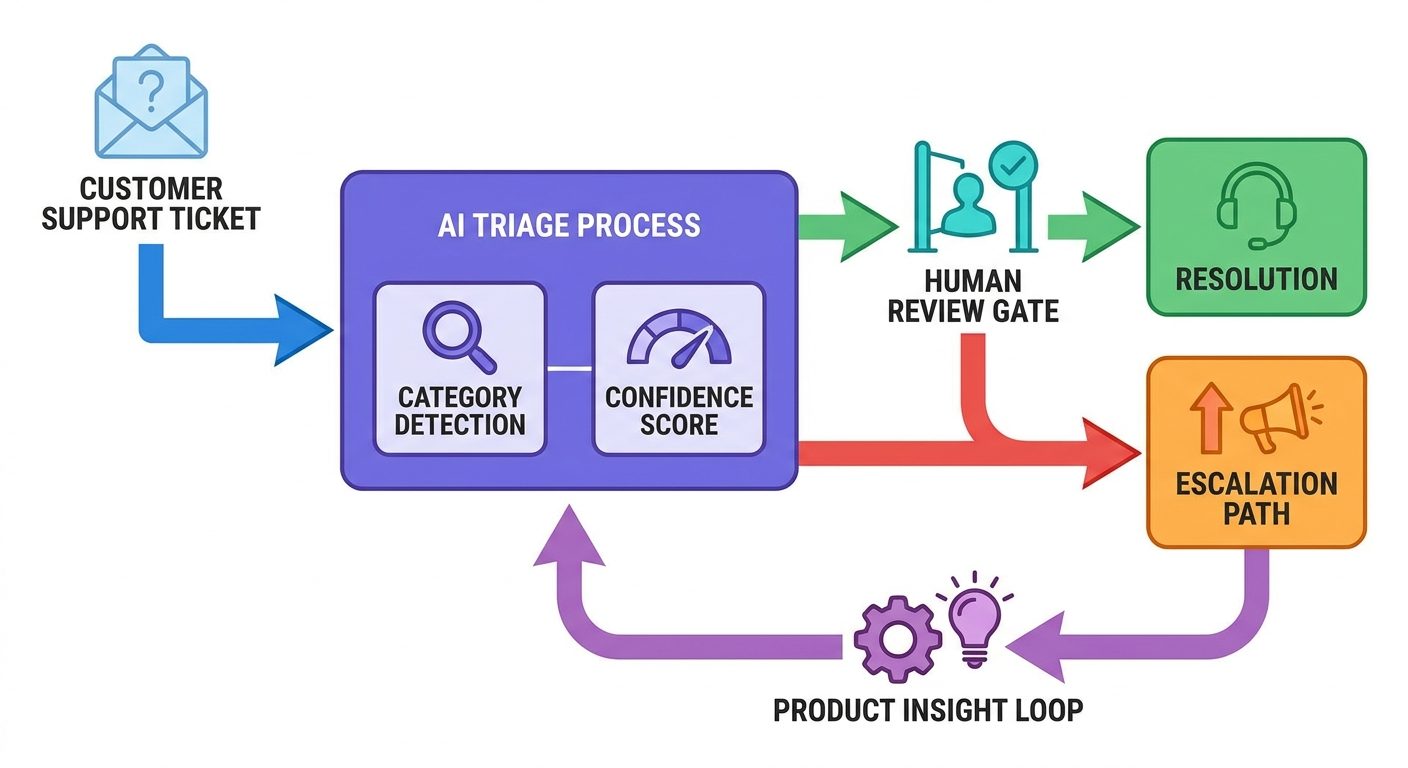
This is a strong project for operations, customer success, product, QA, and community roles. Create a synthetic inbox of support tickets. Design an AI workflow that classifies tickets by urgency, product area, sentiment, likely root cause, and escalation need. The key is not automation alone. The key is responsible triage.
Your case study should include categories, escalation rules, examples of correct and incorrect classifications, and a human review checklist. If you want to make it more advanced, add a section showing how repeated tickets become product insights. This demonstrates business thinking beyond response speed.
4. Content refresh and fact-check workflow
For marketers, writers, educators, analysts, and founders, this project shows how you can improve content quality without producing generic AI sludge. Choose an old article, guide, landing page, documentation page, or educational resource. Build a workflow that identifies outdated claims, missing examples, unclear sections, SEO gaps, user questions, and source needs.
The proof should include a content audit table, suggested revisions, source verification notes, and final before-and-after excerpts. Make it clear where AI helped and where human editorial judgment decided. This is especially useful because many organizations want AI content speed but are worried about trust, accuracy, and brand voice.
5. Personal AI learning coach with evaluation logs
This project works well for career switchers. Pick a skill you are learning: SQL, product analytics, cybersecurity basics, technical writing, sales discovery, financial modeling, or AI governance. Create a workflow where an AI tutor gives practice tasks, quizzes you, reviews your answers, and adapts the next exercise. The portfolio value comes from the evaluation log, not the chat itself.
Show your starting point, study plan, practice tasks, mistakes, corrections, and final mini-project. This proves that you can use AI to accelerate learning while still doing the work. It also signals resilience and self-directed growth, which are increasingly important when tools change quickly.
The portfolio matrix: what to document for every project
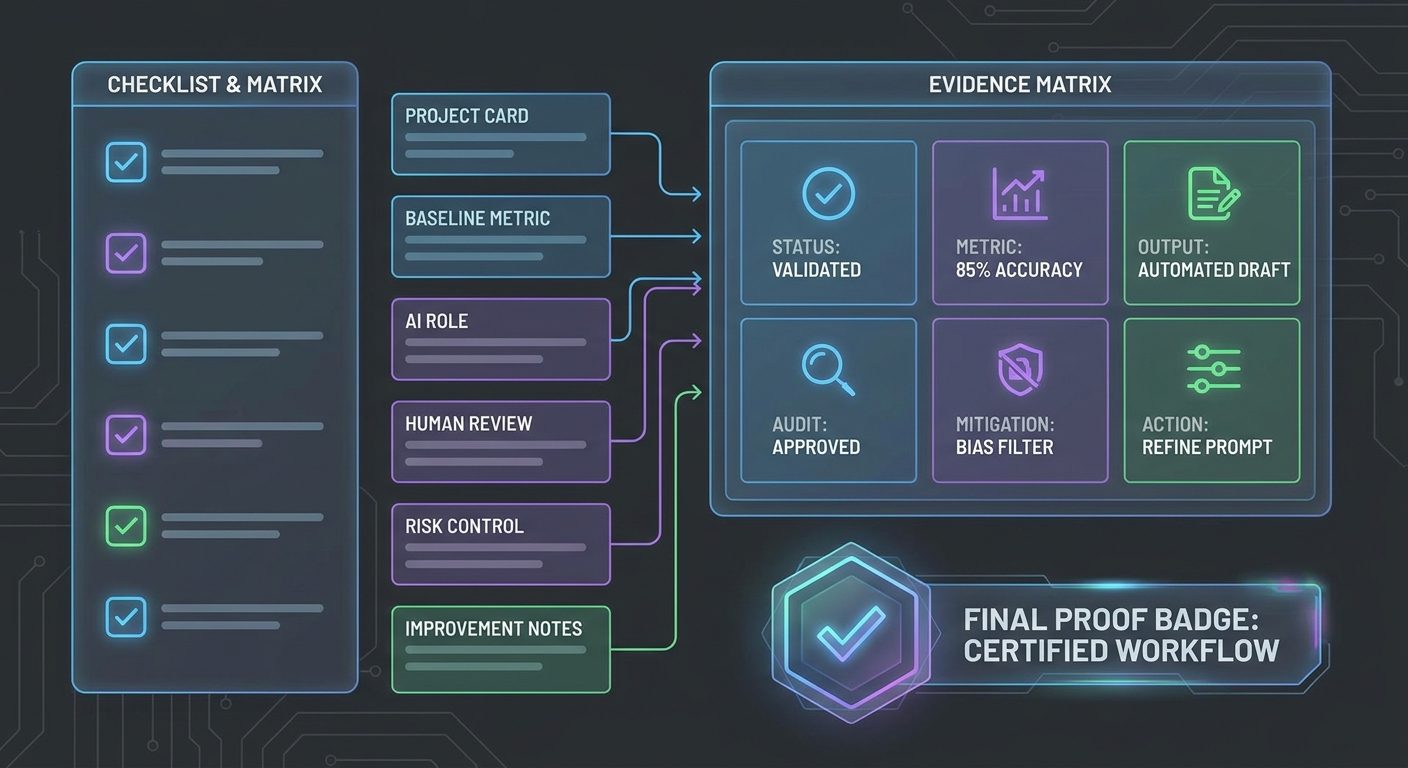
Use the same structure for each case study so reviewers do not have to guess what they are seeing. Consistency makes the portfolio feel professional. It also helps you compare projects and notice gaps in your own skill set.
| Field | Portfolio prompt | Example evidence |
|---|---|---|
| Goal | What work outcome were you trying to improve? | Reduce support triage time while keeping high-risk tickets visible. |
| AI role | What did the agent or AI assistant do? | Classified tickets, suggested summaries, flagged escalation risks. |
| Human role | What remained under human control? | Final priority, customer-facing response, account-sensitive decisions. |
| Inputs | What information did the workflow use? | Synthetic tickets, product taxonomy, policy rules, escalation criteria. |
| Controls | What boundaries protected quality and safety? | No private data, confidence labels, manual approval for urgent cases. |
| Metric | How did you measure improvement? | Average triage time, classification accuracy sample, reviewer rating. |
| Failure | Where did AI perform poorly? | Misread sarcasm, over-prioritized angry but low-risk tickets. |
| Iteration | How did you improve the workflow? | Added severity examples and separate sentiment from urgency. |
If you only remember one thing, remember this: a portfolio without failures looks less credible. Real AI work includes ambiguity, edge cases, and corrections. Showing how you improved the system makes you look more trustworthy, not less.
How to measure AI workflow results without faking precision
You do not need enterprise-grade analytics to build useful portfolio evidence. You do need honest measurement. Avoid fake precision such as “improved productivity by 347%” unless you can prove it. A simple, transparent method is better.
Start with a baseline. Time yourself doing the task manually for three to five samples. Record quality issues, rework, or decision delays. Then run the AI-assisted workflow on similar samples. Record time again, review quality, count errors, and note where human judgment was needed. If the sample is small, say it is small. That honesty is a feature.
Good metrics include minutes saved per task, number of sources checked, number of errors caught before publication, percentage of items correctly categorized in a small review set, reduction in blank-page time, turnaround time, stakeholder satisfaction score, or number of reusable templates created. For many knowledge-work tasks, quality and consistency matter as much as speed.
Use a “confidence statement” at the end of each case study. For example: “In a five-ticket synthetic test, the workflow reduced first-pass triage time from about twelve minutes to about five minutes per ticket, but it still required human review for sentiment and enterprise account risk.” This sounds more professional than overclaiming.
Risk, governance, and the part most portfolios forget
AI career portfolios often over-index on speed. That is understandable, but incomplete. Companies do not only need people who can move fast with AI. They need people who can move safely. IBM’s data breach research highlights a real concern: AI adoption without governance, access controls, and oversight creates avoidable risk. Even if your portfolio project is small, it should show that you understand boundaries.
Every case study should answer five safety questions. Did you use confidential data? If yes, stop and redesign with anonymized or synthetic data. Could the AI output harm a customer, employee, candidate, patient, student, or user if wrong? What human approval step prevents that? Does the workflow cite sources or distinguish facts from suggestions? Are there access limits, audit logs, or review notes? What would trigger escalation to a human expert?
This is where your portfolio can stand out. Many people can make a flashy demo. Fewer can explain why the demo should not be trusted blindly. That maturity is a career advantage.
How to present the portfolio on your resume, LinkedIn, or website
Your portfolio should be easy to skim. A recruiter may only spend a minute on it. A hiring manager may inspect one project deeply. Design for both.
On your resume, add one bullet under a relevant role or project section: “Built an AI-assisted support triage workflow with human escalation rules, reducing sample first-pass categorization time while preserving manual approval for high-risk cases.” Notice the structure: built workflow, included control, measured result.
On LinkedIn, write a short featured post with a screenshot of the workflow map and a link to the case study. Avoid breathless claims. Use clear language: “I documented a small AI workflow portfolio project to show how I approach human-in-the-loop automation.” That tone signals seriousness.
On a personal website, create a dedicated “AI Workflow Portfolio” page with three to five cards. Each card should show the problem, workflow diagram, tool stack, metric, and lesson learned. If you cannot publish certain details, say “anonymized example” or “synthetic data based on a common workflow.” Responsible disclosure is better than mysterious vagueness.
No-code, low-code, and technical portfolio paths
You do not need to be a developer to build a strong AI workflow portfolio. But you should choose a path that matches the roles you want.
If you are non-technical, focus on workflow maps, prompt instructions, review checklists, before-and-after documents, and business metrics. Tools can include spreadsheets, docs, AI chat interfaces, task managers, no-code automation tools, and simple dashboards. Your edge is domain judgment.
If you are semi-technical, add structured inputs, reusable templates, form-based workflows, simple automations, API-connected tools, or lightweight databases. Show that you can turn an experiment into a repeatable process.
If you are technical, connect the portfolio to agent architecture, evaluations, logging, retrieval, permissions, and observability. Link your career proof to production concerns. A developer portfolio should show not only that the agent works once, but that you can test and debug it when it fails.
The important thing is alignment. A customer success manager does not need the same portfolio as an AI engineer. A marketer does not need the same evidence as a cybersecurity analyst. Build proof for the work you want.
Common mistakes that make AI portfolios look weak
The first mistake is showing only outputs. A polished email, summary, image, or deck does not prove much because anyone can generate one. Show the workflow, constraints, and review process behind the output.
The second mistake is hiding the human role. If your project implies the AI did everything, it may look impressive for ten seconds and risky after that. Employers want to know where judgment lives. Make the human role explicit.
The third mistake is using confidential data. Do not do it. A portfolio that leaks private information is an anti-signal. Use public, synthetic, or anonymized material.
The fourth mistake is chasing too many tools. Tool lists age quickly. Workflow judgment travels. Mention tools, but make the project about the process.
The fifth mistake is ignoring failures. AI systems fail in weird ways. If you show no failures, reviewers may assume you did not test seriously. Include one failure and one improvement for each project.
A simple thirty-day build plan
You can build a credible first version in a month. Keep it small. The goal is not to become an AI lab. The goal is to create inspectable proof that you can improve work with AI.
- Days 1–3: Choose the role direction: operations, marketing, product, support, research, sales, HR, finance, education, or engineering. Pick three workflows that matter in that direction.
- Days 4–8: Document the manual baseline for the first workflow. Capture time, friction, quality issues, and examples.
- Days 9–14: Build the AI-assisted version. Write the agent instructions, human approval checklist, and risk boundaries.
- Days 15–18: Test on a small sample. Record mistakes and revise the workflow.
- Days 19–22: Repeat the process for a second project, preferably with a different type of evidence such as a workflow diagram, dashboard, or before-and-after content audit.
- Days 23–26: Build a third lightweight project that shows learning agility or cross-functional thinking.
- Days 27–30: Publish the portfolio page, write resume bullets, and prepare a two-minute explanation for interviews.
By the end, you should have at least three case studies, one summary page, a reusable workflow template, and a clear explanation of your AI working style.
How hiring managers should evaluate an AI workflow portfolio
If you are a manager, this guide is useful from the other side too. Do not evaluate candidates only on whether they used the newest tool. Evaluate whether they can frame a problem, design a responsible workflow, inspect AI output, communicate tradeoffs, and improve the system.
A strong portfolio answer sounds like this: “I used AI to draft the first classification, but I separated sentiment from urgency because angry messages were not always business-critical. I added an escalation rule for enterprise accounts and measured a small test set manually.” That answer shows systems thinking.
A weak answer sounds like this: “I used AI to automate support.” That may be fine as a headline, but it lacks proof. Ask follow-up questions: What did you automate? What did you not automate? How did you check quality? What failed? What metric improved? What data was excluded? The best candidates will have answers.
The deeper career lesson: become the person who can translate work into systems
AI agents reward people who can translate messy human work into clear systems. That does not mean removing humans. It means understanding goals, constraints, exceptions, and accountability well enough to decide where AI belongs.
This skill compounds. Once you can map one workflow, you can map another. Once you can define one review checklist, you can improve it. Once you can measure one before-and-after result, you can build a stronger business case. Over time, your portfolio becomes more than a job-search asset. It becomes a record of how you think.
The future career advantage is not “I use AI more than other people.” It is “I can make AI useful, measurable, and safe inside real work.” That is a much stronger claim, and it is exactly what an AI workflow portfolio can prove.
FAQ
What is an AI workflow portfolio?
An AI workflow portfolio is a collection of documented projects that show how you use AI to improve real workflows. It includes the problem, baseline process, AI-assisted process, human review points, metrics, risks, and lessons learned.
Do I need to code to build one?
No. Coding is useful for technical roles, but non-coders can build strong portfolios by documenting workflow design, prompts, review checklists, no-code automations, quality checks, and business outcomes.
How many projects should I include?
Start with three. One project should show research or analysis, one should show operational workflow improvement, and one should show communication, content, customer, or learning impact. Add more only when each one proves a different skill.
Can I use work projects?
Only if you can remove confidential information and have permission to share. When in doubt, recreate the workflow with synthetic data and describe it as an anonymized or representative example.
What is the best metric for an AI workflow project?
The best metric depends on the workflow. Use time saved, error reduction, turnaround time, consistency, number of sources checked, reviewer rating, or decision quality. Be honest about sample size and uncertainty.
Conclusion: proof beats AI buzzwords
The AI job market will keep producing new tools, labels, and claims. Do not chase all of them. Build evidence. Pick a real workflow, improve it with AI, keep humans accountable, measure the result, and write down what you learned.
That is how you move from “I know AI” to “I can be trusted with AI-enabled work.” It is also how you prepare for a workplace where agents are not a novelty, but part of the team. Start with one small workflow this week. Make it visible. Make it honest. Make it useful. Then build the next one.
