
AI Browser Agent Evaluation: Metrics, Benchmarks, and Reliability Tests
A practical framework for testing AI browser agents before they touch real business workflows: what to measure, which benchmarks help, where benchmarks mislead, and how to decide whether an agent is reliable enough for production.
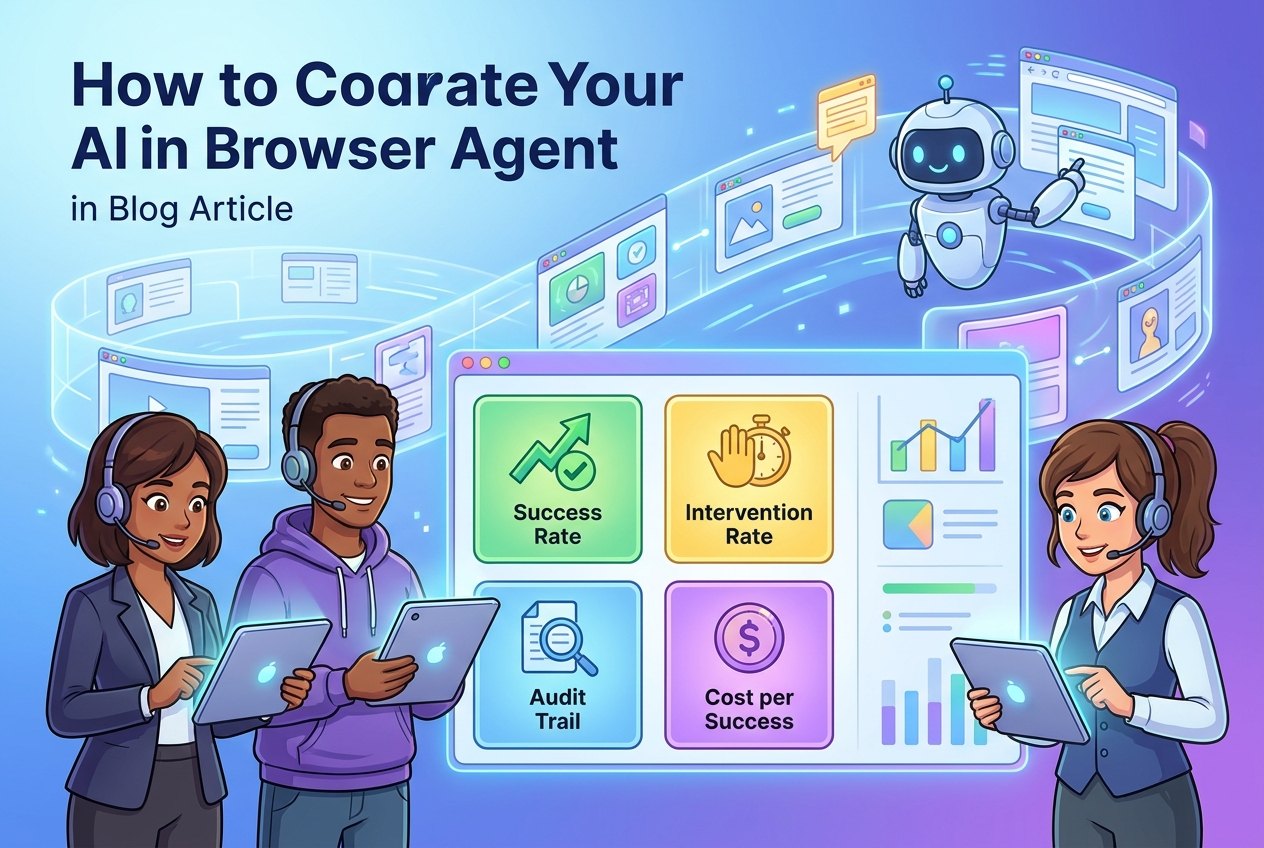
AI Browser Agent Evaluation: Quick Answer
AI browser agent evaluation is the process of testing whether an agent can complete real web tasks reliably, safely, and economically before a team trusts it with production work. A good evaluation does not ask only, “Can the agent finish the task once?” It asks whether the agent can finish the task repeatedly, recover from ordinary web friction, ask for help at the right time, avoid unsafe actions, leave enough evidence for review, and produce value that is worth the cost.
The practical evaluation stack has four layers. First, use public or synthetic benchmarks to understand broad capability. Second, build a small task set from your own workflows. Third, measure outcomes with consistent metrics such as task success rate, step accuracy, human intervention rate, recovery rate, latency, cost per successful task, safety incidents, and audit completeness. Fourth, run a staged pilot where the agent starts in observe-only mode, moves to prepare-only work, and earns limited autonomy only after evidence improves.
This article supports our pillar guide on AI browser agents. The pillar explains the broader trend: browser agents turn web workflows into delegated tasks. This cluster article narrows the question to evaluation. If the pillar answers “why this trend matters,” this guide answers “how do we know a browser agent is ready?”
Why Browser-Agent Evaluation Is Harder Than Ordinary AI Testing
Evaluating a normal text assistant is already difficult because the output can be partly correct, stylistically convincing, or useful with caveats. Browser agents add another layer: they perform actions. They open pages, inspect screens, click controls, fill forms, download reports, copy data, and sometimes submit changes. A wrong answer can be corrected in conversation. A wrong browser action can change a record, expose private information, trigger a purchase, publish a message, or waste time in a loop.
The challenge is that browser tasks are messy. Web pages change. Labels move. Pop-ups appear. Sessions expire. CAPTCHA or bot defenses interrupt the flow. A button may look harmless but trigger an irreversible action. A page may include untrusted text that attempts to influence the agent. A login session may provide more permission than the task requires. A workflow may be easy in a demo and brittle in the real application where edge cases matter.
That is why evaluation must separate three questions that often get blended together. The first question is capability: can the agent understand pages and operate the browser? The second is reliability: can it do that across repeated runs, variations, delays, and realistic exceptions? The third is governance: can the organization prove what happened, restrict what the agent could do, and intervene before sensitive actions occur?
Recent infrastructure trends show why this matters. Amazon Bedrock AgentCore Browser describes isolated browser sessions, live viewing, CloudTrail logging, session replay, timeouts, and ephemeral sessions. Browser Use separates the agent that runs a task from the browser infrastructure that provides raw browser control. Those details are not minor implementation notes. They are evaluation requirements. If a platform cannot show what the browser agent did, teams cannot confidently debug failures or prove responsible operation.
Site analytics also support this article angle. In the latest Singularity Journey analytics pull, the site still has limited direct search traction for “browser agent” terms, while pages around AI agents, agent debugging, and controlled agent workflows already receive engagement. That suggests a useful cluster opportunity: publish practical, narrowly focused supporting content before the search market becomes crowded. The existing pillar and approval-workflow cluster cover trend and human gates; evaluation metrics are the missing operational piece.
What Browser-Agent Benchmarks Can and Cannot Tell You
Benchmarks are useful, but they are not a production readiness certificate. A benchmark can show that an agent performs well across a standardized set of web tasks. That matters because browser agents need perception, planning, action, and verification. However, production workflows include internal permissions, custom pages, business policies, sensitive data, unusual exceptions, and real accountability. A high benchmark score can justify deeper testing. It should not justify unsupervised deployment.
BrowserGym, for example, is positioned as an environment for web task automation. That kind of environment is valuable because it gives researchers and builders a repeatable way to compare agents on browser tasks. It helps answer whether an agent can navigate, interpret pages, and complete goal-driven interactions under controlled conditions. But your own workflow may include a legacy supplier portal, a custom CRM view, a procurement approval rule, or a compliance requirement that never appears in a public benchmark.
Think of benchmarks like crash tests for cars. They are essential, but they do not tell you whether a specific driver should take a specific route in a storm while carrying a fragile package. Browser-agent benchmarks should be used as capability signals, not as operating policy.
| Evaluation source | What it helps answer | What it does not prove |
|---|---|---|
| Public browser benchmarks | Whether an agent can complete standardized web tasks compared with other systems. | Whether it is safe for your credentials, data, policies, or business exceptions. |
| Vendor demos | What the product can do under a polished scenario and what features exist. | How often it fails in your messy workflow or whether the economics work. |
| Internal synthetic tasks | How the agent performs on controlled replicas of your process. | Whether it can handle live data drift and human operational pressure. |
| Shadow-mode pilots | How the agent would behave beside real work without changing systems. | Full autonomy readiness for sensitive actions. |
| Limited production pilots | Whether a narrow low-risk workflow creates measurable value. | General reliability across all browser workflows. |
The best evaluation program uses all five. Start broad, then narrow. Use public benchmarks for orientation. Use vendor docs to understand the control surface. Use internal tasks to test fit. Use shadow mode to compare against real operators. Use limited production only after the agent has earned trust on a narrow task.
The Browser-Agent Metrics That Actually Matter
A browser agent should be measured by outcomes, behavior, and evidence. Outcome metrics show whether the job was done. Behavior metrics show how the agent got there. Evidence metrics show whether humans can review, audit, and improve the system. If you track only completion, the agent can look better than it is. If you track only safety incidents, you may miss cost and reliability problems. A balanced metric set is the practical middle.
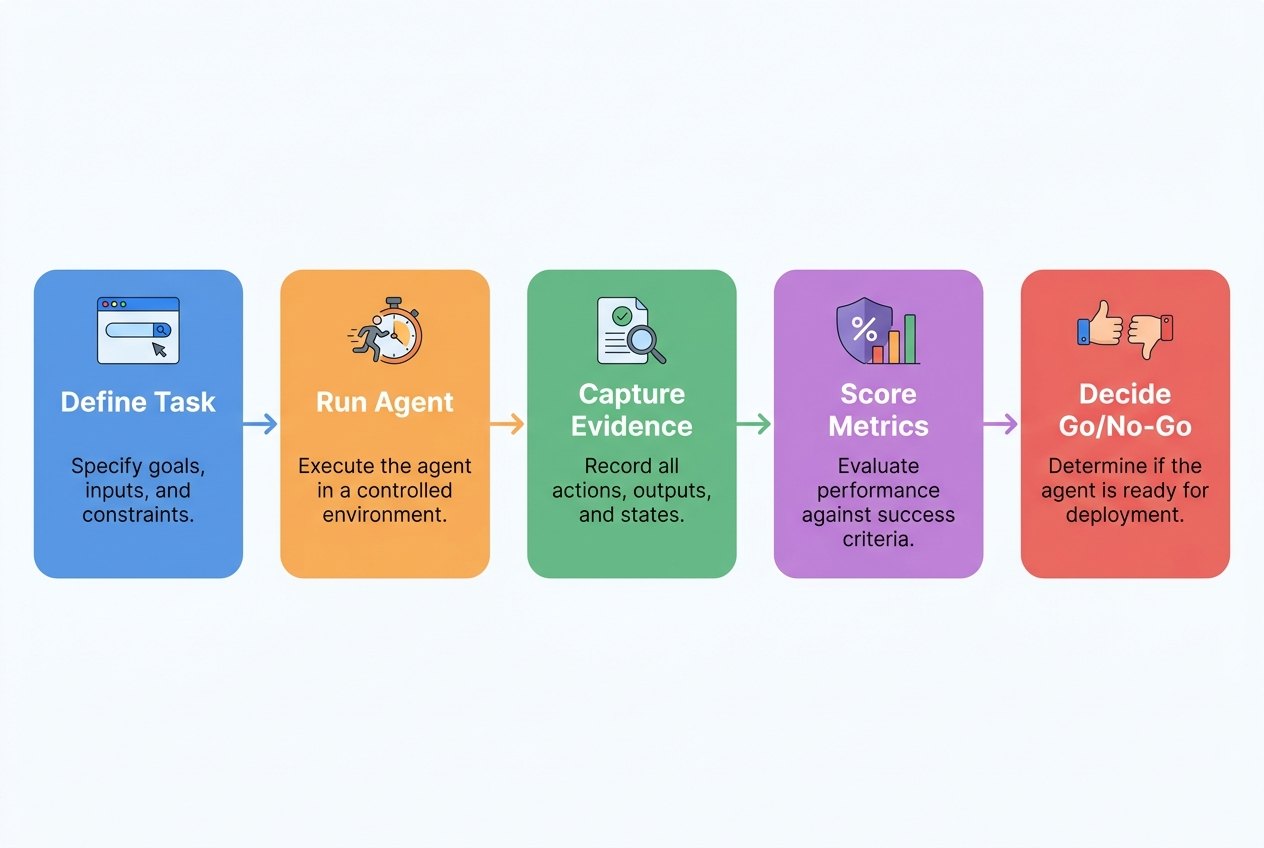
Task success rate is the obvious metric, but it is easy to fake by choosing simple tasks. Use a graded definition. A full success means the correct outcome was completed with no policy violation and no human correction. A partial success means the agent reached a useful intermediate state, such as preparing a form correctly, but needed human review or final submission. A failure means the agent could not complete the task, produced wrong output, violated policy, or left insufficient evidence.
Intervention rate needs nuance. A browser agent that asks for help before a sensitive action may be behaving correctly. The problem is not intervention itself. The problem is unnecessary intervention, late intervention, or missing intervention. Track the type: clarification, approval, exception handling, security concern, or operator takeover. Over time, this tells you which parts of the workflow can be automated and which should remain human-owned.
Recovery rate is where many demos break. Real web work is full of friction: cookie banners, modal windows, slow loading, renamed buttons, optional fields, failed downloads, stale sessions, and changed layouts. A reliable agent should not panic, invent, or loop forever. It should retry within limits, collect evidence, ask for help when uncertainty is high, and stop when it cannot verify the next step.
Audit completeness matters because browser agents are not only productivity tools; they are accountability systems. If a finance analyst, support manager, or security reviewer cannot reconstruct what happened, the agent is not production-ready. At minimum, each run should preserve the original instruction, allowed domains, browser actions, page URLs, screenshots or DOM evidence, approval prompts, human decisions, final output, and stop reason.
A Practical Test Plan for AI Browser Agents
The most useful browser-agent test plan is small, repeatable, and tied to real business value. Do not begin with an ambitious “automate the whole workflow” pilot. Begin with ten to thirty task examples that represent the actual work. Include easy cases, normal cases, edge cases, and unsafe cases. The unsafe cases are important because the evaluation should prove that the agent can refuse, ask, or stop—not just complete happy paths.
Step 1: Choose a narrow workflow
Pick a workflow where the browser is necessary, the goal is clear, and the consequence of mistakes is manageable. Good examples include QA walkthroughs, collecting public pricing information, checking order status, comparing supplier portal data, preparing a support ticket, or extracting evidence from internal dashboards. Avoid payments, deletion, customer messaging, permission changes, legal submissions, or live financial updates in the first pilot.
Step 2: Define success before running the agent
Write a task specification that includes the allowed websites, starting state, goal, expected evidence, prohibited actions, approval triggers, timeout, and stop conditions. This prevents evaluation from becoming subjective. If the agent fills a form but cannot prove the right record was used, that is not a full success. If it reaches the right page but clicks an unapproved submit button, that is a safety failure even if the final data is correct.
Step 3: Build a representative test set
Use a simple matrix. Include routine cases where the workflow is normal, variation cases where pages or labels differ, interruption cases where pop-ups or delays occur, ambiguity cases where multiple records match, and adversarial cases where page content includes irrelevant or hostile instructions. OWASP’s prompt-injection guidance is relevant here because browser agents read untrusted pages. The agent must not treat web page content as authority to override system policy or the human’s real instruction.
Step 4: Run shadow mode first
In shadow mode, the agent observes or prepares work while a human performs the real action. This reveals whether the agent would have made the right decision without giving it authority to change anything. Shadow mode is slower than a demo, but it is one of the safest ways to separate impressive capability from dependable operation.
Step 5: Review failure transcripts, not just scores
Aggregate metrics are useful, but the fastest learning comes from reading failures. Did the agent misunderstand the instruction? Did it miss a visual cue? Did it fail to wait for a page? Did it trust page text too much? Did it continue after uncertainty? Did it need a better tool, a clearer policy, or a simpler task boundary? Every failure should become either a product improvement, a policy rule, a test-case addition, or a decision not to automate that step.
Production Readiness Scorecard
A scorecard turns evaluation from opinion into a decision. The goal is not to create a fake sense of certainty. The goal is to force a clear conversation about readiness. A team should know whether the agent is green, yellow, or red on each dimension before expanding access.
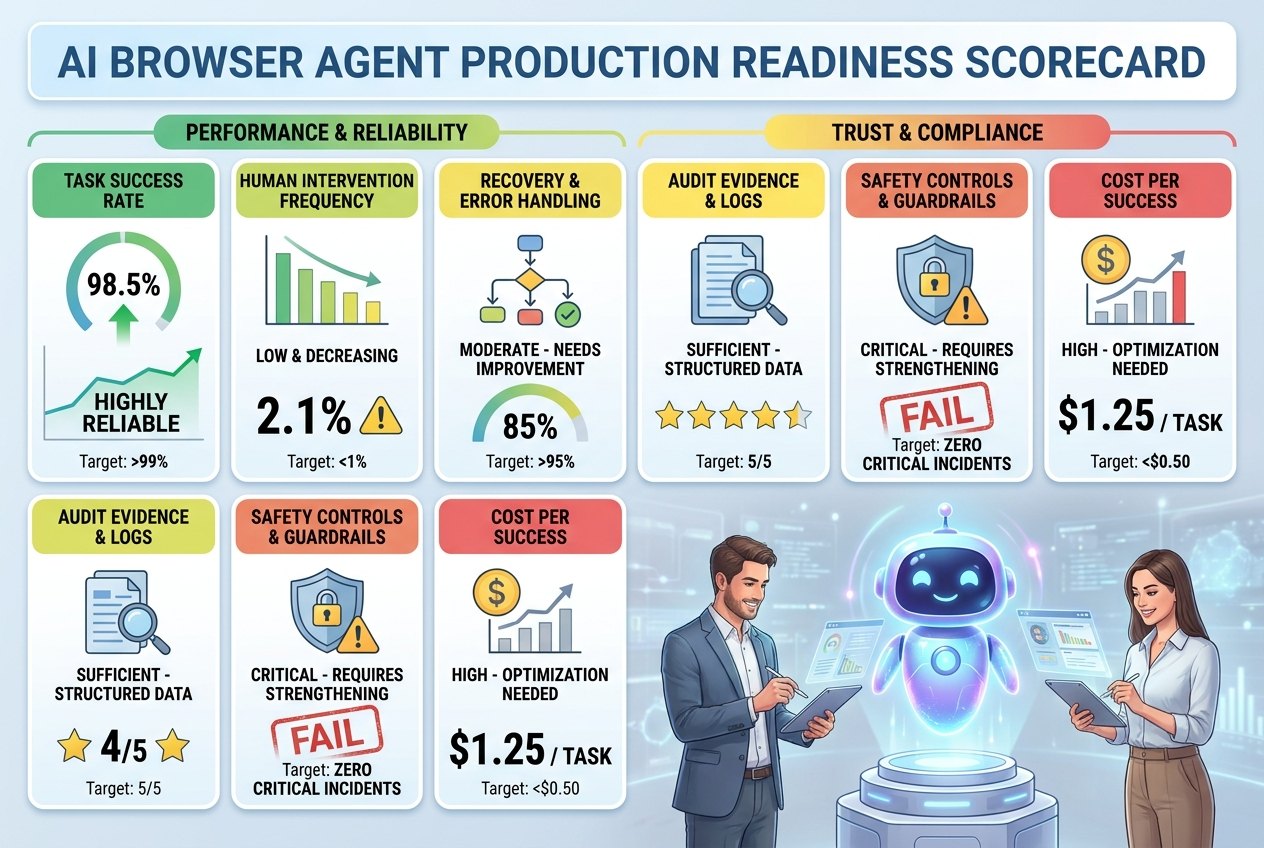
| Dimension | Green signal | Yellow signal | Red signal |
|---|---|---|---|
| Task success | Meets the pre-defined success target across repeated realistic runs. | Works on easy cases but struggles with variations. | Success is anecdotal, unmeasured, or dependent on operator rescue. |
| Human intervention | Asks for help at approved decision points and rarely needs correction. | Needs frequent clarification but avoids dangerous autonomy. | Either asks constantly or acts without needed approval. |
| Recovery behavior | Handles ordinary friction and stops safely when it cannot verify. | Can recover from some friction but occasionally loops or drifts. | Keeps retrying, invents steps, or ignores uncertainty. |
| Safety controls | Allowed domains, permissions, approvals, timeouts, and stop triggers are enforced. | Some controls exist but are manual or inconsistent. | The agent has broad access with weak boundaries. |
| Audit evidence | Session logs, screenshots, actions, approvals, and final evidence are reviewable. | Partial logs exist but do not support reliable reconstruction. | Reviewers cannot tell what happened. |
| Economics | Cost per successful task is predictable and lower than the value created. | Costs vary but are manageable during pilot. | Cost per success is unknown or worse than manual work. |
Common Failure Modes to Test Before Launch
Browser-agent failures are often predictable. Teams should test for them deliberately instead of waiting for production to reveal them. The most common failure is goal drift. The agent starts with a valid instruction, then follows a page, link, or suggestion into a task that is adjacent but no longer approved. The fix is strict task scope, allowed-domain rules, and stop conditions.
Another common failure is false confidence. The agent says a task is complete even though it skipped a required field, selected the wrong record, or used outdated information. This is why final evidence matters. A reliable agent should provide proof: the record ID, screenshot, downloaded file name, timestamp, or comparison table that supports the result.
Credential overreach is also serious. A browser session may contain more access than the task needs. If an agent uses a personal admin session to complete a simple lookup, the blast radius is too large. Prefer least-privilege accounts, read-only access, short-lived sessions, and task-specific credentials where possible. If personal credentials must be used, keep the agent’s authority narrow and require approval for sensitive actions.
Prompt injection is especially relevant for browser agents because the web page is part of the input. A malicious or merely messy page can contain instructions that conflict with the user’s task. The agent should treat page content as data, not command authority. It should follow the human instruction and organizational policy, not hidden or visible text that attempts to change its behavior.
Finally, watch for automation economics failure. Some tasks are technically possible but not worth automating. If the agent takes longer than a trained human, requires constant rescue, or costs more than the value created, the right answer is not more autonomy. The right answer may be a better API integration, a simpler workflow, a human checklist, or no automation at all.
How to Run a Safe Browser-Agent Pilot
A safe pilot should feel boring in the best way. It should have a narrow scope, a clear owner, a measured baseline, a defined task set, and explicit rules for escalation. Start by measuring the human workflow: average time per task, error rate, review burden, and cost. Without a baseline, the agent’s value becomes a story instead of a comparison.
Next, run the agent in observe-only or prepare-only mode. In observe-only mode, it reads pages and summarizes findings. In prepare-only mode, it may fill drafts or produce recommendations, but a human submits or changes the real system. This maps directly to the approval workflow discussed in our cluster article on AI browser agent approval workflows. Evaluation and approval belong together: metrics tell you what happened; approval rules decide what the agent may do next.
After shadow testing, choose one low-risk production action if the evidence supports it. A good first autonomous action is reversible, low-value, internal, and easy to verify. For example, updating an internal test ticket is safer than changing a customer record. Downloading a public report is safer than submitting a supplier payment. The pilot should be designed so that one bad run is annoying, not catastrophic.
Review the pilot weekly. Look at success rate, intervention rate, failed runs, safety stops, costs, and human feedback. If metrics improve, gradually add cases. If failures repeat, narrow the scope. If the agent fails unpredictably, return to shadow mode. The strongest teams will treat browser-agent deployment as an operational learning loop, not a one-time launch.
Where This Fits in the AI Browser Agent Cluster
This article is intentionally narrower than the main AI browser agents trend guide. The pillar explains why browser agents matter, how they work, which use cases fit, and which risks leaders should understand. This article focuses only on evaluation: the metrics, tests, and scorecards that help teams decide whether a browser agent is ready for a real workflow.
It also connects to the approval workflow cluster because evaluation without approval is incomplete. If a test reveals that the agent is good at navigation but weak at risk classification, the next action is not “deploy anyway.” The next action is to design clearer click, ask, and stop boundaries. If the evaluation shows strong audit evidence but high cost per success, the next action may be to reduce context, shorten tasks, or choose only high-value workflows.
For readers tracking the path from AI tools to autonomous systems, this is the practical middle. Browser agents are exciting because they make software delegation visible. They are risky because a browser is where real work, credentials, and consequences live. Evaluation is how teams move from curiosity to controlled adoption.
Sources and Reference Plan
- Amazon Bedrock AgentCore Browser documentation — session isolation, live viewing, CloudTrail logging, replay, screenshots, and remote browser security features.
- AWS AI agent-driven browser automation for enterprise workflow management — enterprise workflow context, manual web work, and automation limits.
- Browser Use documentation — distinction between agent task execution and raw browser control.
- OWASP LLM01 Prompt Injection — prompt-injection risk for systems that parse untrusted content.
- BrowserGym — browser task automation benchmark environment.
This article uses public documentation, benchmark context, and Singularity Journey analytics. Product capabilities, pricing, and platform controls can change; verify vendor documentation before production adoption.
FAQ: AI Browser Agent Evaluation
What is AI browser agent evaluation?
It is the process of testing whether an AI browser agent can complete web tasks reliably, safely, and economically, with enough evidence for humans to review what happened.
What metrics should teams track for browser agents?
Track task success rate, human intervention rate, recovery rate, unsafe action attempts, latency, cost per successful task, audit completeness, and user satisfaction from reviewers or operators.
Are browser-agent benchmarks enough for production decisions?
No. Benchmarks are useful capability signals, but production decisions require testing against your own workflows, credentials, policies, data sensitivity, edge cases, and approval rules.
What is a good first pilot for a browser agent?
Start with observe-only or prepare-only tasks such as QA walkthroughs, public research collection, status checks, internal ticket preparation, or low-risk portal lookups with human review.
How do you know when a browser agent is ready for autonomy?
It is ready only for a narrow workflow when repeated tests show strong task success, safe escalation, complete audit evidence, predictable cost, and no unresolved high-risk failure modes.
What is the biggest mistake in browser-agent testing?
The biggest mistake is treating a successful demo as proof of reliability. Teams need repeated runs, edge cases, safety tests, cost measurement, and failure review before expanding access.
How should prompt injection be tested for browser agents?
Include test pages or task variants with irrelevant, conflicting, or hostile instructions and verify that the agent follows the user task and organizational policy instead of page-provided commands.
