
AI Agent Memory Explained: How Smart Assistants Remember, Forget, and Use Context
A plain-English guide to how AI agents remember context, retrieve useful information, forget safely, and use memory without losing human control.
Quick answer: what is AI agent memory?
AI agent memory is the system that lets an AI assistant keep useful information beyond a single response. Memory can include the current conversation, saved user preferences, retrieved documents, previous tasks, tool results, or structured notes that help the agent make better decisions later.
The simple version is this: a normal chatbot responds to what is in front of it. A memory-enabled AI agent can carry context forward. It may remember your preferred writing style, the project you are working on, the tools it used, the decision you approved, or the fact that a certain source should not be trusted. That continuity is what makes AI feel less like a calculator and more like a collaborator.
This guide explains AI agent memory in plain language. You will learn the difference between context and memory, the main memory types, how retrieval works, where memory helps, where it can go wrong, and what safe memory controls should look like.
Why AI agent memory matters
Memory is one of the biggest differences between a one-off AI chat and a useful AI agent. Without memory, the assistant starts over every time. You explain the same project, repeat the same preference, paste the same background, and correct the same mistake. With memory, the agent can build continuity.
That continuity changes the product experience. A writing assistant can remember that you prefer concise outlines before full drafts. A coding agent can remember the project’s test command and architecture rules. A research agent can remember which sources were already checked. A customer support agent can remember the current case history. A personal assistant can remember that you want vegetarian restaurant suggestions, not steakhouse recommendations.
But memory also raises a serious question: should an AI remember everything? The answer is no. Useful memory is selective. Safe memory is controlled. Trustworthy memory is visible enough that users and teams can inspect, correct, and delete it.
That is why AI agent memory belongs in AI CORE. It is not only a developer architecture topic. It is a basic AI literacy topic. If people do not understand memory, they will misunderstand what agents can do, what they cannot do, and what risks they create.
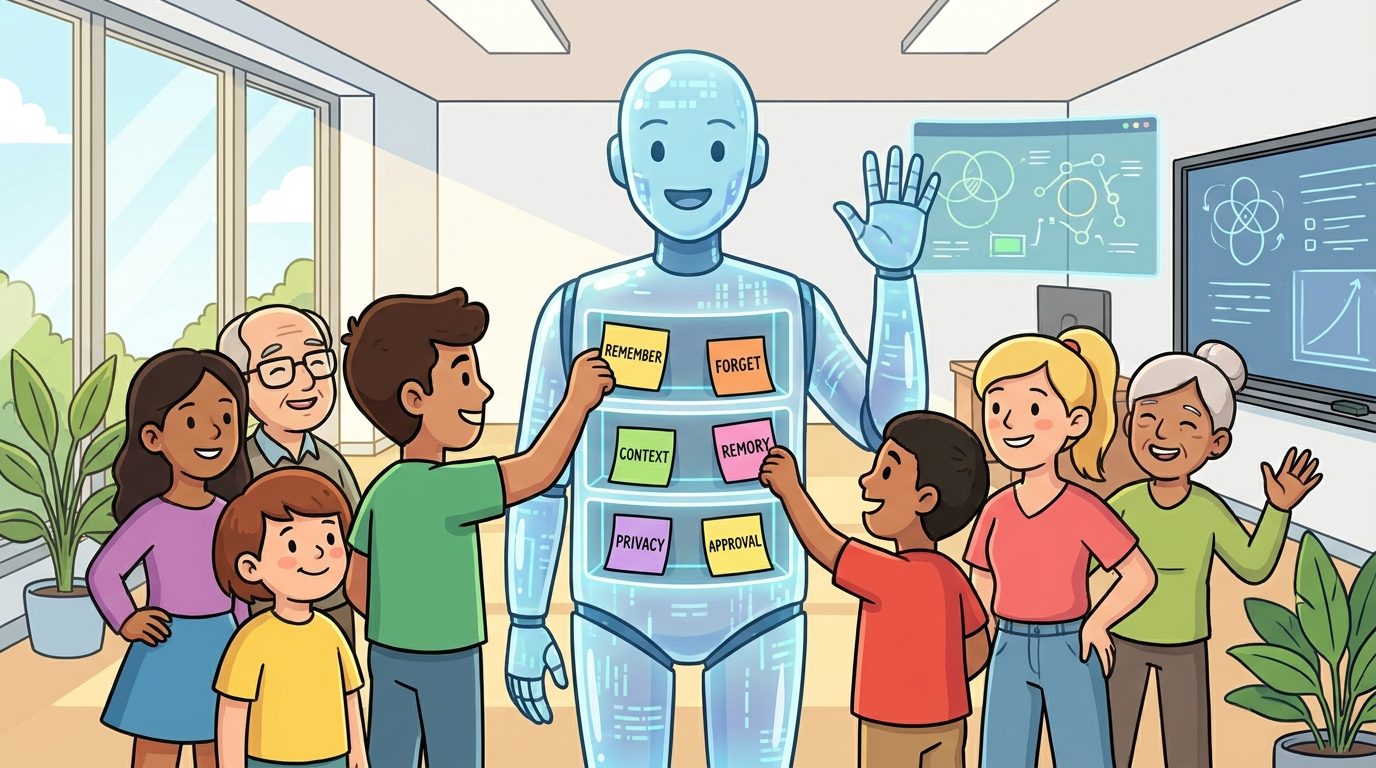
Context window vs memory: the difference beginners must understand
The first confusion is the difference between context and memory. They are related, but they are not the same.
A context window is the information the model can actively see while generating a response. Think of it like the papers open on a desk. If the document is on the desk, the model can use it. If it is not on the desk, the model cannot directly rely on it unless another system retrieves it.
Memory is information that can survive beyond the immediate desk. It might be saved as a profile preference, a project note, a database record, a vector embedding, a task history, or a summary of past interactions. When the agent needs it, the system may bring the relevant memory back into the context window.
| Concept | Plain-English meaning | Example | Common misunderstanding |
|---|---|---|---|
| Context window | What the model can see right now | The current prompt, recent messages, attached files | People assume the model sees everything ever discussed |
| Chat history | Past conversation records | Previous messages in the same app | People assume all history is always used |
| Saved memory | Information stored for future use | “User prefers short answers” | People assume saved memory is always correct |
| Retrieval | Finding relevant stored information | Searching a knowledge base before answering | People assume retrieval equals understanding |
| Long-term memory | Information that persists across sessions | Project goals, preferences, recurring facts | People assume it means the base model learned permanently |
Here is the key mental model: memory usually works by storing information somewhere outside the model, then retrieving the right pieces when needed. The base model does not necessarily change. The surrounding agent system manages what gets stored and what gets shown to the model later.
The main types of AI agent memory
Different articles use different labels, but most AI agent memory can be explained with five useful categories: working memory, episodic memory, semantic memory, procedural memory, and reflective memory. You do not need academic perfection to understand these. You need a practical mental model.
1. Working memory
Working memory is the short-term information the agent needs for the current task. It includes recent conversation, active instructions, open files, tool outputs, and the immediate goal. If you ask an agent to plan a trip, the destination, dates, budget, and constraints are working memory.
Working memory is powerful but temporary. It is where the agent does most of its live reasoning. If the conversation becomes too long or the system compresses older messages, details can drop out. That is why long tasks need summaries, checkpoints, and explicit notes.
2. Episodic memory
Episodic memory records events: what happened, when it happened, what decision was made, and what result followed. For an AI agent, this might be a task log, a meeting summary, a support case timeline, or a list of previous actions.
Example: “On the last run, the deployment failed because the environment variable was missing.” That is episodic memory. It helps the agent avoid repeating the same mistake.
3. Semantic memory
Semantic memory stores facts, concepts, and stable knowledge. For a work agent, semantic memory might include product names, team definitions, glossary terms, policy summaries, customer account facts, or project architecture notes.
Example: “The analytics warehouse is BigQuery, not Snowflake.” That is semantic memory. It helps the agent answer consistently across tasks.
4. Procedural memory
Procedural memory is knowledge about how to do something. It can include workflows, checklists, commands, style guides, approval rules, and step-by-step processes.
Example: “Before publishing a blog post, check one visible h1, upload images, verify labels, and fetch the live URL.” That is procedural memory. It turns repeated work into a reliable routine.
5. Reflective memory
Reflective memory is when the system extracts lessons from experience. After a task, it might summarize what worked, what failed, and what rule should be updated. This is useful for agents that improve workflows over time, but it must be handled carefully. A bad reflection can become a bad habit.
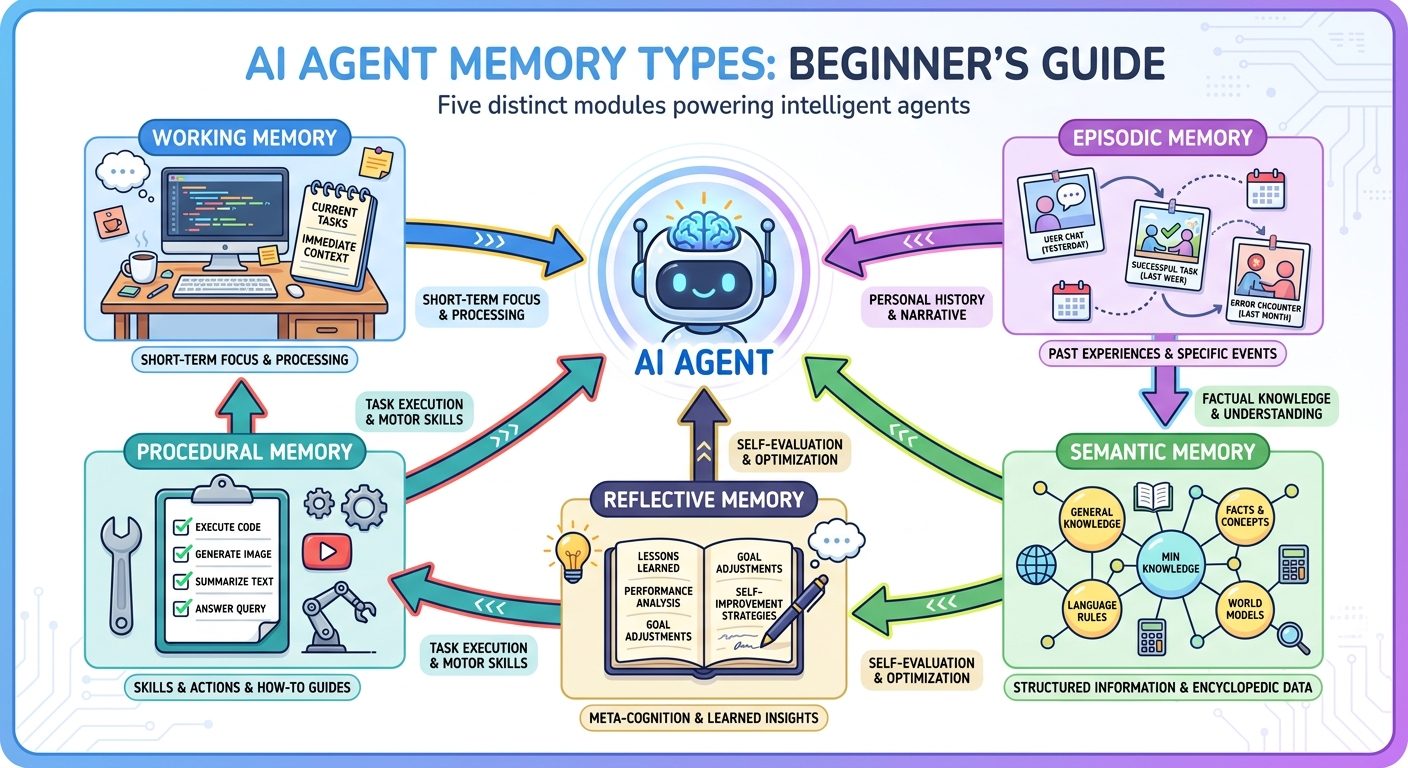
| Memory type | What it stores | Best use | Risk if unmanaged |
|---|---|---|---|
| Working | Current task context | Reasoning through the present task | Important details can be lost or crowded out |
| Episodic | Events and history | Remembering what happened before | Old events may be misread as current |
| Semantic | Facts and concepts | Stable project or user knowledge | Outdated facts can persist |
| Procedural | Rules and workflows | Repeated tasks and checklists | Bad procedures can be repeated confidently |
| Reflective | Lessons and improvements | Learning from outcomes | False lessons can become long-term errors |
How AI agent memory works behind the scenes
Different products implement memory differently, but a typical memory-enabled agent follows a repeatable loop.
Step 1: Capture useful signals
The system identifies information that may matter later. This can come from user instructions, documents, tool results, explicit saved notes, approval decisions, or summaries of previous sessions. Good systems do not save everything automatically. They choose what is useful and allowed.
Step 2: Store memory in a structured place
Memory might be stored in a database, vector store, profile field, note file, event log, knowledge graph, or application-specific record. The storage format matters because it affects retrieval, deletion, auditing, and privacy.
Step 3: Retrieve relevant memory
When a new task begins, the agent searches for memories that match the current goal. Retrieval can be keyword-based, embedding-based, rule-based, time-based, or permission-based. The agent does not need every memory. It needs the right memory.
Step 4: Put selected memory into context
The retrieved memory is added to the model’s active context. This is the moment where old information becomes usable in the current response. If retrieval brings irrelevant or outdated memory, the agent can become worse, not better.
Step 5: Act, ask, or answer
The agent uses memory plus current context to produce an answer, call a tool, draft an action, or ask for clarification. For important actions, memory should support the decision, not replace human judgment.
Step 6: Update or forget
After the task, the system may update memory. It might save a new preference, correct an old fact, archive a completed event, or delete sensitive information. Forgetting is not a weakness. It is part of good memory design.
RAG vs AI agent memory
Retrieval-augmented generation, usually called RAG, is often confused with memory. RAG is a technique for retrieving information from external sources and giving it to the model. Memory is a broader product and architecture concept. RAG can be one way to implement memory, but not all memory is RAG.
Imagine an assistant answering a question about your company policy. If it searches the policy documents and quotes the relevant rule, that is RAG. If it remembers that you are a manager in the India team and should see the India leave policy first, that is memory. If it remembers that you already asked this yesterday and wanted a shorter version, that is also memory.
| Question | RAG | Memory |
|---|---|---|
| Main purpose | Bring external knowledge into the answer | Carry useful context across time or tasks |
| Typical source | Documents, databases, webpages, knowledge bases | User preferences, task history, decisions, summaries, facts |
| Time horizon | Often query-specific | Can persist across sessions |
| Example | Find the refund policy paragraph | Remember that this customer already received one exception |
| Big risk | Retrieving the wrong source | Saving or using the wrong personal/contextual fact |
The best agent systems often combine both. They use RAG to fetch reliable source material and memory to understand the user, task, workflow, and prior decisions.
Practical examples of AI agent memory
AI memory becomes easier to understand when you see it in everyday workflows.
Personal writing assistant
A writing assistant might remember your preferred tone, headline style, formatting rules, and topics you have already covered. It can suggest a better draft because it does not treat every request as a blank page. But it should not store private details from a sensitive conversation unless you explicitly want that remembered.
Coding agent
A coding agent might remember the project’s package manager, test command, lint command, architecture boundaries, and common failure patterns. This saves time because you do not need to explain the project on every run. For developer workflows, memory overlaps with project instruction files and tool logs. It also needs guardrails because wrong procedural memory can break builds repeatedly.
Customer support agent
A support agent might remember the current ticket timeline, customer plan, previous troubleshooting steps, and escalation status. It can summarize the case for a human reviewer. But it must respect permissions and avoid exposing one customer’s information to another.
Learning assistant
A learning assistant might remember which concepts a student struggled with, which examples helped, and what level of explanation works best. This makes tutoring more personal. It also creates privacy responsibilities, especially when learners are children or when educational data is sensitive.
Business operations agent
An operations agent might remember approval rules, vendor exceptions, recurring reporting steps, and previous incidents. This can reduce repetitive work, but it requires audit trails. If the agent recommends an action, the organization should know what memory influenced that recommendation.
What should an AI agent remember?
A good memory system is selective. The question is not “Can we store it?” The question is “Should this information help future tasks, and is it safe to keep?”
| Usually useful to remember | Be careful with | Usually avoid unless clearly necessary |
|---|---|---|
| Stable preferences | Temporary moods or one-off opinions | Passwords and secrets |
| Project rules | Personal details unrelated to the task | Payment details |
| Approved workflows | Health, legal, or financial context | Private third-party information |
| Source preferences | Unverified claims | Sensitive identity data |
| Repeated corrections | Outdated facts | Anything the user asked not to store |
For teams, memory policy should be explicit. A support agent, finance agent, or HR agent should not improvise what it remembers. The organization should define retention rules, approval rules, access boundaries, and deletion procedures.
For individuals, the same principle applies in a simpler way: tell the assistant what to remember only when it will clearly help later. If the information is sensitive, temporary, or emotionally private, think twice.
The risks of AI agent memory
Memory makes AI more useful because it creates continuity. The same continuity can create risk. Here are the main problems to understand.
Wrong memory
If an agent saves an incorrect fact, it may repeat the mistake later. Example: it remembers the wrong product name, wrong deadline, or wrong user preference. This is why memory needs correction tools.
Stale memory
Some facts expire. A project goal changes. A policy is updated. A user preference shifts. If memory does not decay, refresh, or ask for confirmation, the agent can cling to old context.
Over-personalization
An assistant that remembers too much may become narrow. It may assume you always want the same style, same answer length, or same recommendation. Good memory should help without trapping the user in a pattern.
Privacy leakage
Memory can contain sensitive information. If permissions are weak, the agent may reveal information to the wrong person, include private details in an output, or use data in a context where it does not belong.
Prompt injection and memory poisoning
If an agent saves instructions from untrusted content, an attacker can try to poison memory. For example, a webpage or document might include hidden instructions telling the agent to ignore safety rules later. Memory systems should separate trusted user preferences from untrusted external content.
Audit gaps
If a business agent uses memory to make a recommendation, teams need to know what memory was used. Without logs, it becomes difficult to debug errors, prove compliance, or improve the system.
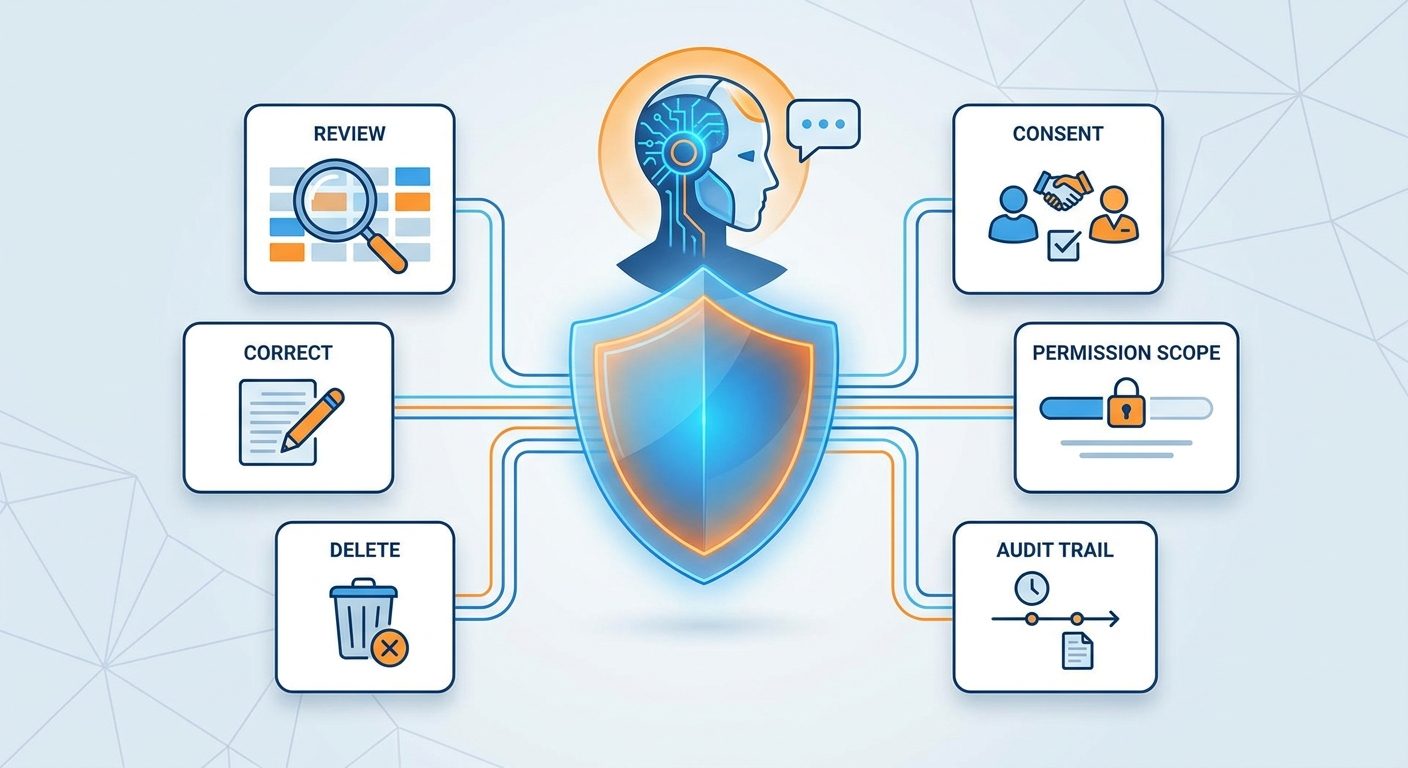
Safe AI memory controls: what good systems should include
Trustworthy AI memory is not invisible magic. It should be designed with controls that normal users and teams can understand.
OpenAI’s public memory controls and similar assistant privacy settings show a broader product direction: users need ways to inspect and manage what assistants remember. Enterprise systems need even more: role-based access, retention policy, logging, and review workflows.
For agent builders, a useful rule is to design memory like a database, not like a diary. It needs schema, permissions, lifecycle, and deletion. It should not become an uncontrolled pile of personal facts.
How to evaluate whether AI memory is working
Memory should be tested. A memory feature is not successful because the assistant sounds confident. It is successful when it improves outcomes without creating unacceptable risk.
| Test | Question to ask | Good sign |
|---|---|---|
| Relevance test | Did the agent retrieve memory that actually matters? | Useful memories appear; irrelevant ones stay hidden |
| Accuracy test | Is the saved memory true and current? | Old or wrong facts are corrected |
| Boundary test | Does memory respect permissions? | Users see only what they are allowed to see |
| Deletion test | Can unwanted memory be removed? | Deleted memory stops influencing outputs |
| Conflict test | What happens when current instructions conflict with old memory? | The agent follows the current user goal or asks |
| Security test | Can untrusted content poison memory? | The system rejects hidden or unsafe instructions |
This connects to broader agent evaluation. If you are building production agents, read AI Agent Evaluation and AI Agent Observability. Memory needs traces because you cannot debug what you cannot see.
The future of AI memory
AI memory will likely become more visible, more personalized, and more regulated. Assistants will not only answer prompts; they will maintain project state, user preferences, task history, and tool context. That will make them more useful, but it will also force better controls.
The most important shift is from bigger context to better context. Larger context windows help, but they do not solve everything. A giant pile of text can still be irrelevant, outdated, or unsafe. The future is not simply agents that remember more. It is agents that remember the right things, retrieve them at the right time, and forget them when they should.
For readers, the practical skill is learning how to work with stateful AI. You will need to know what to tell the assistant, what to save, what to delete, and when to challenge an old assumption. For builders, the practical skill is memory design: schemas, retrieval, evaluation, permissions, and lifecycle management.
Final recommendation: treat memory as a control layer
AI agent memory is not just a convenience feature. It is a control layer for useful, safe, and personalized AI. It decides what context follows the agent from one moment to the next.
If you are a beginner, remember this simple framework:
- Context is what the model sees now.
- Memory is what the system can bring back later.
- Retrieval is how the system finds the right memory.
- Forgetting is how the system stays safe and current.
- Controls are how users and teams keep memory trustworthy.
The best AI agents will not remember everything. They will remember deliberately. They will cite sources, ask when uncertain, respect boundaries, and let humans inspect and change what has been saved.
That is the version of AI memory worth building toward: helpful continuity without hidden surveillance, personalization without lock-in, and smarter agents that still remain under human control.
Keep learning on Singularity Journey
- AI Agents Explained — the beginner foundation for understanding agents.
- AI Agent Memory Controls — deeper governance guidance on what to store and forget.
- AI Agent Controls Explained — tools, permissions, memory, and approvals.
- Human Approval for AI Agents — when agents should stop and ask.
- AI Agent Evaluation — how to test reliability before scaling.
Sources and references
- OpenAI Help Center: Memory FAQ
- Google Gemini Apps Help and privacy controls
- Anthropic: Model Context Protocol
- NIST AI Risk Management Framework
- OWASP Top 10 for LLM Applications
This article avoids unsupported statistics. Product memory features change quickly, so always check the latest privacy and memory settings in the AI tool you use.
FAQ: AI agent memory
What is AI agent memory?
AI agent memory is the system that stores and retrieves useful information so an AI assistant can carry context across tasks, sessions, or workflows. It can include preferences, project facts, task history, retrieved documents, and workflow rules.
Do AI agents really remember?
They can remember in a product or system sense, but usually not because the base model permanently changed. Most AI memory is stored outside the model and retrieved into context when needed.
What is the difference between context and memory?
Context is what the model can see right now. Memory is information saved outside the immediate prompt that can be retrieved later and added back into context.
Is RAG the same as memory?
No. RAG is a retrieval technique for bringing external information into a response. Memory is broader and can include preferences, task history, workflow rules, and prior decisions. RAG can be part of a memory system.
Can AI agents forget information?
Good systems should support forgetting through deletion, expiration, correction, or retention rules. Forgetting is important for privacy, accuracy, and preventing outdated information from influencing future answers.
What are the risks of AI memory?
The main risks are wrong memory, stale memory, privacy leakage, over-personalization, prompt injection, memory poisoning, and weak audit trails. These risks can be reduced with visibility, correction, deletion, consent, scope, and logging.
