
Human Approval for AI Agents: Review Queues, Risk Tiers, and Escalation UX
Human approval for AI agents is not just a safety checkbox. It is a product workflow that decides when an agent can proceed, when a person must review the next action, what evidence the reviewer sees, and how the system resumes after approval or rejection. If that workflow is vague, the agent may still be technically "human in the loop" while the human has too little context to make a real decision.
This article is a focused cluster under Durable AI Agent Workflows. The pillar explains retries, recovery, idempotency, and production reliability. This guide zooms into the approval layer: the queue, screen, policy, escalation path, and audit trail that keep risky AI agent actions under human control.
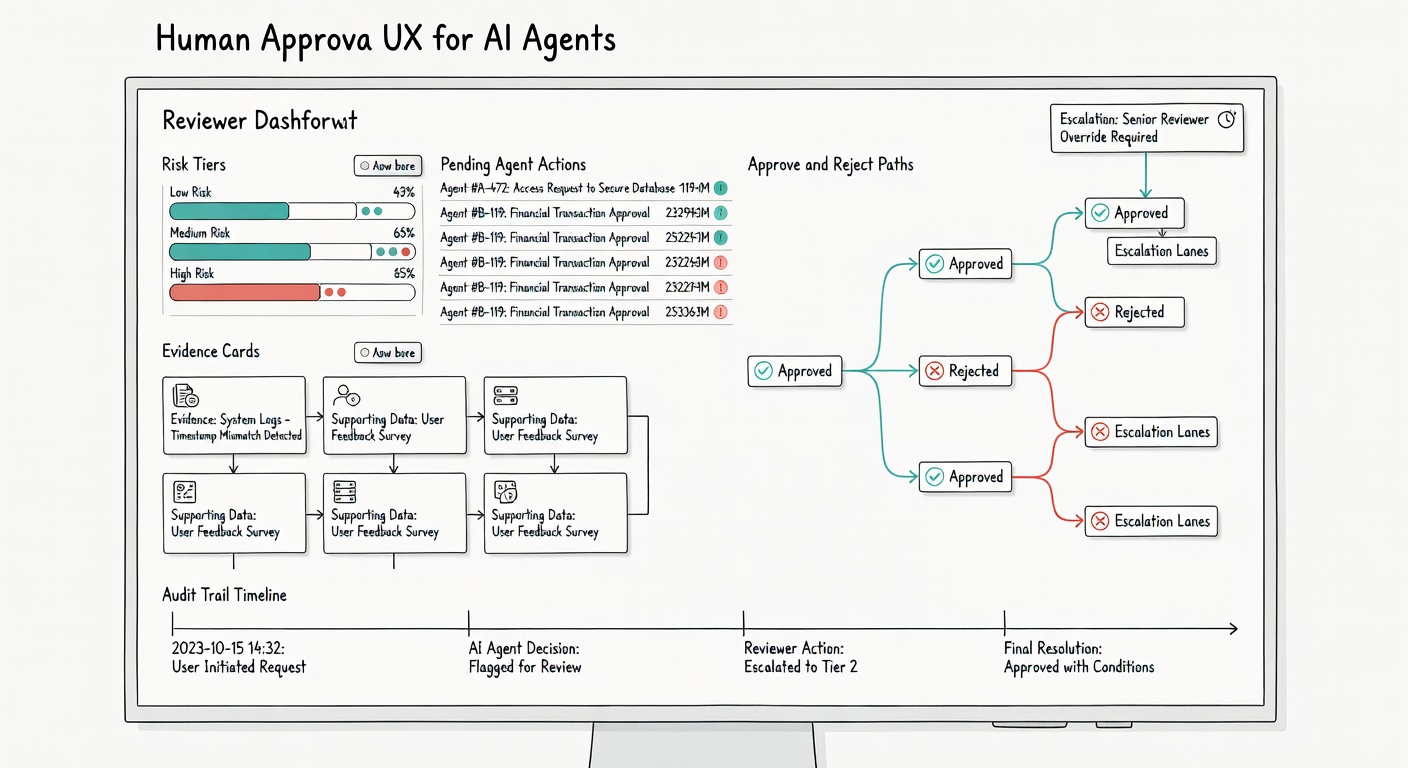
Why Human Approval for AI Agents Matters
Most teams understand that agents need approval before sending money, deleting data, changing permissions, deploying code, or messaging customers. The harder question is how that approval should work. A weak design says, "approve this action?" and forces the reviewer to reconstruct the situation from logs, chat history, and tool outputs. A strong design shows the intent, evidence, risk, policy rule, expected side effect, rollback path, and reason the agent is asking.
Approval UX is where reliability, security, and accountability meet. The OpenAI Agents SDK documentation on human-in-the-loop approvals shows the basic runtime idea: a tool call can pause for approval, then resume after a decision. In production, that pause needs to become a durable review experience with ownership, timing, and traceability.
Without that experience, reviewers become rubber stamps. They approve because the queue is noisy, because the evidence is incomplete, or because rejection breaks the workflow. Good approval design should make the right decision fast.
Start With Risk Tiers, Not Buttons
The first design mistake is putting approve and reject buttons on every agent action. That creates alert fatigue. Low-risk actions should not block work. High-risk actions should not be squeezed into the same tiny confirmation pattern as a harmless draft.
Define risk tiers before you design screens:
- Tier 0 - read only: search, retrieve, summarize, inspect, or classify without changing another system.
- Tier 1 - draft only: prepare a message, ticket note, query, or patch that remains internal until accepted.
- Tier 2 - reversible write: update a field, create a ticket comment, or stage a change that can be undone with low cost.
- Tier 3 - sensitive write: send customer communication, issue a refund, change access, update production configuration, or modify a high-value record.
- Tier 4 - irreversible or regulated action: delete data, terminate service, report a compliance decision, execute a payment, or take an action with legal, financial, or safety impact.
Tier 0 and Tier 1 actions usually need logging, not manual approval. Tier 2 may need approval only when confidence is low or the account is sensitive. Tier 3 should normally enter a reviewer queue. Tier 4 should require escalation, two-person review, or a stricter policy gate.
What Reviewers Need to See
A reviewer is not there to reread the entire run. The interface should compress the run into decision-grade context. That means the approval card should answer six questions without requiring the reviewer to open separate logs.
1. What Is the Agent Trying to Do?
The proposed action should be written as a concrete operation: "Issue a $42 refund for order 9817," "Send this reply to customer ACME," or "Grant read-only analytics access to user Priya." Avoid generic text such as "continue workflow" or "approve tool call." The reviewer should see the real-world side effect.
2. Why Does the Agent Recommend It?
Show the evidence used by the agent. For a refund, include policy match, order status, customer history, amount, and reason code. For a code change, include failing test, changed files, risk summary, and rollback plan. For a permissions change, include requester, target system, requested scope, owner, and expiry.
3. What Is the Risk Class?
Every approval card should display its risk tier and the rule that assigned it. If the agent escalated because confidence was low, say that. If a policy rule forced review because the amount exceeded a threshold, show the threshold. NIST's AI Risk Management Framework is useful background here because it treats risk management as an operational process, not a one-time model choice.
4. What Happens After Approval?
Approval should not be ambiguous. The card should state the exact tool that will run, the target system, the idempotency key or operation ID, and the expected next state. This matters because the reviewer is authorizing a side effect, not just agreeing with a sentence.
5. What Happens After Rejection?
Reject should be a first-class path. The reviewer may reject because evidence is missing, the amount is wrong, the agent used the wrong policy, the action belongs to another team, or the request is unsafe. Each rejection reason should route the workflow differently: gather more evidence, ask the user a question, revise the draft, escalate, or close the run.
6. Who Is Accountable?
The approval record should store the reviewer, timestamp, reason, policy version, agent run ID, and final outcome. This is not only for audits. It helps teams learn which approval rules are too strict, too loose, or too noisy.
Design the Approval Queue
The queue is where approval UX either scales or collapses. A simple chronological inbox works for a prototype, but it fails when agents generate many review items across teams and risk levels. A production queue needs prioritization, routing, aging, and ownership.
Start with a few queue fields:
- Risk tier: high-risk work should not be buried under routine drafts.
- Deadline: some workflows expire, breach an SLA, or become stale after a time window.
- Owner group: finance, support, security, legal, product, or engineering.
- Customer or system impact: production, VIP account, regulated data, internal-only, or sandbox.
- Action type: refund, send, deploy, access change, delete, publish, or escalate.
- Confidence and evidence quality: useful when reviewers need to spot weak recommendations quickly.
Then define routing rules. A medium-risk support refund might go to the support lead. A high-risk access grant might go to the system owner and security. A legal-sensitive customer reply might go to a specialist queue. The point is to put each decision in front of the person who can actually judge it.
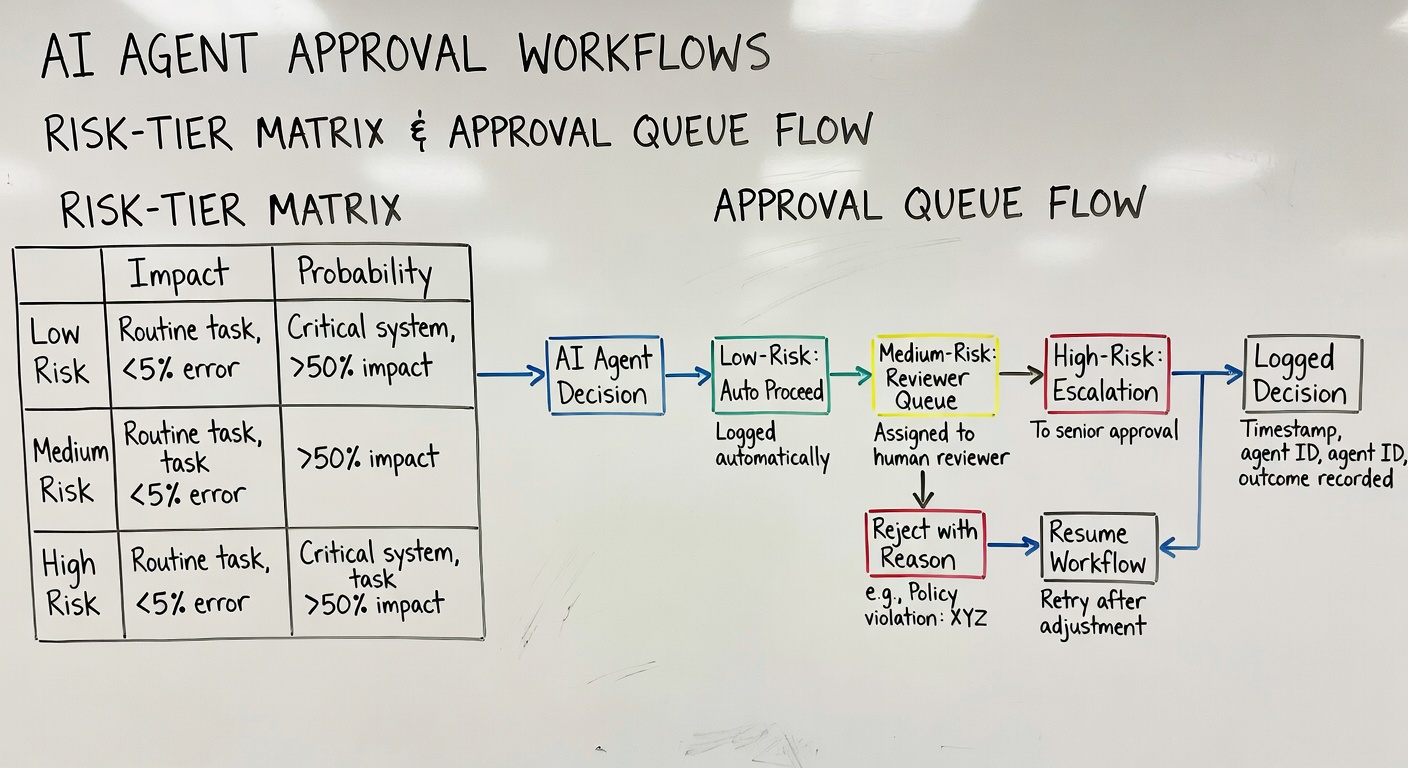
Approval Patterns That Work
Pre-Execution Approval
This is the safest pattern for external writes. The agent prepares the action, the workflow stores a proposed operation, and the reviewer approves before the tool executes. Use this for refunds, emails, permission changes, deployments, file deletion, publishing, and customer-visible actions.
Approval by Exception
Some actions are safe enough to proceed automatically unless a rule is triggered. For example, a support agent may auto-draft and post an internal note, but require review if the customer is in a regulated industry, the confidence score is low, or the suggested response mentions legal terms. Approval by exception keeps queues smaller while still catching risky cases.
Two-Step Approval
For sensitive actions, one reviewer may approve the business decision while another approves the execution risk. A finance lead may approve the refund reason; an operations rule may still check the amount, duplicate-payment risk, and idempotency record. Two-step approval is slower, so reserve it for Tier 4 actions.
Delegated Approval
Review queues need delegation. People go offline. Ownership changes. Work expires. A durable approval system should support reassignment, backup reviewers, and escalation timers. The workflow should not be stuck because one person is unavailable.
Build Rejection Into the Agent Loop
Rejection is not failure. It is feedback. If a reviewer rejects with a structured reason, the workflow can resume intelligently. A rejection reason such as "missing evidence" can send the agent back to retrieve a document. "Wrong policy" can trigger a policy lookup. "Too risky" can escalate to a specialist. "Bad draft" can ask the agent to revise with specific constraints.
This is where many teams lose value. They build approval but treat rejection as terminal. Better systems turn rejection into a controlled branch in the workflow.
Use a short rejection taxonomy:
- Missing evidence: agent must gather more information.
- Wrong action: agent proposed the wrong tool or target.
- Policy mismatch: agent cited or applied the wrong rule.
- Needs user input: workflow should ask a specific question.
- Escalate: route to a specialist or higher authority.
- Close: stop the workflow and record why.
Keep Excessive Agency Under Control
Approval UX also protects against excessive agency. OWASP's Top 10 for Large Language Model Applications highlights risks around LLM applications that can access tools, data, and downstream systems. For agent builders, the practical lesson is simple: permissions, approval gates, and scoped tools should be part of the design from the start.
Do not give the agent a broad "do anything" tool and hope approvals catch mistakes. Use narrow tools with clear side effects. Separate draft tools from execute tools. Require operation IDs for mutating actions. Log every approval decision. For duplicate-action protection, pair this article with AI Agent Idempotency, because approval and idempotency should meet at the final execution step.
Practical Example: Customer Refund Approval
Imagine an AI agent that helps a support team process refund requests. The agent reads the customer message, retrieves order data, checks refund policy, and drafts a recommendation. The workflow assigns the case to Tier 2 if the refund is small, the order is recent, the customer history is clean, and the policy match is exact. It assigns Tier 3 if the amount is high, the customer has multiple recent refunds, or evidence is incomplete.
The reviewer sees one card: customer request, order status, amount, policy rule, agent recommendation, confidence, prior refunds, proposed customer message, and the exact refund tool call that will run after approval. If the reviewer approves, the workflow executes the refund with a stable operation ID, records the payment reference, and sends the message. If the reviewer rejects because evidence is missing, the workflow asks the agent to retrieve the shipment record and returns the updated case to the same queue.
This is faster than manual processing because the agent gathers and summarizes evidence. It is safer than full automation because the human still controls the side effect when the risk is meaningful.
Audit Trails and Compliance
Approval records should be boring and complete. Store who approved, what they approved, what evidence they saw, which policy version applied, what changed after approval, and how the workflow completed.
In regulated or high-impact settings, human oversight is not just a product preference. The EU AI Act's Article 14 on human oversight is a useful reference point because it frames oversight around enabling people to understand system capacities, monitor operation, interpret output, and intervene when needed. Even when your product is not directly covered, the design principle travels well: a human cannot oversee a system they cannot inspect or interrupt.
Implementation Checklist
- Define action risk tiers before adding approval buttons.
- Separate read, draft, stage, and execute tools.
- Require pre-execution approval for sensitive external writes.
- Show evidence, policy, risk tier, side effect, and rollback path on the approval card.
- Make rejection reasons structured so the workflow can resume.
- Route queues by owner group, deadline, risk tier, and action type.
- Use escalation timers so approval requests do not stall silently.
- Log reviewer, timestamp, policy version, operation ID, and final result.
- Measure approval volume, rejection rate, override rate, time to decision, and incidents.
FAQ
What is human approval for AI agents?
Human approval for AI agents is a workflow checkpoint where a person reviews a proposed agent action before the system performs a risky side effect. The best designs show evidence, risk, policy, and expected outcome, not just an approve button.
Which AI agent actions should require approval?
Actions that affect money, access, production systems, customer communication, legal decisions, sensitive data, deletion, or irreversible changes should usually require approval. Low-risk reads and drafts can often be logged without blocking.
How do risk tiers reduce approval fatigue?
Risk tiers let low-risk actions proceed automatically while routing sensitive actions to humans. This keeps review queues focused on decisions where human judgment changes the outcome.
Should rejection stop the workflow?
Not always. Rejection should usually route the workflow to the next useful step: gather missing evidence, revise the draft, ask the user a question, escalate to a specialist, or close with a recorded reason.
How is approval UX different from agent observability?
Approval UX is the reviewer-facing decision surface. Observability is the broader run record used for debugging, monitoring, evaluation, and incidents. They overlap because the approval screen should display a concise slice of the run trace.
Conclusion
Human approval for AI agents only works when it is designed as a real workflow. A good approval layer knows which actions deserve review, routes them to the right owner, shows enough evidence for judgment, supports rejection and escalation, and records the final decision for later review.
For production AI agents, this layer is as important as model choice. The model can propose useful work, but the workflow must decide when a human should control the next side effect. Start with risk tiers, make the approval card decision-grade, and connect every approval to durable state, idempotency, and audit logs.
