
Enterprise AI Agent Control Plane: A Practical Governance Blueprint
Enterprise AI agents become useful only when they are connected to a disciplined control layer. This blueprint explains the practical control plane that sits between agents, employees, tools, data, approvals, monitoring, and business risk.
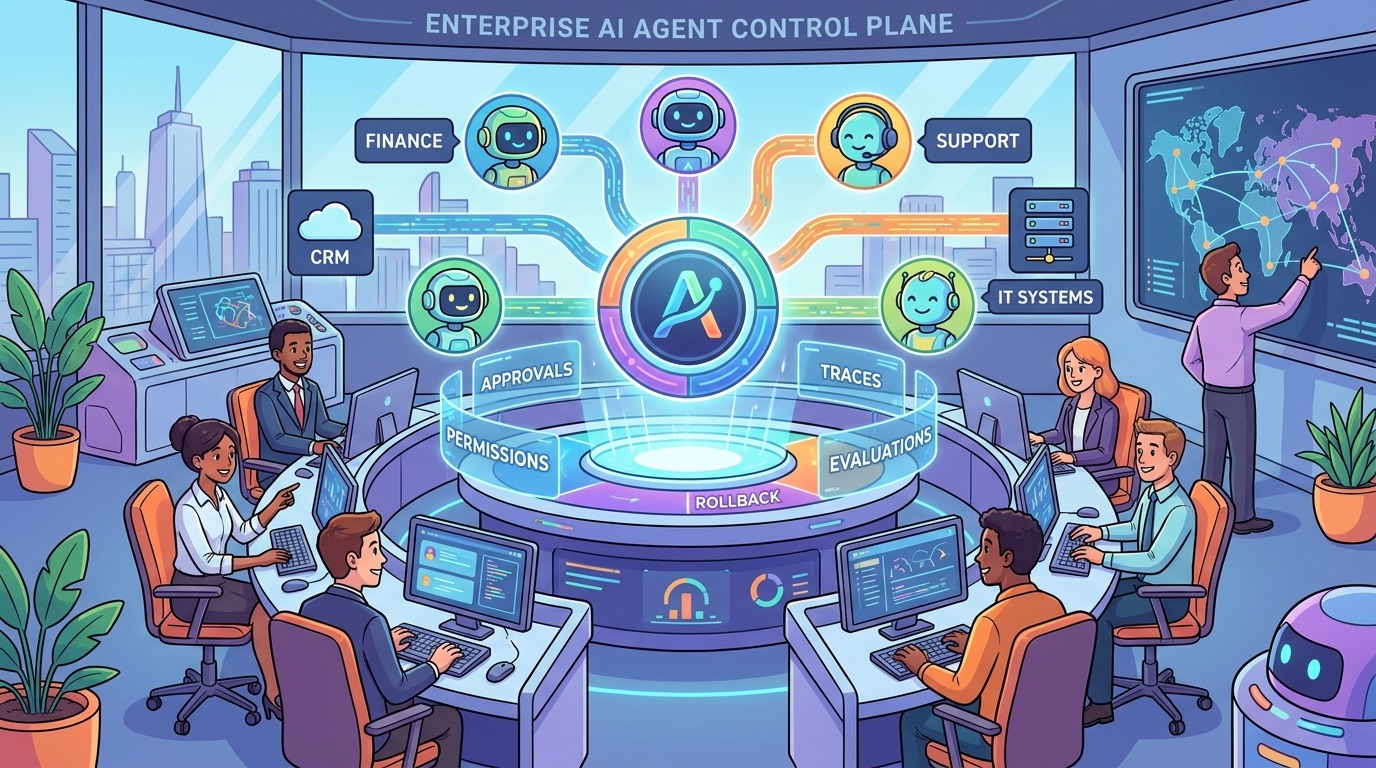
Enterprise AI Agent Control Plane: A Practical Governance Blueprint
An enterprise AI agent control plane is the governance and operations layer that decides what agents may do, which tools they can access, when humans must approve an action, what gets logged, how failures are detected, and when autonomy should be expanded or rolled back. It is not one dashboard. It is a practical operating system for controlled autonomy.
The source pillar, Enterprise AI Agents: The Trend Leaders Need to Understand, explains why enterprise agents are becoming a serious business trend. This cluster article goes narrower: if a company decides agents are worth piloting, what control layer should leaders and builders put in place before agents touch real workflows?
This is especially important because enterprise agents are different from simple chatbots. A chatbot usually answers. An agent may retrieve information, call APIs, update records, trigger workflows, draft customer responses, open tickets, request purchases, summarize legal terms, or coordinate with other systems. That extra agency creates value, but it also creates a new management problem: the organization needs a way to supervise actions, not just review outputs.
For searchers comparing “agent governance,” “agent observability,” “AI control plane,” and “enterprise AI agents,” the useful answer is a concrete blueprint: inventory agents, classify actions, enforce permissions, route approvals, capture traces, evaluate behavior, monitor cost, and keep rollback paths ready.
Why Enterprise AI Agents Need a Control Plane
The current AI agent conversation often jumps from impressive demo to broad transformation claim. That misses the uncomfortable middle. Enterprises do not struggle only with model capability. They struggle with responsibility. Who approved the action? Which data was used? Why did the agent call that tool? Did it exceed its job description? Could it repeat the same mistake across thousands of records?
Google Cloud and IBM describe AI agents as systems that can reason over goals and use tools or workflows to complete tasks. Microsoft’s Work Trend Index describes a shift toward human-agent teams and AI-operated, human-led organizations. NIST’s AI Risk Management Framework gives leaders a useful language for governance: map the context, measure risk, manage controls, and govern the process. Put those ideas together and the need becomes obvious: agents require a management layer that is technical enough to enforce rules and organizational enough to assign accountability.
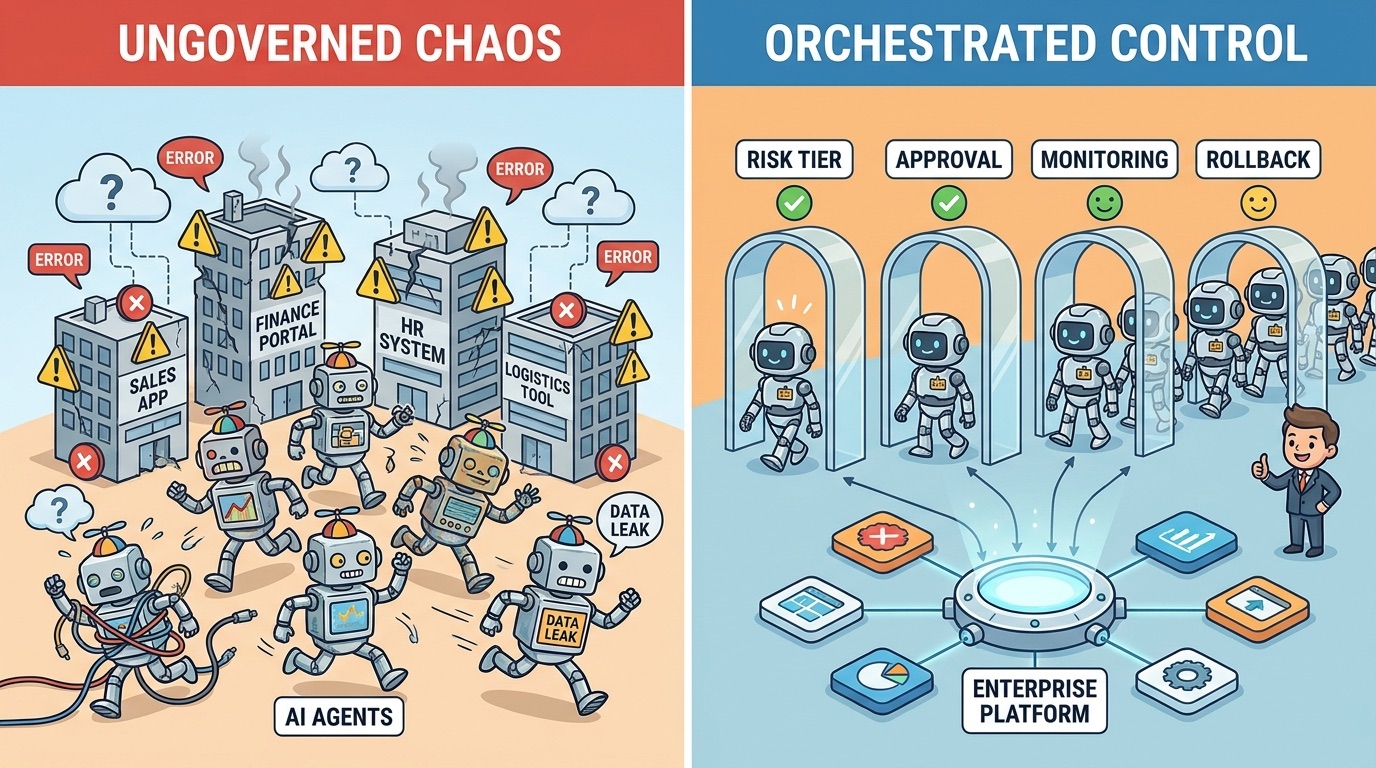
Without a control plane, each pilot invents its own permissions, logs, reviews, and escalation path. That may be fine for a demo. It breaks down when ten departments start connecting agents to customer data, finance tools, ticketing systems, code repositories, CRM records, and internal knowledge bases.
| Without a control plane | With a control plane |
|---|---|
| Each agent has custom permissions and unclear ownership. | Agents are registered with owners, scope, allowed tools, and risk tier. |
| Approvals happen manually in chat or not at all. | Approval rules are tied to action type, sensitivity, and confidence. |
| Logs show final output but not the decision path. | Traces capture prompts, context, tool calls, outputs, approvals, and errors. |
| Failures become anecdotes. | Failures become measurable events with root-cause categories. |
| Autonomy expands because the demo looked good. | Autonomy expands only after evaluations and production evidence support it. |
The practical goal is not to slow every agent down with bureaucracy. The goal is to let safe actions move quickly while risky actions get the right friction.
The Enterprise AI Agent Control Plane Architecture
A useful control plane has six layers. Teams may implement them with commercial platforms, internal services, workflow tools, policy engines, observability systems, or a mix. The architecture matters more than the brand name.
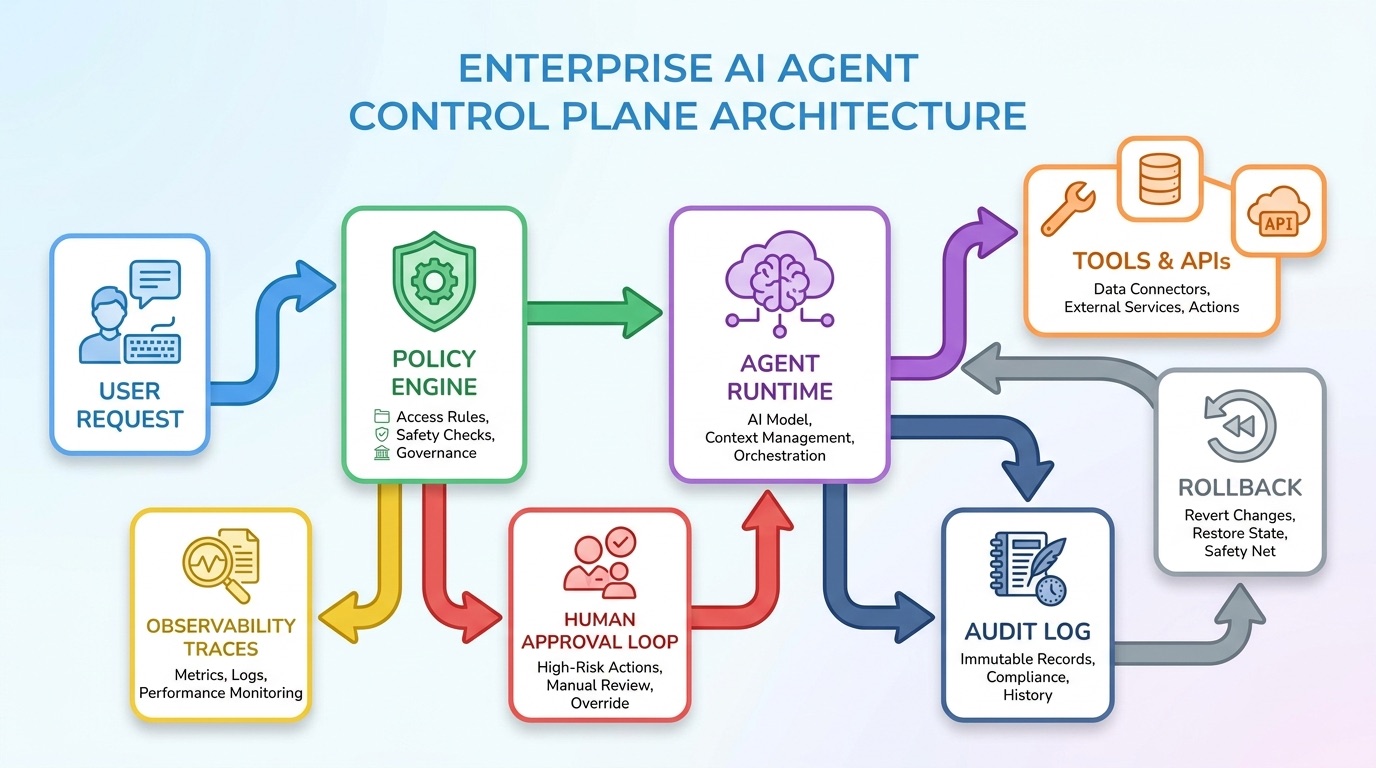
Notice what is missing: there is no assumption that one large autonomous system should control everything. Mature enterprises usually need many narrow agents with shared controls. A procurement agent, support agent, compliance triage agent, sales research agent, and IT operations agent should not each invent their own definition of safe behavior.
The simplest reference flow
A user asks an agent to complete a task. The agent reads its job description and available context. Before it calls a tool, the runtime gateway checks whether that tool is allowed for this agent, this user, this data type, this environment, and this action. If the request is low-risk, it proceeds and logs the event. If it is medium-risk, the system may require a review checkpoint. If it is high-risk, the action requires explicit human approval or is blocked entirely.
That sequence sounds basic, but it is the difference between “agent as impressive assistant” and “agent as manageable enterprise system.”
The Core Controls Every Enterprise Agent Needs
The control plane should start with a small number of controls that map directly to real failure modes. Do not write a fifty-page policy before you can answer who owns the agent and what it can touch.
| Control | What it answers | Minimum implementation |
|---|---|---|
| Agent ownership | Who is accountable for this agent? | Named business owner, technical owner, and escalation contact. |
| Scope definition | What job is the agent allowed to do? | One-sentence mission, allowed tasks, forbidden tasks, target users. |
| Tool permissions | Which systems can it use? | Read/write/destructive classification for every tool or API. |
| Data boundaries | What information can it access? | Allowed datasets, restricted fields, tenant boundaries, retention rules. |
| Approval thresholds | When does a human need to intervene? | Rules based on money, customer impact, legal risk, data sensitivity, and reversibility. |
| Trace logging | Can we reconstruct what happened? | Request, context source, tool call, response, approval, error, and final action logs. |
| Evaluation cases | How do we know behavior is acceptable? | Golden tasks, adversarial prompts, regression cases, and acceptance criteria. |
| Rollback path | How do we stop or reverse damage? | Kill switch, permission revocation, workflow pause, record correction process. |
A helpful rule is to classify every possible agent action by reversibility and consequence. Reading a public policy page is low risk. Drafting a message for human review is moderate. Sending that message to a customer, changing a price, approving a refund, deleting a record, or modifying production code is high risk.
A Practical Human Approval Model for AI Agents
Human-in-the-loop should not mean “a human reviews everything forever.” That destroys the value of agents. It also does not mean “humans approve whatever the agent suggests because the dashboard looks official.” The right approval model uses risk tiers.
| Risk tier | Examples | Default rule |
|---|---|---|
| Tier 1: Read-only | Search knowledge base, summarize a public document, classify incoming tickets. | Allow with logging and periodic review. |
| Tier 2: Drafting | Draft email, prepare quote, recommend next action, create ticket summary. | Human reviews before external or business-impacting use. |
| Tier 3: Reversible write | Update an internal ticket field, tag a CRM record, schedule a follow-up. | Allow only for narrow fields with undo path and sampling review. |
| Tier 4: High-impact write | Send customer communication, change billing, approve purchase, alter access. | Require explicit approval with context and reason codes. |
| Tier 5: Destructive or regulated | Delete records, change production systems, make legal commitments, process sensitive decisions. | Block by default or require strict multi-party approval. |
The approval screen should be designed like a decision tool, not a rubber stamp. A reviewer needs the user request, agent interpretation, sources used, proposed action, affected records, confidence or uncertainty notes, policy checks, and rollback option. If the reviewer must open five systems to understand the risk, the control plane has failed.
Approval routing examples
A support agent can draft a refund response, but refunds above a threshold go to a support lead. A procurement agent can summarize vendor options, but purchase orders require budget-owner approval. An IT agent can suggest access changes, but privileged access routes to security. A sales research agent can enrich account notes, but external outreach stays in human review until quality scores are stable.
This is how enterprises avoid the false choice between “agents everywhere” and “agents nowhere.” They give agents meaningful work, but the riskiest edge remains human-led.
What to Log for Enterprise AI Agent Audit Trails
Audit logs are often treated as compliance leftovers. For agents, they are also a learning system. Good logs tell teams which prompts fail, which tools create risk, where approvals bottleneck, and when an agent’s scope is too broad.
At minimum, capture these fields for meaningful agent events:
- Agent ID, version, owner, model, and environment.
- User or system that initiated the task.
- Task category, risk tier, and business workflow.
- Input prompt or normalized request, with sensitive data handling rules applied.
- Context sources used, such as documents, databases, search results, or retrieved passages.
- Tool calls requested, allowed, denied, and completed.
- Policy checks applied by the control plane.
- Human approval status, reviewer, reason code, and edits.
- Final output or action summary.
- Error type, retry count, latency, cost estimate, and rollback status.
Do not log sensitive information carelessly. The control plane itself must respect privacy, retention, and access rules. The point is not to store everything forever. The point is to preserve enough evidence to understand material decisions and improve the system.
Metrics That Show Whether the Control Plane Works
Agent success should not be measured only by time saved. A fast unsafe agent is not a success. A safe agent that nobody uses is also not a success. Use a balanced scorecard.
| Metric category | What to track | Why it matters |
|---|---|---|
| Business value | Cycle time saved, backlog reduced, successful task completion, user adoption. | Shows whether the agent is worth operating. |
| Reliability | Task success rate, tool-call failure rate, retry rate, fallback rate. | Shows whether the system works under real conditions. |
| Risk and safety | Denied tool calls, escalations, policy violations, sensitive-data incidents, rollback events. | Shows whether controls are preventing harm. |
| Human workload | Approval volume, review time, rejection rate, edit rate, bottlenecks. | Shows whether human oversight is well-designed. |
| Quality | Evaluation pass rate, hallucination reports, source accuracy, customer or employee feedback. | Shows whether outputs meet workflow standards. |
| Cost | Token spend, tool spend, infrastructure cost, cost per completed workflow. | Shows whether agent economics make sense. |
These metrics also decide autonomy. If an agent repeatedly passes evaluation cases, completes low-risk tasks reliably, and produces few escalations, the organization may reduce review friction for a narrow action. If incidents rise, permissions shrink. This is controlled autonomy: expand based on evidence, not excitement.
How to Roll Out an Enterprise AI Agent Control Plane
Start smaller than your ambition. The first version of the control plane does not need to manage every agent in the company. It needs to create a repeatable pattern that future agents can adopt.
Step 1: Inventory existing and planned agents
List every pilot, workflow automation, assistant, embedded tool, and agent-like system. Include shadow experiments. For each one, capture owner, users, data, tools, actions, current logs, and risk tier. This exercise often reveals that governance is already behind adoption.
Step 2: Pick one workflow with real value and bounded risk
A good first workflow is frequent, annoying, measurable, and reversible. Examples include support ticket triage, sales account research, internal policy Q&A, IT request classification, or document intake. Avoid the most regulated or highest-impact workflow as your first control-plane test.
Step 3: Define policy as runtime rules
Convert policy language into enforceable conditions. Instead of “agents should avoid sensitive data,” define which fields are blocked, masked, or approval-gated. Instead of “humans approve important actions,” define thresholds, reviewers, deadlines, and reason codes.
Step 4: Build the minimum trace
Capture request, context, tool call, result, approval, and final action. You can improve later. If you cannot reconstruct what happened in the pilot, do not expand it.
Step 5: Run evaluations before production
Create test cases from real tasks, edge cases, adversarial prompts, wrong-tool attempts, ambiguous requests, and policy conflicts. Keep those cases as regression tests. Every model, prompt, tool, or policy change should run against them.
Step 6: Launch with narrow permissions
Give the agent the minimum tools needed for the workflow. Prefer draft mode, read-only mode, or reversible writes at first. Increase autonomy only after the metrics support it.
Step 7: Hold a recurring agent review
Review incidents, denied calls, approvals, cost, quality, user feedback, and proposed scope changes. The control plane becomes stronger when it is part of an operating cadence, not a one-time project.
Common Mistakes to Avoid
Mistake 1: Treating the control plane as a dashboard
A dashboard can show activity, but it does not enforce behavior. The control plane must shape runtime actions: permissions, approvals, blocked calls, logging, and rollback.
Mistake 2: Letting every team define risk differently
Teams need room for workflow-specific rules, but the enterprise needs a common language for read, write, destructive, sensitive, reversible, external-facing, and regulated actions.
Mistake 3: Logging outputs but not context
If you only store the final answer, you cannot understand why the agent acted. Trace the sources, tool calls, policy checks, and approval path.
Mistake 4: Confusing human approval with accountability
Approvers need authority, context, and training. If approval becomes a rushed click, the organization has created liability theater rather than meaningful oversight.
Mistake 5: Expanding autonomy without evidence
Autonomy should be earned through evaluation results, production metrics, incident history, and clear business value. A successful demo is not enough.
How This Supports the Enterprise AI Agents Pillar
This article is the practical implementation companion to Enterprise AI Agents: The Trend Leaders Need to Understand. The pillar explains the trend, maturity model, major risks, and adoption roadmap. This cluster article focuses on one missing subtopic: the control layer that turns broad agent strategy into governed daily operations.
Next, leaders can use this blueprint to evaluate pilot readiness, ask better vendor questions, and design a first agent program that is useful without becoming uncontrolled automation.
Sources and References
- Singularity Journey: Enterprise AI Agents: The Trend Leaders Need to Understand
- NIST AI Risk Management Framework
- Microsoft Work Trend Index: The year the Frontier Firm is born
- IBM: What are AI agents?
- Google Cloud: What are AI agents?
This article uses public frameworks and vendor explanations as background. It does not assume any single vendor platform is required to build an enterprise AI agent control plane.
FAQ
What is an enterprise AI agent control plane?
It is the governance and operations layer that manages agent identity, permissions, tool access, approvals, traces, evaluations, metrics, and rollback. It helps enterprises supervise actions rather than only reviewing final outputs.
Is a control plane the same as agent observability?
No. Observability is one part of the control plane. A full control plane also enforces policies, routes approvals, manages permissions, evaluates behavior, and supports rollback.
Who should own the AI agent control plane?
Ownership should be shared. Business teams own workflow value, technology teams own integration and reliability, security and risk teams define boundaries, and executives set accountability for enterprise-wide adoption.
What should be logged for enterprise AI agents?
Log the agent ID, user request, context sources, tool calls, policy checks, approvals, final actions, errors, cost indicators, and rollback status. Avoid careless storage of sensitive data; logging must follow privacy and retention rules.
How do we start without overbuilding?
Start with one narrow workflow, a named owner, basic tool permissions, clear approval thresholds, minimum viable traces, and a small evaluation set. Expand the control plane only after real usage exposes what is missing.
Should enterprise AI agents ever act without human approval?
Yes, but only for narrow, low-risk, logged, reversible actions where evaluations and production evidence support autonomy. High-impact, external, destructive, or regulated actions should require stronger approval or be blocked by default.
