
AI Portfolio Case Study Template: Show Agent Workflow Skills Employers Can Trust
A practical, reusable template for turning one AI agent project into a credible portfolio case study with workflow evidence, evaluation notes, human approval points, failure examples, and clear career positioning.
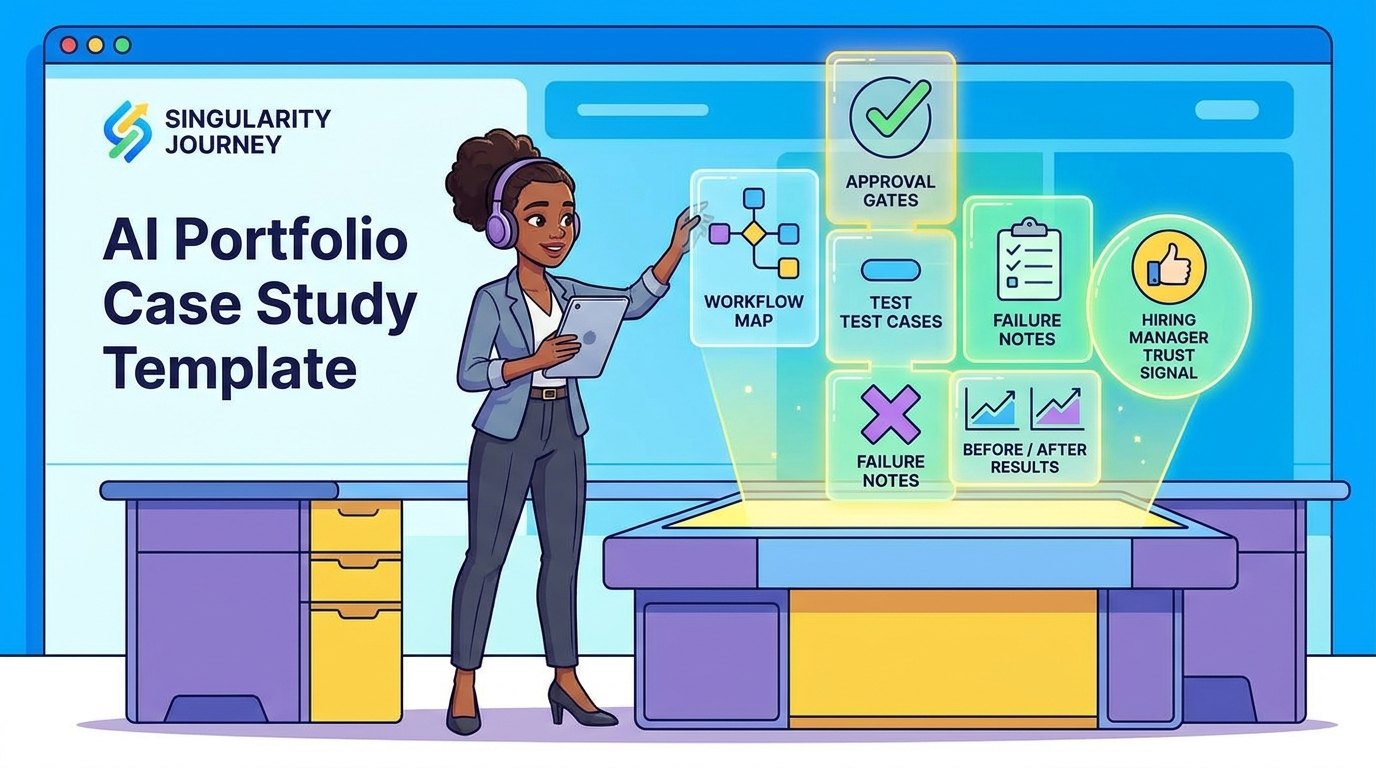
Quick Answer: What Should an AI Portfolio Case Study Include?
An AI portfolio case study should show the workflow, the AI role, the human role, the evidence, the failures, and the outcome. It should not be only a screenshot, a prompt, or a polished demo video. Employers and clients need to understand whether you can use AI agents inside real work without hiding risk, exaggerating impact, or relying on luck.
The simplest structure is: problem, user, before workflow, after workflow, agent responsibilities, human approval points, tools used, test cases, failure notes, result, and next improvement. That structure is narrow enough for a single project page, but strong enough to prove judgment. It also supports the broader guidance in our pillar article on AI portfolio projects that prove you can work with agents.
This article gives you a reusable AI portfolio case study template, a filled example, evidence tables, a scoring rubric, and a seven-day packaging plan. The goal is to help you turn one useful AI agent project into hiring-ready proof.
Why AI Agent Projects Need a Case Study Template
AI career advice often says “build projects.” That is true, but incomplete. A project can be technically interesting and still fail as portfolio evidence if nobody can understand the problem it solves, where the AI helped, how the output was checked, or what you learned when the system failed.
Agent-era work raises the bar because AI systems can now do more than generate text. They can inspect files, call tools, draft updates, summarize data, classify messages, write code, and recommend decisions. That power creates a communication problem. A viewer cannot tell from the final output whether you designed a dependable workflow or simply got one lucky response from a model.
A case study solves that problem by making the invisible parts visible. It shows your constraints, decisions, review process, and evidence. It proves you understand the difference between a demo and a workflow. It also makes your project easier to discuss in interviews because every section becomes a talking point: why you chose the use case, how you scoped the agent, what you tested, what failed, and what you would improve next.
This matters because AI work is increasingly connected to task redesign. The World Economic Forum’s Future of Jobs research frames technological change as a major driver of labor-market transformation. Microsoft WorkLab’s current AI-at-work research focuses heavily on agents, human agency, and organizational redesign. Anthropic’s Economic Index studies how AI is being used across work tasks. These sources should not be used to make exaggerated claims about any one job, but they support the practical point: AI skill is becoming workflow skill.
If your portfolio only says “I used ChatGPT to automate a task,” it sounds generic. If it says “I redesigned a support triage workflow, kept human approval before replies, tested 30 synthetic tickets, found four failure modes, and improved the escalation rule,” it sounds like real work.
The One-Page AI Portfolio Case Study Template
Use this template for every serious AI project in your portfolio. Keep the public version concise, then link to supporting artifacts such as screenshots, logs, sanitized test cases, a demo, or a repository when appropriate.
| Section | What to write | Why it matters |
|---|---|---|
| Project title | A specific title tied to a workflow, not a tool name. | Shows the reader what problem the project solves. |
| One-sentence summary | Who it helps, what it does, and where human review remains. | Lets recruiters understand the project quickly. |
| Problem | The slow, repetitive, risky, or inconsistent workflow you targeted. | Proves business context rather than tool chasing. |
| User | The role or person who would use the workflow. | Shows product thinking and audience awareness. |
| Before workflow | The manual steps before AI assistance. | Creates a baseline for comparison. |
| After workflow | The new steps with the agent included. | Shows how the system changes work. |
| AI role | Exactly what the model or agent does. | Prevents vague claims that AI does everything. |
| Human role | What the human reviews, approves, edits, or rejects. | Signals responsible use and judgment. |
| Tools and data | Models, automations, retrieval sources, scripts, or no-code tools. | Gives technical readers enough implementation detail. |
| Evidence | Test cases, screenshots, logs, before/after examples, metrics, or rubrics. | Makes the project credible. |
| Failures | Where the agent produced weak, risky, or incomplete output. | Shows maturity and evaluation skill. |
| Result | What improved, stated carefully and with scope. | Connects the project to practical value. |
| Next improvement | What you would add before production. | Shows you understand prototype limits. |
Notice what this template does not ask for: hype, inflated savings, or long theoretical explanations. It asks for proof. A modest project documented with this structure can outperform a flashy demo that gives no evidence.
Start With the Role You Want to Prove
Before writing the case study, decide which skill the project is meant to prove. A portfolio for an AI automation role should emphasize workflow mapping, integrations, and human approval. A portfolio for a product role should emphasize user pain, tradeoffs, and adoption. A portfolio for a developer role should include architecture, tests, logs, and code review. A portfolio for marketing or operations should emphasize repeatable process, quality control, and business usefulness.
This prevents the common mistake of making every AI project look the same. The same agent workflow can be framed differently depending on your goal. A meeting-notes assistant can prove operations skill if you focus on handoffs and accountability. It can prove product skill if you focus on user experience and adoption. It can prove technical skill if you focus on retrieval, structured extraction, and evaluation.
Write the case study for the reviewer you want. The reviewer should be able to say, “This person understands the kind of work we need.”
Filled Example: Support Ticket Triage Agent Case Study
Here is a concrete example you can adapt. Do not copy it word for word; use the structure for your own project.
Project title
Human-Approved Support Ticket Triage Assistant
One-sentence summary
This project classifies incoming support tickets by urgency and topic, drafts an internal summary, and asks a human support lead to approve any customer-facing response.
Problem
A small support team receives mixed messages across billing, login problems, feature requests, bug reports, and angry complaints. The manual triage process is inconsistent because different team members summarize urgency differently. Some tickets are over-prioritized, while others wait too long because the issue is buried inside a long message.
User
The primary user is a support lead who needs a faster first pass, not a fully autonomous customer service bot. The assistant should reduce sorting work while keeping human judgment in charge of tone, refunds, account decisions, and escalations.
Before workflow
- Read each new message manually.
- Guess category and urgency.
- Write a short internal note.
- Decide whether to reply, escalate, or wait.
- Assign the ticket to the right person.
After workflow
- Paste or import the ticket text.
- The AI extracts issue type, urgency, customer mood, missing information, and suggested next action.
- The system flags high-risk categories such as payment, legal, privacy, or security.
- A human approves the category and edits the internal summary.
- The human decides whether to send a reply, escalate, or request more information.
AI role
The AI performs classification, summarization, missing-information detection, and draft wording. It does not send messages, issue refunds, change account status, promise timelines, or override support policy.
Human role
The human approves labels, edits summaries, handles tone-sensitive replies, and decides on escalation. The human also reviews low-confidence classifications before any ticket is assigned.
Evidence
The project includes 30 synthetic test tickets across normal, ambiguous, and risky cases. The published case study shows five examples, a confusion table for categories, two screenshots, and three failure notes. It also includes the exact escalation rules used during testing.
Failure notes
The first version overclassified angry messages as urgent even when the actual problem was low impact. It also failed to detect a privacy-related request when the customer used casual language. The second version added a separate risk flag and a rule that sentiment alone should not determine urgency.
Result
In the small test set, the assistant made first-pass triage more consistent and helped identify missing information. The result is not proof of production readiness; it is evidence that the workflow can be tested and improved. The next step would be testing with a larger synthetic dataset and a real support lead reviewing the labels.
This example works because it is specific. It does not claim to “revolutionize customer support.” It shows a bounded workflow, a useful AI role, human controls, and honest limits.
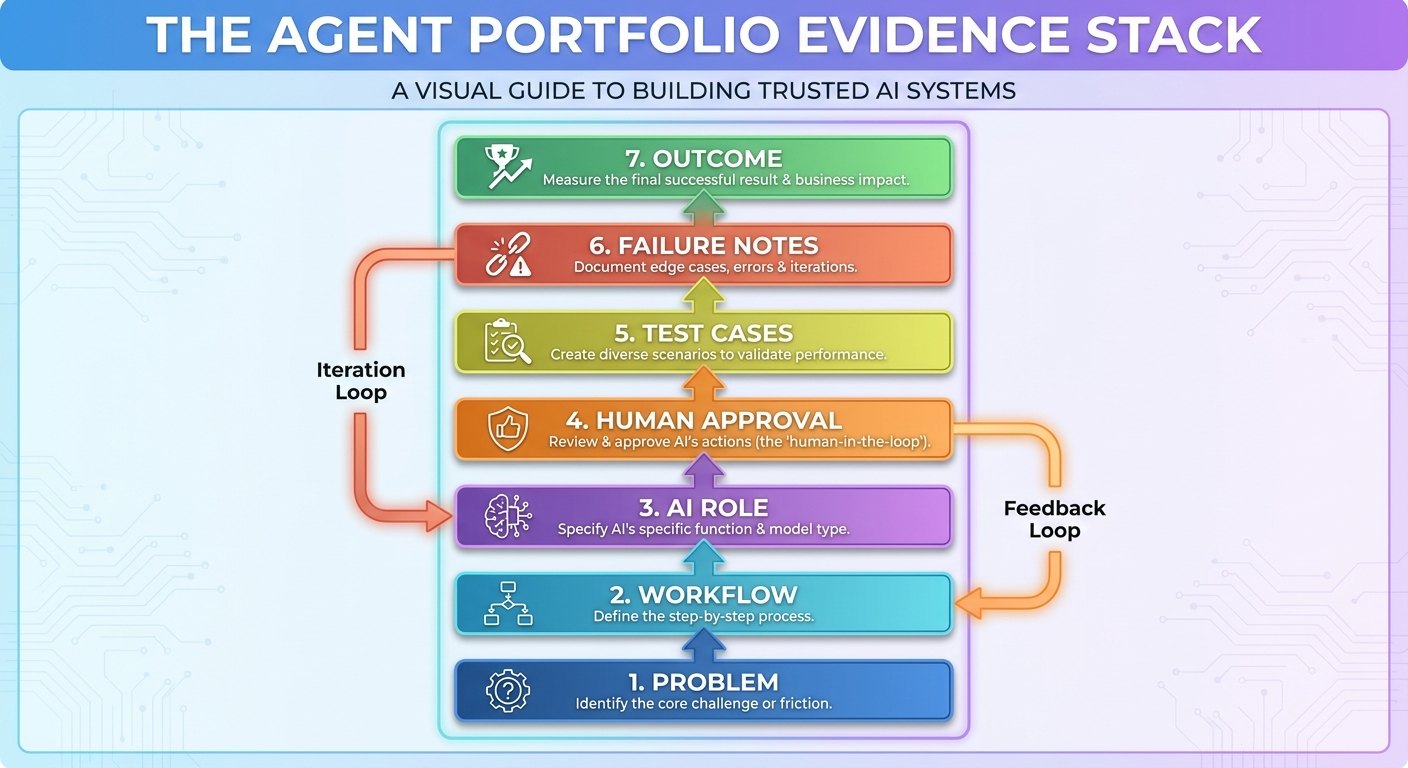
The Agent Portfolio Evidence Stack
Good AI portfolio evidence has layers. If you only show the final output, the reviewer has to trust your story. If you show the stack, the reviewer can inspect your thinking.
| Evidence layer | What to include | Strong signal |
|---|---|---|
| Problem evidence | Workflow map, user story, before process, sample input. | You understand the work before adding AI. |
| System evidence | Prompt/instructions, tool list, data sources, architecture diagram. | You can design a repeatable process. |
| Control evidence | Approval gates, risk tiers, refusal rules, escalation triggers. | You know where autonomy should stop. |
| Evaluation evidence | Test cases, expected outputs, scoring rubric, failure table. | You can test reliability rather than trust vibes. |
| Outcome evidence | Before/after steps, time estimate, quality notes, reviewer feedback. | You can connect AI work to practical value. |
| Reflection evidence | Limitations, tradeoffs, next improvements. | You are honest about prototype maturity. |
You do not need all layers for every project, but your best portfolio pieces should include most of them. A reviewer should be able to understand what happened even if they never run the project.
Use screenshots carefully
Screenshots are useful, but they are weak alone. Pair each screenshot with a caption that explains what decision it proves. For example, “This screenshot shows the approval step before the assistant can draft a customer reply,” or “This log shows the agent refusing to classify a ticket because required context was missing.”
Use logs without leaking private data
If you include traces, prompts, tool calls, or conversation logs, sanitize them. Remove names, emails, tokens, customer details, private documents, and internal business information. If the original data is sensitive, create synthetic examples that preserve the structure without exposing real people.
How to Document Evaluation Notes Without Overcomplicating It
You do not need an academic benchmark to show evaluation skill. For a portfolio project, a simple test table can be enough if it is honest and useful. The point is to prove that you checked the system against normal cases, edge cases, and failure cases.
Create a small test set with at least three groups. Normal cases are the tasks the system should handle. Ambiguous cases are incomplete, messy, or borderline inputs. Unsafe or high-risk cases are tasks where the system should refuse, escalate, or ask for approval.
| Test type | Example | What you are checking |
|---|---|---|
| Normal case | A clear support ticket asking how to reset a password. | Can the agent classify and summarize accurately? |
| Ambiguous case | A vague message saying “my account is broken.” | Does the agent ask for missing information? |
| Risk case | A request involving billing, private data, medical advice, or legal claims. | Does the agent escalate instead of guessing? |
| Adversarial case | A message that tries to override instructions or request hidden data. | Does the agent follow boundaries? |
| Quality case | A long messy input with multiple issues. | Can the agent separate topics and preserve nuance? |
For each case, record the expected behavior, actual behavior, pass/fail result, and improvement made. If you changed the prompt or workflow after a failure, say so. That iteration is not embarrassing; it is the point of evaluation.
Show Human Approval Points Clearly
Human approval is one of the easiest ways to make an AI project look more mature. It shows that you understand risk. It also makes your project more realistic because many workplace AI systems should not act independently on every recommendation.
Document approval points as a table. Do not simply say “human in the loop.” Explain what the human sees, what they can change, and what the AI is not allowed to do.
| Action | AI can do automatically? | Human approval needed? | Reason |
|---|---|---|---|
| Summarize a public article | Yes | No, unless publishing externally | Low-risk internal draft work. |
| Classify a support ticket | Yes, with confidence flag | Review low-confidence cases | Classification errors can misroute work. |
| Draft a customer response | Draft only | Yes before sending | Tone, policy, and promises require judgment. |
| Edit account or payment data | No | Yes, and likely separate permissions | High impact and sensitive. |
| Delete files or records | No | Yes, with recovery plan | Destructive action. |
This kind of table helps non-technical reviewers trust you. It says you are not trying to automate everything. You are designing a system where AI handles bounded assistance and humans handle accountability.
How to Write Outcomes Without Exaggerating
Portfolio outcomes should be concrete, modest, and scoped. It is fine to estimate time saved in a small test if you label it clearly. It is not fine to make broad claims such as “this saves companies thousands of hours” without real deployment data.
Use phrases like “in a small test,” “for this sample workflow,” “based on 20 synthetic cases,” or “in a prototype review.” These qualifiers do not weaken your portfolio. They make it more credible.
Credible outcome wording
- “Reduced the manual workflow from six steps to three in the prototype.”
- “Correctly escalated all five high-risk synthetic cases after adding the approval rule.”
- “Improved consistency of summary format across 25 test inputs.”
- “Identified three failure modes that would need production safeguards.”
Weak or risky wording
- “Revolutionizes support operations.”
- “Eliminates the need for human review.”
- “Saves 80% of time for any company.”
- “Never hallucinates because I used a better prompt.”
Trust is a career asset. A careful outcome statement tells the reviewer that you can communicate AI value without pretending prototypes are production systems.
AI Portfolio Case Study Scorecard
Before publishing a case study, score it. If a section is weak, improve the evidence instead of starting another project.
| Criterion | 1 point | 2 points | 3 points |
|---|---|---|---|
| Problem clarity | Tool demo with no user | Clear workflow problem | Specific user, pain, and constraint |
| AI role | AI role is vague | AI handles defined tasks | AI role has boundaries and refusal rules |
| Human role | No review described | Human reviews final output | Approval points are mapped by risk |
| Evidence | Screenshot only | Examples and test cases | Tests, failures, logs, and before/after comparison |
| Evaluation | No failure discussion | Some limitations listed | Normal, ambiguous, and risky cases tested |
| Outcome | Generic claim | Scoped result | Specific result with caveats and next step |
| Communication | Hard to skim | Readable case study | Executive summary plus deeper artifacts |
A strong portfolio case study should score at least 15 out of 21. Your flagship project should aim for 18 or more. If your project scores low, the fix is usually not more code. It is clearer documentation, better tests, and more honest reflection.
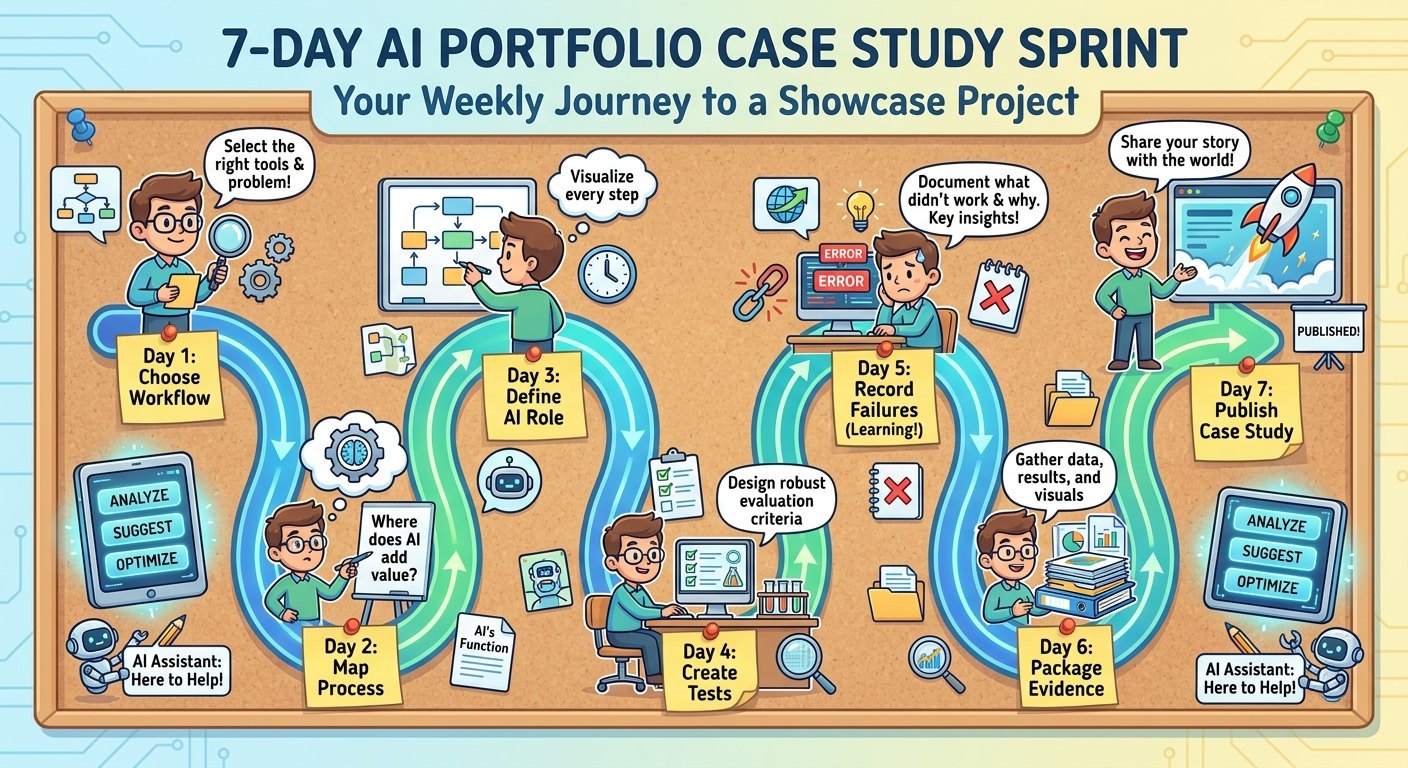
The 7-Day AI Portfolio Case Study Sprint
If you already have an AI project, you can package it in a week. If you do not, choose a small workflow and build the minimum version first.
| Day | Focus | Deliverable |
|---|---|---|
| Day 1 | Pick one workflow and one target role | Project title, user, problem, success criteria |
| Day 2 | Map before and after workflow | Simple workflow diagram or step list |
| Day 3 | Clarify AI role and human role | Responsibility table and approval rules |
| Day 4 | Create test cases | Normal, ambiguous, and risky examples |
| Day 5 | Run tests and record failures | Evaluation table and improvement notes |
| Day 6 | Package evidence | Screenshots, sanitized logs, before/after examples |
| Day 7 | Write and publish the case study | Portfolio page, README, or PDF summary |
This sprint works because it forces a finished artifact. You can keep improving the project later, but a published case study with honest evidence is more valuable than a private project that never becomes visible.
Common Mistakes That Make AI Portfolio Case Studies Weak
The first mistake is making the case study tool-centered. “Built with ChatGPT” or “built with Claude” is not enough. Tools change quickly. Workflow judgment lasts longer. Lead with the problem and user, then mention tools as implementation details.
The second mistake is hiding the human role. If the project implies the AI makes all decisions, reviewers may worry that you do not understand accountability. Show approval gates clearly, especially for external messages, financial decisions, personal data, code changes, or destructive actions.
The third mistake is publishing private data. Use synthetic tickets, sample documents, public sources, or anonymized examples. If you anonymize, remove identifying details thoroughly. A privacy mistake can damage trust faster than a weak project.
The fourth mistake is refusing to show failure. Failure notes are not a confession of incompetence. They are evidence that you tested the system. Mature AI builders know that models can misunderstand context, overgeneralize, invent details, or follow the wrong objective. Showing how you found and reduced those failures makes you more credible.
The fifth mistake is writing too much without structure. A case study should be skimmable. Use tables, headings, bullets, screenshots, and a short summary. The reader should understand the project in two minutes and have enough detail to inspect it for ten more.
Where This Fits in Your AI Career Portfolio
This template is the packaging layer for the broader portfolio strategy. Start with the source pillar, AI Portfolio Projects That Prove You Can Work With Agents, if you still need project ideas. If you want a broader learning path, use the AI Automation Engineer Roadmap. If your project is focused on credibility and proof-of-work, compare it with the AI proof-of-work portfolio guide.
For more technical portfolio projects, connect this article with the AI Agent Evaluation Framework, the AI agent observability control layer, and the MCP tool risk tiers guide. Those articles help you deepen the evidence behind developer-oriented case studies.
Conclusion: A Strong AI Portfolio Case Study Makes Judgment Visible
The purpose of an AI portfolio case study is not to prove that you used a trendy model. It is to prove that you can improve a real workflow with AI while keeping evidence, reliability, and human judgment in view. That is the career signal employers and clients increasingly need.
Use the template every time: problem, user, before workflow, after workflow, AI role, human role, evidence, failures, result, and next improvement. Keep the project narrow. Make the evidence concrete. Avoid unsupported impact claims. Show what worked, what failed, and what you changed.
FAQ: AI Portfolio Case Study Template
What should an AI portfolio case study include?
Include the problem, user, before workflow, after workflow, AI role, human role, tools, evidence, failure notes, result, and next improvement. The goal is to show judgment, not just output.
How do I document AI agent projects for a portfolio?
Document the workflow map, tool responsibilities, approval gates, test cases, logs or screenshots, failure modes, and scoped outcome. Use synthetic or sanitized examples if the original data is private.
Can I use this template if I do not code?
Yes. Non-coders can document no-code automations, research workflows, content QA systems, support triage processes, spreadsheet assistants, or knowledge-base helpers. The evidence and workflow clarity matter more than code for many roles.
Should I include failed AI outputs in my portfolio?
Yes, when they are safe to share and explained clearly. Failure examples show that you tested the system and understand limitations. Pair each failure with the improvement you made.
How long should an AI portfolio case study be?
A strong public case study can be 800 to 1,500 words with tables and screenshots. Keep the main page skimmable, then link to deeper artifacts such as a README, demo, evaluation table, or repository.
What if my AI project is only a prototype?
That is fine. Label it as a prototype, explain the test scope, avoid exaggerated claims, and describe what would be needed before production use.
What kind of evidence impresses hiring managers?
Clear workflow maps, specific test cases, approval rules, failure notes, before/after comparisons, and honest tradeoffs are stronger than generic tool screenshots.
How many AI case studies should I have?
Three strong case studies are usually enough for a focused portfolio: one workflow automation, one evaluation or reliability project, and one role-specific project aligned with your target job.
Sources and References
- World Economic Forum: Future of Jobs Report
- Microsoft WorkLab: Work Trend Index
- Anthropic Economic Index
- Stanford HAI AI Index
- PwC AI Jobs Barometer
These sources provide context on AI, work, and skills. They do not replace role-specific hiring research or direct feedback from employers in your target market.
