
AI Portfolio Projects That Prove You Can Work With Agents
A practical guide to building AI portfolio projects that show real workflow judgment: agent use, evaluation, human approval, case studies, failure notes, and evidence employers can trust.

Quick Answer: What Makes an AI Portfolio Convincing?
An AI portfolio is convincing when it proves how you think, build, evaluate, and improve systems that use AI. A list of prompts is not enough. A folder of screenshots is not enough. In the agent era, hiring managers, clients, and collaborators need evidence that you can turn messy workflows into dependable human-AI systems.
The best AI portfolio projects show a complete loop: a real workflow problem, a clear user, a working prototype, guardrails, measurable outputs, failures discovered during testing, and a short case study that explains what changed after you added AI. That evidence matters because AI work is moving from novelty demos toward operational responsibility. The question is no longer “Can you use ChatGPT?” The better question is “Can you design a workflow where AI helps without creating hidden risk?”
This guide is for students, operators, analysts, marketers, designers, developers, freelancers, and career-switchers who want to prove practical AI ability. You do not need a PhD or a massive app. You need a portfolio that makes your judgment visible.
Why AI Career Proof Has Changed
AI skills used to be easy to signal. You could mention prompt engineering, add a few tools to your resume, and show a simple automation. That is no longer enough. AI assistants and agents are becoming normal parts of knowledge work, which means basic tool familiarity is becoming table stakes. The durable advantage is not knowing that AI exists. It is knowing how to apply it responsibly inside real work.
Reports from organizations such as the World Economic Forum, Microsoft WorkLab, Anthropic, Stanford HAI, and PwC all point to the same broad pattern: AI is changing tasks before it replaces entire job identities. Work is being decomposed into smaller decisions, handoffs, reviews, and automated steps. That makes proof-of-work more important. Employers and clients need to see whether you can redesign tasks, not just talk about technology.
A strong AI portfolio answers practical questions: Can you identify a repetitive workflow? Can you map where human judgment still matters? Can you choose the right model or tool for the job? Can you test the output? Can you explain risk in plain language? Can you measure whether the workflow saved time, reduced errors, improved consistency, or created a better user experience?
Generic career advice often says “learn AI tools.” That advice is too vague. A better career strategy is to create evidence that you can work with agents: scoped tasks, documented constraints, approval points, evaluation logs, and business outcomes.
The Portfolio Principle: Show the Workflow, Not Just the Output
The most common mistake in AI portfolios is showing only the final answer. The final answer may look polished, but it hides the hard parts. Anyone can paste a prompt into a model and get a result. The valuable skill is designing a repeatable process that produces useful results under constraints.
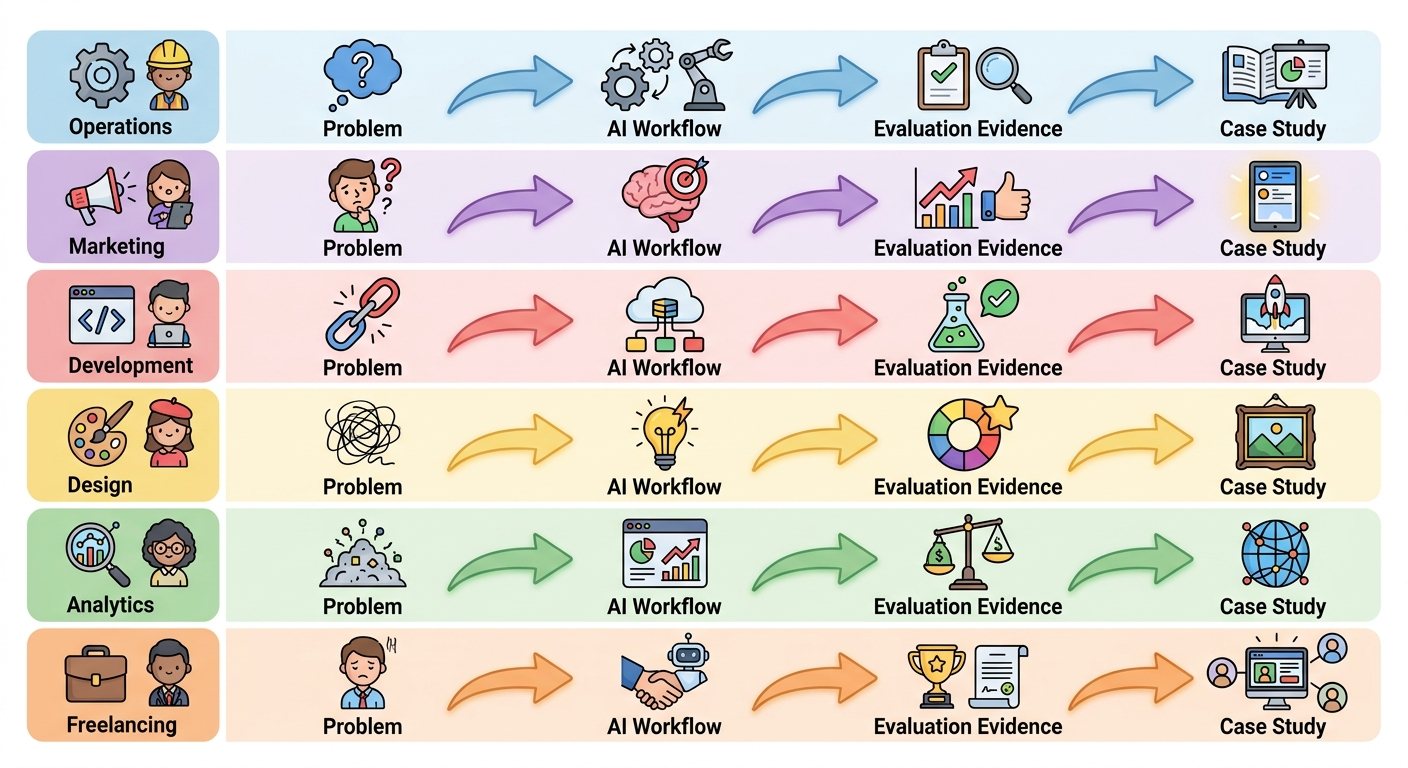
For every project, document four layers. First, show the problem: who had the pain, how the workflow worked before, and why it mattered. Second, show the system: tools, data, prompts, instructions, retrieval, automations, approvals, and integrations. Third, show the evidence: screenshots, test cases, evaluation examples, traces, before/after comparisons, and failure notes. Fourth, show the decision: what you would improve, what you would not automate, and where a human must stay involved.
This approach makes your portfolio credible for both technical and non-technical audiences. A recruiter can understand the business value. A manager can understand the workflow. A developer can inspect implementation choices. A client can imagine hiring you for a similar problem.
| Weak portfolio signal | Stronger agent-era signal |
|---|---|
| “I built a chatbot.” | “I built a support triage assistant with confidence thresholds, escalation rules, and 30 test tickets.” |
| “I know prompt engineering.” | “I created reusable task instructions, compared outputs, and documented failure modes.” |
| “I automated reports.” | “I reduced a manual reporting workflow from six steps to two while keeping human approval before publishing.” |
| “I used AI to code.” | “I used an AI coding agent, reviewed the diff, ran tests, and recorded where the agent failed.” |
AI Portfolio Project Matrix
Choose projects that match the work you want. A future product manager should not build the same portfolio as a backend engineer. A marketer should not copy a data scientist’s project list. The strongest portfolio is a strategic portfolio: it proves the tasks your target role cares about.
The table below gives you a practical starting point. Pick one project from your role lane, then make it unusually well documented.
| Career lane | Best project idea | Evidence to include |
|---|---|---|
| Analyst | AI research brief generator with source checking | Input examples, source list, error checks, final brief, evaluation notes |
| Operations | Email-to-task workflow with priority classification | Workflow map, routing rules, approval step, before/after time estimate |
| Marketing | Campaign research and content QA pipeline | Brand rules, draft comparisons, checklist, publishing risks |
| Developer | Agent-assisted test generation and bug-fix loop | Trace logs, failing tests, diffs, review notes, regression results |
| Designer | UX research synthesis assistant | Interview notes, theme extraction, uncertainty flags, human review |
| Freelancer | Client onboarding assistant with proposal drafts | Template, sample client scenario, approval gates, deliverable package |
Project One: The Human-in-the-Loop Workflow Assistant
This is the best first project for most people because it proves practical judgment. Choose a real workflow that currently moves through messages, documents, spreadsheets, forms, or tickets. Then design an assistant that helps with the repetitive parts while leaving important decisions to a human.
Examples include triaging inbound emails, summarizing customer requests, turning meeting notes into action items, drafting first-pass proposals, sorting research links, or preparing weekly status updates. The goal is not to remove the human. The goal is to make the human faster and more consistent.
What to build
Create a simple interface or documented workflow where the user provides raw input, the AI extracts structured information, suggests next steps, and asks for approval before any external action. You can use no-code tools, scripts, spreadsheets, or a small app. The implementation matters less than the workflow clarity.
What to document
Show the old workflow, the new workflow, sample inputs, sample outputs, approval points, and at least five edge cases. Include cases where the assistant should refuse, ask for clarification, or escalate to a human. This is where your judgment becomes visible.
What makes it portfolio-worthy
Add a short case study. Explain what the workflow saves, what risks remain, and how you would deploy it safely in a real team. If you can, include a lightweight metric such as steps removed, minutes saved per run, error types caught, or consistency improvements found during testing. Label estimates clearly and never pretend a small test is a large scientific study.
Project Two: The Agent Evaluation Lab
An agent evaluation project is powerful because it shows you understand that AI systems need testing. Many people can demo an agent when everything works. Fewer people can explain how the agent fails, which tools are risky, and which tasks need guardrails.
Pick a small agent workflow: answering questions from a document set, creating tasks from emails, updating a spreadsheet, writing tests, or classifying support tickets. Then create a test set with normal cases, tricky cases, ambiguous cases, and unsafe cases. Run the agent and record what happened.
What to include in the evaluation
Include task success rate, hallucination examples, missing-context failures, bad tool-use attempts, slow or expensive loops, and cases where the agent needed human approval. If your tool provides traces or logs, include sanitized screenshots. If it does not, create a manual evaluation table.
| Evaluation dimension | Question to answer | Portfolio evidence |
|---|---|---|
| Task success | Did the agent complete the intended job? | Pass/fail table with examples |
| Grounding | Did the answer rely on provided sources? | Source comparison notes |
| Tool safety | Did the agent try risky actions? | Tool-call log and approval policy |
| Recovery | What happened when context was missing? | Failure screenshots and fixes |
| User experience | Would a real user trust this? | Test user notes or self-review rubric |
This kind of project pairs naturally with technical posts on agent observability, trace debugging, and evaluation frameworks. It also proves a rare skill: you can separate a cool demo from a dependable workflow.
Project Three: The AI Knowledge Assistant With Source Discipline
A knowledge assistant is a familiar project, but most portfolios do it poorly. They upload a few PDFs, ask questions, and show a friendly answer. To make it stand out, focus on source discipline. The assistant should say what it knows, cite where it found the answer, and admit when the answer is not in the source material.
Choose a useful but bounded knowledge base: a product FAQ, a policy handbook, class notes, technical docs, onboarding docs, or a curated research folder. Build or simulate a retrieval workflow. Then test it with questions that are answerable, partially answerable, and unanswerable.
Your portfolio should show the difference between a confident AI answer and a grounded AI answer. Include examples where the assistant refuses to guess. This is especially valuable for roles involving operations, compliance, support, research, and internal enablement.
Project Four: The AI Automation Case Study
If you want clients or employers to trust you, write a case study around one automation. The case study should read like a business story, not a tool tutorial. Start with the old process. Explain why it was slow or inconsistent. Show the AI-assisted workflow. Then show evidence that the new process is better enough to matter.
A good case study has a narrow scope. For example: “turn five messy meeting notes into a structured project update,” “summarize support tickets into weekly themes,” “create first-draft social posts from approved source notes,” or “convert product feedback into tagged spreadsheet rows.”
Include the prompt or instruction pattern, but do not make the prompt the whole story. The more important artifact is the operating procedure: input requirements, review checklist, escalation rule, and quality standard.
Case study structure
- Problem: what was slow, painful, or error-prone?
- User: who needed help?
- Workflow: what changed step by step?
- AI role: what did the model do and not do?
- Human role: where was judgment required?
- Evidence: examples, tests, time estimates, and failures.
- Next improvement: what would you add before production?

Project Five: The Agent-Safe Tool Use Demo
As AI agents gain tools, safety becomes part of the job. A strong portfolio can show that you understand tool permissions, approvals, and risk tiers. You do not need to build a production system. A clear demo with a mock tool is enough if the reasoning is strong.
Create a small agent that can perform read-only actions, draft changes, and request approval before write actions. For example, it can read a task list, propose updates, and ask before changing status. Or it can inspect a mock customer record, draft a response, and require human approval before sending anything.
The key is to classify tools by risk: read, draft, write, external send, financial action, destructive action, and private-data access. Then define what the agent may do automatically and what requires approval. This project is especially useful for developer, operations, product, and AI governance roles.
Show your permission matrix, sample logs, and a failure case where the agent tries to do something it should not. Hiring teams will notice that you are thinking beyond the demo.
A Hiring-Ready Rubric for AI Portfolio Projects
Use this rubric before publishing a project. If a project scores poorly, improve the evidence before adding another project. Quality beats quantity.
| Rubric item | Beginner | Strong | Excellent |
|---|---|---|---|
| Problem clarity | Tool demo without a real user | Clear workflow pain | Specific user, constraints, and business context |
| AI role | AI does everything vaguely | AI handles defined subtasks | AI role is bounded with human checkpoints |
| Evidence | Screenshot only | Examples and outputs | Tests, failures, logs, before/after comparison |
| Risk handling | No safety discussion | Mentions limitations | Permission rules, escalation, and failure analysis |
| Communication | Technical dump | Readable summary | Executive summary plus technical appendix |
A project does not need to be perfect to be useful. In fact, honest limitations often make the project stronger. Saying “this worked on 24 test cases, failed on six, and here is what I changed” sounds more credible than saying “this AI assistant solves the workflow.”
How to Present AI Portfolio Projects
Presentation matters because most people will not inspect every file. Give each project a one-page landing page or README with the same structure. Make it easy to skim, then easy to dig deeper.
Start with a two-sentence summary. Then show the workflow diagram, demo screenshots, evidence table, and links to the implementation or artifacts. Include a “what I learned” section that describes failure modes. Add a “how I would productionize this” section so readers know you understand the gap between prototype and deployment.
Recommended project page sections
- Problem and target user
- Before workflow and after workflow
- Tools and model choices
- Human approval points
- Test set and evaluation results
- Failure examples and improvements
- Security, privacy, and data limitations
- Business outcome or practical value
- Demo, screenshots, repository, or artifact links
If you are applying for jobs, connect each project to a job requirement. If the role asks for automation, show the workflow assistant. If it asks for AI evaluation, lead with the agent lab. If it asks for cross-functional communication, lead with the case study.
Common AI Portfolio Mistakes to Avoid
The first mistake is building projects that are too generic. A chatbot, a summarizer, and a prompt library can be useful learning exercises, but they do not automatically prove role readiness. Make the project specific to a workflow and audience.
The second mistake is hiding failure. AI systems fail in interesting ways. If you document those failures clearly, you show maturity. If your portfolio pretends everything worked perfectly, it looks less credible.
The third mistake is ignoring privacy. Never publish sensitive prompts, customer data, private documents, internal code, or personal information. Use synthetic or public examples. Mention this choice in your project notes because it signals professionalism.
The fourth mistake is claiming impact you did not measure. You can say “in a small test, this reduced a six-step workflow to three steps.” You should not say “this saves companies 40% of their time” unless you have real evidence. Trust is part of your portfolio.
The fifth mistake is overbuilding. A polished app with weak documentation is less useful than a modest prototype with strong evidence. Employers and clients are not only evaluating your interface. They are evaluating your thinking.
Where This Fits in Your AI Career Learning Path
If you are starting from scratch, begin with the AI Automation Engineer Roadmap. It gives you the broader skill map. Then use this article to turn those skills into proof. If you already have projects, compare them with the AI proof-of-work portfolio guide and improve the evidence.
For technical readers, connect portfolio projects with the AI Agent Evaluation Framework, secure MCP server guide, AI agent observability article, and MCP tool risk tiers. These articles help turn portfolio demos into safer systems.
The goal is not to become “an AI person” in a vague way. The goal is to become someone who can improve real workflows with AI while understanding reliability, risk, and human judgment.
A Simple Four-Week AI Portfolio Sprint
If this feels like a lot, use a short sprint. The point is momentum, not perfection.
| Week | Focus | Deliverable |
|---|---|---|
| Week 1 | Pick one workflow and map the current process | Problem brief, user description, before workflow |
| Week 2 | Build the smallest useful AI-assisted version | Prototype, prompt/instruction set, screenshots |
| Week 3 | Test normal, edge, and unsafe cases | Evaluation table, failure notes, improvement list |
| Week 4 | Package the project for readers | Case study page, demo assets, README, next-step plan |
At the end of four weeks, publish one strong project. Then repeat with a different workflow. Over time, your portfolio becomes a map of your ability: not just what tools you know, but how you reason about work.
Conclusion: Build Evidence That Compounds
The best AI portfolio projects are not random demos. They are evidence assets. They prove you can understand a workflow, apply AI where it helps, keep humans in control, test reliability, and communicate tradeoffs. That combination is valuable across roles because AI work is becoming less about novelty and more about execution quality.
Start with one real workflow. Build a small assistant. Test it honestly. Document the failures. Package the story. Then use the next project to prove another capability. If you do this consistently, your portfolio becomes more than a job-search artifact. It becomes a record of how you think in the agent era.
FAQ: AI Portfolio Projects
What are the best AI portfolio projects for beginners?
The best beginner AI portfolio projects are workflow assistants, knowledge assistants, research brief generators, content QA pipelines, and simple agent evaluation labs. Choose a narrow workflow and document the evidence clearly.
Do I need to code to build an AI portfolio?
No. Coding helps for developer roles, but non-technical portfolios can use no-code tools, spreadsheets, workflow diagrams, prompt systems, and case studies. The key is proving useful workflow design and evaluation.
How many AI projects should be in a portfolio?
Three strong projects are usually better than ten weak demos. Aim for one workflow automation, one evaluation or reliability project, and one role-specific case study.
Should I publish prompts in my AI portfolio?
Publish prompts only when they are safe and not tied to private data. Also explain the workflow, tests, limitations, and human review process because prompts alone are not enough.
What makes an AI portfolio project credible?
Credible projects include a real problem, clear user, workflow map, sample inputs and outputs, evaluation notes, failure examples, approval points, and a realistic explanation of limitations.
Can AI portfolio projects help career switchers?
Yes. Career switchers can use projects to prove practical judgment, domain understanding, and AI workflow ability even without a traditional job title in AI.
What should I avoid in an AI portfolio?
Avoid private data, exaggerated impact claims, generic chatbot demos, unsupported statistics, and projects that hide failure modes. Be specific, honest, and evidence-focused.
How do I show AI agent skills in a portfolio?
Show traces or logs, task plans, tool-use rules, approval checkpoints, evaluation tables, failed cases, and review notes. This proves you understand agents as systems, not magic demos.
Sources and References
- World Economic Forum Future of Jobs Report
- Microsoft Work Trend Index
- Anthropic Economic Index
- Stanford AI Index
- PwC AI Jobs Barometer
Use these sources for labor-market context, not as a substitute for role-specific research. Always verify current hiring requirements in your target market.
