
MCP Permission Manifests: How to Define Tool Scopes, Expiration, and Approval Rules
A secure MCP server should not expose tools with vague, permanent, all-powerful access. Use permission manifests to describe exactly which tool can do what, for whom, for how long, under which approval rule, and with which audit trail.
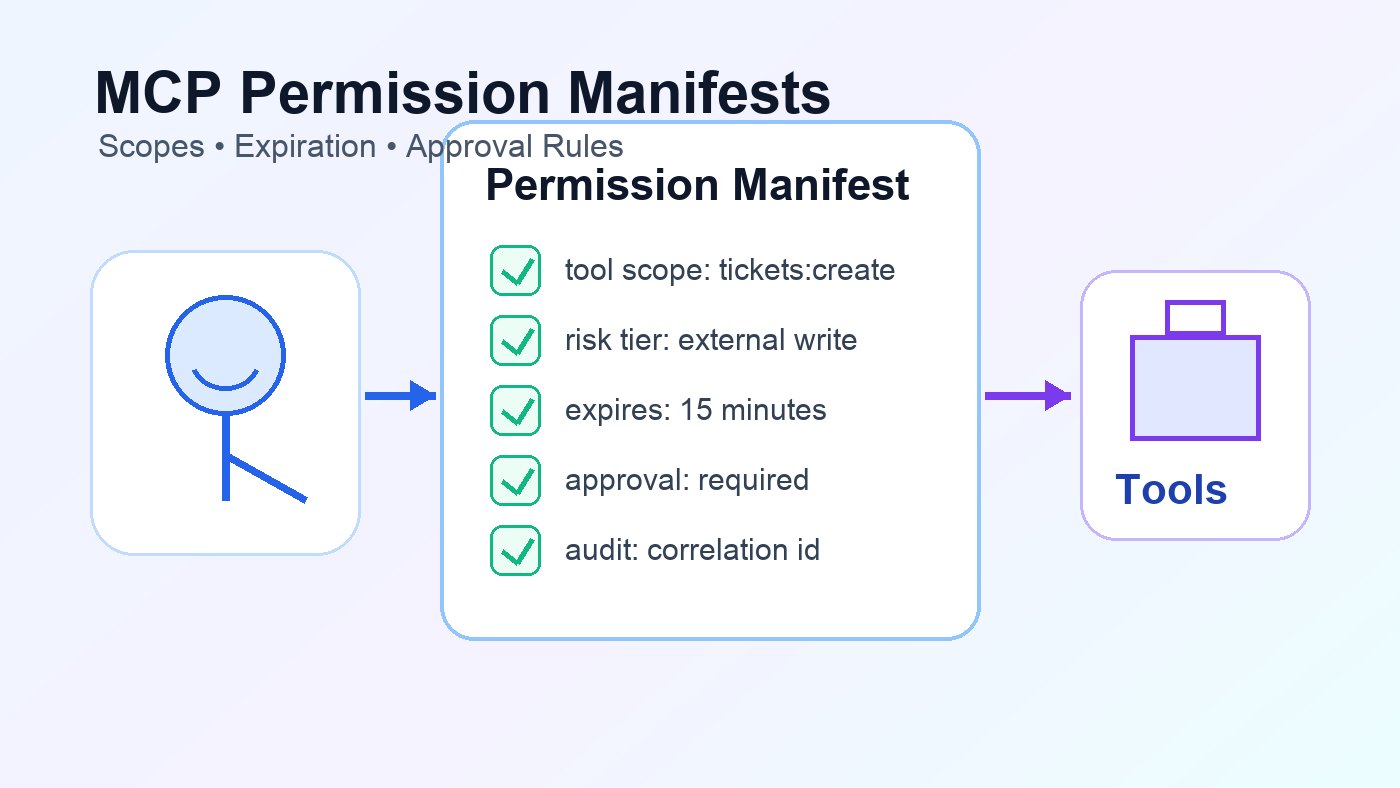
MCP Permission Manifest: Quick Answer
The source pillar, How to Build a Secure MCP Server, explains the full architecture: tools, permissions, validation, human approval, and production safeguards. This cluster article goes narrower. It focuses on one implementation artifact: the MCP permission manifest.
An MCP permission manifest is a structured policy document that says which tool is allowed, what action it can perform, which resources it can touch, which user or tenant boundary applies, when the permission expires, whether human approval is required, and what must be logged. It is not part of the MCP specification as a universal file format. It is a practical pattern for teams that need deterministic policy around model-controlled tools.
Why MCP Servers Need Permission Manifests
MCP tools give AI applications a bridge into external systems: databases, ticketing systems, files, APIs, internal workflows, and production services. The official MCP tools specification describes tools as model-controlled capabilities, meaning the language model may discover and invoke them based on context. The same guidance recommends clear user indicators and confirmation prompts for sensitive operations.
That design is powerful, but it creates a security question that ordinary route-based APIs do not fully answer: what exactly is this model-controlled tool allowed to do right now? A backend endpoint may already have application authorization, but an MCP server still needs a tool-level permission boundary. Otherwise a friendly tool name such as manage_customer can hide a dangerous bundle of reads, writes, exports, refunds, and messages.
A permission manifest forces the team to write the boundary down. It gives reviewers a concrete artifact. It gives the server an enforceable contract. It gives auditors a way to connect tool calls to scopes and approvals. Most importantly, it prevents the quiet drift from “agent can help draft a support reply” to “agent can send anything to anyone with a broad API token.”
The MCP Permission Manifest Field Matrix
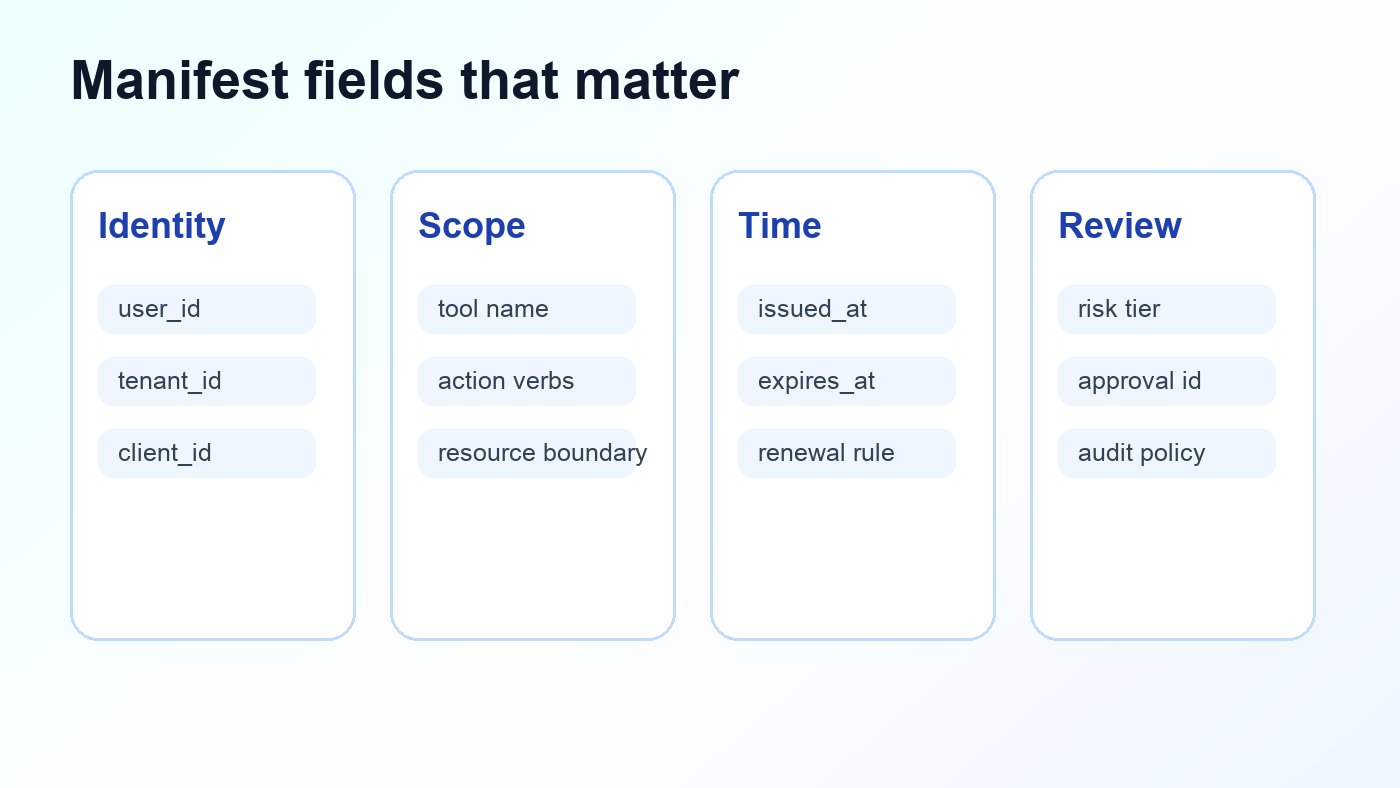
A useful manifest should be boring, explicit, and reviewable. It should not rely on natural-language descriptions alone. Use stable identifiers, enums, resource patterns, expiry rules, risk tiers, and audit policies.
| Manifest field | Example | Why it matters |
|---|---|---|
tool_name | send_customer_reply | Maps the manifest to one exposed MCP tool. |
allowed_actions | ["draft", "send"] | Prevents one tool name from silently covering too many behaviors. |
resource_boundary | tenant:${tenant_id}/tickets/* | Limits which tenant, account, project, file, or environment can be touched. |
required_scope | messages:send_customer | Connects tool policy to OAuth/API scopes or internal authorization claims. |
risk_tier | Tier 3 external action | Determines default approval, logging, and rate-limit rules. |
expires_after | 15m | Prevents temporary access from becoming permanent access. |
approval_rule | preview_required | Defines when a human must review the action before execution. |
argument_constraints | max_amount: 100 | Limits dangerous parameters even when a tool is otherwise allowed. |
audit_policy | log_decision_and_result | Ensures investigations can explain what happened without collecting everything. |
output_policy | sanitize_untrusted_text | Controls what tool output can be passed back into the model context. |
This matrix fills a gap between broad security advice and production code. Least privilege is easy to recommend. A manifest makes least privilege concrete enough to test.
A Practical MCP Permission Manifest Example
Here is a compact YAML-style example for a customer support MCP server. The syntax is illustrative; use JSON, YAML, database rows, or signed policy bundles depending on your stack.
tool: send_customer_reply
version: 3
risk_tier: tier_3_external_action
allowed_actions:
  - draft
  - send
resource_boundary:
  tenant: "${tenant_id}"
  ticket_id_pattern: "ticket_*"
required_scope: "messages:send_customer"
expires_after: "15m"
argument_constraints:
  recipient_must_match_ticket: true
  max_recipients: 1
  attachments_allowed: false
approval_rule:
  required: true
  preview_fields:
    - recipient
    - subject
    - message_body
    - ticket_id
  execution_must_match_preview: true
audit_policy:
  log:
    - user_id
    - tenant_id
    - client_id
    - tool_name
    - approval_id
    - recipient_hash
    - message_hash
    - result_status
output_policy:
  sanitize_for_model: true
  mark_external_content_untrusted: true
The key idea is separation. The tool handler sends the message. The manifest describes whether that handler may run, with which arguments, for which resource, and under which review rule. If the manifest says approval is required, the server must reject direct execution until it receives a valid approval record.
Permissions Should Expire by Default
Agent tool access should usually be temporary. A user might authorize an agent to summarize one ticket, update one document, or send one approved reply. That does not mean the same permission should remain active for every future session.
| Permission type | Suggested lifetime | Good for | Risk if too long |
|---|---|---|---|
| Single-call permission | One execution | Refund, delete, publish, send message | Replay or accidental reuse |
| Short session permission | 5–30 minutes | Ticket triage, document edits, batch classification | Session drift and hidden scope expansion |
| Project permission | Hours or days with review | Low-risk read workflows or sandbox automation | Over-broad background access |
| Standing permission | Rare; explicit admin review | Public docs search, harmless internal utilities | Permanent agent authority nobody remembers granting |
Expiration is not only a security control. It is also a product clarity control. Users understand “approve this reply” better than “approve this agent to send replies whenever it decides.”
Bind Approval Rules to Risk Tiers
The companion article on MCP tool risk tiers explains how to classify read, write, external, and destructive actions. Permission manifests should reuse that risk tier instead of inventing a new approval system for each tool.
Approval records should be first-class objects. The manifest should name which fields must appear in the approval UI and whether the final execution must match the approved preview. If the model changes the amount, recipient, environment, or file path after approval, the server should require a new approval.
Where to Enforce the Manifest
A manifest is only useful if the server enforces it before the tool handler touches the downstream system. Do not let individual handlers decide their own security rules. Put a policy layer in front of them.
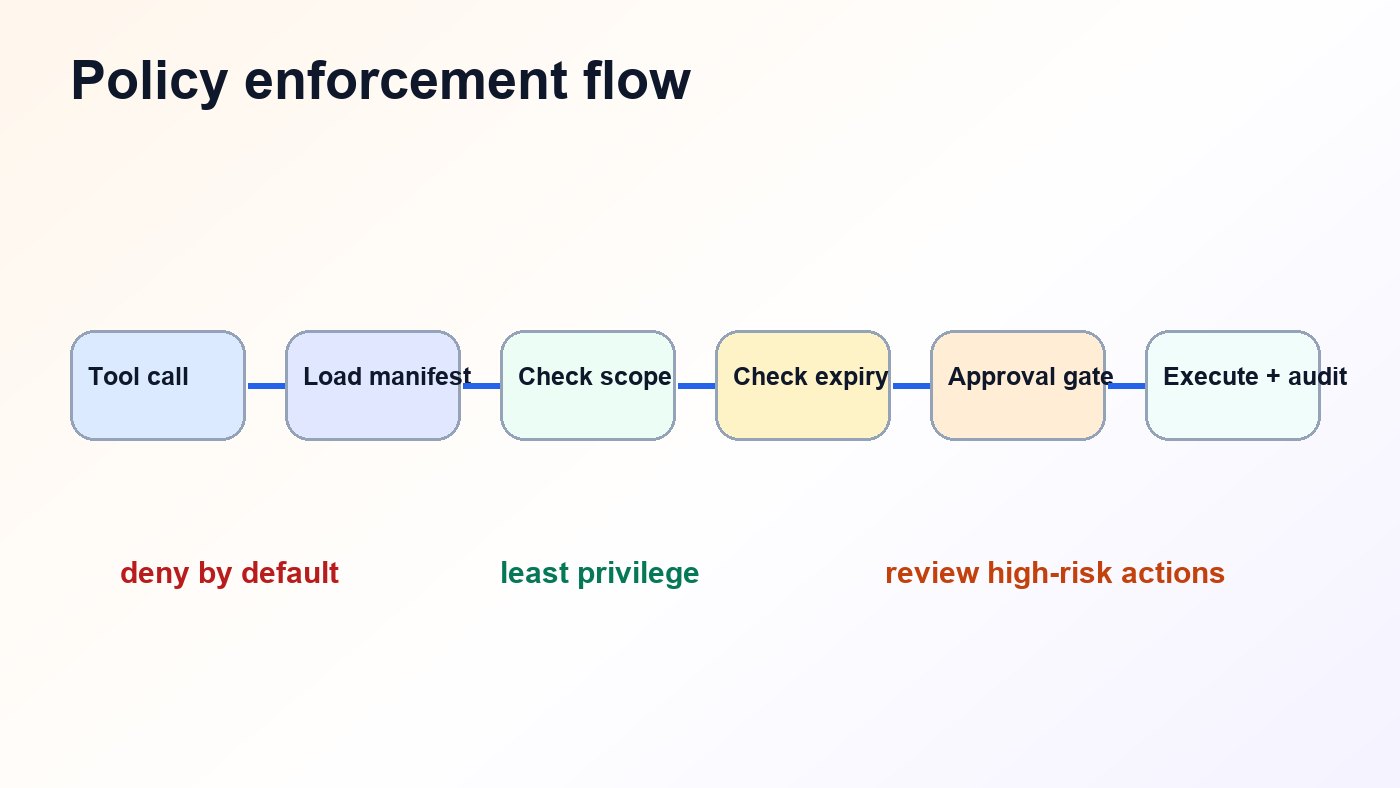
tool_call_received
  → load_permission_manifest(tool_name)
  → validate_schema(arguments)
  → authenticate_user_and_client()
  → check_required_scope()
  → check_resource_boundary()
  → check_expiration_or_lease()
  → require_or_verify_approval()
  → execute_handler()
  → sanitize_output()
  → write_audit_event()
This order matters. If the server validates only after execution, the manifest becomes documentation rather than control. If it checks only identity but not resource boundaries, a user-scoped token may still touch the wrong tenant, customer, repository, or environment. If it checks approval but not argument equality, the approved preview can drift from the actual execution.
For remote HTTP-based MCP servers, connect this layer to authorization. The MCP authorization specification describes OAuth-style protected resource behavior for HTTP transports. Your manifest should map tool-level permissions to token scopes or internal authorization claims, then still enforce resource boundaries inside the server.
Tool Annotations Are Helpful, But Not Enough
MCP tool metadata and annotations can help clients and models understand a tool’s intended behavior. That is useful for discovery and UX. It is not enough for security. A malicious or compromised server can describe a tool incorrectly, and a well-meaning server can still have overly broad backend credentials.
Use annotations as hints. Use permission manifests as enforceable policy. Use backend authorization as the final guardrail. The three layers should agree, but only the enforcement layer should decide whether the action runs.
How to Test MCP Permission Manifests
Permission bugs usually hide in edge cases: expired approvals, mismatched tenants, retries, changed arguments, and fallback credentials. Add tests that prove the policy fails closed.
| Test case | Expected result |
|---|---|
| Unknown tool name | Deny by default; no handler execution. |
| Missing required scope | Deny with safe error; log policy decision. |
| Expired permission lease | Require renewal or fresh approval. |
| Tenant mismatch in resource path | Deny even if user is authenticated. |
| Approval preview differs from execution arguments | Deny and request a new approval. |
| Retry after successful destructive action | Deduplicate with idempotency key. |
| Tool output contains instruction-like text | Mark as untrusted data and sanitize before model context. |
Common Permission Manifest Mistakes
- Using broad verbs. Replace
managewith specific actions such asread,draft,send,archive, ordelete. - Forgetting resource boundaries. A scope without tenant, account, repository, file, or environment limits is still too broad.
- Making approval permanent. Approval should usually bind to one action, one preview, or one short session.
- Logging raw secrets. Audit the decision path, not access tokens, private prompts, or full sensitive payloads.
- Letting handler code bypass policy. All tool calls should pass through the same manifest enforcement layer.
Source-Backed Design Principles
- The MCP tools specification describes tools as model-controlled capabilities and recommends human-in-the-loop controls for trust and safety.
- The MCP authorization specification defines authorization behavior for HTTP transports using OAuth-related patterns and protected resource metadata.
- The MCP security best-practices guidance discusses authorization and confused-deputy risks in MCP server designs.
- The OWASP Authorization Cheat Sheet recommends least privilege, deny by default, permission validation on every request, logging, and authorization tests.
- The OWASP AI Agent Security Cheat Sheet highlights tool least privilege, human-in-the-loop controls, output validation, observability, and abuse-case testing.
Keep Learning on Singularity Journey
- How to Build a Secure MCP Server — source pillar for the full tools, permissions, and approval architecture.
- MCP Tool Risk Tiers — classify read, write, external, and destructive agent actions.
- MCP Audit Logs — decide what to capture for secure tool-call investigation.
- MCP Authorization — scope users, tools, and tokens for remote servers.
FAQ: MCP Permission Manifests
What is an MCP permission manifest?
An MCP permission manifest is a structured policy document that defines which tool can perform which action, against which resource, with which scope, for how long, and under which approval and audit rules. It is a practical implementation pattern, not a universal MCP file format.
Should MCP permissions expire?
Yes, risky permissions should usually expire. Single-call or short-session permissions reduce the chance that temporary agent access becomes forgotten standing authority.
How do permission manifests relate to OAuth scopes?
OAuth scopes or internal authorization claims prove the user or client has a category of access. The manifest maps that access to a specific MCP tool, action, resource boundary, approval rule, and expiry condition.
Can MCP tool annotations replace permission manifests?
No. Tool annotations can help describe expected behavior, but they should not replace server-side policy enforcement. Treat annotations as hints and manifests as enforceable rules.
What fields should every MCP permission manifest include?
At minimum, include tool name, allowed actions, resource boundary, required scope, risk tier, expiry rule, approval rule, argument constraints, audit policy, and output policy.
Conclusion: Make Tool Authority Explicit
The safest MCP tools are not merely well-described. They are explicitly bounded. A permission manifest gives your team a single place to review scope, expiry, approval, constraints, and audit expectations before a model-controlled tool touches real systems.
If you are still designing the broader server architecture, start with the source pillar: How to Build a Secure MCP Server: Tools, Permissions, and Human Approval. Then use this manifest pattern to turn “least privilege” from a principle into code your MCP server can enforce.
