
MCP Authorization: How to Scope Users, Tools, and Tokens for Remote Servers
MCP authorization is the control layer that decides which user, client, agent, and tool may access which resource, with which scope, and under which approval rule.
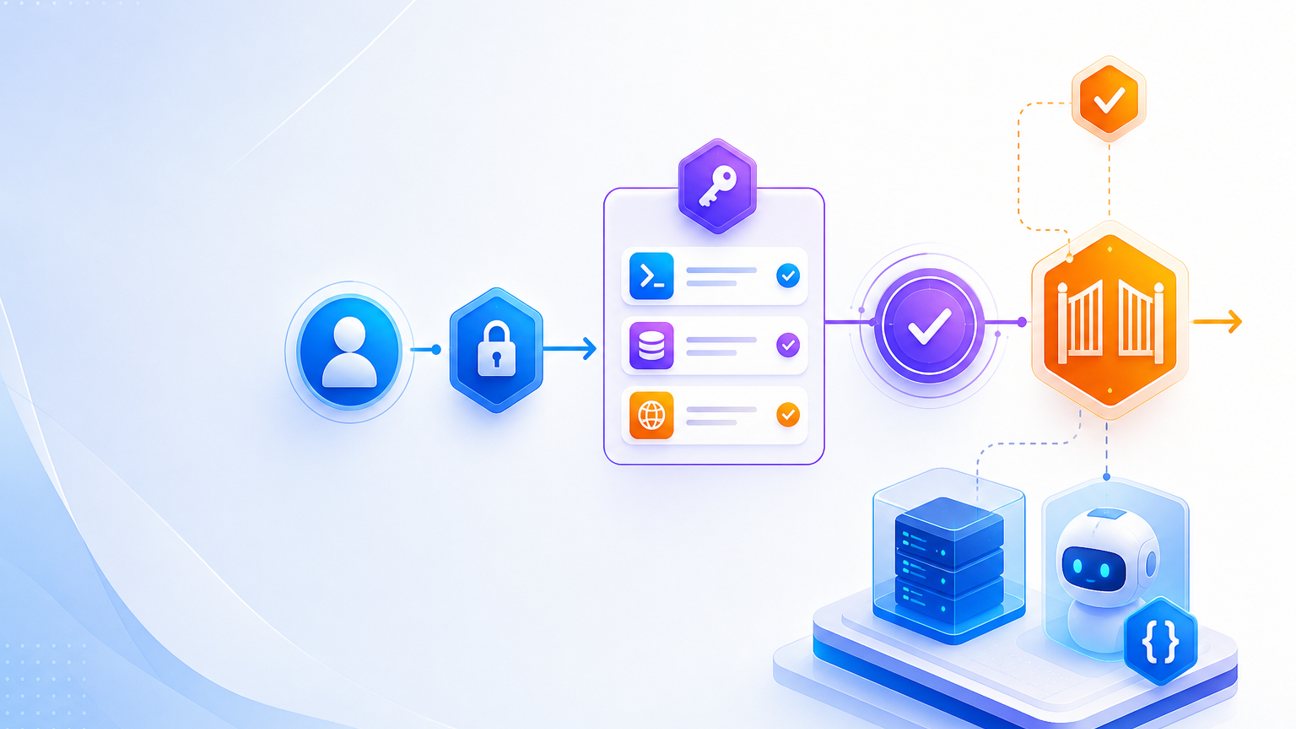
MCP authorization becomes urgent the moment your Model Context Protocol server moves beyond a local toy integration. A local stdio server that reads a public documentation folder is one thing. A remote MCP server that lets an AI agent query customer records, create tickets, send messages, or update internal systems is a different security problem. At that point, the question is not just “Can the model call this tool?” The better question is: “Who authorized this tool call, for which user, against which resource, with which scope, and how would we prove it later?”
This article is a focused cluster guide for readers who already understand the broader secure-MCP-server architecture. If you need the full foundation first, start with Singularity Journey’s pillar guide on how to build a secure MCP server. Here we go narrower: OAuth-style authorization, protected resource metadata, scopes, token validation, downstream access, cross-server risk, and the troubleshooting habits that keep remote MCP servers from becoming overpowered agent gateways.
Quick Answer: What MCP Authorization Controls
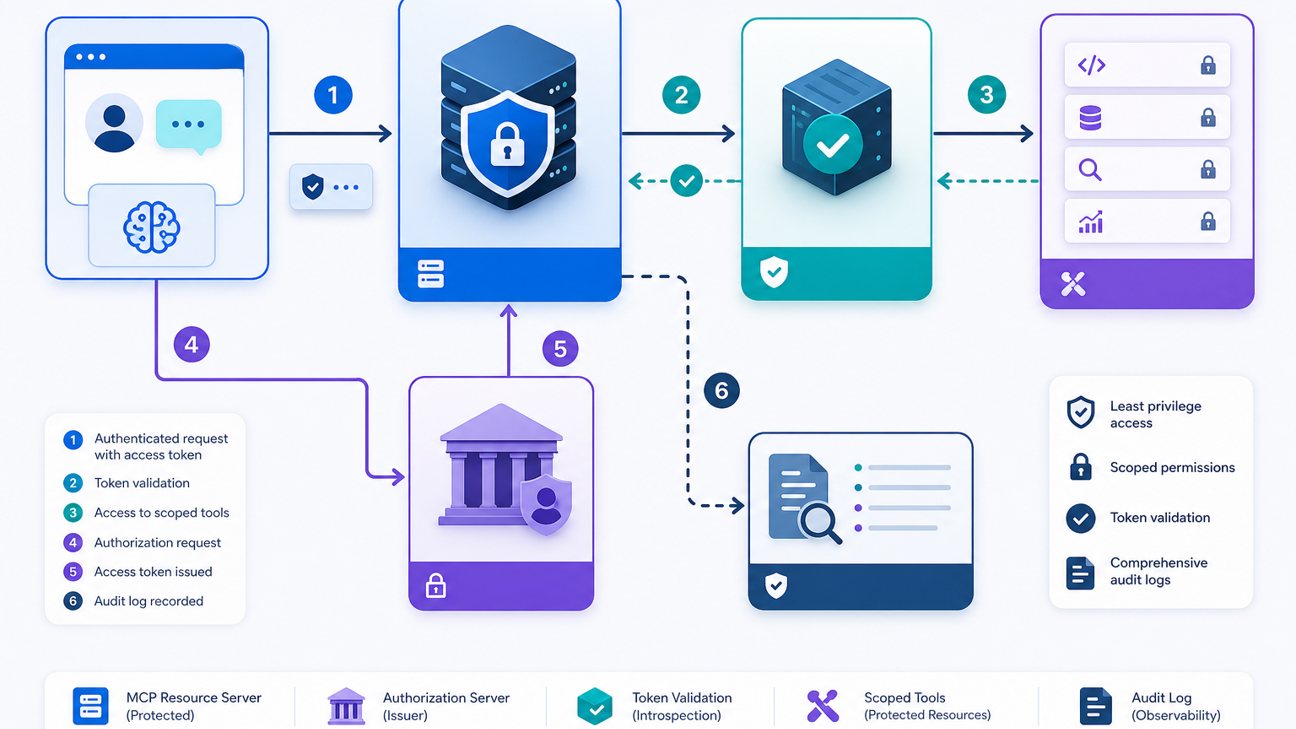
MCP authorization controls whether a client can access a remote MCP server and what it may do once connected. In current MCP guidance, a remote MCP server is commonly treated as a protected resource server. The client obtains an access token from an authorization server, then presents that token to the MCP server using a bearer token. The MCP server validates the token before it exposes tools, resources, or prompts. That is the entry gate, but it is not the whole security model.
A good authorization design answers seven questions before a tool runs. Who is the end user? Which MCP client or host is acting? Which tenant, workspace, account, repository, inbox, or dataset is being touched? Which tool or resource is requested? Which action is being attempted: read, draft, update, send, delete, deploy, or grant permission? Which scope allows that action? And does the risk level require a dry-run, a draft, or human approval before execution?
The official MCP authorization documentation describes OAuth 2.1-style flows, protected resource metadata, supported scopes, authorization server discovery, client registration, bearer access tokens, and audience validation. Those protocol pieces matter because they let a client discover how to authenticate and authorize safely. But developers still need to turn the protocol into product policy. A token with mcp:tools may prove that the client can call tools in general; it does not automatically prove that this user may send an email to this customer or update this production table.
| Layer | Question it answers | Common mistake |
|---|---|---|
| Authentication | Who is this user or client? | Accepting anonymous remote tool access because the tool “looks read-only.” |
| Protocol authorization | Does the token permit access to this MCP resource? | Checking that a token exists but not its issuer, audience, expiry, or scopes. |
| Application authorization | May this user perform this action on this object? | Using one integration token for every user and tenant. |
| Tool-risk policy | Does this action require approval, dry-run, or refusal? | Letting the model decide whether the action is safe. |
| Auditability | Can we reconstruct who authorized what? | Logging success/failure but not user, scope, tool, resource, or approval state. |
MCP Authorization Architecture for Remote Servers
The architecture starts with a remote MCP server exposed over HTTP. When a client calls it without valid authorization, the server can respond with a 401 Unauthorized challenge that points to protected resource metadata. That metadata tells the client which resource is being protected, which authorization servers can issue tokens, and which scopes the server understands. The client then uses the authorization server’s metadata to perform the OAuth flow, obtain a token, and call the MCP endpoint again with Authorization: Bearer ....
In that model, the MCP server is not the place where the user logs in. It is the place where access is enforced. The authorization server handles login, consent, token issuance, refresh behavior, and client registration. The MCP server validates the resulting token and maps it to its own resource and tool policy. This separation is useful because it lets developers reuse established identity providers instead of inventing a custom agent login system.
For local stdio servers, the story is different. A local server often runs as a subprocess of the client and may receive configuration through environment variables. That does not remove security requirements; it simply moves them. The local server still needs to authorize downstream calls to SaaS APIs, databases, files, or internal services. If the local MCP server carries an admin token in an environment variable, the agent may still become overpowered even without a remote OAuth handshake.
The article’s scope is remote servers because that is where many developer pain points concentrate: OAuth discovery, redirect URIs, token audience, scopes, API key fallback, proxy paths, multi-user sessions, and connector compatibility. Community discussions show that developers can make a “hello world” MCP server quickly, but spend far longer making authentication and authorization work across real clients. Treat that as a design warning, not just a setup annoyance.
Design a Scope Model for Users, Tools, and Tenants
Scope design is where MCP authorization becomes practical. A scope is not just a string attached to a token. It is a promise about what the client is allowed to attempt. Weak scopes are too broad, such as mcp:all, tools:full, or admin. Better scopes are narrow enough for both users and reviewers to understand. For example, tickets:read, tickets:draft, tickets:send, calendar:freebusy, calendar:create_draft, and repo:issues:write communicate real boundaries.
Do not model scopes only by API category. Model them by agent risk. A read-only tool that returns public status pages can use a low-risk scope. A tool that drafts an internal ticket can use a draft scope. A tool that sends an external email, changes permissions, moves money, deploys code, deletes data, or reads sensitive customer records needs a stricter scope and probably an approval rule. This aligns with Singularity Journey’s related guidance on human approval for AI agents: humans should review actions where the cost of a wrong tool call is high.
| Scope pattern | Example | Good for | Approval rule |
|---|---|---|---|
| Read scope | customers:summary:read | Returning bounded records the user can already access. | Usually no approval, but log and filter sensitive fields. |
| Draft scope | support:ticket:draft | Creating proposed work that a human reviews later. | No direct external impact; approval before send or publish. |
| Write scope | crm:status:update | Changing internal state with business impact. | Approval or policy gate when impact is material. |
| External action scope | email:send | Sending messages, publishing, charging, deploying, or notifying. | Require explicit human approval and audit trail. |
| Admin scope | workspace:members:manage | Permission changes, secrets, user management. | Restrict heavily; often disallow direct agent execution. |
Good scopes must also include context. A user may have tickets:read for one workspace and not another. A customer-support agent may draft replies but not approve refunds. A developer may inspect CI logs but not rotate production secrets. If your token system cannot express tenant, organization, environment, or resource boundaries, your MCP server must enforce those boundaries after token validation.
Use the same mental model as an AI agent control plane: identity, permissions, policy, approval, and audit must live outside the model’s prompt. The model may propose a tool call. The server decides whether the call is allowed.
Downstream Authorization and Confused-Deputy Risk
The hardest part of MCP authorization is not always the first token check. It is what happens after the MCP server receives a valid request. Many servers call downstream systems: Gmail, GitHub, Slack, databases, CRMs, calendars, deployment systems, payment providers, observability tools, or internal APIs. If the MCP server uses one powerful service token for every user, it can become a confused deputy: the agent convinces a trusted server to perform an action the user should not be able to perform directly.
OWASP’s MCP security guidance highlights several risks that matter here: prompt injection through tool return values, supply-chain risk, cross-server attacks, overbroad permissions, monitoring gaps, and confused-deputy problems. The practical developer takeaway is that authorization must survive the entire call chain. A valid MCP bearer token should not automatically become an unlimited downstream API call.
There are three safer patterns. First, propagate user identity downstream when the target service supports user-delegated authorization. Second, map the user to internal permissions before making downstream calls, even if the server itself uses a service account. Third, split high-risk tools so the server can produce a dry-run, diff, or draft instead of immediately executing the final action. For example, draft_pull_request_comment is safer than post_pull_request_comment, and prepare_refund_request is safer than issue_refund.
MCP Authorization Token Validation Checklist
A remote MCP server should reject weak token handling. Checking that the Authorization header exists is not enough. The server should validate issuer, audience or resource binding, expiry, signature, scopes, token type, tenant mapping, revocation behavior where available, and replay or session constraints where relevant. The MCP authorization specification and tutorials emphasize protected resource metadata and audience/resource binding because tokens should be issued for the resource that receives them, not reused casually across unrelated systems.
// Pseudocode: MCP authorization gate before tool execution
async function authorizeMcpTool(ctx, toolName, input) {
  const token = parseBearerToken(ctx.request);
  const claims = await verifyJwtOrIntrospect(token);
  requireIssuer(claims.iss, TRUSTED_ISSUER);
  requireAudienceOrResource(claims, "https://api.example.com/mcp");
  requireNotExpired(claims.exp);
  const user = await mapSubjectToUser(claims.sub);
  const toolPolicy = policyForTool(toolName);
  requireScopes(claims.scope, toolPolicy.requiredScopes);
  requireTenantAccess(user, input.tenant_id || ctx.tenant);
  const risk = classifyRisk(toolName, input, user);
  if (risk.requiresApproval) return createApprovalRequest(user, toolName, input, risk);
  auditDecision({user:user.id, tool:toolName, scopes:claims.scope, decision:"allowed"});
  return {allowed:true, user, risk};
}- Publish protected resource metadata for the MCP endpoint.
- Use an authorization server that supports the needed OAuth/OIDC metadata and client flow.
- Validate token signature or introspect opaque tokens through a trusted endpoint.
- Check issuer, audience/resource, expiry, scopes, and tenant mapping.
- Reject tokens issued for another resource or environment.
- Separate read, draft, write, external-action, and admin scopes.
- Map each tool to required scopes and risk tier.
- Enforce downstream permissions before calling SaaS or internal APIs.
- Log the authorization decision before and after tool execution.
- Require approval for irreversible, external, sensitive, or privileged actions.
Interactive Authorization Decision Helper
Use this lightweight helper while designing a remote MCP tool. It does not replace a threat model, but it turns authorization decisions into a repeatable design review.
MCP authorization risk selector
Select every statement that applies to the tool you want to expose.
Troubleshooting MCP OAuth and Permission Failures
Developer community signals show that auth failures are often silent, indirect, or client-specific. A remote server can be correct in isolation but fail through a proxy, connector, vault, redirect URI, or scope mismatch. Treat troubleshooting as part of the article’s implementation value: keep a diagnostic table, log safe error codes, and expose enough metadata for clients to discover the correct authorization path.
| Symptom | Likely cause | What to check |
|---|---|---|
| Client receives 401 repeatedly | Missing or invalid bearer token, wrong issuer, expired token, or audience mismatch. | Verify WWW-Authenticate, protected resource metadata, issuer, expiry, audience/resource, and clock skew. |
| OAuth starts but callback fails | Redirect URI mismatch or unsupported client registration behavior. | Compare registered redirect URI, client metadata, environment URL, proxy hostname, and HTTPS scheme. |
| Token validates but tool is forbidden | Scope exists but does not authorize this tool, tenant, user role, or risk tier. | Log required scopes, received scopes, user ID, tenant ID, and policy decision. |
| Works locally but fails behind proxy | Path rewriting, trailing slash, streaming headers, or discovery endpoints are not forwarded correctly. | Test /.well-known URLs, MCP path, POST path, stream behavior, and forwarded host headers. |
| User can access too much | MCP server uses a broad downstream service token without per-user checks. | Add user-to-resource authorization before downstream API calls; split read/draft/write scopes. |
| Approval appears bypassed | Server trusts model text or client state instead of an approval record. | Require server-side approval IDs and bind them to user, tool, arguments, expiry, and risk tier. |
Keep error messages useful but not leaky. The client can receive “missing required scope” or “token audience mismatch” without seeing secrets, raw tokens, or internal policy tables. Your logs can carry structured diagnostic details for operators. The user-facing message should explain what to reconnect, reauthorize, or request from an administrator.
Production Checklist for MCP Authorization
Production authorization is not a one-time OAuth configuration. It is a lifecycle. Tools change. Scopes expand. Users leave teams. Tenants merge. Clients add new connector behavior. Attackers study tool descriptions. The server should assume that authorization policy will need reviews, tests, and emergency disable switches.
Before launch
- Define scope names by action and risk, not only by API area.
- Map every tool to required scopes, tenant requirements, and approval policy.
- Validate tokens for issuer, audience/resource, expiry, and scope.
- Use least-privilege downstream credentials or user-delegated access.
- Test 401, 403, expired-token, wrong-audience, wrong-tenant, and missing-scope paths.
After launch
- Monitor denied requests, approval frequency, scope usage, and suspicious tool combinations.
- Review logs for broad scopes that are never needed.
- Rotate secrets and support token revocation where possible.
- Run prompt-injection and tool-output abuse tests.
- Maintain an incident playbook for disabling tools or scopes quickly.
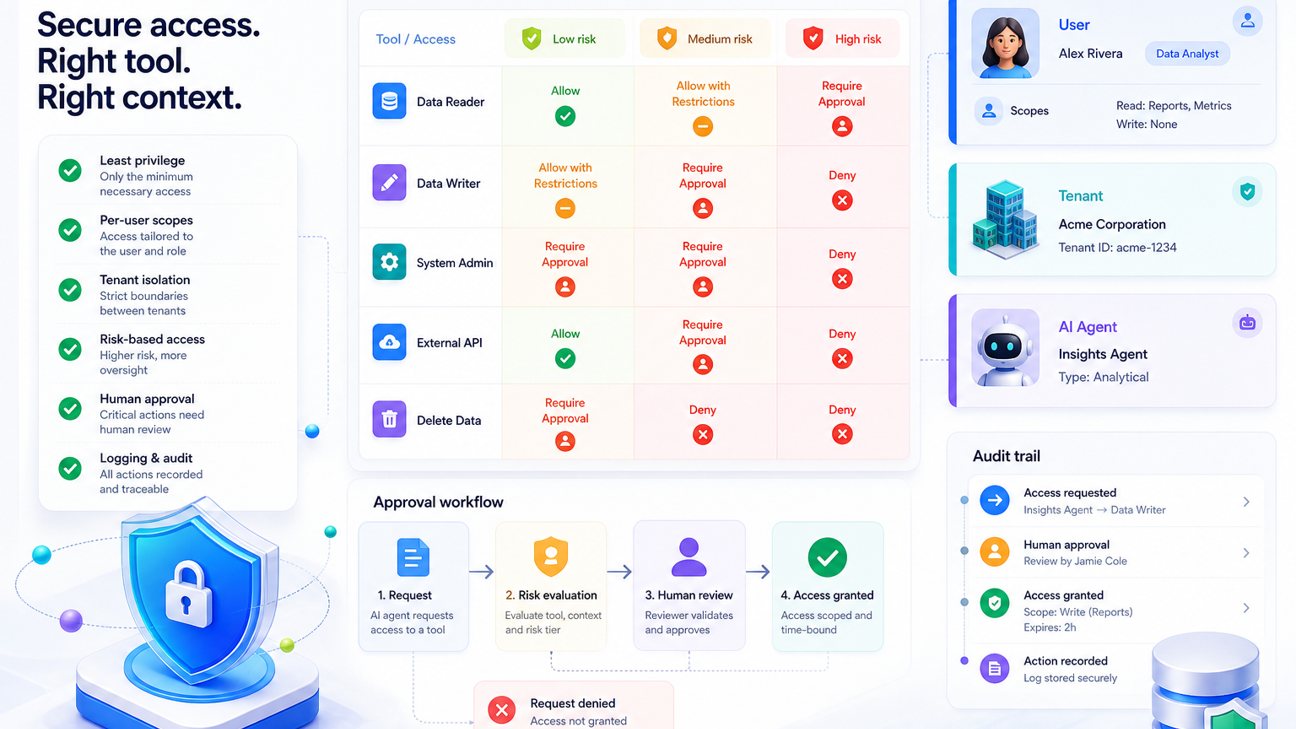
Connect this checklist to your broader agent reliability work. Authorization logs should join the same trace as the user request, model plan, tool call, approval decision, downstream operation, and final response. Singularity Journey’s guide to AI agent evaluation is useful here because a tool call that succeeds technically can still fail the user’s real intent or violate a policy. For multi-step systems, pair authorization with durable AI agent workflows so retries do not duplicate sensitive actions.
Finally, keep the MCP tool surface small. If your server exposes twenty overlapping tools with broad write scopes, authorization becomes hard to reason about. If it exposes a few well-named tools with clear schemas, scoped tokens, approval gates, and audit logs, both humans and agents can use it more safely. The goal is not to make agents powerless. The goal is to let them do useful work inside boundaries that your team can explain, test, monitor, and revoke.
FAQ: MCP Authorization for Remote Servers
Is MCP authorization required for every server?
Not every MCP server needs the same level of authorization. A local read-only stdio server for personal use has different requirements from a remote server that touches private data or writes to production systems. Remote multi-user servers should usually implement strong authentication, authorization, token validation, scoped tools, and audit logging.
What is the difference between authentication and authorization in MCP?
Authentication identifies the user or client. Authorization decides what that identity may do. In MCP, a client may authenticate through an OAuth-style flow and receive a token, but the MCP server still needs to authorize specific tools, resources, tenants, and actions.
Should I use API keys or OAuth for a remote MCP server?
API keys can be useful for developer-only or internal prototypes, but OAuth-style authorization is a better fit for multi-user remote servers, user consent, token expiry, scopes, and connector compatibility. Some clients and hosted connectors expect OAuth rather than static API keys.
What scopes should an MCP server use?
Use narrow, understandable scopes that map to real actions and risk levels: read, draft, write, send, deploy, manage permissions, or admin. Avoid broad scopes such as mcp:all unless the environment is tightly controlled and temporary.
How do I prevent an MCP server from becoming a confused deputy?
Do not let a valid MCP request automatically use a broad downstream service token. Map the request to the end user, tenant, resource, action, and scope before calling downstream systems. Use user-delegated access where possible and require approval for sensitive actions.
Do human approvals replace authorization?
No. Human approval is a control for high-risk actions, but the server still needs authentication, token validation, scope checks, tenant checks, input validation, logging, and downstream authorization. Approval should be a server-side record, not just a sentence in the model context.
What should I log for MCP authorization decisions?
Log user ID, client ID, tenant, token issuer, non-sensitive scope summary, tool name, resource ID, risk tier, policy decision, approval ID if any, downstream operation, result, latency, and error code. Never log raw access tokens or secrets.
