
AI Guardrails Explained: How Safe AI Systems Prevent Mistakes, Misuse, and Runaway Actions
AI guardrails are the practical safety layers that sit around an AI system. They check what goes in, shape what the model can do, verify what comes out, and decide when a human should step in. This guide explains guardrails without hype, fear, or false certainty.
AI Guardrails: Quick Answer
AI guardrails are controls that reduce the chance an AI system will accept unsafe input, reveal private data, invent unsupported answers, follow malicious instructions, call the wrong tool, or take an action without enough human oversight. A guardrail can be as simple as a content filter or as advanced as a full review workflow with retrieval, policy checks, permissions, logging, and escalation.
The most important thing to understand is that guardrails are not one feature. They are a layered system. A safe AI app usually needs several controls working together: input screening before the model sees a request, instructions that define allowed behavior, retrieval that grounds answers in trusted sources, tool permissions that limit what the AI can do, output validation before the user sees the answer, and monitoring after deployment. When the task is high-stakes, a human review step becomes part of the guardrail stack too.
This matters because modern AI is no longer only a chatbot that writes text. AI tools can search files, summarize private documents, write code, call APIs, browse websites, update records, and operate inside business workflows. The more an AI system can do, the more guardrails it needs. A harmless typo in a poem generator is one kind of problem. A wrong medical summary, a leaked customer record, a tool call that deletes data, or an agent that follows a prompt injection is a different problem entirely.
For readers who are new to this topic, keep one rule in mind: guardrails reduce risk; they do not prove safety. A good guardrail strategy assumes the model can still be wrong, users can still be adversarial, and the surrounding system must still be tested, monitored, and improved.
Why AI Needs Guardrails in the First Place
AI systems are powerful because they are flexible. The same model can draft an email, explain code, summarize a policy, write a sales response, or reason through a plan. That flexibility is also the source of risk. Traditional software follows explicit rules written by developers. A large language model generates probable responses from patterns in data, instructions, context, and user input. It can be helpful in surprising ways, but it can also misunderstand the task, overstate confidence, or follow instructions the product team never intended.
Beginners often hear the word guardrail and imagine a single safety switch. In real systems, the risk is broader. An AI assistant may answer outside its domain. It may make up a citation. It may expose sensitive information included in a prompt. It may produce harmful or biased content. It may accept a hidden instruction inside a webpage and ignore the developer’s original rules. It may call a tool because the user asked nicely, even though the action should require approval. It may produce JSON that breaks downstream software. It may be technically correct but inappropriate for the user’s context.
Official guidance from organizations such as NIST, OWASP, OpenAI, Anthropic, Microsoft, and Google points in the same direction: responsible AI is not only about the model. It is about the whole system around the model. NIST’s AI Risk Management Framework gives teams a language for mapping, measuring, managing, and governing AI risks. OWASP’s work on large language model applications highlights security risks such as prompt injection, sensitive information disclosure, insecure output handling, and excessive agency. OpenAI safety guidance emphasizes moderation, adversarial testing, and human review in high-stakes uses. Anthropic’s documentation discusses ways to increase output consistency through formats, examples, structured outputs, and retrieval grounding. Microsoft documents content filtering for prompts and completions. Google Cloud’s responsible AI material frames safety as a design and deployment responsibility.
The lesson is practical: if an AI system matters, the team should design the guardrails as deliberately as the features. You would not launch payments without fraud controls, access permissions, logs, and rollback procedures. You should not launch an AI agent with tool access without policy checks, permissions, human approval for risky actions, and monitoring.
The AI Guardrail Stack: Six Layers That Work Together
A useful way to understand guardrails is to place them in the order information moves through an AI system. A user sends a request. The application decides what context and tools the model can access. The model generates an answer or plan. The system checks the output. Then the system either shows the answer, asks a human to approve an action, or blocks the response. Afterward, logs and evaluations help the team improve the product.
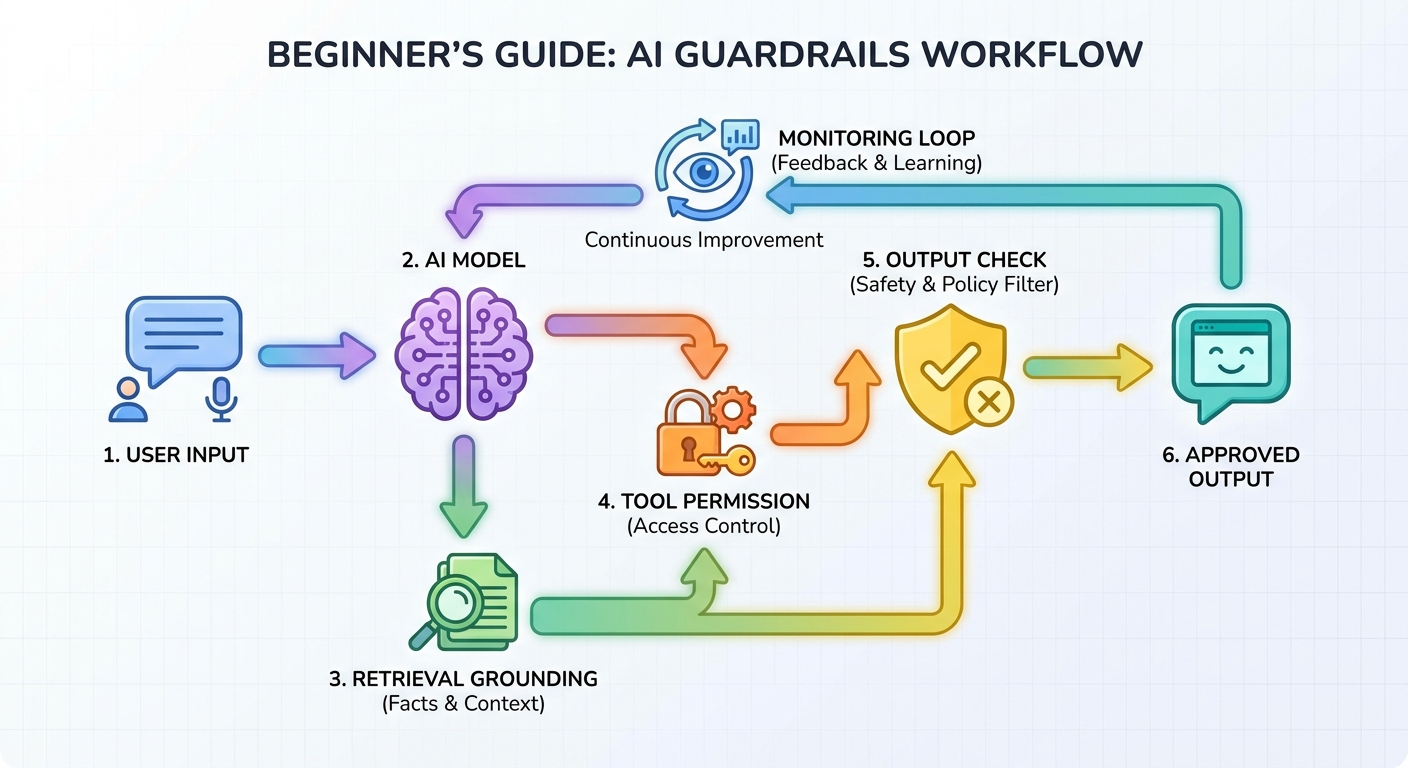
A strong guardrail system uses multiple layers because no single control catches every failure mode.
These layers overlap by design. If the input filter misses a prompt injection, strong tool permissions may still prevent damage. If the model produces an unsupported claim, output validation or citation requirements may catch it. If a failure reaches the user, monitoring and feedback should make the next version safer. Guardrails are not magic walls; they are layered defenses.
| Failure mode | What it looks like | Useful guardrails |
|---|---|---|
| Hallucination | The AI states a fact, source, policy, or number that is not supported. | Retrieval grounding, citation checks, uncertainty wording, output review, human verification for high-stakes answers. |
| Prompt injection | A user or webpage tries to override the system instructions with hidden or direct commands. | Input scanning, instruction hierarchy, source separation, tool permissions, allowlists, human approval for risky actions. |
| Unsafe content | The AI produces harmful, hateful, sexual, violent, or self-harm-related material outside the product policy. | Moderation, content filters, refusal templates, escalation paths, human review. |
| Data leakage | The AI reveals secrets, private records, credentials, or data from another user. | Access control, data minimization, redaction, retrieval permissions, output scanning, audit logs. |
| Bad tool call | The AI calls an API, sends a message, edits a file, or updates a record incorrectly. | Scoped tools, dry-run previews, confirmations, rate limits, reversible actions, human approval. |
| Broken format | The AI returns prose when the system expects valid JSON, structured fields, or a strict template. | Structured output, schema validation, retries, examples, parser checks. |
Guardrails Are More Than Prompt Engineering
Prompt engineering is useful, but it is not the same as a complete guardrail strategy. A prompt can tell the AI to avoid making unsupported claims, stay in scope, ask clarifying questions, and refuse unsafe requests. Those instructions help shape model behavior, especially in low-risk tasks. But prompts are soft controls. They depend on the model following instructions correctly under messy conditions.
Harder guardrails live outside the model. A content filter can block a prompt before it is sent. A retrieval system can limit answers to approved documents. An API permission layer can prevent the model from accessing a dangerous tool. A schema validator can reject malformed output. A human approval step can stop a high-impact action even if the model is confident. Logs can show whether the system is failing more often after a product change.
The best systems combine both. Use instructions to make the model helpful and predictable. Use external controls to enforce boundaries that cannot depend only on the model’s judgment. This is especially important for AI agents, because agents do not merely answer questions; they choose steps and may call tools. If an agent can send email, edit a database, run code, or browse websites, “please be careful” is not an adequate control.
AI Guardrails Examples You Can Actually Picture
Guardrails become easier to understand when you map them to everyday AI products. The right guardrail depends on what the AI is allowed to know, say, and do.
Customer support chatbot
A customer support bot should answer from approved help-center articles, not invent policy. Useful guardrails include retrieval from official support docs, refusal behavior when the answer is not in the knowledge base, privacy filters for account data, escalation to a human for billing disputes, and logs for unanswered questions. If the bot can issue refunds, that action should require strict permissions and probably human approval above a defined risk threshold.
Research assistant
A research assistant should separate sourced facts from interpretation. Useful guardrails include citation requirements, answer templates that distinguish “source says” from “analysis,” checks for missing sources, and warnings when the source set is incomplete. A good research assistant should be comfortable saying, “I do not have enough evidence,” instead of filling the gap with a confident guess.
Coding assistant
A coding assistant can help write tests, explain errors, and propose patches. Guardrails should include repository permissions, sandboxed command execution, diff review, test execution, secret scanning, and human approval before merging or deploying. For code generation, OpenAI’s safety guidance specifically calls out the importance of human review, because generated code can look plausible while containing subtle bugs or security issues.
AI browser agent
A browser agent that reads webpages and takes actions faces prompt injection risk. A webpage could contain hidden text asking the agent to ignore prior instructions or send private data elsewhere. Guardrails should separate webpage content from trusted instructions, restrict which sites and actions are allowed, require confirmation before purchases or messages, and show the human what action will be taken before it happens.
Internal company assistant
An internal assistant may search policies, project notes, tickets, and documents. Guardrails should enforce existing access permissions. If an employee cannot read a document directly, the AI should not reveal it indirectly. The system should also avoid mixing confidential data into prompts unnecessarily, redact sensitive fields, and keep audit logs for regulated or sensitive workflows.
Interactive Guardrail Decision Helper
Use this simple helper to decide how many guardrail layers an AI use case probably needs. It is not a compliance tool. It is a practical thinking aid for beginners, product teams, and builders who want to avoid under-protecting a workflow.
The pattern is simple: guardrails should become stronger when the AI has more impact, more autonomy, or more sensitive data. A poem generator can tolerate playful mistakes. A claims assistant, HR screener, security copilot, medical summarizer, or deployment agent cannot.
AI Agent Guardrails: Why Tool Use Changes the Risk
AI agents need special attention because they combine language, planning, memory, retrieval, and tool use. A chatbot says something. An agent may do something. That difference changes the safety problem. Once the AI can call tools, browse, write files, query systems, send messages, or trigger workflows, guardrails must control actions, not just words.
A beginner-safe way to design agent permissions is to separate actions into four levels. First, read-only actions: search docs, inspect a file, summarize a page, or check a calendar. Second, reversible draft actions: prepare an email draft, propose a pull request, or create a task that a human can edit. Third, sensitive write actions: update customer records, send messages, change permissions, or run code against real data. Fourth, irreversible or high-impact actions: delete records, transfer money, publish content, deploy production changes, or make regulated decisions.
| Action level | Example | Recommended guardrail |
|---|---|---|
| Read-only | Search approved docs and summarize a policy. | Access permissions, source citations, output checks, logs. |
| Draft/reversible | Create an email draft or suggest a code patch. | Preview before action, diff view, easy undo, human edit. |
| Sensitive write | Update CRM fields or open a customer ticket. | Scoped permissions, confirmation, validation, audit trail. |
| High-impact | Send payment, delete data, publish externally, deploy production. | Human approval, policy gate, least privilege, rollback plan, post-action monitoring. |
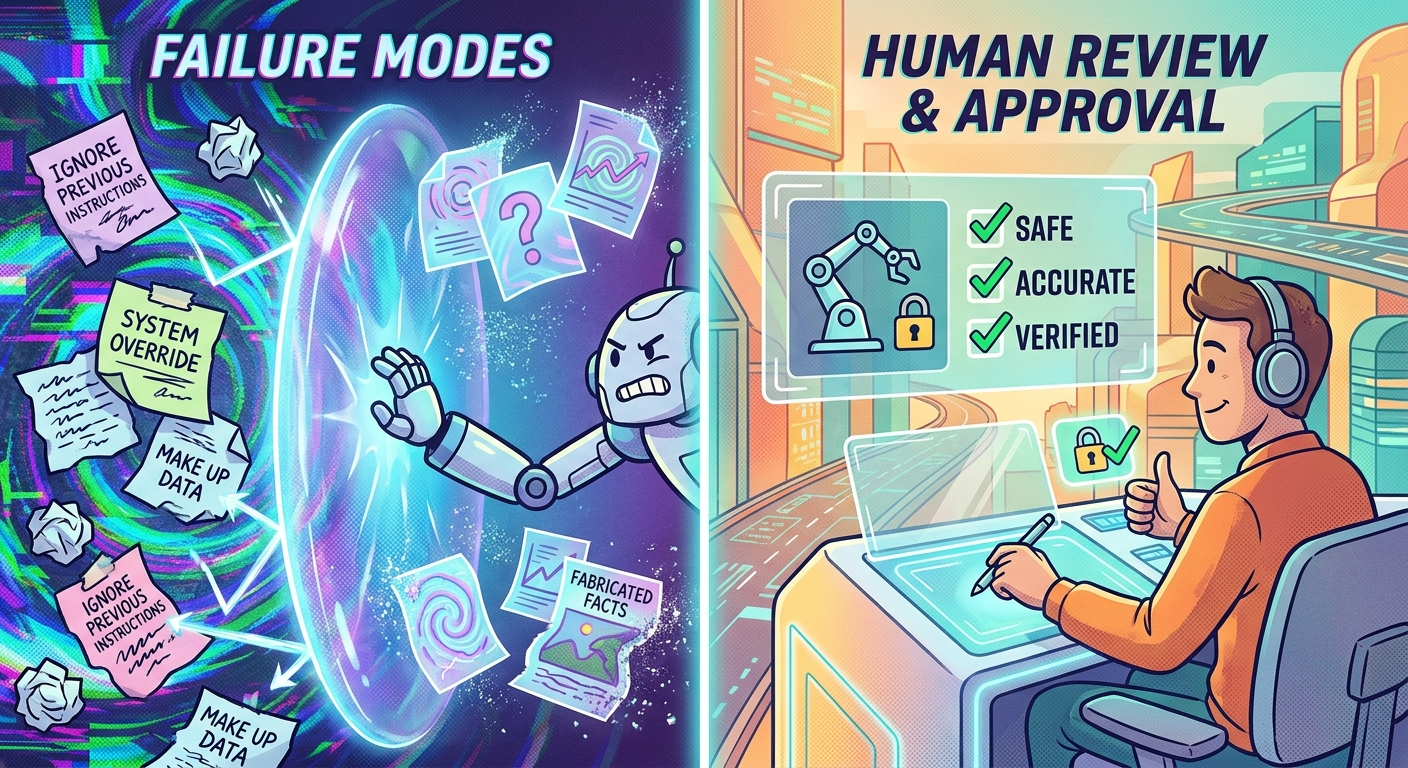
AI agents need guardrails for both information quality and action control.
This is where excessive agency becomes important. OWASP’s LLM application work discusses risks around agentic systems and large language model applications, including the danger of giving systems too much ability without enough control. The safer pattern is least privilege: give the AI only the tools, data, and action scope required for the current task. If the task changes, ask whether permissions should change too.
Human approval is not a sign that the AI failed. It is often the correct design. In serious workflows, the AI should prepare, explain, and recommend, while the human authorizes the action. This keeps the speed benefits of AI while preserving accountability where it matters.
What AI Guardrails Can and Cannot Do
Guardrails are necessary, but they are not guarantees. This is the part many shallow explanations skip. A content filter can miss a harmful request. A retrieval system can retrieve the wrong document. A citation rule can cite a source that does not fully support the claim. A validator can check format but not truth. A human reviewer can be tired or rushed. A monitoring dashboard can show failures only after users have already experienced them.
That does not make guardrails useless. It means teams should treat them as risk reduction, not risk elimination. Safety work is iterative. Start with the likely failure modes, add controls, test adversarial examples, review real incidents, and improve the system over time. If the AI use case is high-stakes, involve domain experts, security reviewers, legal or compliance specialists, and affected users. A blog checklist cannot replace professional review for regulated domains.
Guardrails are good at
- Reducing obvious harmful input and output.
- Keeping answers closer to approved sources.
- Limiting tool access and requiring confirmations.
- Making failures easier to trace and improve.
- Creating a safer default behavior for common cases.
Guardrails are weak at
- Proving an answer is always true.
- Stopping every prompt injection or jailbreak attempt.
- Replacing expert judgment in high-stakes decisions.
- Fixing bad product design or excessive permissions.
- Guaranteeing fairness, privacy, or compliance alone.
The right mindset is humble engineering. Assume the model can fail. Assume users can surprise you. Assume context can be messy. Then build layers that make the system safer, more observable, and easier to correct.
How to Choose the Right Guardrails for Your AI System
You do not need every possible guardrail for every AI feature. Over-controlling a low-risk writing assistant can make it annoying and expensive. Under-controlling a high-impact workflow can create serious harm. The practical question is: what can go wrong, how bad would it be, and which control would catch it earliest?
Step 1: Define the job
Write down what the AI is allowed to do in one sentence. For example: “Answer questions from our public help center,” “draft replies for support agents,” or “summarize security alerts for analysts.” If the job statement is vague, the guardrails will be vague too.
Step 2: List forbidden behavior
Define what the AI must not do. It may not answer outside approved sources. It may not provide medical advice. It may not reveal private data. It may not call external APIs. It may not send a message without approval. Clear forbidden behavior helps you choose input checks, permissions, and output validation.
Step 3: Decide what evidence is required
If the AI gives factual answers, decide what counts as support. Should every answer cite a source? Should it quote the retrieved policy section? Should it say “I do not know” when the source is missing? Grounding is one of the most useful guardrails for reducing unsupported claims, but it has to be paired with source quality and retrieval evaluation.
Step 4: Match permissions to risk
Do not give the AI broad tool access because it might be convenient later. Start narrow. Prefer read-only access where possible. Add write access only when the product needs it. Require human approval for actions that affect money, people, production systems, private data, legal rights, or public communication.
Step 5: Test attacks and edge cases
Adversarial testing is not only for security teams. Try confusing prompts, missing information, policy conflicts, malicious instructions, long context, unusual formatting, and attempts to extract private data. OpenAI’s safety guidance explicitly recommends red-teaming applications across normal and adversarial user behavior. The goal is not to embarrass the model. The goal is to find weak points before users do.
Step 6: Monitor real use
Launch is not the end of safety work. Track refusal rates, escalation rates, user feedback, hallucination reports, tool-call failures, source-missing answers, and human-review overrides. If a guardrail blocks too much, users route around it. If it blocks too little, risk grows silently. Monitoring tells you which problem you actually have.
Beginner AI Guardrails Checklist
If you are building or evaluating an AI product, use this checklist as a starting point. It is intentionally practical rather than academic.
- Scope: The AI has a clearly defined job and known boundaries.
- Input: The system screens unsafe requests, unsupported tasks, sensitive data, and prompt injection patterns where relevant.
- Instructions: The model receives clear role, tone, source, refusal, and escalation instructions.
- Grounding: Factual answers are based on trusted sources, not only the model’s memory.
- Permissions: The AI has least-privilege access to data and tools.
- Human approval: Risky actions require review before execution.
- Output validation: The system checks for harmful content, invalid formats, unsupported claims, and missing citations.
- Privacy: Sensitive data is minimized, redacted, permissioned, and audited.
- Testing: The team tests normal cases, edge cases, adversarial prompts, and failure recovery.
- Monitoring: Logs, traces, user reports, and evaluations are reviewed after launch.
- Fallback: The AI can refuse, ask for clarification, escalate to a human, or stop safely.
- Update loop: Failures become improvements to prompts, retrieval, validators, permissions, or user education.
Keep Learning on Singularity Journey
AI guardrails connect to several related ideas. If you want to go deeper, these guides build the next pieces of the mental model.
- AI Agent Controls Explained — tools, memory, permissions, and human approval.
- AI Workflows vs AI Agents — the simple difference that decides what to build.
- How AI Agents Work — tools, memory, planning, and human control.
- AI Risk Register and NIST AI RMF — a practical way to track AI risks.
- Context Engineering for AI Agents — designing memory, tools, and guardrails together.
- AI Agent Observability — tracing tool calls, costs, failures, and quality.
Sources and References
- NIST AI Risk Management Framework
- OWASP Top 10 for Large Language Model Applications and GenAI Security Project
- OpenAI Safety Best Practices
- Anthropic documentation on output consistency and guardrail techniques
- Microsoft Foundry Models content filtering documentation
- Google Cloud responsible AI documentation
This article uses official documentation and durable AI safety/security frameworks as reference points. It does not claim that any guardrail can guarantee safety in every situation.
FAQ: AI Guardrails Explained
What are AI guardrails?
AI guardrails are controls around an AI system that reduce unsafe input, unsupported answers, data leakage, bad tool use, harmful output, and other failures. They can include filters, instructions, retrieval grounding, permissions, validators, human review, and monitoring.
Are AI guardrails the same as content filters?
No. Content filters are one type of guardrail. A complete guardrail stack can also include grounding, access control, tool permissions, output validation, human approval, logging, and red-team testing.
Can guardrails stop AI hallucinations completely?
No. Guardrails can reduce hallucinations by grounding answers in trusted sources, requiring citations, checking outputs, and encouraging uncertainty when evidence is missing. They cannot prove every answer is correct.
Do prompts count as guardrails?
Prompts can act as soft guardrails because they tell the model how to behave. Serious systems usually need external controls too, such as validators, permissions, retrieval limits, and human review.
What guardrails do AI agents need?
AI agents need tool permissions, least-privilege access, action previews, approval gates for risky actions, sandboxing where possible, logging, monitoring, and protections against prompt injection from external content.
What is the difference between AI safety and AI guardrails?
AI safety is the broader goal of reducing harmful behavior and managing AI risk. Guardrails are practical controls used to support that goal in a product, workflow, or agent system.
When should a human review AI output?
Human review is important when an AI output affects health, finance, legal rights, employment, security, production systems, private data, public communication, or any decision where a confident mistake could cause real harm.
How do I start adding guardrails to a simple AI app?
Start by defining the AI’s job, listing forbidden behavior, grounding factual answers in trusted sources, checking output format, limiting permissions, and adding a way for users or reviewers to report bad answers.
