
Context Engineering for AI Agents: Design Memory, Tools, and Guardrails That Actually Work
Most weak agents do not fail because the model is useless. They fail because the wrong information, tools, memory, permissions, and expectations are pushed into the model at the wrong time. This guide gives developers a practical framework for designing the context layer that makes agents reliable enough to ship.

Quick Answer: What Is Context Engineering for AI Agents?
Context engineering for AI agents is the discipline of deciding what an agent should know, remember, retrieve, use, ignore, and prove at every step of a task. It includes prompt instructions, conversation state, memory, retrieved documents, tool schemas, user permissions, policy rules, examples, evaluation signals, and the trace of what the agent already tried.
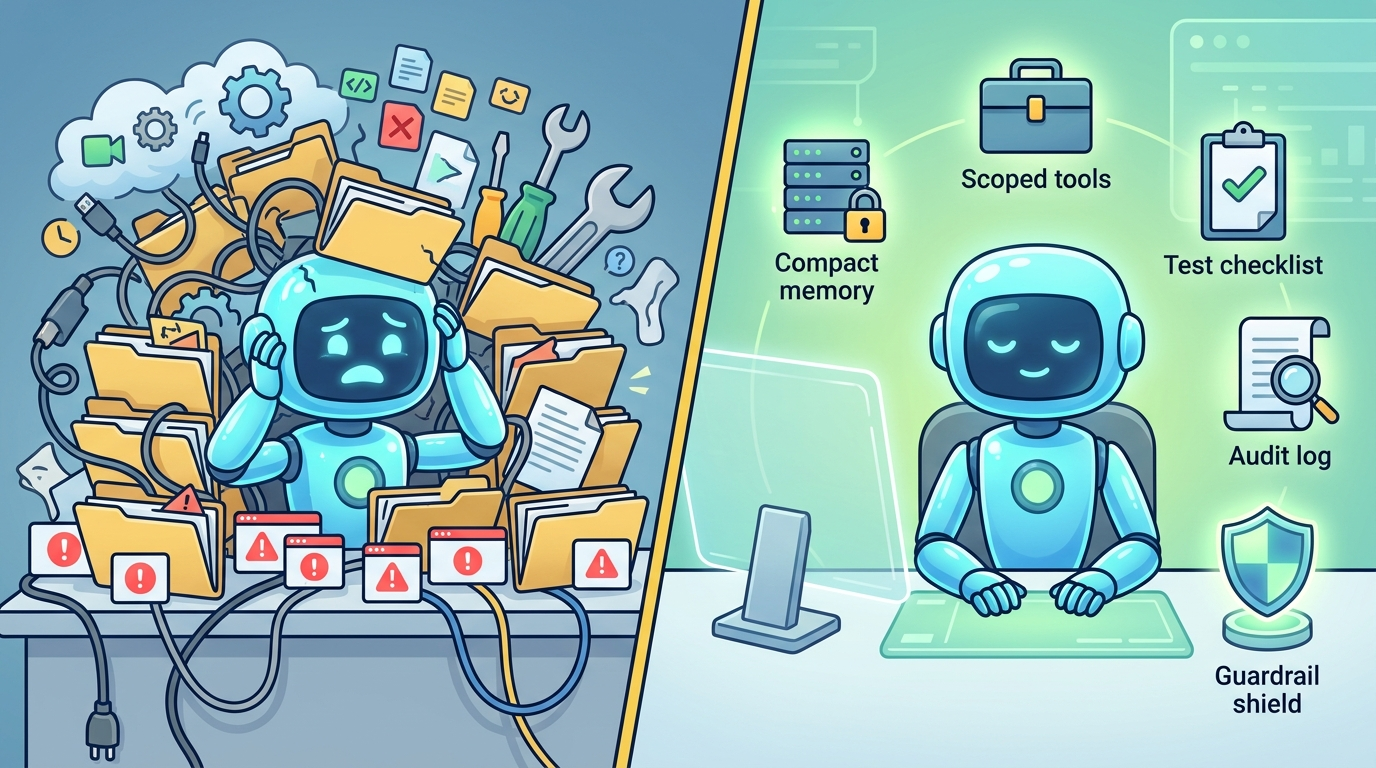
Prompt engineering asks, “What should I say to the model?” Context engineering asks a larger systems question: “What information and actions should be available to the model right now, and what should stay outside the model until it is needed?” That distinction matters because agents are not just chat boxes. They may call tools, read files, write code, search the web, update records, ask for approval, or run for many steps. A good context design makes the agent focused. A bad context design turns the agent into a distracted intern with admin access.
The search gap around this topic is clear: developer documentation covers agents, tools, MCP, memory, guardrails, and tracing separately. What builders need is a practical operating model that connects those pieces. This article gives you that model.
Why Context Engineering Matters More Than Bigger Prompts
Anthropic’s guide to building effective agents makes a useful distinction between workflows and agents: workflows follow predefined paths, while agents dynamically direct their own process and tool use. It also warns that agentic systems often trade latency and cost for better task performance. That warning is really a context warning. Every extra document, tool, message, and hidden instruction increases the chance that the agent spends more, runs slower, or reasons over stale information.
LangChain’s memory documentation makes the same point from another angle: long conversations can exceed a model’s context window, and even when they fit, models can get distracted by stale or off-topic content. Developers often respond by buying a larger context window, but that only postpones the design problem. If your agent cannot distinguish task facts from user preferences, durable memory from temporary notes, and trusted data from untrusted documents, the context window becomes a junk drawer.
OpenAI’s Agents SDK documentation exposes the modern agent stack: agents, tools, guardrails, sessions, context management, tracing, MCP, handoffs, and human-in-the-loop flows. The Model Context Protocol adds another important idea: standardized connections between AI applications and external systems such as files, databases, tools, and workflows. Once those connections exist, context is no longer only text. Context becomes power. It determines what the system can see and do.
That is why context engineering belongs in DEV ZONE. It is an implementation topic, not only a theoretical AI concept. It decides whether your customer support agent respects policy, whether your coding agent edits the right files, whether your research assistant cites sources instead of inventing them, and whether your enterprise agent asks for human approval before touching production data.
The Agent Context Map: What Belongs Where?
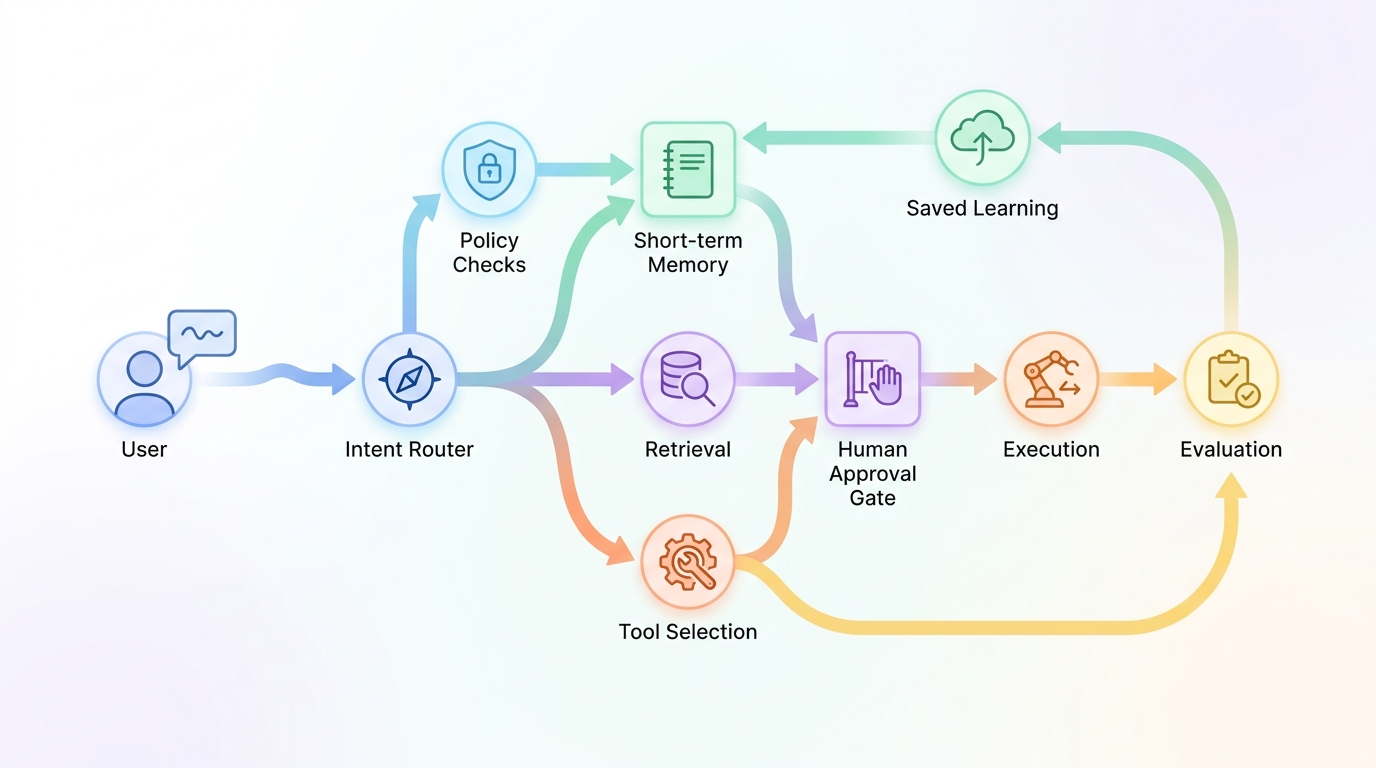
The first practical step is to stop treating context as one blob. An agent needs different context types for different reasons. Some context is stable, such as the agent’s role and safety boundaries. Some is task-specific, such as the current user request. Some is retrieved, such as documentation or database records. Some is generated during the run, such as plans, tool outputs, and intermediate observations. Some should never be shown to the model unless a policy gate permits it.
| Context layer | Purpose | Common mistake | Better design |
|---|---|---|---|
| System and developer instructions | Define role, priorities, boundaries, output format, and tool-use rules. | Writing vague instructions like “be helpful” and relying on them to solve security problems. | Use explicit tool rules, refusal rules, escalation paths, and output contracts. |
| User request | Defines the immediate goal and constraints. | Letting the user override policy or secretly redefine tools. | Parse intent, check permissions, and separate user goals from system rules. |
| Conversation state | Keeps the current thread coherent. | Sending the entire conversation forever. | Summarize stale turns, keep current facts, and drop irrelevant chatter. |
| Short-term memory | Stores working facts for the active thread. | Saving everything the user says. | Save only facts needed for task completion, with timestamps and source labels. |
| Long-term memory | Stores durable preferences or reusable knowledge. | Saving private or unverified facts without consent. | Require explicit criteria, user control, and deletion paths. |
| Retrieval | Provides external evidence from docs, databases, or search. | Retrieving too much, too little, or untrusted content without labels. | Rank, filter, quote, cite, and mark external content as untrusted. |
| Tools | Let the agent act: search, write, calculate, edit, send, query, deploy. | Giving broad tools with ambiguous names and no approval gates. | Use narrow schemas, scopes, dry runs, and human approval for risky actions. |
| Trace and evaluation signals | Show what happened and whether it worked. | Logging only final answers. | Log decisions, tool calls, retrieved evidence, failures, and human interventions. |
This map is the heart of context engineering. It helps you answer the most important question before you write code: what does the model need to see to make the next good decision, and what should remain outside the prompt because it is irrelevant, risky, private, stale, or better handled by deterministic code?
Design Memory Like a Database, Not a Diary
Memory is where many agents become creepy, wrong, or expensive. A diary records everything. A production agent should not. It should remember only what improves future task performance, what the user expects it to remember, and what policy allows it to store. Memory should have a type, source, confidence level, timestamp, owner, and deletion path.
For most agents, use three memory buckets. Working memory is temporary state for the current task: the plan, constraints, files touched, and unresolved questions. Thread memory keeps a conversation coherent: decisions made earlier in the same session, user confirmations, and intermediate outputs. Durable memory stores reusable facts: user preferences, team conventions, project glossary, approved credentials policy, or known environment constraints. Durable memory should be intentional, not accidental.
| Memory type | Example | Retention | Validation rule |
|---|---|---|---|
| Working memory | “The user asked to refactor only the billing module.” | Until task ends. | Derived from current user request or tool result. |
| Thread memory | “The user approved dry-run output but not live publishing.” | Current conversation or ticket. | Must be traceable to a user confirmation. |
| Durable preference | “Use TypeScript strict mode in this repository.” | Until changed or deleted. | Should be explicitly stated or confirmed. |
| Durable fact | “Production deploys require two approvals.” | Policy lifecycle. | Should come from trusted docs, not casual chat. |
A strong memory policy also says what not to remember. Do not store secrets, medical details, financial identifiers, private third-party information, or sensitive workplace details unless the product has a clear legal basis and user-facing controls. Even harmless preferences can become harmful if surfaced in the wrong context. Treat memory as product infrastructure, not just a vector store.
Tool Context: The Interface Is the Guardrail
MCP popularized a helpful metaphor: a standard connection layer for AI applications and external systems. That is powerful because agents become more useful when they can reach files, calendars, databases, search engines, calculators, code sandboxes, and internal workflows. It is also dangerous because every tool expands what the agent can affect.
The best tool designs are boring. They have narrow names, clear descriptions, strict schemas, limited permissions, predictable outputs, and explicit failure modes. A tool called run_command is risky because the model must infer too much. A tool called run_tests_for_selected_package is safer because the action is constrained. A tool called send_email should probably support draft mode, preview, recipient validation, and approval before sending.
Safer tool design
- Narrow tool names tied to one action.
- JSON schema validation and typed arguments.
- Read-only defaults for sensitive data.
- Dry-run modes for writes.
- Human approval for external, irreversible, or costly actions.
- Audit logs for every tool call and result.
Risky tool design
- Broad shell or browser access by default.
- Tools that accept free-form instructions.
- No permission separation between read and write.
- No preview for messages, posts, purchases, or deployments.
- No record of which evidence informed the action.
- Tool outputs mixed with trusted instructions.
One subtle context rule: tool results should be treated as data, not authority. A web page, email, document, or ticket can contain malicious instructions. OWASP’s GenAI security work emphasizes risks around LLM and agentic applications; prompt injection is one of the core reasons developers must label external content as untrusted and prevent it from rewriting system goals.
Guardrails Are Context Routes, Not Magic Walls
Guardrails are often described as if they are a wall around the model. In practice, they are a set of routing and decision rules. Some inputs go to the model. Some go to deterministic validation. Some require retrieval. Some require human approval. Some are blocked. Some are answered with a safe alternative. Good guardrails reduce the chance that the model receives a confusing or dangerous context in the first place.
Use pre-run guardrails before the agent starts: classify the request, check user permissions, detect sensitive actions, and decide whether tools should be available. Use in-run guardrails during the task: validate tool arguments, check retrieved sources, require approval for writes, and stop loops. Use post-run guardrails before the final answer or action: verify citations, run tests, inspect diffs, scan for secrets, or ask for confirmation.
if action.type in ["send_message", "publish", "deploy", "delete", "purchase"]:
    require_human_approval(preview=action.summary, rollback=action.rollback_plan)

if retrieved_document.source == "external_web":
    label_as_untrusted()
    forbid_instruction_override()

if agent.tool_failures >= 3:
    stop_and_ask_for_help()
Notice that these rules are not glamorous. They are product decisions encoded in software. That is the point. Reliable agents come from boring boundaries around a capable model.
Evaluate Context, Not Only Final Answers
Most agent evaluation starts too late. If you only grade the final answer, you miss why the agent succeeded or failed. A production agent should be evaluated across the trace: intent classification, retrieval quality, memory selection, tool choice, argument validity, approval behavior, output accuracy, cost, latency, and recovery after failure.
| Evaluation dimension | Question | Signal to log |
|---|---|---|
| Intent routing | Did the agent understand the task type? | Classifier result, confidence, fallback path. |
| Context selection | Did it include the right facts and exclude stale noise? | Context items, source labels, token budget. |
| Retrieval | Were sources relevant, current, and cited? | Query, document IDs, snippets, rank, citation use. |
| Memory | Did it use memory appropriately? | Memory reads, writes, confidence, expiration. |
| Tool use | Were tools necessary and correctly scoped? | Tool name, args, dry-run result, approval status. |
| Safety | Did it respect policies and ask before risky action? | Guardrail hits, approvals, refusals, escalations. |
| Outcome | Did the user goal get solved? | Human rating, tests passed, issue closed, revision count. |
For developer agents, add code-specific signals: tests run, files changed, diff size, security scan results, lint errors, and whether the agent touched files outside the requested scope. For customer agents, track resolution quality, escalation accuracy, policy compliance, and whether the agent invented unsupported answers. For research agents, track citations, source freshness, contradiction handling, and uncertainty flags.
Three Reliable Patterns for Agent Context Engineering
1. Plan, retrieve, act, verify
Ask the model to produce a short plan before tool use. Use that plan to decide what evidence to retrieve and which tools to unlock. After action, verify with tests, citations, or human review. This pattern is slower than a single prompt but far safer for multi-step work.
2. Small tools, strong approvals
Instead of one powerful tool that can do anything, create small tools with narrow permissions. Read tools can be broad. Write tools should be scoped. External actions should require a preview and approval. This makes context simpler because the model has fewer dangerous degrees of freedom.
3. Memory after evidence, not before
Do not let the agent write durable memory just because a statement appeared in conversation. Confirm important preferences, cite policy facts, and attach provenance. Memory should be a controlled output of a completed step, not a side effect of every chat turn.
Production Checklist: Ship the Context Layer Before the Agent
Define the agent’s job boundary
Write down what the agent is allowed to do, what it must never do, what it should ask approval for, and what success looks like. If the job boundary is fuzzy, context routing will be fuzzy too.
Create a context budget
Allocate room for instructions, current task, recent conversation, retrieved evidence, tool results, and scratchpad or plan. Decide what gets summarized or dropped when the budget is tight.
Separate trusted and untrusted content
System instructions, policy documents, user input, retrieved web pages, emails, logs, and tool results should carry trust labels. Untrusted content must not be able to change tool rules or developer instructions.
Write a memory policy
Define what can be stored, who can inspect it, when it expires, how users can correct it, and which categories are prohibited.
Scope every tool
Use least privilege, typed schemas, dry-run outputs, argument validation, and human approval for irreversible or external effects.
Trace every important decision
Log enough to debug: selected context, retrieval IDs, memory reads and writes, tool calls, approvals, failures, and final output.
Evaluate the trace
Score intent routing, context selection, retrieval quality, memory behavior, tool correctness, policy compliance, cost, latency, and final outcome.
If you do only one thing from this article, do this: draw your agent’s context map before you choose the framework. Frameworks are useful, but they cannot decide your memory policy, tool boundaries, approval rules, or evaluation criteria for you.
Keep Learning on Singularity Journey
- AI Agent Evaluation Framework — how to test traces, tools, memory, and production behavior.
- AI Workflows vs AI Agents — decide whether you need autonomy or a simpler workflow.
- AI Agent Controls Explained — tools, memory, permissions, and human approval.
- Build a RAG Pipeline for AI Agents — retrieval foundations for agent context.
- MCP Server Security — reduce tool and connector risk.
Sources and References
- Anthropic: Building effective agents
- Model Context Protocol introduction
- OpenAI Agents SDK documentation
- LangChain: Short-term memory
- OWASP Top 10 for LLM Applications / GenAI Security Project
This article avoids unsupported benchmark claims. The recommendations are based on public documentation, security guidance, and practical agent design patterns.
FAQ: Context Engineering for AI Agents
What is context engineering for AI agents?
It is the design of what an agent sees, remembers, retrieves, and can do at each step. It includes instructions, memory, retrieval, tools, permissions, guardrails, and evaluation traces.
How is it different from prompt engineering?
Prompt engineering focuses on wording instructions. Context engineering designs the whole information and action environment around the model, including what should not be shown or allowed.
Should I put all documents into the context window?
No. Retrieve focused evidence, label sources, cite what matters, and summarize or exclude stale information. More context often increases cost, latency, and distraction.
What should go into agent memory?
Only information that improves future task performance, is allowed by policy, has a clear source, and can be corrected or deleted. Do not save secrets or sensitive facts casually.
How do MCP tools affect context design?
MCP makes it easier to connect agents to external systems. That increases capability and risk, so tool schemas, permissions, approval gates, and audit logs become central to context engineering.
How do I evaluate an agent context system?
Evaluate the trace, not just the final answer: intent routing, retrieved evidence, memory reads/writes, tool calls, approvals, policy compliance, cost, latency, and user outcome.
