
Human Approval Gates for AI Agents: A Practical Workflow Design Guide
Design human approval gates for AI agents with clear risk tiers, escalation rules, audit logs, rollback plans, and workflow examples that keep automation useful and accountable.
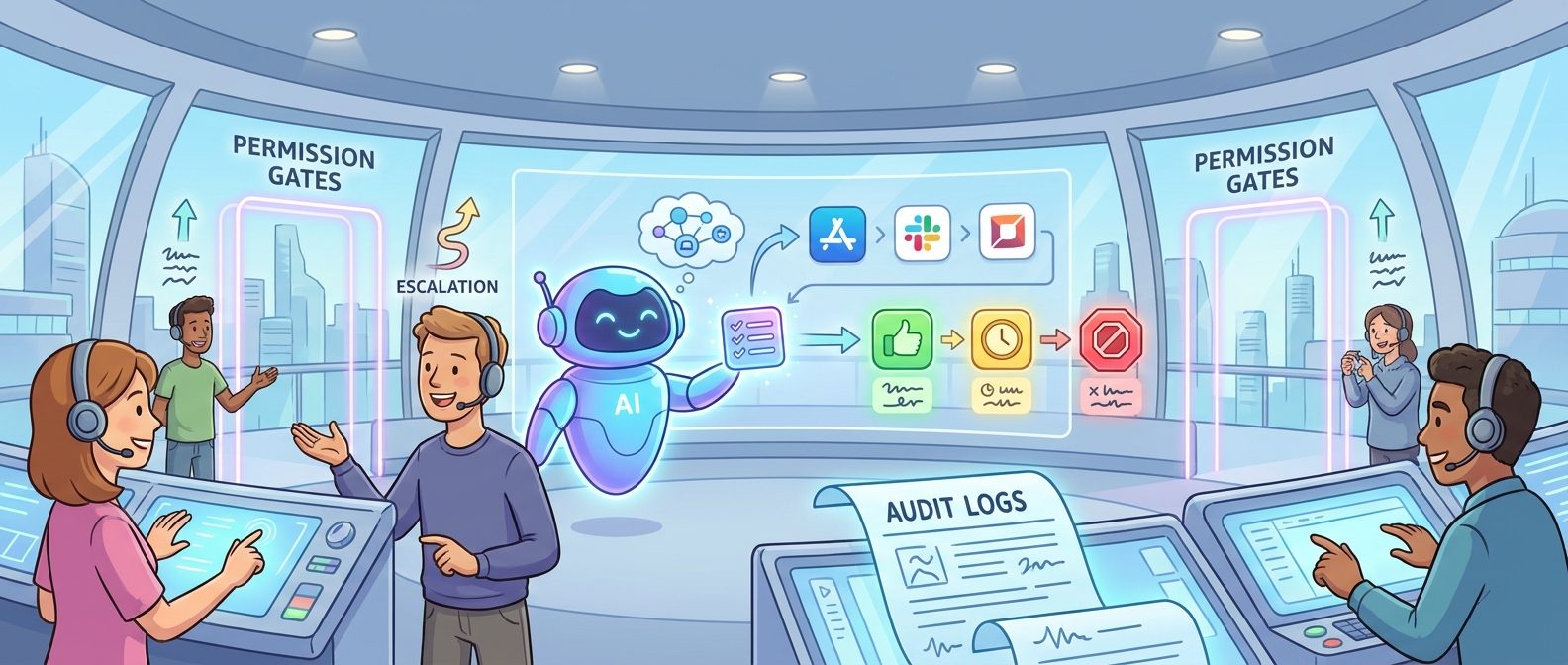
Quick Answer: What Are Human Approval Gates for AI Agents?
Human approval gates for AI agents are the moments in an automated workflow where the agent must pause, show its reasoning or evidence, and get permission before it takes a consequential action. They are not a decoration added after an agent is built. They are the control points that decide whether agentic automation becomes a trustworthy workflow layer or an unpredictable shortcut across your tools.
A useful approval gate answers five questions before the agent can continue: what action is being requested, what data or system will be changed, what risk is involved, who is allowed to approve it, and what record will prove the decision later. If those five answers are missing, the workflow does not have a real approval gate. It has a polite confirmation button.
This cluster article supports our pillar analysis, AI Agents Are Becoming the Workflow Layer, by going deeper on one practical question: when software starts taking action across apps, where should humans stay in the loop? The answer is not “approve everything.” That would destroy the productivity benefit. The answer is also not “trust the agent completely.” That creates operational and security risk. The useful middle is a gate design model that matches autonomy to consequence.
Why Approval Gates Matter When Agents Become the Workflow Layer
The older automation model was easier to reason about. A script had a narrow job. A rule-based workflow moved a ticket from one stage to another. A macro updated a spreadsheet. Someone could inspect the exact logic and usually predict what would happen. Modern AI agents are different because they can interpret goals, choose steps, call tools, retrieve context, write content, update records, ask follow-up questions, and sometimes recover from failure. That flexibility is exactly why they are useful, and exactly why approval design matters.
When an agent sits between people and applications, it becomes a workflow layer. It may read a customer ticket, summarize the history, draft a response, update the CRM, create a refund request, notify finance, and schedule a follow-up. Each of those steps has a different risk profile. Summarizing a ticket is usually low-risk. Sending a customer email is medium-risk. Issuing a refund or changing account permissions may be high-risk. A single workflow can therefore contain several different approval policies.
The mistake many teams make is treating human-in-the-loop as a binary feature. They ask, “Should this agent require approval?” A better question is, “Which specific actions require approval, under which conditions, by which person, with what evidence, and with what fallback if the approval is denied?” This turns approval from a vague safety promise into an operational design pattern.
Approval gates also shape adoption. Employees are more likely to use agents when they know the agent will not silently take irreversible actions. Leaders are more likely to sponsor agent projects when risk controls are visible. Security and compliance teams are more likely to cooperate when audit trails and permissions are built into the workflow instead of bolted on at the end.
The Three-Tier Risk Model for Agent Approval Gates
The simplest practical model is a three-tier risk system: auto-run, review, and escalate. It is intentionally boring. Boring is good here because the approval model must be easy enough for product managers, engineers, operations leads, security reviewers, and frontline users to understand.
| Risk tier | Typical agent action | Approval behavior | Required evidence |
|---|---|---|---|
| Low risk | Summarize a document, classify a ticket, draft a note, prepare a checklist, search approved knowledge | Run automatically, log the result, let a human inspect if needed | Input source, output, timestamp, model/tool used |
| Medium risk | Send a non-sensitive message, update a CRM field, create a task, change an internal document, recommend a decision | Ask for human approval before committing the action | Proposed action, source evidence, confidence notes, diff or preview |
| High risk | Move money, alter permissions, delete data, publish externally, approve legal language, touch production infrastructure | Escalate to named approver or require multi-step approval | Full context, impact estimate, policy check, rollback plan, audit record |
This tier system should be attached to actions, not to the agent as a whole. The same agent may be allowed to summarize customer history automatically, require approval before sending a customer message, and be completely blocked from issuing refunds above a threshold. That action-level approach keeps the workflow useful while preventing the most dangerous shortcuts.
Risk tiers should also include thresholds. For example, an agent may create a discount request automatically below a small amount, require manager approval above that amount, and require finance approval for unusually large adjustments. A recruiting agent may schedule an interview automatically but require human review before rejecting a candidate. A DevOps agent may open a pull request but require approval before merging or changing infrastructure.
The best approval model is specific enough to enforce and simple enough to maintain. If the rules require a legal memo every time someone adds a new workflow, teams will bypass them. If the rules are too vague, the agent will drift into risky behavior without anyone noticing. The middle path is a short risk matrix, a small set of protected actions, and clear ownership for exceptions.
A Simple Approval-Gate Workflow
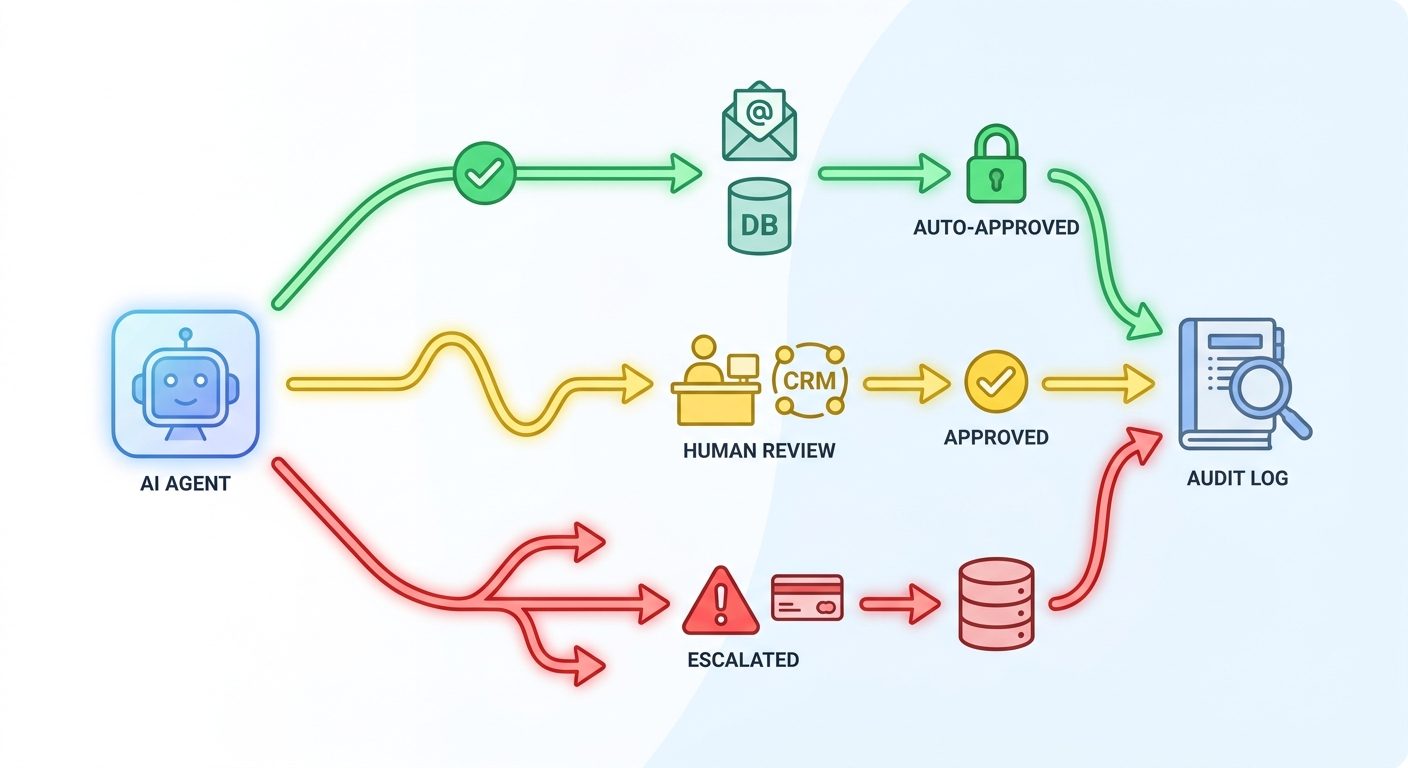
Think of an approval-gate workflow as a set of lanes. In the first lane, the agent can prepare information and perform reversible work. In the second lane, the agent can propose an action but must wait for a human click, comment, or signed-off decision. In the third lane, the agent must escalate because the action affects money, access, public trust, safety, compliance, or production systems.
This is why approval design belongs early in agent planning. If you wait until after the agent has access to tools, the team will debate safety in the abstract. If you define the lanes first, the implementation becomes clearer: permissions, prompts, UI, logging, tool scopes, and tests can all align around the same risk model.
How to Design a Useful Human Approval Gate
A useful approval gate is more than a yes-or-no modal. It should help the human make a fast, informed decision. If the reviewer must leave the workflow, hunt for context, open five systems, and reconstruct what the agent is doing, the approval gate will slow everything down and people will rubber-stamp decisions just to clear the queue.
1. Show the proposed action in concrete language
The approval screen should say exactly what will happen. “Proceed?” is useless. “Send this reply to customer Priya Sharma from support@company.com” is better. “Update the CRM renewal stage from Negotiation to Closed Lost for account Acme Ltd.” is even better because it names the system, the field, the old value, and the new value.
2. Show the evidence the agent used
Agents often make mistakes when context is missing, stale, or misread. The reviewer needs to see the sources. For a customer support workflow, show the latest ticket, relevant policy excerpt, and account status. For a finance workflow, show the invoice, threshold rule, and exception reason. For a development workflow, show the diff, failing test, and affected files.
3. Show the risk tier and policy reason
Approval gates become easier to trust when the system explains why approval is required. “Manager approval required because refund amount exceeds the automatic threshold” is much better than a mysterious approval request. It teaches users the policy and helps teams debug excessive approvals.
4. Offer approve, deny, edit, and escalate
Many approval gates only offer approve or reject. Real work is messier. A human may want to edit the customer message, change the amount, request more information, or escalate to someone with authority. A good gate should support those paths without forcing the user to restart the workflow.
5. Record the decision
The audit log should capture who approved, what was approved, when it happened, which agent proposed it, which tool was called, what evidence was shown, and what changed afterward. This record is not just for compliance. It is also how teams learn which gates are valuable and which ones are creating unnecessary friction.
Workflow Examples: Where Humans Should Approve AI Agent Actions
The right approval gate depends on the workflow. Below are practical examples that show how the same principle applies across business functions.
Customer support agent
A support agent can summarize the customer history, identify likely intent, retrieve help-center articles, and draft a response automatically. It should request approval before sending the first reply to a customer, applying a refund, changing account status, or promising an exception. For repeat low-risk questions, the gate may be relaxed after quality review shows consistent performance.
Sales operations agent
A sales agent can research a lead, enrich a company profile, draft a follow-up email, and suggest a next step. It should ask before sending outbound messages, changing opportunity stage, applying discounts, or updating forecast values. It should escalate if the account is strategic, the discount exceeds a threshold, or the agent detects conflicting CRM data.
HR and recruiting agent
A recruiting agent can summarize resumes, schedule interviews, prepare interview packets, and draft candidate communications. It should not reject candidates, rank protected attributes, make compensation commitments, or send sensitive HR decisions without human review. The approval gate should show the job criteria used and avoid unsupported claims about a candidate.
Finance operations agent
A finance agent can match invoices, flag anomalies, prepare approval packets, and route questions. It should require approval before payment release, vendor bank changes, write-offs, unusual reimbursements, or policy exceptions. The gate should show invoice details, purchase order match, vendor identity check, and anomaly notes.
Software engineering agent
A coding agent can inspect code, propose patches, write tests, and open pull requests. It should require human approval before merging, deploying, changing secrets, modifying production infrastructure, or deleting data. The approval gate should show the diff, test status, affected systems, rollback steps, and security-sensitive changes.
These examples show the pattern: let the agent prepare, analyze, and propose; make humans approve consequential change. The human is not there to babysit every token. The human is there to own judgment where the consequences matter.
What Analytics and Research Suggest About This Cluster Topic
This article was selected because the latest Singularity Journey pillar focuses on AI agents becoming the workflow layer, while site analytics and content history show a need for narrower operational guides that support that theme. GA4 data for the recent reporting window showed agent and workflow pages among the most viewed internal content, including articles on AI agent controls, AI workflows versus agents, human approval for agents, agent observability, and enterprise adoption. Search Console data is still sparse, which is common for a young or recently expanded site, but agent-related impressions and indexed pages show early topical relevance.
The search gap is practical: many broad articles explain that agentic AI needs human oversight, but fewer explain how to design approval gates inside real workflows. The weak content pattern is usually one of two extremes. Some pages say “keep a human in the loop” without defining the loop. Others describe autonomous agents as if approval is a simple checkbox. A useful cluster article can win by giving readers a reusable gate design model, examples, policy language, and implementation checks.
The data gap is also clear. Teams need evidence-based controls, not vague trust. NIST’s AI Risk Management Framework emphasizes governance, mapping, measurement, and management of AI risk. OWASP’s generative AI security work highlights risks in LLM and agentic applications. IBM’s data-breach research points to the growing need to secure agentic identities, tightly scoped permissions, runtime enforcement, human attribution, and auditability. Microsoft’s Work Trend Index frames agents as part of the changing structure of work, which makes human agency and organizational design central rather than optional.
That combination makes human approval gates a strong supporting topic for the pillar. It is narrow enough to avoid duplicating the pillar’s broad trend analysis, but important enough to strengthen the cluster around AI agents, workflow orchestration, governance, and adoption.
Six Approval-Gate Patterns Teams Can Reuse
Pattern 1: Preview before send
The agent drafts an external message, report, comment, or update. The human sees the exact version that will be sent, edits if needed, and approves. This is the default pattern for customer communication, sales emails, candidate messages, public posts, legal language, and executive summaries.
Pattern 2: Diff before change
The agent proposes a change to a record, file, workflow, policy, or configuration. The approval screen shows old value, new value, reason, and source. This pattern is essential for CRM fields, knowledge base edits, code changes, database updates, and configuration management.
Pattern 3: Threshold approval
The agent can act automatically below a defined threshold and must ask above it. Thresholds may involve money, customer tier, data sensitivity, permission level, number of affected users, production impact, or confidence score. This keeps low-risk work fast while protecting consequential actions.
Pattern 4: Two-person approval
For sensitive actions, one human approval is not enough. A second approver may be required for vendor bank changes, production access, legal commitments, high-value refunds, security exceptions, or regulated decisions. The agent’s role is to prepare the packet and route it, not to choose the final answer.
Pattern 5: Escalate on uncertainty
If the agent detects missing information, conflicting sources, policy ambiguity, unusual customer behavior, or a low-confidence result, it should escalate rather than improvise. This is especially important because agents can sound confident even when their internal state is uncertain.
Pattern 6: Break-glass stop
Every serious agent workflow needs a stop condition. If tool calls fail, permissions do not match, outputs differ from expected format, or a protected action is requested, the workflow should pause and notify a human. A stop is not a failure of automation. It is automation behaving responsibly.
Approval Gates Need Audit Logs, Observability, and Rollback
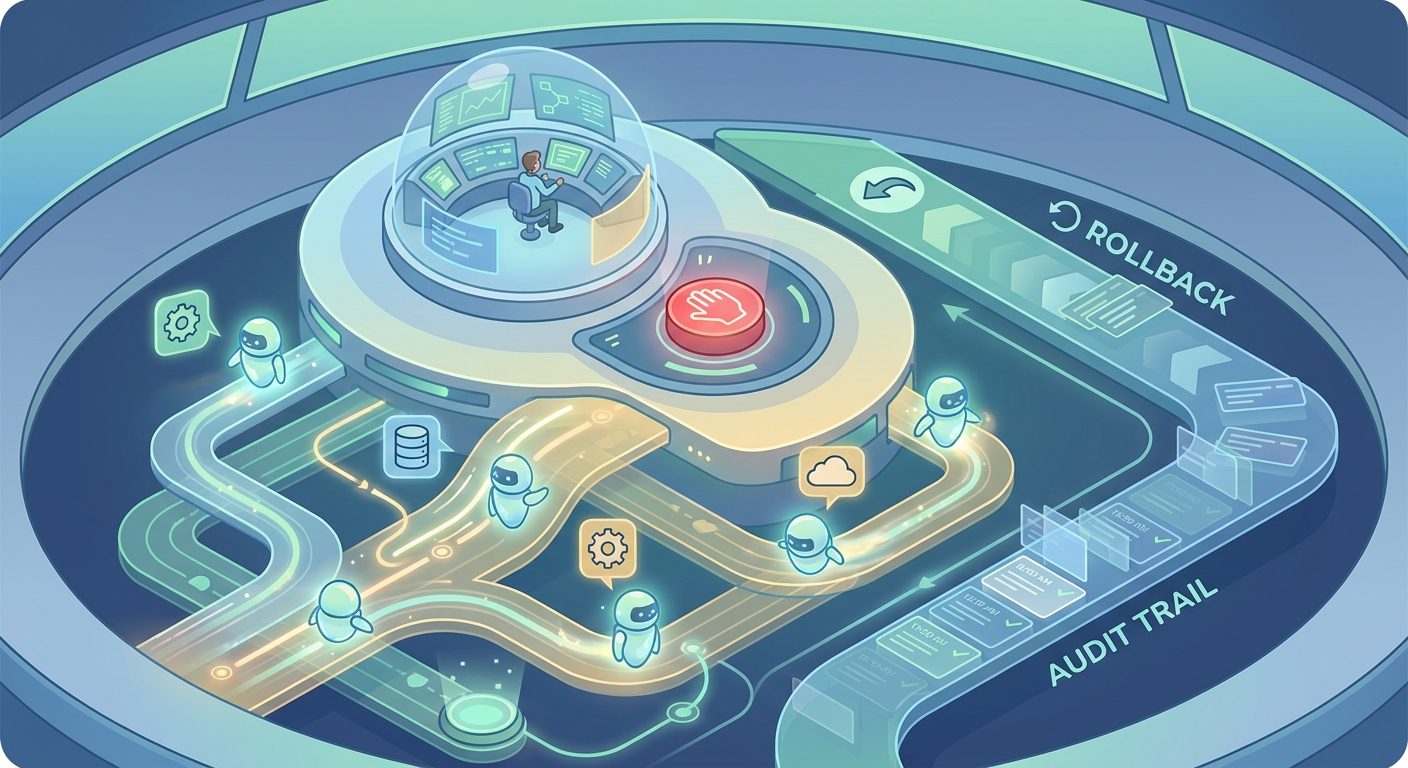
Approval gates are only as good as the records around them. If an agent asks for approval but the system does not store what was shown, who approved it, and what happened afterward, the organization cannot learn or defend the decision. The log should be structured enough for analysis, not just a wall of chat transcripts.
At minimum, store the workflow ID, agent version, model or system version, tool requested, data sources used, proposed action, risk tier, approver identity, decision, timestamp, final tool result, and any exception. For engineering workflows, include commit hash, test result, and deployment status. For customer workflows, include message preview, policy source, and customer/account identifier. For finance workflows, include amount, vendor, invoice, threshold rule, and approval chain.
Rollback matters because approval does not guarantee correctness. A human can approve the wrong thing. The agent can execute the right approval incorrectly. A downstream system can behave unexpectedly. For any high-risk workflow, define how to reverse or contain the action: cancel a payment, revoke a permission, restore a record, revert a pull request, send a correction, or freeze the workflow pending investigation.
Observability also helps reduce unnecessary approvals. If logs show that a low-risk action is approved 99 percent of the time with no edits and no incidents, the team may move that action to auto-run with sampling. If logs show frequent denials or edits, the agent needs better context, stricter tool limits, or clearer policy. This turns approval gates into a learning system rather than permanent bureaucracy.
Implementation Checklist for Product and Engineering Teams
- List every tool the agent can call. Include read, write, send, delete, publish, payment, permission, and deployment actions.
- Classify actions by risk tier. Do not classify only the workflow. Classify the specific tool action and the condition under which it runs.
- Define protected actions. Protected actions usually include external communication, money movement, access changes, deletion, production changes, legal commitments, and regulated decisions.
- Design the approval UI. Show proposed action, source evidence, risk reason, diff or preview, approver options, and escalation path.
- Scope permissions technically. The agent should not possess a tool permission merely because it might be convenient one day. Use least privilege and time-bound access where possible.
- Write denial paths. Decide what happens when approval is denied: revise, escalate, ask for more information, cancel, or route to a human-only process.
- Log decisions in structured form. Make the logs useful for audits, debugging, metrics, and future policy changes.
- Test failure scenarios. Include stale data, conflicting data, wrong recipient, tool timeout, malicious input, prompt injection, excessive cost, and unexpected model output.
- Review metrics monthly. Track approval volume, edit rate, denial rate, escalation rate, incidents, time saved, and user satisfaction.
For teams building agents, this checklist should live beside the technical architecture. It is not separate “governance paperwork.” It directly shapes prompt design, tool contracts, UI, permissions, logging, evaluation, and deployment readiness.
Common Mistakes to Avoid
Mistake one: approving everything. If every action requires approval, people stop reading. They click approve to make the queue go away. Approval should protect meaningful risk, not create a fake sense of control.
Mistake two: approving too late. If the agent has already changed the system and then asks for acknowledgment, that is not approval. That is notification. Put the gate before the irreversible step.
Mistake three: hiding evidence. A reviewer cannot make a good decision from a vague summary. Show the documents, records, policy, diff, or tool result that led to the recommendation.
Mistake four: mixing human approval with broad permissions. Approval gates do not replace permission boundaries. An agent should still have scoped tools. If the agent can technically do anything after one approval, the design is too loose.
Mistake five: failing to measure gate quality. Approval systems should improve. If a gate is always approved with no edits, automate or sample it. If a gate is often denied, fix the agent or policy. If approvals pile up, redesign the workflow.
How This Supports the AI Agent Workflow Layer Pillar
The pillar article explains the larger shift: AI agents are moving from chat boxes toward a workflow layer that can act across applications. This cluster article focuses on one necessary building block of that shift. Without approval gates, the workflow layer becomes risky. With too many gates, it becomes useless. The durable advantage is designing gates that preserve human judgment without blocking every low-risk action.
Internal linking should work in both directions. Readers who land here for the practical approval question should move up to the pillar to understand the broader trend. Readers who start with the pillar should move down to this article when they need a concrete operating model. Together, the articles help Singularity Journey build topical authority around agentic AI, workflow orchestration, governance, observability, and human control.
If you are still mapping the bigger picture, read the source pillar next: AI Agents Are Becoming the Workflow Layer. If you are already building or buying agents, use this page as a design checklist before giving the agent write access to real systems.
FAQ: Human Approval Gates for AI Agents
What is a human approval gate for an AI agent?
It is a controlled pause in an agent workflow where a human reviews the proposed action, evidence, and risk before the agent can continue with a consequential tool call or system change.
Should every AI agent action require human approval?
No. Approving every action creates fatigue and reduces productivity. Low-risk reversible actions can often run automatically, while medium- and high-risk actions should require review or escalation.
Which AI agent actions usually need approval?
External messages, money movement, permission changes, data deletion, production infrastructure changes, legal commitments, regulated decisions, and sensitive HR or customer actions usually need approval.
What should an approval screen show?
It should show the proposed action, affected system, old and new values where relevant, evidence used by the agent, risk tier, policy reason, approver options, and rollback or escalation notes.
How do approval gates relate to audit logs?
The approval gate captures the decision. The audit log proves what happened: who approved, what was shown, what tool was called, when it happened, and what changed afterward.
Can approval gates be automated over time?
Yes, but only after measurement. If a low-risk gate is approved consistently without edits or incidents, teams may move it to auto-run with sampling and monitoring. High-risk actions should remain protected.
Sources and References
- NIST AI Risk Management Framework
- OWASP Top 10 for Large Language Model Applications and GenAI Security Project
- IBM Cost of a Data Breach Report
- Microsoft Work Trend Index
- Singularity Journey pillar: AI Agents Are Becoming the Workflow Layer
This guide is educational and operational, not legal, security, or compliance advice. Adapt approval rules to your systems, data sensitivity, industry, and internal policies.
