
How AI Agents Work: Tools, Memory, Planning, and Human Control Explained
A clear, practical guide to the loop behind AI agents: goals, tools, memory, planning, observations, human approval, and the limits that keep agentic systems useful instead of chaotic.
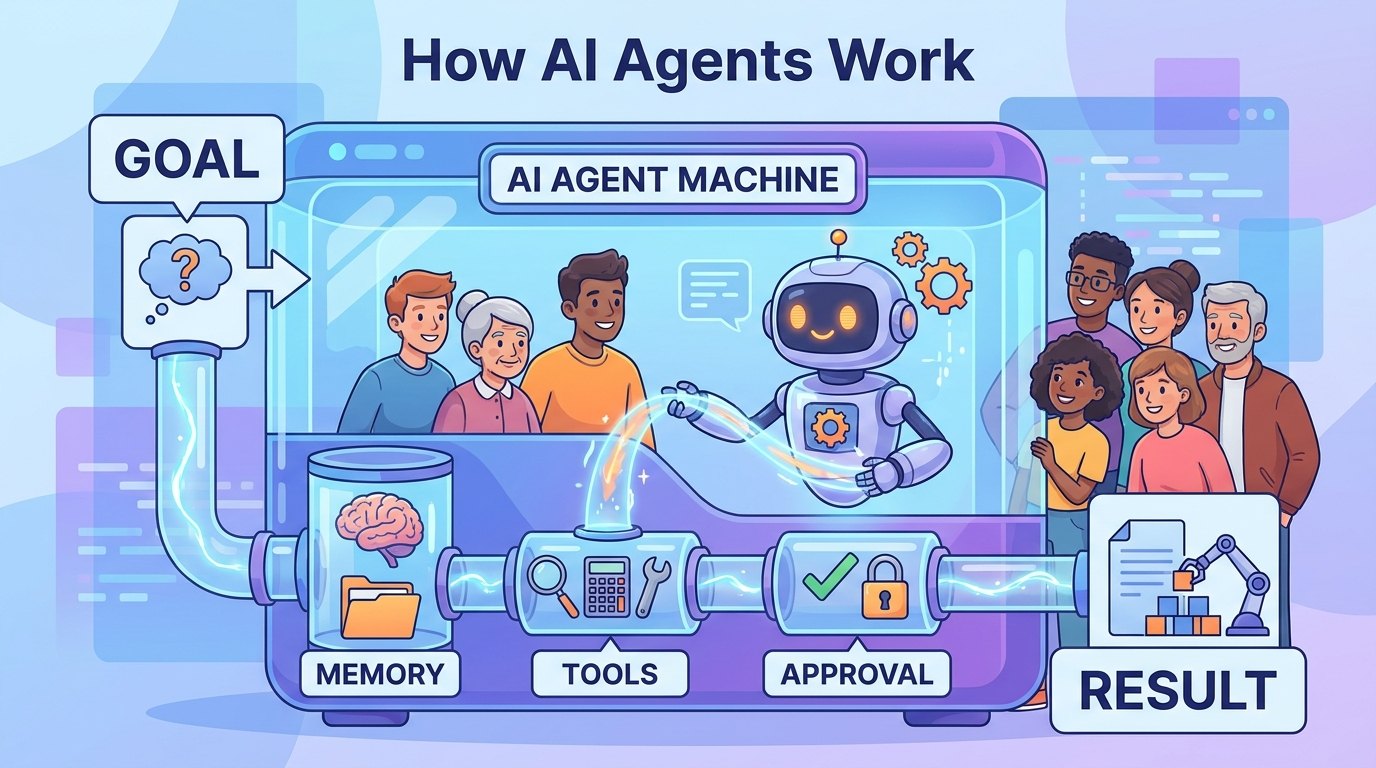
Quick Answer: How AI Agents Work
An AI agent is software that can take a goal, decide what information it needs, use tools, observe the result, and keep working until it can produce an answer or hand the task back to a human. That sounds futuristic, but the core idea is simple: an agent is an AI system wrapped in a loop. The loop lets it move from one step to the next instead of only replying once.
This article is an AI CORE pillar for readers who want a clear mental model before they dive into frameworks, prompt tricks, or enterprise governance. You will learn the parts of an agent, how the loop works, why tools and memory matter, where human approval belongs, and when a normal workflow is safer than an autonomous agent.
The topic was chosen because Singularity Journey analytics show repeated interest in AI agent controls, workflows, context, evaluation, and beginner explainers. Search Console data is still sparse, but one relevant query, “how do agents work,” appeared with no clicks. That is exactly the type of early signal a strong evergreen explainer can serve.
What Is an AI Agent?
An AI agent is an AI-powered system that tries to complete a goal by choosing actions, using available tools, and updating its next step based on what happens. A chatbot usually answers within the conversation. A workflow follows a fixed path written by developers. An agent can choose among possible steps as the task unfolds.
That choice is the important part. If the system always runs step one, then step two, then step three, it is mostly a workflow. If the model can decide whether to search, calculate, open a file, ask for approval, retry a failed step, or stop, it becomes agentic. Anthropic describes this distinction as workflows being orchestrated through predefined code paths, while agents dynamically direct their own process and tool use.
The most useful beginner definition is: an agent is a goal-directed AI system with a decision loop. The loop does not make it magical. It simply means the system can inspect the current state, choose an action, and continue based on new information.
The Eight Parts Inside an AI Agent
A practical agent has eight parts: a goal, a model, instructions, context, memory, tools, policies, and a trace. The goal tells the system what outcome matters. The model interprets the goal and decides the next step. Instructions define the role, constraints, style, and safety rules. Context provides the facts available right now.
Memory lets the agent carry useful information across steps or sessions. Tools let it act outside the chat box, such as searching a knowledge base, reading a document, calling an API, creating a calendar event, running a test, or drafting a report. Policies decide which actions are allowed, which require approval, and which must be blocked. The trace records what the agent did so humans can debug and trust the result.
Beginners often hear only about tools and memory, but policies and traces are just as important. A tool without a policy can become risky. Memory without a deletion rule can become messy. A long agent run without a trace is hard to debug. Good agent design is not only about making the AI powerful; it is about making the AI understandable.
| Part | What it does | Beginner example |
|---|---|---|
| Goal | Defines the outcome the agent is trying to reach. | “Find the best answer and cite sources.” |
| Model | Interprets context and chooses the next action. | An LLM deciding whether to search or answer. |
| Instructions | Set role, boundaries, tone, and success criteria. | “Do not send external messages without approval.” |
| Context | Information available during the current task. | User request, files, prior tool results. |
| Memory | Useful information retained or retrieved later. | Project preferences or past decisions. |
| Tools | Actions the agent can call outside the model. | Search, calculator, browser, database, code runner. |
| Policies | Rules that allow, block, or require approval. | Approval before purchases or deletions. |
| Trace | Record of steps, tools, observations, and decisions. | A log showing why the agent chose an action. |
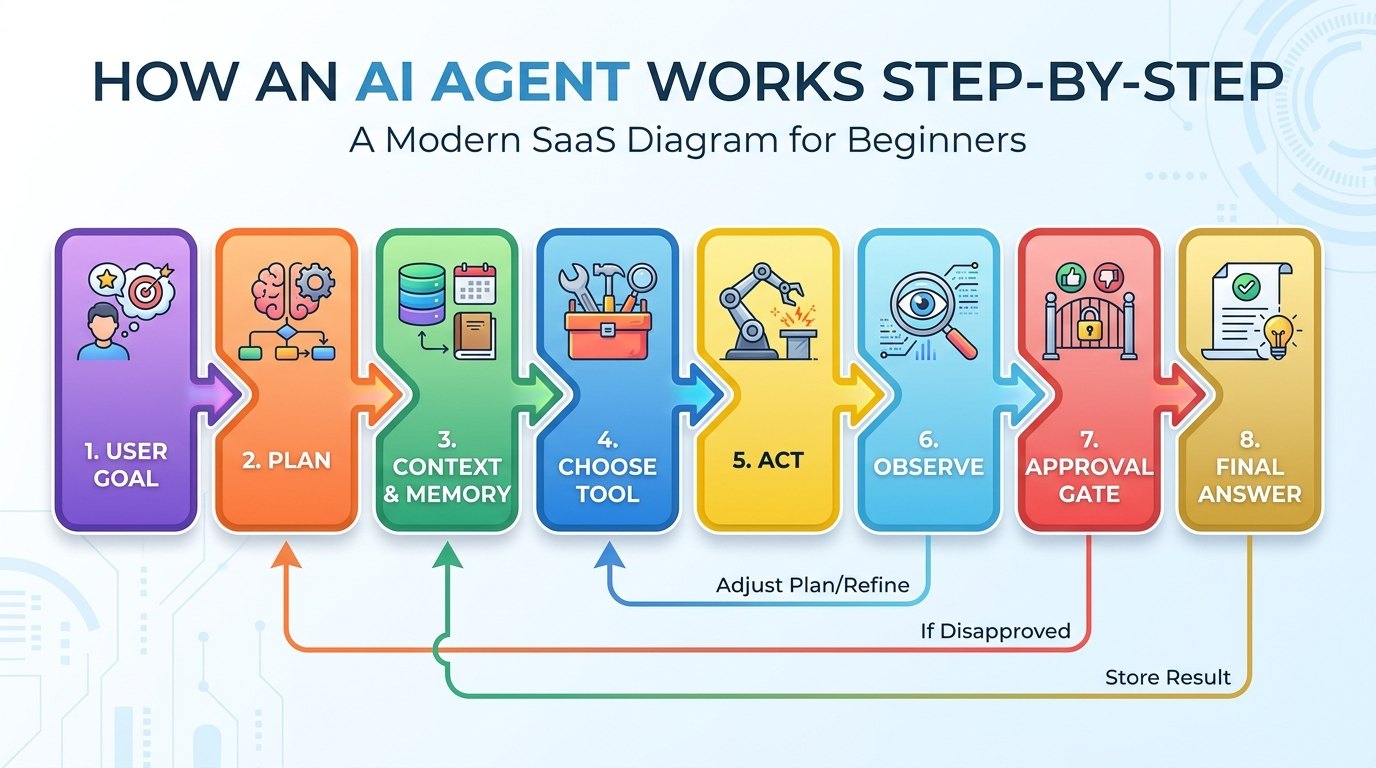
The Agent Loop: Plan, Act, Observe, Decide
Most agents follow a loop: understand the goal, make a plan, choose a tool or response, observe the result, update context, and decide whether to continue. In developer language, this is sometimes called a tool-calling loop, ReAct-style loop, planner-executor pattern, or graph-based agent. For a beginner, the labels matter less than the cycle.
Imagine asking an agent to compare three invoices against a purchase order. A simple chatbot might explain how to compare them. A workflow might run a fixed invoice-checking script. An agent can inspect the first invoice, notice a missing field, search the vendor record, compare totals, flag a mismatch, and ask a human before sending a message to finance.
The observation step is what makes agents feel different. After every tool call, the system gets a result: a search result, a database row, a failed command, a permission error, or a human decision. The next action should depend on that observation. Without observation, the agent is only guessing.
Chatbot vs Workflow vs Agent
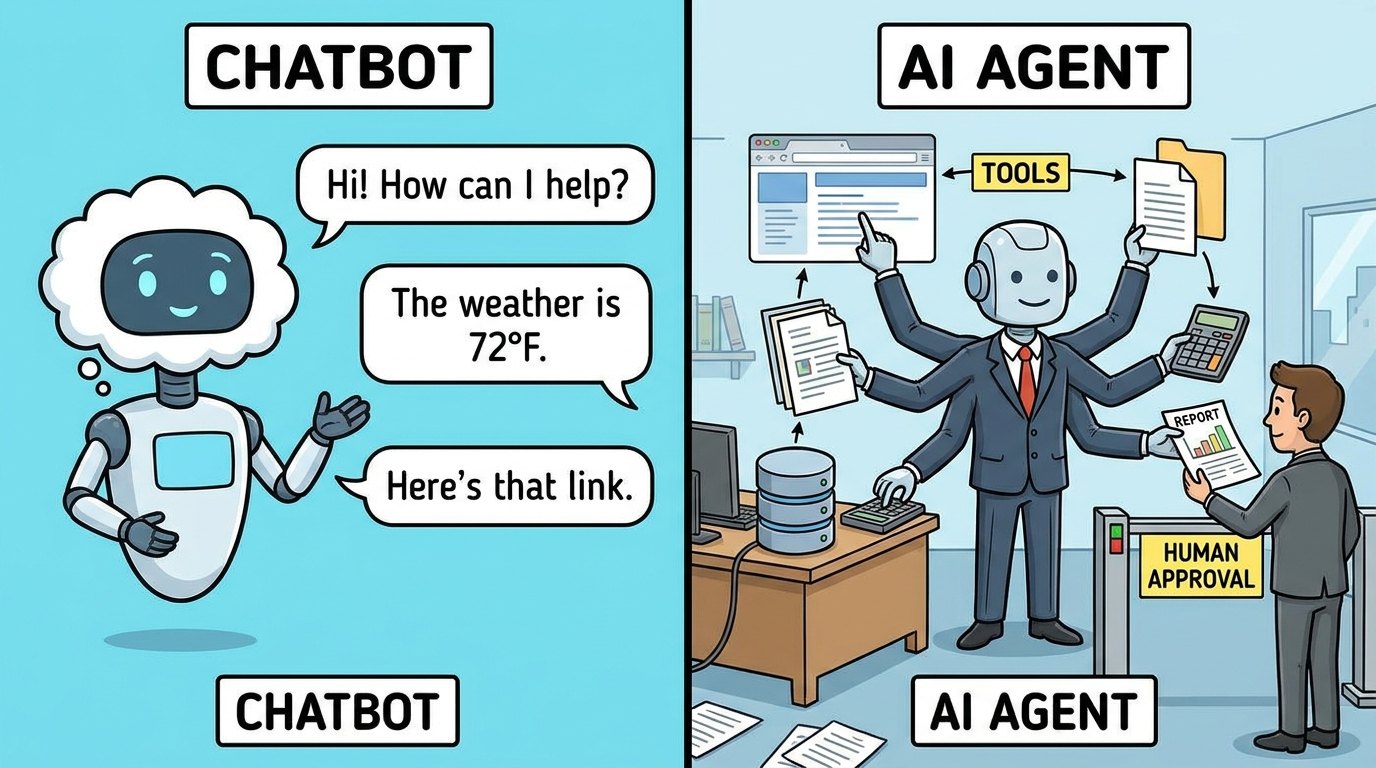
The distinction between chatbot, workflow, and agent prevents a lot of confusion. A chatbot is best when the user wants an explanation, draft, summary, or brainstorm. A workflow is best when the steps are predictable and mistakes are expensive. An agent is best when the goal is clear but the path may change.
For example, summarizing a document is a chatbot task. Sending every support ticket through the same classification, routing, and escalation process is a workflow task. Investigating a messy customer account across tickets, docs, billing notes, and product logs may need an agent because the next step depends on what the system discovers.
This is why serious builders do not automatically choose agents for everything. Anthropic’s guidance is refreshingly practical: start with the simplest solution and increase complexity only when needed. Agents trade latency, cost, and predictability for flexibility. That trade is worth it only when flexibility creates real value.
| System | Best for | Weakness |
|---|---|---|
| Chatbot | Answering, explaining, summarizing, drafting. | Usually does not act unless connected to tools. |
| Workflow | Predictable repeated processes. | Cannot adapt well when the path changes. |
| Agent | Goal-directed tasks where the next step depends on observations. | Needs guardrails, evaluation, cost control, and human oversight. |
How Tools Give Agents Hands
A language model by itself predicts and generates text. Tools let it interact with the world. Common tools include web search, document retrieval, calculators, databases, calendars, email systems, browsers, code execution, ticketing systems, and internal APIs. A tool usually has a name, a description, an input schema, permissions, and a result format.
Good tools are narrow and well described. A tool called “do everything in Salesforce” is dangerous and confusing. A tool called “look up account renewal date by account ID” is easier for the agent to use correctly. Tool design is one of the hidden skills behind reliable agents.
The agent should also know when not to use a tool. If the answer is already in context, calling a search tool wastes time. If a tool can change real data, the policy may require human approval. If a tool result is incomplete, the agent should say so rather than inventing missing facts.
How Agent Memory Works
Memory is not one thing. Short-term memory is the working context inside the current task: the user goal, current plan, files inspected, tool results, and unresolved questions. Long-term memory is information stored across sessions, such as user preferences, project facts, or previous decisions. Retrieval memory is a searchable knowledge base the agent can query when needed.
The mistake is assuming more memory is always better. Too much memory can pollute context with stale facts. Too little memory makes the agent repeat itself or forget constraints. Useful memory is curated, scoped, and reviewable. It should answer: what should this agent remember, why, for how long, and who can correct it?
A customer support agent might remember the current ticket history during a case, retrieve company policy from a knowledge base, and store a short resolution note after the case closes. It should not silently memorize private customer details forever unless the system has a clear retention policy and user consent.
Planning: Why Agents Need a Map
Planning helps an agent avoid random action. A plan can be a simple checklist, a tree of possible paths, a graph with checkpoints, or a hidden scratchpad created by the model. The visible form matters less than the discipline: before acting, the agent should identify the likely steps, the needed information, and the risky actions.
For easy tasks, planning can be lightweight. For risky tasks, planning should be explicit and reviewable. If an agent is going to edit production configuration, send a message, purchase something, delete data, or trigger a workflow, it should show the plan and ask for approval before taking the irreversible step.
Planning also reduces cost and confusion. A vague agent run can wander. A scoped plan keeps the system focused. This is why many production agent stacks combine deterministic workflow steps with model-driven decisions: predictable where possible, flexible where useful.
Human Control: Where Approval Belongs
Human control is not a sign that the agent failed. It is part of good design. The right question is not whether an agent is autonomous; the right question is where autonomy is safe. Reading a public document may be low risk. Sending an email to a customer is higher risk. Deleting data is high risk. Spending money is high risk. Changing security settings is very high risk.
Approval gates should appear before actions with external consequences. The agent can prepare the action, summarize why it thinks the action is correct, show the data it used, and wait for a human to approve, edit, or reject. This turns the agent from a mysterious actor into a supervised assistant.
A good approval request is specific: here is the action, here is the reason, here is the evidence, here is the risk, and here is what will happen if you approve. A bad approval request says only “Can I continue?” without enough context for a human to decide.
Common Failure Modes and How to Reduce Them
Agents can fail in predictable ways. They may misunderstand the goal, choose the wrong tool, trust stale memory, overfit to irrelevant context, retry the same failed action, hallucinate missing evidence, or complete the wrong task very confidently. These failures are not reasons to ignore agents; they are reasons to design them carefully.
The first defense is scope. Give the agent a clear job and a clear stopping condition. The second defense is tool design. Give it safe, narrow tools rather than broad powers. The third defense is observability. Keep traces, logs, tool inputs, tool outputs, and user approvals. The fourth defense is evaluation. Test the agent against realistic cases before trusting it in production.
For everyday users, the same principles apply. Ask for a plan. Limit the files or data you share. Review the output. Require the agent to cite what it used. Do not let it take irreversible actions without confirmation.
Three Practical Examples
Example one: a research agent. You ask it to prepare a short brief on a topic. It searches trusted sources, extracts key claims, records citations, compares conflicts, and drafts a summary. Human control matters because the agent should not fabricate citations or treat every source as equal.
Example two: a coding agent. You ask it to fix a failing test. It reads the error, inspects relevant files, proposes a patch, runs the test, observes the result, and explains the diff. Human control matters because the developer still reviews the code and decides whether the change matches the project’s design.
Example three: an operations agent. You ask it to triage support tickets. It classifies urgency, retrieves account details, suggests a response, and routes edge cases to a person. Human control matters because customer communication and account changes can have real consequences.
When Should You Use an AI Agent?
Use an AI agent when the goal is clear, the path is uncertain, the task may require multiple steps, tool use is valuable, and the result can be checked. Do not use an agent just because the word sounds advanced. Many problems are better solved with a simple prompt, a normal automation, or a deterministic workflow.
Agents are especially useful for investigation, synthesis, triage, drafting with evidence, debugging, routine operations with exceptions, and workflows where the next step depends on new information. They are weaker for tasks with unclear goals, high-stakes irreversible outcomes, poor data access, or no way to verify success.
The best rule is: automate the boring path, agentically handle the messy middle, and keep humans in charge of judgment, approval, and accountability.
What This Means for the Singularity Journey
AI agents matter because they move AI from answer generation toward delegated work. That shift is one reason they appear in discussions about productivity, labor, safety, governance, and the path toward more capable AI systems. But the important story is not a sudden leap to full autonomy. The important story is the gradual assembly of models, tools, memory, workflows, policies, and human oversight into systems that can do more than chat.
This is also where the hype gets dangerous. Calling a system an agent does not prove it is reliable, safe, or useful. A strong agent is measured by task success, error handling, transparency, cost, human control, and recovery from failure. The future belongs less to flashy demos and more to systems that can be trusted in repeated real-world work.
For readers, the next step is to learn the mental model first. Once you understand the loop, tools, memory, planning, and approval gates, frameworks become easier to evaluate and marketing claims become easier to challenge.
Beginner Checklist for Reading Agent Demos
When you see an AI agent demo, do not judge it only by whether the final screen looks impressive. Ask what goal the agent received, what tools it could access, what data it used, what it was forbidden to do, and whether a human could inspect the steps. A polished demo can hide a fragile process, while a modest demo with clear traces can be much closer to production quality.
The most useful questions are practical. Did the agent know when to stop? Did it recover from a failed tool call? Did it cite the source of important claims? Did it separate facts from assumptions? Did it ask permission before an external action? Did it leave an audit trail? These questions help you evaluate agent reliability without needing to be an AI researcher.
If the answer to those questions is unclear, treat the agent as experimental. That does not make it useless. It simply means the correct setting is a sandbox, a supervised workflow, or a low-risk internal task. Trust should grow from repeated evidence, not from the word “agent” in a product description.
A Simple Mental Model to Remember
Think of an AI agent as a careful intern with a checklist, a toolbox, a notebook, and a supervisor. The checklist is the goal and plan. The toolbox is the set of allowed tools. The notebook is context and memory. The supervisor is the human approval layer. If any of those pieces is missing, the system becomes less dependable. A smart model without tools cannot act. Tools without supervision can create risk. Memory without review can preserve mistakes. A plan without observations can become stale after the first unexpected result.
This mental model keeps the topic grounded. Agents are not tiny digital people, and they are not guaranteed replacements for workers. They are software systems that combine language models with orchestration, permissions, external tools, stored context, and feedback loops. The better you can name each part, the easier it becomes to design, buy, evaluate, or safely use agentic AI.
Related Singularity Journey Guides
Sources and Further Reading
FAQ: How AI Agents Work
What is the simplest definition of an AI agent?
An AI agent is a goal-directed AI system that can decide steps, use tools, observe results, and continue until it reaches an answer or needs human help.
How is an AI agent different from a chatbot?
A chatbot mainly replies inside the conversation. An AI agent can use tools and make step-by-step decisions to complete a task.
Do AI agents always need memory?
No. Some agents only need current-task context. Memory becomes useful when the agent must remember preferences, prior decisions, or information across steps or sessions.
Why do AI agents need tools?
Tools let an agent retrieve facts, calculate, read files, call APIs, run code, or take actions that a text-only model cannot do by itself.
Are AI agents autonomous?
Some are highly autonomous, but many useful agents are supervised. The safest designs allow autonomy for low-risk steps and require approval for risky actions.
When should I not use an AI agent?
Avoid agents when the task is simple, the steps are fixed, the outcome is high stakes and hard to verify, or the system lacks safe tools and approval gates.
