
AI Agent Tool Use Explained: How Agents Choose Tools, Call APIs, and Ask for Approval
AI agents become useful when they can do more than write text. This guide explains the narrow but important part of the agent stack: how an agent chooses a tool, calls an external system, reads the result, and knows when to ask a human before acting.
Quick Answer: What Is AI Agent Tool Use?
AI agent tool use is the process where an AI system decides that a normal text answer is not enough, selects an external capability, sends a structured request to that capability, receives a result, and uses that result to decide what to do next. A tool can be a search function, calendar, database, file reader, code runner, browser action, payment API, ticketing system, spreadsheet, or internal business workflow.
The important part is not that the model has a magic button. The important part is the loop around the button. A safer agent should understand the goal, choose the smallest useful tool, explain or internally represent why it needs that tool, respect permission limits, call the tool with valid inputs, inspect the returned data, and stop or ask for approval before a risky action. When people say agents can “take action,” this is usually what they mean.
This article supports our pillar guide, How AI Agents Work: Tools, Memory, Planning, and Human Control Explained. That guide explains the whole agent system. Here, we zoom in on one component: tools. The goal is to make tool use understandable for non-engineers, product managers, students, and early builders who want the mental model before they read API documentation.
Why AI Agents Need Tools Instead of Just Prompts
A language model can answer from patterns in its training data and from context you provide in the prompt. That is enough for brainstorming, summarizing provided text, drafting an email, or explaining a concept. But many useful tasks require live information or action in another system. A model cannot know your current calendar unless a calendar tool provides that data. It cannot check a warehouse database unless a database tool exposes a safe query. It cannot file a support ticket unless a ticketing tool accepts a structured request.
Tools turn an agent from a conversational assistant into a participant in a workflow. The difference sounds small, but it changes the risk profile. A wrong paragraph can be edited. A wrong tool call may send an email, delete a row, book a meeting, charge a card, overwrite a file, or expose private information. That is why tool use belongs next to human control, not far away from it.
Anthropic’s engineering guidance draws a useful distinction between workflows and agents: workflows follow predefined code paths, while agents dynamically direct their own process and tool usage. That distinction matters because a fixed workflow can be easier to test, while a flexible agent can handle messier tasks at the cost of more uncertainty, latency, and expense. Tool use is the bridge between those worlds.
OpenAI’s function calling documentation describes the core interaction pattern in technical terms: provide tools, receive a tool call, execute the tool in your application, return the tool output, and let the model continue. MCP documentation uses a broader ecosystem metaphor: a standard way for AI applications to connect with data sources, tools, and workflows. For a beginner, both ideas point to the same thing: the model does not directly own the outside world. Your application gives it carefully shaped handles.
The Six-Step Tool-Use Loop
The safest way to understand tool use is as a loop, not a single action. A weak demo makes it look like the agent simply says, “I will use the calendar,” then something happens. A production-ready mental model is more detailed.
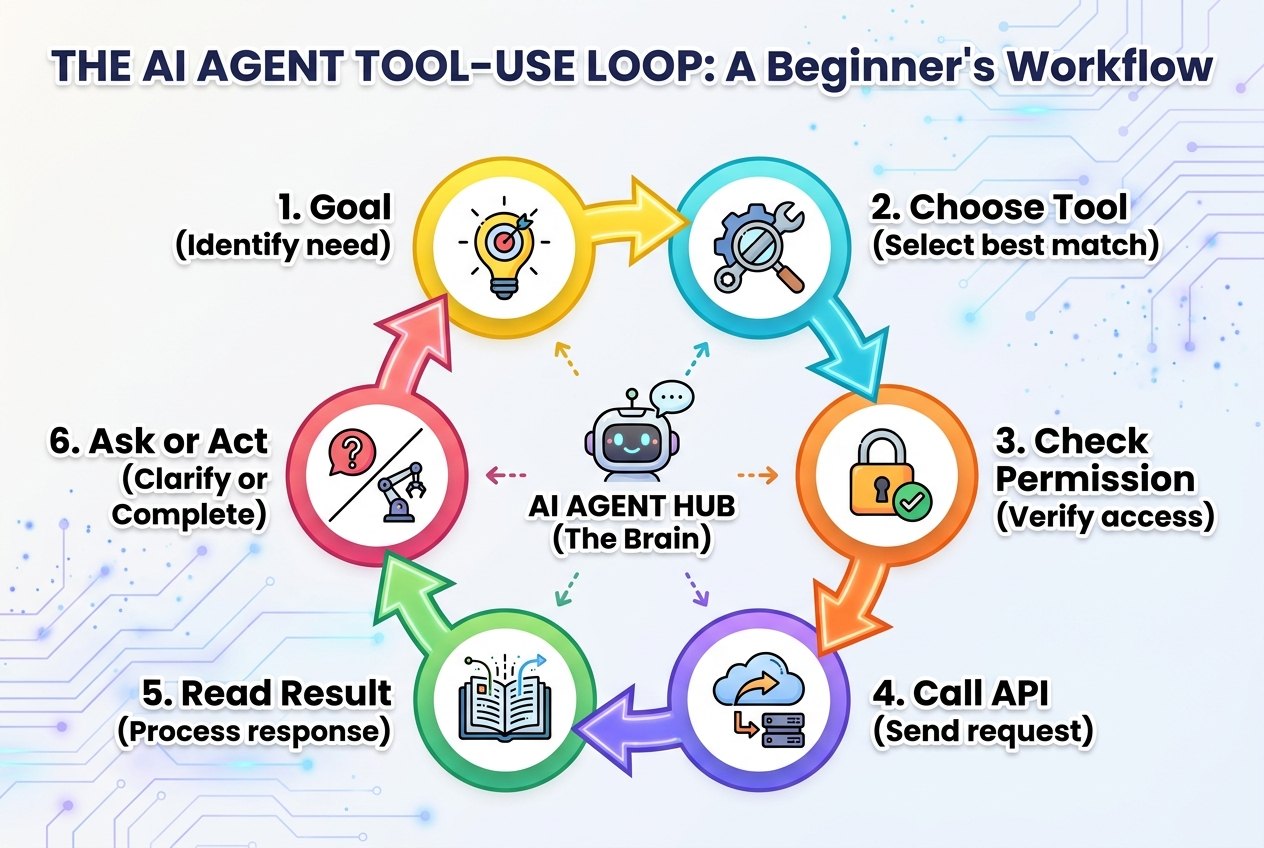
| Step | What happens | Why it matters |
|---|---|---|
| 1. Understand the goal | The agent turns the user request into a concrete task, such as finding a document, checking a balance, or preparing a draft. | Bad goals create bad tool calls. “Handle this customer” is vague; “summarize the last three tickets” is bounded. |
| 2. Choose the tool | The agent selects from the available tools, such as search, database, CRM, email, browser, or code execution. | Tool selection should be based on need, not habit. A search tool is safer than a write tool when the task is only informational. |
| 3. Build the request | The agent fills arguments such as date range, customer ID, query text, or file path. | Structured arguments reduce ambiguity and make validation possible before anything runs. |
| 4. Check permission | The system verifies whether the agent is allowed to use that tool for this user, task, and risk level. | Permissions prevent an agent from turning a low-risk request into a high-risk action. |
| 5. Read the result | The agent receives tool output and decides whether it is enough, incomplete, suspicious, or contradictory. | The result is not automatically truth. The agent still needs to interpret it carefully. |
| 6. Continue, ask, or stop | The agent either answers, uses another tool, asks the human, or stops because the task is too risky or unclear. | This is where human control belongs: before irreversible or sensitive action. |
Notice that the model is only one part of this loop. The application, permission layer, tool schema, logging system, and human interface all matter. A more capable model can make better choices, but it cannot compensate for a tool that exposes too much power with no guardrails.
Permissions: The Difference Between Useful and Dangerous Tool Use
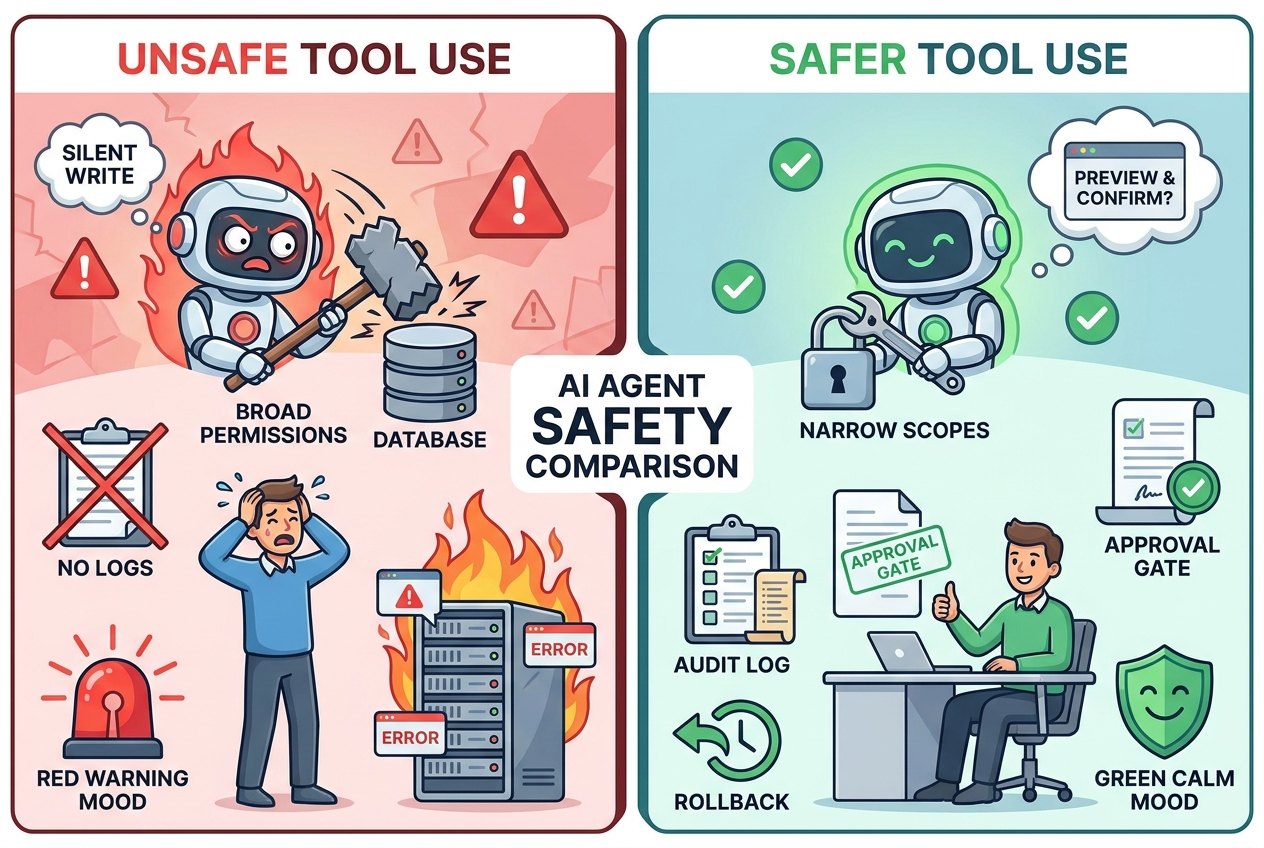
Tool permissions are the rules that define what an agent can read, write, modify, approve, or delete. They are the agent equivalent of giving a new employee access to company systems. You would not give a junior intern admin access to payroll on day one. You should not give a general-purpose agent broad write access just because a demo looks impressive.
A good permission design starts with scopes. Read-only tools are safer than write tools. Preview tools are safer than immediate execution tools. Narrow tools are safer than broad tools. Temporary permissions are safer than permanent permissions. User-specific permissions are safer than global permissions. This is not bureaucracy; it is how you make automation trustworthy enough to use repeatedly.
OWASP’s GenAI Security work highlights that LLM and agentic applications introduce security risks that traditional software teams need to treat explicitly. NIST’s AI Risk Management Framework also emphasizes mapping, measuring, managing, and governing AI risks. For everyday readers, the lesson is simple: the more authority an agent has, the more visible its guardrails should be.
Safer permission patterns
- Read before write.
- Preview before send, delete, buy, or publish.
- Allow low-risk tools by default, but require approval for high-risk tools.
- Keep logs that show the tool, input, output, user, and time.
- Use short-lived access when the task is temporary.
Risky permission patterns
- One agent token that can access every system.
- Silent writes with no preview or confirmation.
- Tools that accept vague free-text commands for destructive actions.
- No audit trail for what the agent saw or changed.
- No clear owner when something goes wrong.
Practical Examples of AI Agent Tool Use
Example 1: Research assistant with a search tool
A research assistant receives the question, “What changed in our market this week?” Without tools, it can only answer from stale knowledge or from text pasted into the chat. With tools, it can search approved sources, fetch pages, summarize findings, cite references, and produce a brief. This is a good beginner example because the first version can be read-only. The agent retrieves information but does not publish, email, or modify anything.
Example 2: Support agent with a ticketing tool
A customer support agent can read a customer’s recent tickets, summarize the history, suggest a response, and draft a refund request. The safer design separates drafting from execution. Reading tickets may be allowed automatically. Drafting a reply may be allowed automatically. Sending the reply or issuing a refund should require an approval step, especially when money, account status, or legal wording is involved.
Example 3: Calendar agent with scheduling tools
A calendar agent can inspect availability, propose time slots, and draft an invitation. A cautious system asks for confirmation before sending the invite, adding external guests, changing recurring meetings, or booking over protected focus time. The difference between “suggest a meeting time” and “schedule the meeting” is a permission boundary, not just a product feature.
Example 4: Coding agent with shell and file tools
A coding agent can read files, edit code, run tests, inspect errors, and prepare a patch. This is powerful because the feedback loop is fast. It is also risky if the agent can run arbitrary shell commands, install packages, delete files, or push changes without review. A safer setup makes read and test commands easy, but requires approval for destructive commands, credential access, network calls, or publishing changes.
Common AI Agent Tool Types
Most agent tools fall into a few simple categories. Once you know these categories, product announcements become easier to read. Instead of asking whether a tool is impressive, ask what category it belongs to and what risk it introduces.
A beginner-friendly rule is to treat retrieval as low-risk, computation as medium-risk, and action as context-dependent. Reading public documentation is usually low risk. Running code may be safe in a sandbox but dangerous on a production machine. Sending a customer email may be harmless for a draft but risky if it goes out automatically.
How Tool Use Fails
Agent failures are often described as hallucinations, but tool-use failures can be more specific. The agent might choose the wrong tool, call the right tool with the wrong arguments, misunderstand the result, repeat the same failed call, trust stale data, ignore a permission boundary, or continue acting when it should ask a human.
| Failure mode | What it looks like | Safer design |
|---|---|---|
| Wrong tool | The agent searches the web when it should use internal policy docs. | Give tools clear descriptions and route sensitive questions to trusted sources. |
| Bad arguments | The agent queries the wrong customer, wrong date range, or wrong file. | Validate tool inputs and show previews for sensitive records. |
| Overbroad action | The agent updates many rows when the user intended one. | Require limits, dry runs, and human approval for bulk changes. |
| Result confusion | The agent treats an error message as a successful result. | Return structured status fields, not only plain text. |
| Looping | The agent keeps calling the same tool without progress. | Set iteration budgets and ask for human help after repeated failure. |
| Silent risk escalation | A harmless summary request turns into a send, delete, or publish action. | Separate read, draft, preview, and execute permissions. |
This is why logs matter. A useful agent trace should show what the user asked, which tool was selected, what arguments were sent, what came back, and why the agent chose the next step. Without that trace, debugging agent behavior becomes guesswork.
There is also a product-design lesson here. Tool use should be visible enough that normal users understand what the agent is about to do, but not so noisy that every harmless read action becomes a frustrating permission popup. The right balance usually depends on reversibility. If a tool only reads public information, silent execution may be fine. If a tool writes to a shared system, sends a message, changes a customer account, or uses private data, the interface should slow down and show the user exactly what will happen. Good agent products make this boundary feel natural instead of surprising.
A Beginner Checklist for Evaluating Tool-Using Agents
When you see an AI agent demo, use this checklist before trusting it in a real workflow. The point is not to be cynical. The point is to separate a fun demo from a system that can be used safely.
- Can the agent explain why it needs a tool? If not to the user every time, at least in a trace or plan.
- Are tools named clearly? “send_email_draft” is safer than a vague “email_tool” with hidden behavior.
- Are read and write actions separated? Reading a record and modifying a record should not be the same permission.
- Is there a preview step? The user should see important outgoing messages, deletions, purchases, or updates before execution.
- Are risky actions gated? Money, legal, security, production systems, private data, and external communication deserve approval.
- Can the agent stop? A good agent should say when it lacks permission, context, or confidence.
- Is there an audit trail? You should be able to reconstruct what happened after the task completes.
- Can mistakes be reversed? Idempotency, rollback, and drafts matter more than flashy autonomy.
How This Fits Into the Bigger Agent System
Tools are only one part of an agent. The broader system also includes goals, instructions, memory, planning, evaluation, human control, and observability. That is why this article should be read with the pillar guide on how AI agents work. Tool use explains how an agent touches external systems. The pillar explains how that capability fits inside the full agent loop.
The relationship between the two matters for learning. If you only read the broad pillar, tools may sound like a simple add-on. If you only read tool documentation, you may miss the human-control problem. Together, the two ideas show the real pattern: an AI agent is not just a model plus APIs. It is a controlled decision loop that uses external capabilities under rules.
For teams building agents, the immediate next step is not to add every possible integration. It is to list the few tools that matter, classify them by risk, decide which are read-only, define approval boundaries, and test failure cases. For non-builders, the next step is to ask better questions when a vendor says “our agent can take action.” What action? With whose permission? Against which system? With what log? With what rollback?
Related Singularity Journey Guides
- How AI Agents Work: Tools, Memory, Planning, and Human Control Explained — the source pillar article this cluster supports.
- AI Agent Controls Explained — a broader guide to tools, memory, permissions, and approval.
- AI Workflows vs AI Agents — when a fixed workflow is better than a flexible agent.
- AI Agent Evaluation Framework — how to test traces, tool calls, memory, and production behavior.
- AI Agent Test Cases — golden datasets and failure scenarios for agent reliability.
Sources and References
FAQ: AI Agent Tool Use
What does tool use mean in AI agents?
Tool use means the agent can call an external capability such as search, a database, a calculator, calendar, browser, code runner, or business API instead of only producing text from the prompt.
Is tool calling the same as an AI agent?
No. Tool calling is one capability. An AI agent usually combines goals, planning, tool use, memory or state, result interpretation, and control rules across multiple steps.
Why do AI agents need human approval?
Human approval is important when a tool call could send information, spend money, modify records, delete files, affect customers, change production systems, or expose private data.
What is the safest first tool for an agent?
A read-only retrieval tool is usually safest because it helps the agent gather information without changing external systems. Write tools should be added later with previews and approval gates.
How can I tell if an agent tool is risky?
Ask whether the tool reads, writes, deletes, publishes, pays, communicates externally, accesses private data, or changes production systems. The more it changes the world, the stronger its controls should be.
What is MCP in agent tool use?
The Model Context Protocol is an open standard for connecting AI applications to data sources, tools, and workflows. It helps standardize how assistants and agents access external systems.
