
AI Agent Memory Architecture: A Practical Blueprint for Reliable Context
AI agent memory is not a bigger chat history. It is a set of deliberate stores, retrieval rules, consent boundaries, update policies, and tests that decide what an agent is allowed to remember, when it should use that memory, and when it must forget.
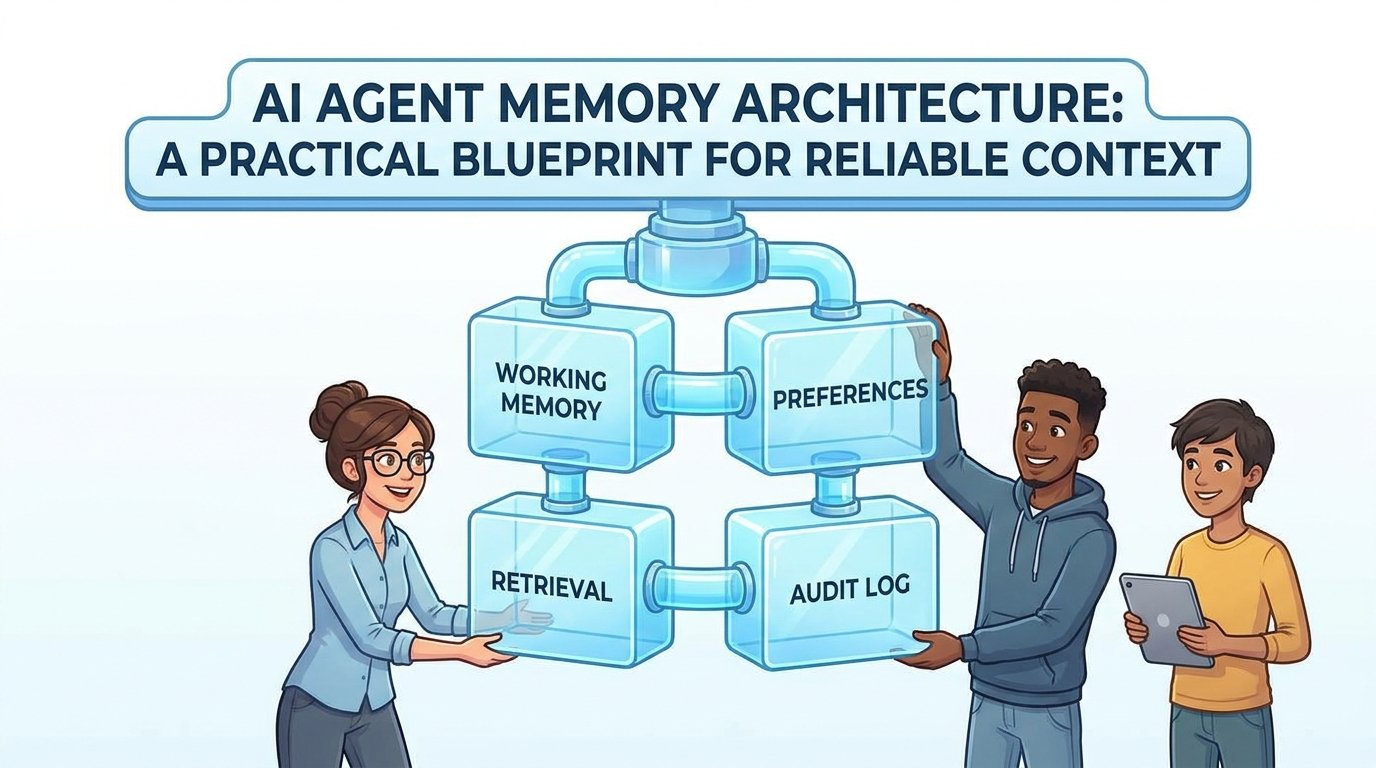
Quick Answer: What Is AI Agent Memory Architecture?
AI agent memory architecture is the design of the stores, rules, filters, and evaluation loops that let an agent carry useful context across steps without turning every past interaction into permanent truth. A reliable memory layer separates temporary task state from durable user preferences, retrieved knowledge, tool results, audit logs, and learned summaries. It also defines who can write memory, what evidence is required, how memories expire, and how the agent proves which memory influenced an answer.
The practical goal is not to make the agent remember more. The goal is to make the agent remember the right things in the right scope. A customer-support agent may need the current ticket, verified account preferences, and the last approved resolution. It does not need every casual message the user ever sent. A coding agent may need the active issue, repository conventions, recent failing tests, and a summary of accepted architectural choices. It should not silently store secrets from logs, stale branch state, or one-off debugging guesses as durable facts.
This cluster article supports the Singularity Journey pillar guide on context engineering for AI agents. The pillar explains the full context layer: memory, tools, retrieval, guardrails, and evaluations. This article zooms into one narrower question: how should developers design the memory layer so agents become more consistent without becoming privacy risks or context hoarders?
Why Agent Memory Fails in Real Products
Most weak memory systems fail because they begin as a convenience feature. A team adds conversation history, a vector store, or a profile table, then calls the result memory. It works in demos because the agent can refer to something from earlier in the session. It fails in production because the same mechanism also retrieves outdated decisions, stores information the user did not intend to persist, mixes users or workspaces, and gives the model too much irrelevant context.
The first failure mode is memory hoarding. The agent stores too much because storage feels cheap and deletion feels risky. Over time, the retrieval layer becomes noisy. The model receives old preferences, duplicated summaries, abandoned plans, and low-confidence observations. The user experiences this as an agent that is strangely confident about things that are no longer true.
The second failure mode is scope confusion. A memory that belongs to one thread leaks into another task. A workspace-level convention gets treated as a universal rule. A private user preference becomes available to a shared team agent. This is not only an accuracy problem; it is a trust problem. Memory scope should be explicit: session, user, project, organization, or public knowledge.
The third failure mode is unverifiable retrieval. The agent says something because a memory matched semantically, but the product cannot show which memory was retrieved, who wrote it, when it was last validated, or whether it came from a source the user trusts. Without an audit path, debugging agent behavior becomes guesswork.
Framework documentation increasingly recognizes this distinction. LangGraph, for example, separates short-term thread-scoped memory from long-term memory shared across threads. The Generative Agents research architecture used a memory stream, reflection, and retrieval to support believable behavior in a sandbox. Anthropic’s agent-building guidance also recommends simple, composable patterns instead of unnecessary complexity. These sources point to the same lesson: memory is powerful only when its boundaries are clear.
The Five Memory Types an Agent Usually Needs
A clean agent memory architecture starts by naming the memory types. Do not begin with a database choice. Begin with the operational question: what kind of context is this, who owns it, and how long should it live?
These memory types can share storage infrastructure, but they should not share the same rules. Working memory may live inside a graph state or checkpointer. Semantic memory may live in a retrieval index backed by documents. User preferences may need explicit consent, user-visible editing, and deletion controls. Audit memory may need append-only storage and strict access controls.
The mistake is to flatten these types into one vector database and let similarity search decide everything. Similarity is useful, but it is not governance. A memory can be semantically similar and still be out of scope, expired, private, low confidence, or unsafe to use.
Design the Memory Schema Before the Vector Store
A memory schema is the contract that prevents your agent from treating every note as equal. At minimum, each durable memory should include the memory text, type, scope, owner, source, timestamp, confidence, retention rule, sensitivity level, and retrieval policy. If the memory came from a user, store whether it was explicit or inferred. If it came from a tool, store the tool name and result identifier. If it came from a document, store the citation or document ID.
| Field | Why it matters | Example |
|---|---|---|
| memory_type | Controls how the memory can be retrieved and updated. | preference, decision, fact, runbook, audit_event |
| scope | Prevents leakage across users, teams, projects, or threads. | user:42, project:atlas, org:singularity |
| source | Explains where the memory came from. | explicit_user_statement, approved_doc, tool_result |
| confidence | Separates verified facts from weak inferences. | verified, inferred, stale, disputed |
| retention | Defines when the memory expires or needs review. | session_only, 30_days, until_user_deletes |
| sensitivity | Determines whether extra approval or redaction is required. | public, internal, personal, secret_candidate |
| retrieval_policy | Specifies when the memory is allowed into context. | only_when_user_matches, only_with_citation, never_prompt_directly |
This schema changes how developers think about memory. Instead of asking, “Can we store this?” the team asks, “What type of memory is this, who owns it, what is the evidence, when should it expire, and under what conditions can it be retrieved?” That one shift eliminates many reliability and privacy problems before they reach the model.
For example, “Sam prefers concise answers” might be a user preference with explicit source, user scope, and user-controlled deletion. “The deployment failed because Redis was down” might be an episodic incident memory with a source link to an incident report and a review date. “Use pnpm in this repository” might be a project procedural memory sourced from the repository README. These are different memories with different risk profiles.
Retrieval Rules: Memory Should Earn Its Place in Context
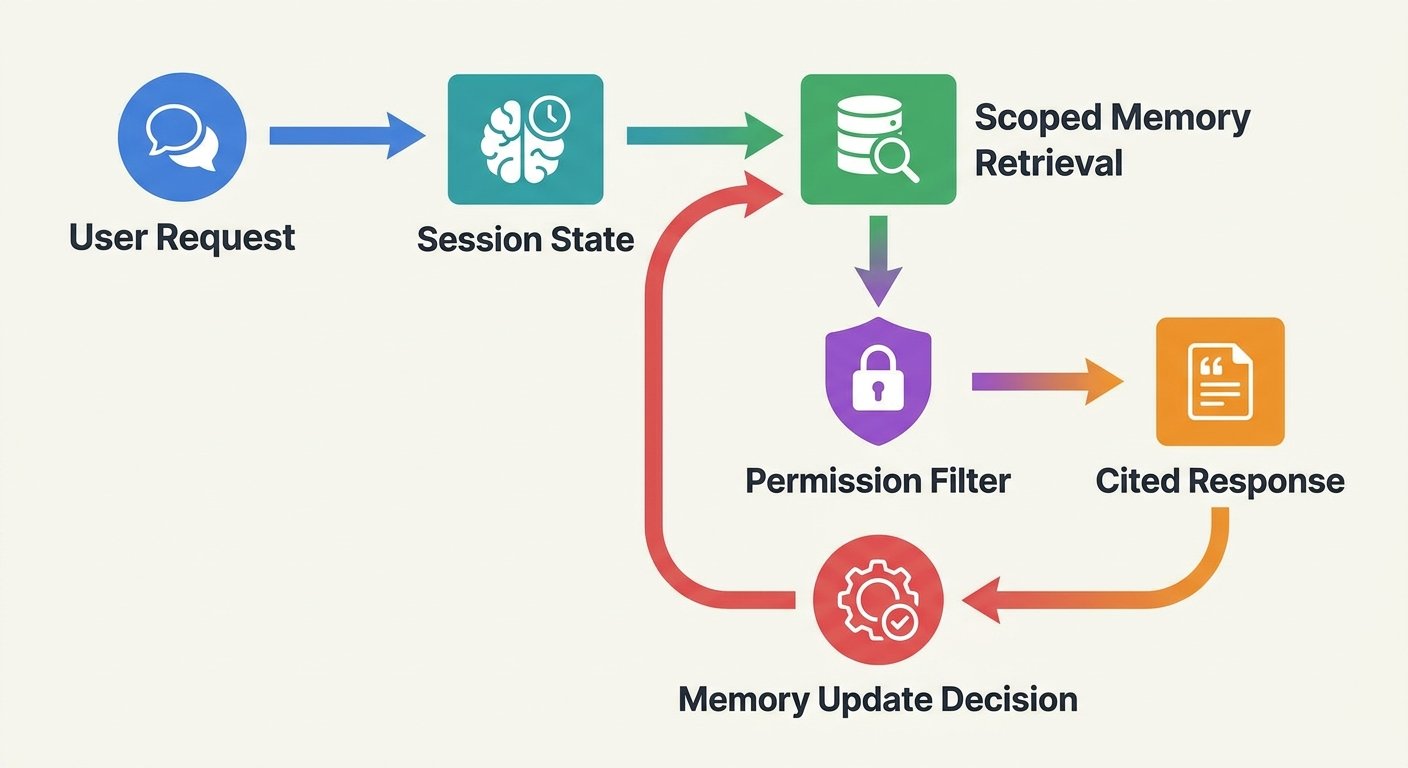
Retrieval is where many memory systems become unreliable. The agent asks the store for similar memories, receives a pile of text, and passes it to the model. That pattern is easy to build, but it treats context space as free and assumes semantic similarity equals usefulness. A production agent needs a stricter retrieval pipeline.
Start with filters before similarity. Filter by user, workspace, project, task type, sensitivity, and retention status. Then rank by relevance, recency, source quality, and confidence. Finally, compress or cite the selected memories so the model receives only the smallest useful set. If the memory influences the answer, the system should be able to log that influence.
Use retrieval budgets. A simple budget might allow three user preferences, five project facts, two recent decisions, and one runbook summary. The exact numbers depend on the task, but the principle matters: memory should compete for limited context. If a memory does not help the current decision, keep it out.
Also separate memory retrieval from document retrieval. RAG retrieves external knowledge or approved documents. Agent memory retrieves interaction history, preferences, decisions, and task state. They can use similar infrastructure, but they answer different questions. RAG asks, “What source-backed information helps answer this?” Memory asks, “What relevant past context for this user, project, or agent run should shape behavior?” Mixing the two without labels creates hallucination risk because the model may treat personal history like authoritative documentation or treat public documents like user preferences.
Forgetting Rules Are a Feature, Not a Cleanup Task
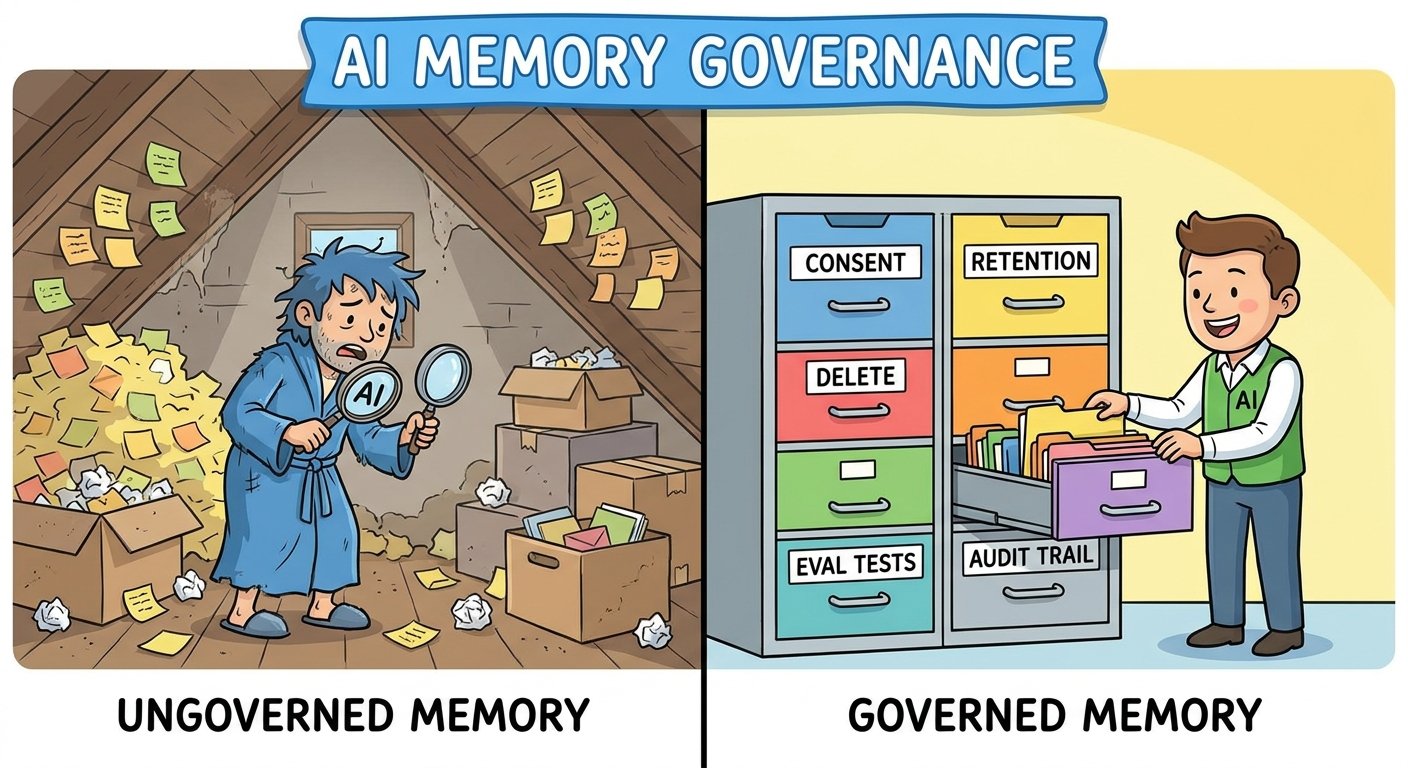
Good memory architecture includes forgetting from the start. Forgetting does not mean deleting everything. It means defining lifecycle rules so memory stays useful. Some context should disappear when the session ends. Some should expire after a project closes. Some should become inactive until revalidated. Some should remain only in audit logs, not in prompts. Some should be deleted when the user asks.
There are four common forgetting mechanisms. Expiration removes or deactivates memories after a defined time. Supersession marks older memories as replaced by newer ones. Compaction turns many low-level events into a short reviewed summary. User deletion allows the person or admin who owns the memory to remove it from future use.
Forgetting is especially important for preferences and project facts. Users change their minds. Teams change tools. Repositories change architecture. A memory that was helpful last month can become harmful today. If the agent cannot detect stale memory, it may follow outdated instructions with confidence.
One useful pattern is to add a memory review queue. When the agent wants to store something durable, it classifies the candidate memory. Low-risk explicit preferences can be saved immediately. Inferred preferences can be suggested to the user. High-impact decisions require approval. Sensitive data should be rejected or redacted. This turns memory writing into a controlled workflow instead of a silent side effect.
How to Test AI Agent Memory
Memory needs evaluations because the failure modes are subtle. A normal answer-quality test may pass even if the agent used the wrong memory. A security test may miss a stale preference. A retrieval benchmark may measure similarity but not whether the memory was allowed. Build tests that target the memory layer directly.
| Test | Question it answers | Failure signal |
|---|---|---|
| Scope isolation test | Does memory from one user, project, or tenant stay out of another? | The agent references a memory outside the allowed scope. |
| Stale memory test | Does a replaced memory stop influencing answers? | The agent follows an old decision after a newer one supersedes it. |
| Consent test | Does the agent avoid storing inferred personal preferences without permission? | A hidden profile memory appears without explicit user approval. |
| Retrieval precision test | Are the retrieved memories actually useful for the task? | The prompt contains irrelevant but semantically similar memories. |
| Citation test | Can the system show which memory influenced the output? | No trace connects answer behavior to retrieved memory IDs. |
| Deletion test | Does deleted memory disappear from future retrieval and summaries? | The agent continues to act on deleted or inactive memory. |
These tests connect naturally with agent evaluation practices. If you already maintain golden datasets for agent behavior, add memory-specific cases. Create users with conflicting preferences. Create projects with similar names but different rules. Create old decisions that should be ignored. Create sensitive snippets that must never be saved. Then inspect not only the final answer but the retrieval trace.
OpenAI’s agent documentation highlights evaluation and observability as part of agent workflows, and Singularity Journey’s AI agent evaluation framework explains how to test tool calls, traces, memory, and production behavior. The memory-specific addition is simple: assert which memories should be retrieved, which should be blocked, and which should be written after the run.
A Practical Implementation Blueprint
You can implement agent memory with many frameworks, but the blueprint is mostly framework-independent. Start by separating state, retrieval, and governance. The agent runtime should hold working memory for the active task. A long-term store should hold scoped durable memories. A retrieval service should apply filters and budgets before returning context. A memory writer should decide whether new information deserves storage. An audit layer should record reads, writes, blocks, and deletions.
Step 1: Define memory boundaries
Write a memory policy before writing code. List what the agent may remember, what it must never remember, what requires confirmation, and what expires by default. Include examples. “Remember user communication preferences” is too vague. “Store explicit preferences about answer length, language, and timezone at user scope until the user changes or deletes them” is actionable.
Step 2: Create separate stores or namespaces
Use separate namespaces for session state, user preferences, project facts, documents, and audit logs. This may be separate databases, separate tables, or strict partition keys in one system. The key is that retrieval cannot accidentally merge unrelated scopes.
Step 3: Add a memory candidate classifier
After an interaction, ask whether anything should become durable memory. Classify candidates as save, suggest, ignore, redact, or escalate. A user saying “Please remember that I prefer concise summaries” can be saved. A user pasting an API key must not be saved as a helpful fact. A model inferring “the user is impatient” should not become a hidden profile.
Step 4: Retrieve with filters and budgets
Before each agent step, retrieve only memories allowed for that user, workspace, and task. Apply retention filters, confidence filters, and sensitivity filters before semantic ranking. Limit the number of memories by type. Add IDs and short source notes so traces remain debuggable.
Step 5: Show memory controls to users
Users should be able to inspect durable memories, correct them, delete them, and understand why the agent used them. This is both a trust feature and a product-quality feature. Users will fix bad memory faster than your evaluation suite can discover every edge case.
Step 6: Log enough to debug
When an agent behaves oddly, you need to know whether the issue came from the prompt, model, tool result, retrieved document, retrieved memory, or new memory write. Store trace events such as retrieved_memory_ids, blocked_memory_ids, memory_write_candidates, approved_writes, and deletion events. Keep audit logs separate from promptable memory so governance data does not leak into answers.
Good memory architecture gives you
- More consistent agent behavior across sessions.
- Lower prompt clutter because irrelevant history is excluded.
- Better debugging through memory IDs and retrieval traces.
- Clearer privacy boundaries for users and teams.
- A practical path to personalization without silent profiling.
Bad memory architecture creates
- Stale preferences that override current instructions.
- Cross-user or cross-project context leakage.
- Hidden assumptions that users cannot inspect or correct.
- Retrieval pollution from duplicated summaries and abandoned plans.
- Security risk when secrets or sensitive data become durable context.
Examples: What to Store, Retrieve, and Forget
Consider a developer agent helping with a repository. Good working memory includes the current issue, selected files, failing test output, and the plan for the current run. Good project memory includes coding conventions, test commands, deployment rules, and accepted architectural decisions. Good episodic memory includes a previous migration decision with a link to the pull request. Bad durable memory includes raw stack traces with secrets, temporary guesses, unreviewed model summaries, or personal comments from a one-off chat.
For a customer-success agent, good memory includes explicit customer preferences, product plan constraints, unresolved ticket state, and approved notes from previous cases. Bad memory includes sensitive personal data that is not needed for service, unsupported inferences about the customer’s mood, or old account details that have been replaced by authoritative systems.
For a research assistant, good memory includes saved research goals, preferred source types, excluded domains, citation style, and completed source notes. Bad memory includes uncited claims copied from casual conversation, weak summaries of paywalled reports, or conclusions that were later contradicted by better evidence.
These examples show why memory architecture is part of context engineering. Memory is not a feature you bolt on after the agent works. It is one of the routes by which context reaches the model. If the route is noisy, unsafe, or unaudited, the agent’s reasoning will inherit those problems.
Sources and References
- LangChain/LangGraph memory overview — short-term and long-term memory concepts for agents.
- Generative Agents: Interactive Simulacra of Human Behavior — research architecture using memory, reflection, and retrieval.
- Anthropic: Building Effective Agents — practical guidance on simple composable agent patterns.
- OpenAI Agents SDK documentation — agent state, tools, evaluations, and observability concepts.
- Model Context Protocol specification — standardized context and tool integration for LLM applications.
- OWASP GenAI Security Project — security risks for LLM and agentic applications.
- NIST AI Risk Management Framework — governance framing for mapping, measuring, and managing AI risk.
This article avoids invented benchmarks. Memory quality should be measured in your own application with scoped retrieval tests, stale-memory tests, consent tests, and trace inspection.
Keep Learning on Singularity Journey
- Context Engineering for AI Agents — the source pillar for this cluster article.
- AI Agent Memory Controls — what to store, forget, and ask before remembering.
- AI Agent Tool Context — how to give agents the right tools without confusing them.
- AI Agent Evaluation Framework — test tool calls, traces, memory, and production behavior.
- AI Workflows vs AI Agents — decide when fixed workflows are safer than agent autonomy.
FAQ: AI Agent Memory Architecture
What should an AI agent remember?
An AI agent should remember explicit user preferences, relevant project facts, approved decisions, durable runbooks, and useful past outcomes when they are scoped, sourced, current, and allowed. It should not remember secrets, unsupported inferences, irrelevant chat history, or stale task details as durable facts.
Is AI agent memory the same as RAG?
No. RAG retrieves source-backed documents or knowledge. Agent memory retrieves past context such as preferences, decisions, task state, and interaction history. They may use similar storage and retrieval tools, but they need different labels, scopes, and governance rules.
How do you prevent stale memories?
Add timestamps, retention rules, supersession links, confidence states, and review workflows. A memory should be easy to expire, replace, deactivate, or delete. Test stale-memory cases where old facts should no longer influence the agent.
Should users be able to see agent memory?
For durable user-level memory, yes. Users should be able to inspect, edit, and delete the memories that shape personalization. Internal audit logs may need restricted access, but promptable user memory should not be a hidden profile.
How do you test AI agent memory?
Test scope isolation, retrieval precision, stale memory handling, consent, deletion, and traceability. Verify not only the final answer but also which memory IDs were retrieved, blocked, written, or ignored during the run.
What is the biggest mistake in agent memory design?
The biggest mistake is storing everything in one undifferentiated memory store and relying on semantic similarity alone. Reliable memory needs types, scopes, permissions, retention, citations, and evaluations.
