
AI Browser Agents: The Trend Turning Web Workflows Into Delegated Tasks
AI browser agents are becoming the bridge between old web apps, modern AI agents, and work that still depends on clicking, reading, filling forms, comparing screens, and handling exceptions. This guide explains what changed, why the trend matters, where it is useful, and how teams should evaluate it safely.
AI Browser Agents: Quick Answer
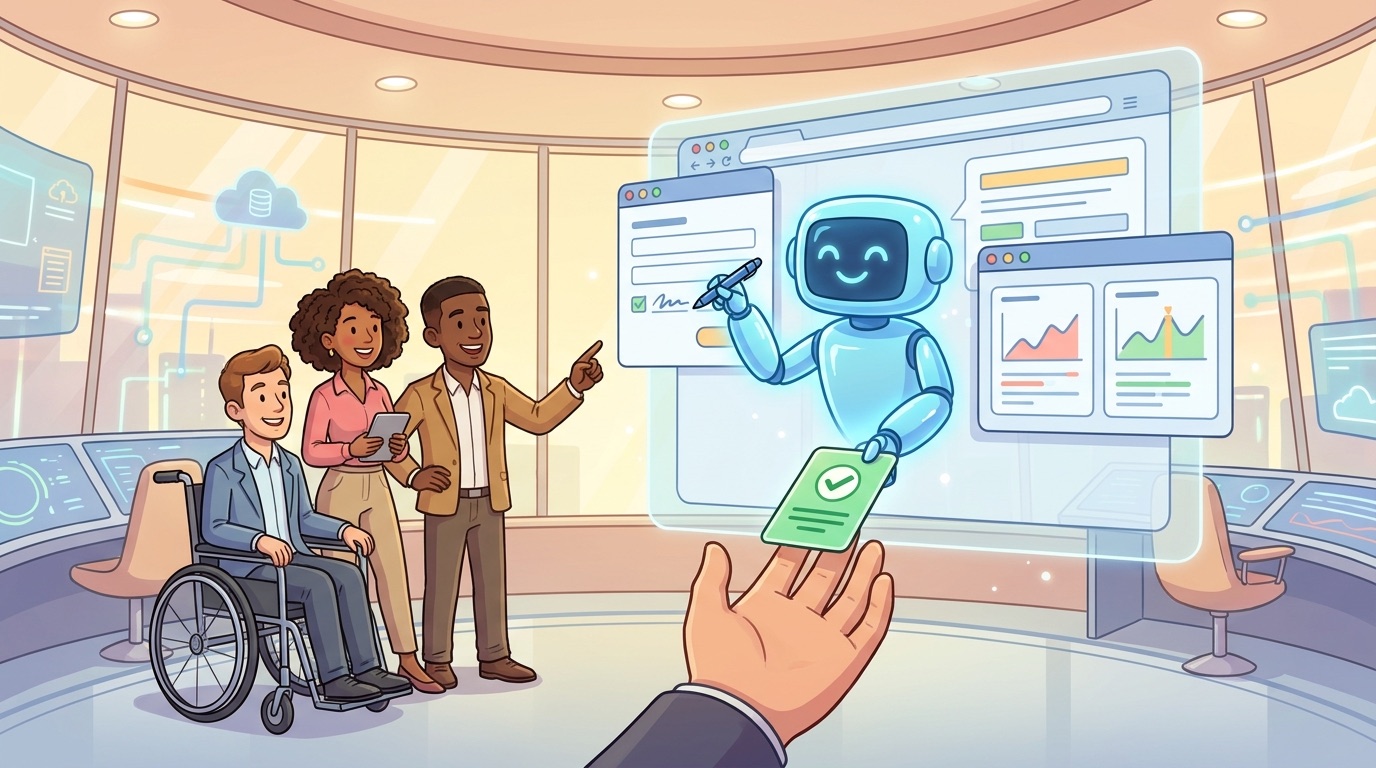
AI browser agents are AI systems that can use a web browser on behalf of a person or workflow. Instead of only answering a question in chat, they can open pages, inspect screens, click buttons, fill forms, extract information, compare results, and report back. The important shift is not that automation exists. Robotic process automation, scripts, macros, and API integrations have existed for years. The new shift is that AI agents can reason over messy web interfaces and adapt when a screen, form, label, or workflow changes.
That makes browser agents one of the most practical trends in agentic AI. Many business workflows still live inside web applications that were designed for humans, not APIs. A sales team checks a CRM, a finance team validates invoices, an operations team moves between supplier portals, a developer tests a product flow, and a researcher collects information across dynamic websites. When an AI agent can work through a browser, it can reach parts of the digital world that are difficult to automate with ordinary integrations.
For Singularity Journey, this topic sits in TRENDS & INSIGHTS because it is less about one tool and more about a wider shift: AI is moving from “answering” to “doing.” Browser agents are an early, visible example of that shift. They show what happens when models become not just text generators, but operators inside ordinary software environments.
Why AI Browser Agents Are Becoming a Serious Trend
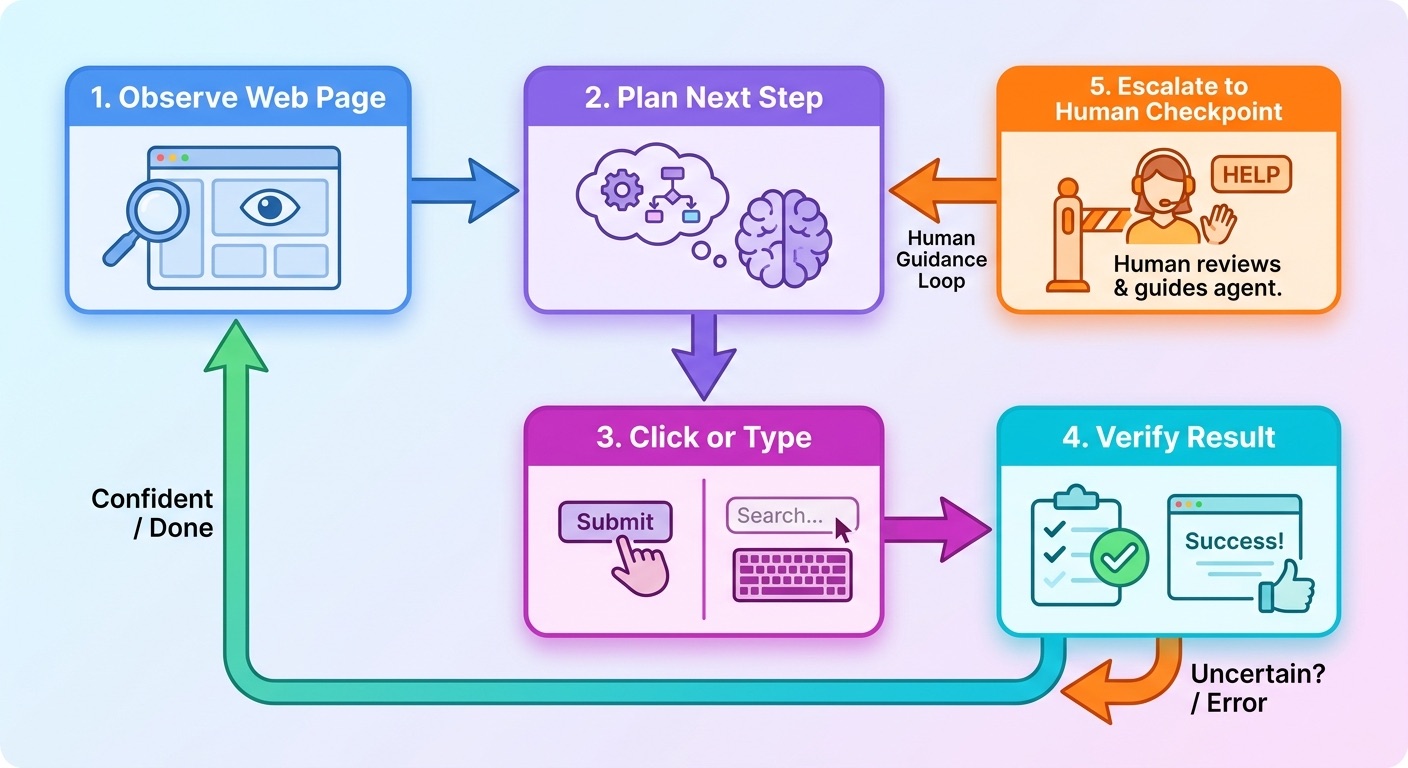
The trend is accelerating because three forces are meeting at the same time. First, AI models have become better at interpreting visual and textual context. They can read pages, reason about instructions, recognize form labels, and decide the next step in a task. Second, agent frameworks now provide tool loops: observe, plan, act, verify, and repeat. Third, remote browser infrastructure gives teams safer places to run those agents without handing an AI direct control over a worker’s personal machine.
AWS describes this enterprise problem clearly in its AI agent-driven browser automation work: organizations rely heavily on web applications, but knowledge workers still move across many systems, manually copy information, validate fields, and maintain audit trails. The same AWS post says knowledge workers routinely navigate between eight to twelve web applications during standard workflows, data entry and validation can consume roughly 25–30% of worker time, and many enterprise workflow tasks remain partly or fully manual. Those figures should not be treated as universal laws for every company, but they explain why this category is attracting attention.
Traditional automation does not disappear. APIs remain the best option when they exist and are stable. RPA remains useful for structured, repeatable workflows. Human review remains essential where judgment, accountability, trust, and exceptions matter. Browser agents fill the uncomfortable middle: workflows that are too dynamic for brittle scripts, too manual to scale, and too tied to web interfaces to solve with clean APIs.
Search demand also reflects this confusion. Current SERP results are split between tool roundups, vendor documentation, developer demos, and videos. Many pages answer “which browser agent should I try?” Fewer answer the more important strategic question: where should browser agents fit in a real workflow, and what controls are needed before they touch sensitive systems? That gap is why this pillar article focuses on decision-making, not just definitions.
How AI Browser Agents Work
An AI browser agent usually has four parts: a model, a browser environment, tools for taking actions, and a control layer. The model interprets the task and decides what to do. The browser environment renders real web pages. The tool layer lets the agent click, type, scroll, take screenshots, inspect elements, and read results. The control layer enforces limits such as timeouts, domains, credentials, approvals, logging, and session replay.
Amazon Bedrock AgentCore Browser is a useful example of the infrastructure trend. Its documentation describes a secure, isolated browser environment where agents can interact with web applications in a containerized session. It highlights features such as session isolation, built-in observability, live viewing, CloudTrail logging, session replay, and temporary sessions that reset after use. Those details are not glamorous, but they are exactly what moves browser agents from fun demo to enterprise candidate.
Browser Use’s documentation shows another useful split: an “agent” runs a task, while a “browser” gives raw browser control. That distinction matters. A browser alone is infrastructure. An agent adds goal-directed decision-making. A reliable system needs both, plus guardrails around when the agent can act, when it must ask for help, and how a human can review what happened.
| Layer | What it does | Why it matters |
|---|---|---|
| Model | Reads task instructions, page text, screenshots, and prior steps. | Determines reasoning quality and ability to handle ambiguity. |
| Browser session | Runs a real web page in a local or remote browser. | Lets the agent interact with software built for humans. |
| Action tools | Click, type, scroll, fill forms, capture screenshots, inspect DOM, extract data. | Turns model decisions into real workflow steps. |
| Control layer | Limits domains, credentials, budgets, time, approvals, logging, and replay. | Turns risky autonomy into accountable automation. |
The best mental model is a junior digital operator, not a magic employee. A browser agent can be fast and tireless, but it needs clear instructions, constrained permissions, tests, observation, and escalation paths. When a team treats it as an unbounded autonomous worker, reliability and safety problems appear quickly.
Where AI Browser Agents Are Actually Useful
Browser agents are most useful when the workflow is web-based, repetitive, moderately variable, and expensive for humans to do manually. They are less useful when a clean API exists, when the task requires deep human judgment, when the target site blocks automation, or when a mistake would create unacceptable harm.
A good first pilot is not the most impressive workflow. It is the workflow with a clear success condition, low blast radius, visible audit trail, and manageable exception rate. For example, checking whether ten supplier records match an internal spreadsheet is a better pilot than letting an agent negotiate contract terms. Submitting a staging test form is safer than filing production tax documents. Running a product QA checklist is safer than changing billing settings for customers.
This is where many tool-focused articles miss the real adoption path. Teams do not need a browser agent because browser agents are trendy. They need one when a specific workflow has enough manual cost, enough stability, and enough control points to justify delegated execution.
AI Browser Agents vs API Automation vs RPA vs Human Work
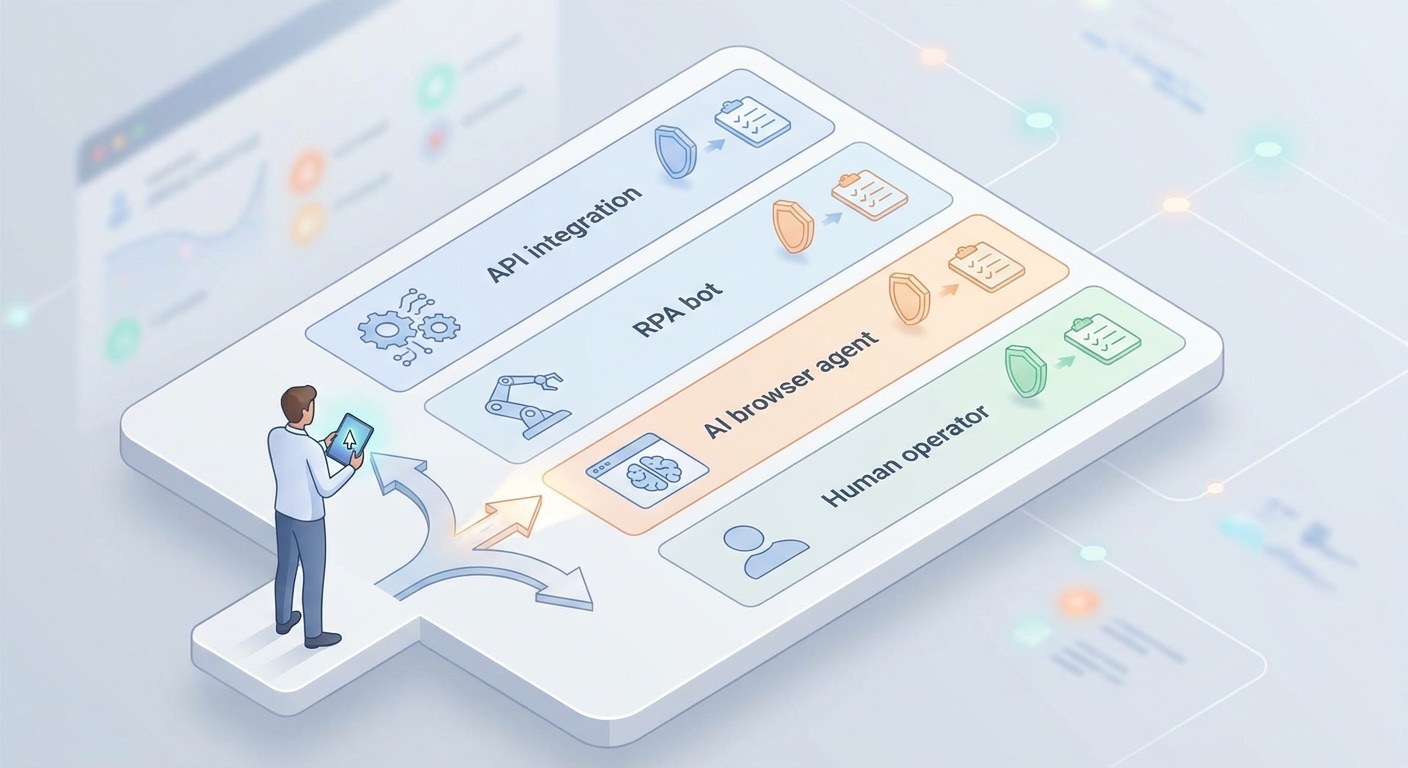
The strongest browser-agent strategy starts with a boring question: should this be a browser agent at all? If a stable API exists, use the API. If the process is rigid and screen-based, RPA may be cheaper and more predictable. If the work is rare, high-risk, or judgment-heavy, a human should remain primary. Browser agents are best when the task is web-native, semi-structured, and requires adaptation that brittle automation struggles with.
| Option | Best when | Weak when | Recommended role |
|---|---|---|---|
| API integration | Systems expose stable APIs, events, and permissions. | Legacy portals lack APIs or require human-like navigation. | Default first choice for reliable production automation. |
| Traditional RPA | Steps are repetitive, predictable, and screen layouts are stable. | Interfaces change often or require flexible reasoning. | Useful for fixed back-office tasks with known paths. |
| AI browser agent | Workflow is web-based, variable, and still needs human-style navigation. | Task is legally sensitive, high-risk, blocked by site terms, or impossible to verify. | Best for supervised semi-structured web workflows. |
| Human operator | Judgment, accountability, relationship context, or risk tolerance is central. | Task is repetitive, low-risk, and consumes large blocks of time. | Keep for approvals, exceptions, and ambiguous decisions. |
What the Tool Landscape Signals
The browser-agent market is already separating into categories. There are consumer AI browsers for everyday browsing. There are open-source frameworks for developers who want to build custom agents. There are managed browser-infrastructure platforms for teams that need scalable remote sessions, recordings, proxies, and observability. There are cloud-native offerings such as Amazon Bedrock AgentCore Browser that tie browser sessions into broader enterprise AI infrastructure.
Firecrawl’s browser-agent roundup is useful as a market signal because it shows how crowded and fast-moving the space has become: consumer browsers, developer frameworks, scraping/data platforms, managed browser environments, and specialized form automation tools all compete for attention. But tool lists can become stale quickly. The more durable question is not “which tool is best?” It is “which architecture matches the workflow?”
If the task is research-heavy, extraction quality and source traceability may matter most. If the task is form-heavy, success rate, field mapping, and exception recovery matter more. If the task touches internal systems, identity, logging, domain controls, and session replay become essential. If the task is customer-facing, reliability, rollback, and human-in-loop design matter more than speed.
The trend is still early enough that teams should expect tool churn. Some products will become infrastructure layers. Some will become browser-native assistants. Some will be absorbed into larger cloud and productivity platforms. The winners will likely be the systems that combine reliable execution with boring enterprise needs: auditability, identity, permissions, cost visibility, and support for human intervention.
The Risks Teams Must Manage Before Delegating Browser Work
AI browser agents are exciting because they can act. They are risky for exactly the same reason. A chatbot that gives a bad answer creates one kind of problem. A browser agent that clicks the wrong button, submits a wrong form, downloads sensitive data, or loops through a workflow creates a different kind of operational risk. This is not a reason to ignore the trend. It is a reason to design it carefully.
1. Credential and permission risk
Browser agents often need access to systems that require login. Teams must decide whether agents use service accounts, delegated user sessions, short-lived credentials, or supervised access. Broad personal credentials are a bad default. The agent should only have the permissions needed for the task, and high-risk actions should require human approval.
2. Reliability and exception risk
Web pages change. Buttons move. Pop-ups appear. Sessions expire. Captchas, rate limits, and anti-automation systems may interrupt tasks. A reliable browser-agent workflow needs clear failure states: stop, summarize what happened, capture evidence, and ask a human rather than improvising endlessly.
3. Compliance and audit risk
If an agent touches business records, teams need a record of what happened. Session replay, logs, screenshots, timestamps, input/output records, and change summaries matter. AWS’s emphasis on CloudTrail logging, observability, and replay is a sign that the market understands this requirement.
4. Data exposure risk
Browser pages may include customer data, financial details, employee records, or confidential contracts. Teams should limit what the model sees, redact unnecessary fields when possible, and avoid sending sensitive data into tools that do not meet the organization’s privacy requirements.
5. Cost and runaway-task risk
Browser agents can be slower and more expensive than direct APIs because they observe, reason, act, and retry. Long sessions, repeated screenshots, premium models, remote browser time, and failed retries can add up. Cost controls should include timeouts, step limits, budget alerts, and task-scoping rules.
What gets better
- Manual web work becomes easier to delegate.
- Legacy portals become more automatable without APIs.
- QA and research workflows can produce richer evidence trails.
- Human workers can focus on exceptions and decisions.
What gets harder
- Permissions and credentials require careful design.
- Dynamic pages can break automation unexpectedly.
- Auditability becomes non-negotiable for enterprise use.
- Teams need clear rules for when agents may act independently.
A Practical Scorecard for Evaluating AI Browser Agents
Use this scorecard before choosing a browser-agent tool or launching a pilot. It turns the trend into an operational decision instead of a shiny demo.
| Criterion | Question to ask | Good sign |
|---|---|---|
| Workflow fit | Is this task web-based, repeatable, and easy to verify? | Clear start, end, success condition, and exception path. |
| Safer alternative | Would an API or simple automation solve it better? | Browser agent is chosen only after easier options are ruled out. |
| Success rate | How often does the agent complete the task without help? | Measured on real workflows, not only vendor demos. |
| Observability | Can we see what happened? | Logs, screenshots, live view, and session replay are available. |
| Permissions | What can the agent access and change? | Least-privilege credentials and approval gates for risky actions. |
| Human handoff | What happens when the agent is uncertain? | It stops, summarizes, and requests review instead of guessing. |
| Cost control | Can we limit session length, retries, model use, and volume? | Timeouts, step budgets, and reporting exist before scale-up. |
| Policy fit | Does automation comply with site terms, privacy rules, and internal policy? | Legal/security review is included for sensitive workflows. |
A pilot that cannot answer these questions is not ready for production. A pilot that can answer them is much more likely to become useful, even if the first version is narrow. Narrow is good. The path to dependable automation usually starts with one boring workflow done well.
Why This Topic Fits Singularity Journey Now
Recent Singularity Journey analytics show a small but growing site with stronger engagement than raw search volume might suggest. GA4 recorded 61 active users, 138 sessions, and 602 page views in the recent 28-day window, up from 22 active users, 65 sessions, and 273 page views in the previous comparable period. Search Console data is still sparse, with very low impressions and limited ranking-distance opportunities, which means topic selection should focus on building topical authority before chasing high-volume terms.
The existing article history has strong agent-related coverage: AI agent memory, AI agent controls, agent governance, MCP servers, AI observability, enterprise AI agents, and AI career moats. A TRENDS & INSIGHTS pillar on AI browser agents extends that cluster naturally without repeating the last article. It creates internal bridges to AI agents, governance, developer automation, and future work, while targeting a narrower trend with clearer SERP gaps than a generic “AI trends” article.
This is also a good information-gain topic because most readers have seen AI agents discussed abstractly, but browser agents make autonomy concrete. They show where the singularity path becomes practical: software begins operating software. That does not mean fully autonomous organizations are here. It means the interface between humans, AI, and everyday web tools is changing quickly.
Recommended Adoption Plan
Teams should adopt browser agents in phases. The first phase is observation: map workflows where people still manually move through web apps. The second phase is triage: classify each workflow by risk, repeatability, data sensitivity, and verification clarity. The third phase is a supervised pilot with read-only or staging access. The fourth phase is limited production use with logging, approval gates, and rollback paths. The fifth phase is scale, but only after the team has measured reliability, cost, exception rate, and human time saved.
Phase 1: Map browser-heavy work
Ask teams where they spend time in portals, dashboards, admin panels, forms, research pages, and internal tools. Look for workflows that require many clicks but not deep human judgment.
Phase 2: Choose a low-risk pilot
Pick a workflow with limited permissions, clear expected output, and an easy review step. A browser agent that prepares a report for human approval is safer than one that submits final production changes.
Phase 3: Add guardrails before speed
Define allowed domains, allowed actions, credential boundaries, session timeout, step limit, escalation trigger, and evidence requirements. If the agent cannot prove what it did, do not scale it.
Phase 4: Measure outcomes
Track completion rate, human review time, exception rate, average session duration, cost per successful run, and quality issues. A flashy demo is not enough. The workflow needs measurable improvement.
Phase 5: Expand carefully
Only after one pilot works should teams expand to adjacent workflows. Browser agents will become more capable, but capability without controls is not a strategy.
Where the Trend Is Heading
The likely future is not one universal browser agent that controls everything. The more realistic future is layered: AI assistants inside browsers, remote browser sessions for developers, enterprise browser sandboxes for regulated workflows, data extraction systems for research, and agentic testing tools for product teams. Some will be consumer products. Some will become invisible infrastructure inside automation platforms.
As models improve, browser agents will handle more ambiguity. As infrastructure improves, sessions will become safer, cheaper, and more observable. As enterprises experiment, policy will mature around credentials, approvals, data handling, and acceptable automation. The biggest shift will be cultural: teams will stop asking whether AI can click a button and start asking which decisions humans should keep.
That is the deeper singularity signal. AI browser agents are not just a productivity feature. They are a step toward AI systems that operate inside the same digital environments humans use. The question is not whether that future is useful. It is how to make it legible, reversible, auditable, and aligned with human responsibility.
Keep Learning on Singularity Journey
- AI Agent Memory Explained — understand how agents remember context and past tasks.
- Autonomous AI Agents and Human Control — governance blueprint for agentic systems.
- How to Build an MCP Server for AI Agents — developer guide to controlled tool access.
- Enterprise AI Agents — trend analysis for leaders adopting agentic workflows.
- AI Career Moat — skills that stay valuable as agents improve.
Sources and References
- AWS: AI agent-driven browser automation for enterprise workflow management
- Amazon Bedrock AgentCore Browser documentation
- Browser Use documentation
- Firecrawl: browser-agent tool landscape
- Stanford HAI AI Index Report
This article uses public documentation, vendor examples, and site analytics. Product capabilities, pricing, benchmarks, and market claims can change; verify tool documentation before production adoption.
FAQ: AI Browser Agents
What is an AI browser agent?
An AI browser agent is an AI system that can use a browser to complete tasks such as navigating pages, clicking buttons, filling forms, extracting information, and reporting results.
How are browser agents different from RPA?
Traditional RPA follows predefined rules and often breaks when interfaces change. Browser agents use AI reasoning and page understanding to adapt to more variable workflows, though they still need guardrails and verification.
When should a team use a browser agent instead of an API?
Use an API when a stable API exists. Consider a browser agent when the workflow depends on human-facing web apps, lacks clean APIs, and has clear verification and safety boundaries.
Are AI browser agents safe for enterprise use?
They can be safe enough for controlled workflows if teams use isolated sessions, limited permissions, audit logs, session replay, human approval for risky actions, and strict data-handling rules.
What are good first browser-agent pilots?
Good pilots include QA walkthroughs, research collection, status checks, supplier portal lookups, invoice-preparation checks, and other repeatable web tasks with low risk and clear success criteria.
What are the biggest risks?
The biggest risks are credential exposure, wrong clicks, unreliable execution, data leakage, compliance gaps, runaway costs, and lack of auditability.
Will browser agents replace human workers?
They are more likely to remove repetitive browser work and shift humans toward review, exception handling, policy decisions, customer judgment, and workflow design.
