
AI Agent Control Plane: Identity, Permissions, Logs, and Human Review
An AI agent becomes risky the moment it can do more than answer questions. Give it tools, memory, files, credentials, or workflow permissions, and the real question changes from “Can the model reason?” to “Who is allowed to let this system act?”
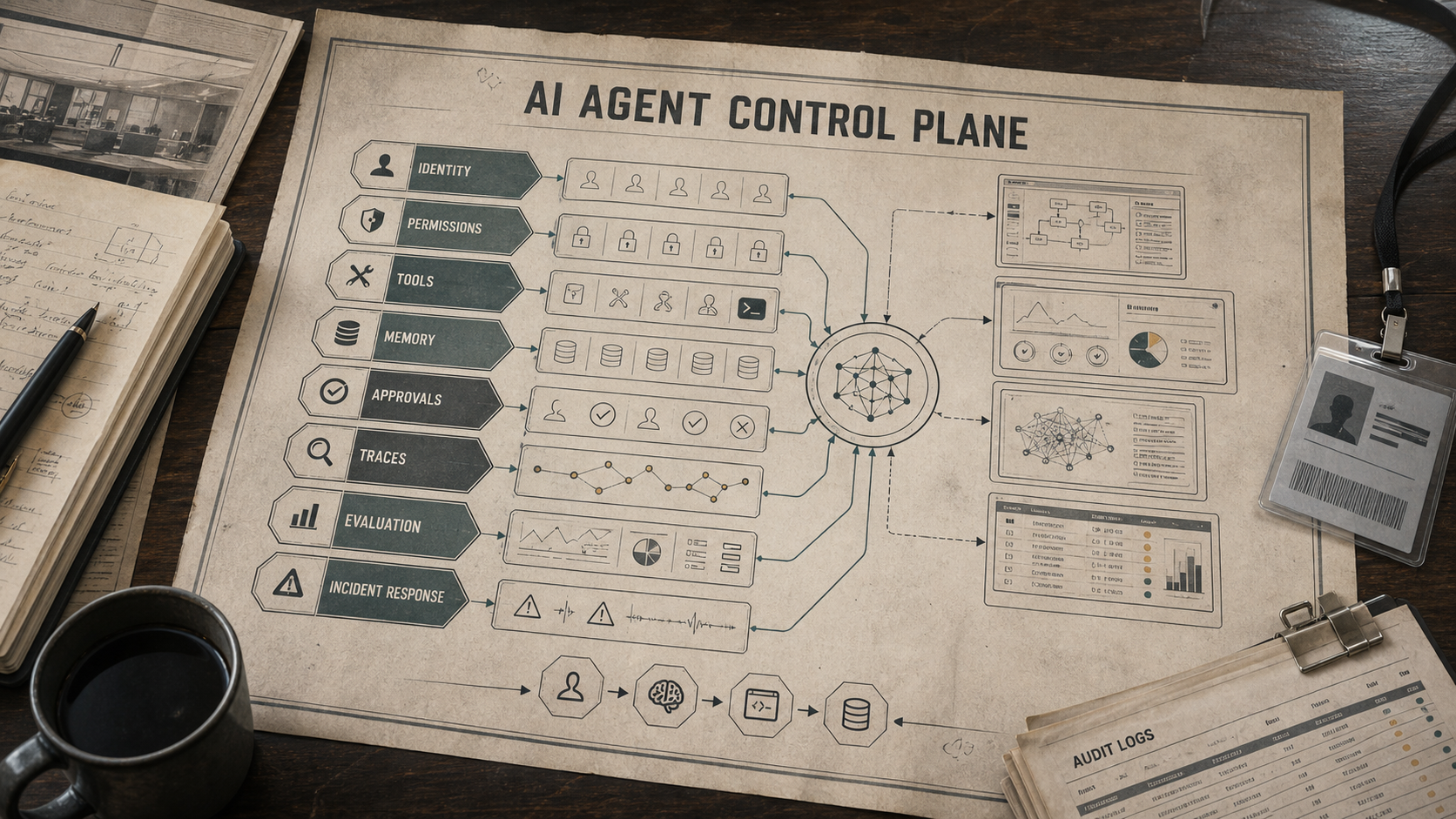
That is why teams need an AI agent control plane: a layer that governs identity, permissions, tool access, memory, human approval, tracing, evaluation, and incident response. Without it, every agent becomes a one-off automation with unclear ownership, hidden privileges, and weak rollback paths.
This guide gives you a working model. You will learn what belongs in the control plane, how to right-size controls by risk tier, what to log, when to require human approval for AI agents, and how to build a roadmap that improves safety without blocking useful automation.
What Is an AI Agent Control Plane?
An AI agent control plane is the layer that decides how agents are identified, what they can access, which actions need approval, how activity is observed, and how failures are contained. It is the system around the agent that makes autonomy governable. If you are still defining the broader architecture, start with the site's guide on how to build AI agents, then use this control-plane model to govern real tool access.
In traditional software, control planes manage policies, routing, access, and observability. AI agents need a similar layer because they combine language, tools, memory, and workflow execution. A prompt alone cannot carry that responsibility.
A good control plane answers seven operational questions:
- Which human, service, or workflow owns this agent?
- Which identity does the agent use when it calls a tool?
- What data can the agent read, write, export, or remember?
- Which actions are allowed automatically, and which require review?
- What happened during the run, including tool calls and handoffs?
- How do we evaluate whether the agent is improving or drifting?
- How do we stop, roll back, or investigate a bad action?
These questions matter because agent systems increasingly use APIs, browsers, files, databases, and multi-step workflows. The control plane is where product, security, platform, legal, and operations teams agree on boundaries before scale forces the issue.
Why Agents Need More Than Prompt Rules
Prompt instructions are useful, but they are not a durable permission system. A prompt can tell an agent not to delete records, but a scoped credential prevents the deletion. A prompt can ask for careful reasoning, but a trace shows what actually happened. A prompt can request human review, but a review queue enforces it.
The mistake is treating agent governance as a content moderation problem. Some risks are about harmful language, but many agent risks are operational: excessive privileges, tool misuse, bad memory, hidden state, missing audit trails, weak evaluation, and unclear accountability.
The NIST AI Risk Management Framework is helpful because it frames AI risk as ongoing work across governance, mapping, measurement, and management. For agent systems, the work is not finished when a model passes a demo. It continues through permissions, monitoring, evaluations, and response procedures.
The same logic appears in agent-specific security work. The OWASP Agentic AI threats and mitigations guide treats agentic systems as a distinct attack surface because tools, memory, planning, and autonomy create risks older checklists do not fully cover.
The Seven Layers of an AI Agent Control Plane
You do not need a giant governance program to start. You need a clear stack of controls that can grow with the agent’s authority. The seven layers below are the useful minimum.
1. Agent Identity
Every production agent needs an identity. That identity should not be a shared administrator token, a developer’s personal account, or an invisible background service with unknown ownership.
Record the agent name, owner, business purpose, environment, model provider, tool set, data classes, and approval path. For higher-risk agents, add expiration dates, separate identities per environment, and break-glass procedures for emergency disablement.
The identity layer should also distinguish the agent from the user. If a sales agent updates a CRM record on behalf of a manager, the audit trail should show the requesting user, the agent identity, the tool used, and the final action.
2. Permission Boundaries
Agent permissions should follow the principle of least privilege. The agent should receive only the access needed for its current task, not broad access because it might be useful later.
Use separate permission scopes for reading, drafting, staging, writing, exporting, deleting, and executing external effects. A read-only research agent should not have write access. A draft-and-review agent should be able to prepare a change without applying it. A limited-action agent may update low-risk records, but only within narrow constraints.
Permission boundaries are also where protocol choices matter. If an agent connects to external tools through systems such as MCP, review authorization carefully. The Model Context Protocol authorization specification describes authorization patterns for HTTP-based transports when agents request access to protected resources through tool servers. For the broader tool taxonomy, see AI agent tools and approval boundaries.
3. Tool Registry
An agent should not discover unlimited tools at runtime without policy. Maintain a tool registry that lists each tool, owner, data access, side effects, risk tier, rate limits, approval requirements, and rollback options.
Classify tools by impact. A search tool is usually lower risk than a payment tool. A file summarizer is lower risk than a code execution tool. A ticket update is lower risk than provisioning infrastructure. The registry turns vague tool access into an inventory that security and operations teams can reason about.
4. Memory and State Controls
Agent memory can improve continuity, but uncontrolled memory creates privacy, accuracy, and security risk. The control plane should define what the agent may store, where memory lives, how long it persists, who can inspect it, and when it must be forgotten.
Separate AI agent memory from workflow state. Memory might include user preferences, prior decisions, or domain facts. Workflow state includes retries, approvals, idempotency keys, pending actions, and recovery checkpoints. Mixing them makes failures harder to investigate.
For sensitive workflows, store only the minimum necessary context. Avoid saving secrets, private personal data, unverified tool outputs, or temporary assumptions as long-term memory. Include memory retrieval in evaluation because bad recall can be as damaging as bad reasoning.
5. Human Review and Approval Gates
Human review should be tied to risk, not anxiety. If every action requires review, the agent becomes a slow form. If no action requires review, the system may act beyond its evidence or authority.
Use approval gates for irreversible actions, financial impact, security changes, sensitive customer communication, external publication, legal commitments, access grants, and bulk updates. The reviewer should see the user request, agent plan, evidence used, proposed action, confidence signals, and a clear accept, edit, reject, or escalate path.
Approval gates work best when the agent can stage changes. Instead of “send the email,” the agent drafts the email, attaches evidence, explains tradeoffs, and waits for approval. Instead of “update the database,” the agent produces a proposed diff or queued transaction.
6. Tracing, Logs, and Observability
Agents need observability that captures more than final output. You need enough evidence to reconstruct the run: prompt context, model response, tool calls, retrieved documents, approvals, handoffs, errors, latency, cost, and final action.
The OpenAI Agents SDK tracing documentation is a useful example of the level of detail production teams should expect: traces can include model generations, tool calls, handoffs, guardrails, and custom events. Whether you use that SDK or another stack, the operating principle is the same: agent activity should be reviewable after the fact.
Do not log everything blindly. Sensitive prompts, customer data, secrets, and private files need redaction, access controls, retention limits, and review policies. The goal is accountable observability, not uncontrolled surveillance.
7. Evaluation and Incident Response
AI agent evaluation metrics are the feedback loop of the control plane. They tell you whether the agent is useful, safe enough, reliable enough, and worth expanding. Incident response tells you what happens when the answer is no.
Track task success, tool-call accuracy, approval rejection rate, escalation rate, retrieval quality, policy violations, bad memory incidents, cost per successful task, rollback frequency, and user correction patterns. For higher-risk workflows, add red-team cases, prompt-injection tests, tool-permission tests, and regression suites before each meaningful change.
Incident response should include a kill switch, credential revocation, queue pause, rollback procedure, owner notification, trace review, affected-user assessment, and post-incident update to the evaluation set. A control plane is incomplete if it can approve an agent but cannot stop one.
Risk Tiers: Match Controls to Impact
The fastest way to make agent governance practical is to tier agents by impact. A read-only assistant does not need the same control burden as an autonomous workflow that can change production systems.
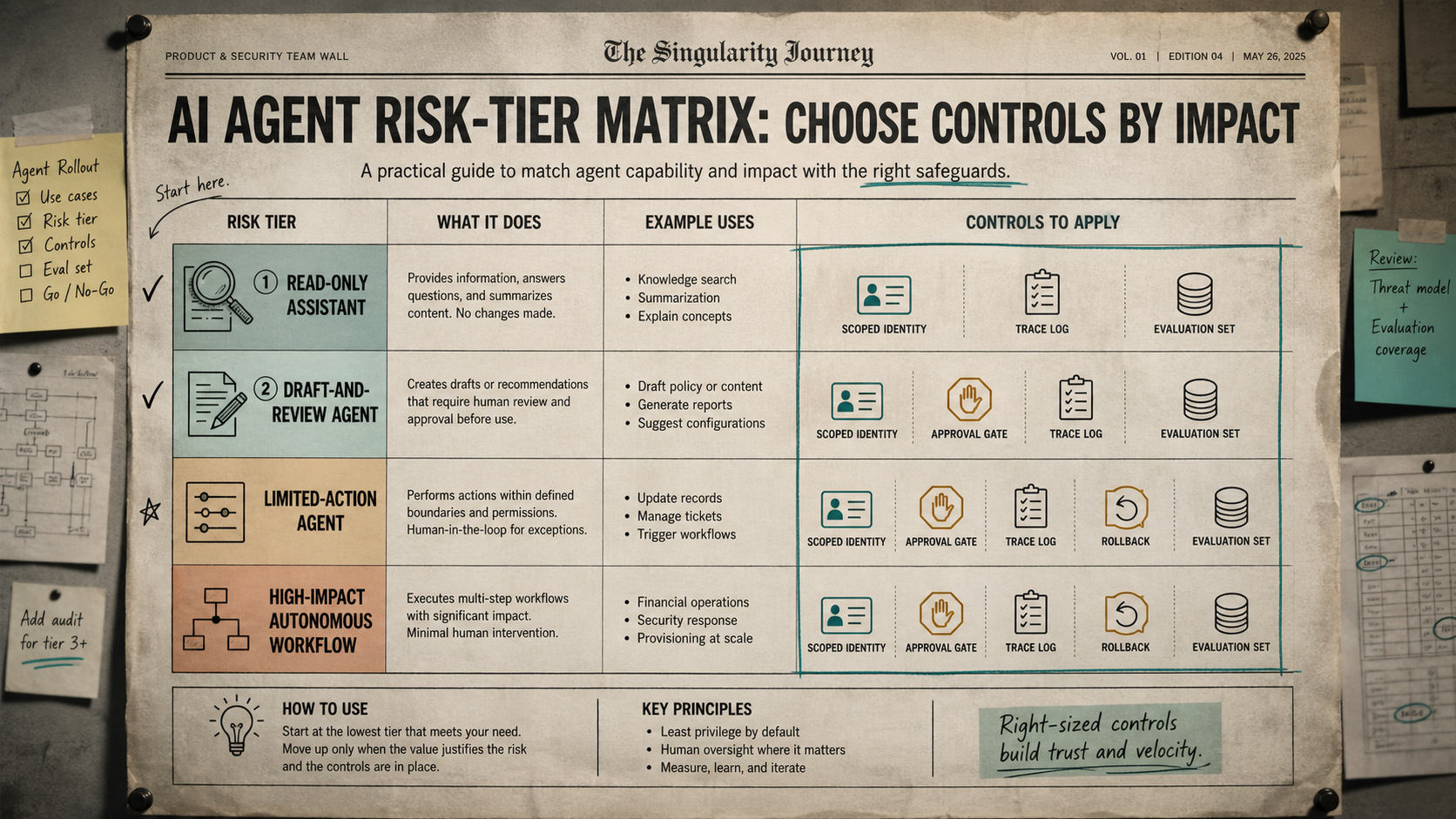
Tier 1: Read-Only Assistant
This agent answers questions, summarizes content, searches knowledge bases, or explains concepts. It does not change records or call tools with side effects.
Recommended controls: scoped read access, source citations where possible, basic trace logs, data retention limits, and periodic answer-quality evaluation. Human approval is usually unnecessary unless the output is externally published or used for regulated decisions.
Tier 2: Draft-and-Review Agent
This agent creates drafts, recommendations, reports, plans, code suggestions, or configuration proposals. A human must review before anything is sent, merged, applied, or published.
Recommended controls: scoped identity, draft-only permissions, approval queue, reviewer context, trace logs, evaluation set, and versioned outputs. This is often the best starting point for teams that want agent productivity without giving up control.
Tier 3: Limited-Action Agent
This agent can perform bounded actions such as updating low-risk records, triaging tickets, routing requests, creating calendar holds, or triggering predefined workflows.
Recommended controls: narrow write scopes, allowlisted tools, rate limits, approval gates for exceptions, idempotency keys, rollback paths, trace logs, and continuous monitoring. Tier 3 agents should have clear “cannot do” boundaries.
Tier 4: High-Impact Autonomous Workflow
This agent can execute multi-step workflows with significant business, financial, security, legal, or customer impact. It may operate with minimal human intervention, so the control plane must be mature before expansion.
Recommended controls: dedicated service identity, strict tool registry, policy engine, high-risk approval rules, sandboxing where possible, pre-production evaluation, live monitoring, anomaly detection, rollback, incident response, and executive-level ownership.
A Practical Build Plan for the First 30 Days
You can start without buying a new platform. The first month should create visibility and boundaries before adding complex automation.
Week 1: Inventory Current Agents and Tools
Create a simple registry. List every agent, assistant, automation, workflow, model integration, tool connection, and service account. For each item, capture owner, purpose, inputs, outputs, tools, permissions, environment, and user group.
The uncomfortable part is usually service-account discovery. Many early agent projects use developer keys, shared credentials, or overly broad tokens. Put those in the registry even if you cannot fix them immediately.
Week 2: Assign Risk Tiers and Owners
Classify each agent into one of the four tiers. If the team disagrees, choose the higher tier until the agent has stronger evidence and controls. Assign a business owner and a technical owner for every Tier 2 or higher agent.
Then define what each tier is allowed to do. For example, Tier 2 may draft customer replies but cannot send them. Tier 3 may update non-sensitive ticket fields but cannot issue refunds. Tier 4 requires a formal launch review.
Week 3: Add Approval and Logging to the Riskiest Path
Do not try to fix every agent at once. Pick the highest-risk active workflow and add three controls: scoped credentials, a human approval step, and a trace that records tool calls and final actions.
This gives the team a reusable pattern. Once one workflow has a working approval and observability path, other teams can copy it instead of inventing their own policies.
Week 4: Create the First Evaluation Set
Build a small but realistic evaluation set from actual user requests, edge cases, rejected drafts, security concerns, and known failure modes. Include successful examples as well as traps.
For each test case, define the expected behavior: answer, refuse, ask for clarification, call a tool, request approval, or escalate. Run the set before changing prompts, tools, models, memory policies, or permission scopes.
Examples: How the Control Plane Changes Real Workflows
Customer Support Refund Agent
Without a control plane, the agent might read tickets, infer intent, call a refund API, and send a customer message using broad support credentials. If something goes wrong, the team may see only the final bad refund.
With a control plane, the agent uses a scoped identity, reads only relevant ticket and order data, calculates eligibility, drafts the refund recommendation, cites the policy, requests approval above a threshold, logs each tool call, and stores an idempotency key so retries do not duplicate refunds.
Security Triage Agent
Without a control plane, the agent might investigate alerts with broad access and accidentally suppress, modify, or expose sensitive findings.
With a control plane, it receives read-only security data access by default, opens investigation notes, recommends containment actions, escalates high-confidence incidents, and requires approval before disabling accounts or changing firewall rules. The trace becomes part of the incident record.
Content Operations Agent
Without a control plane, the agent may publish low-quality or inaccurate content directly because the workflow values speed over review.
With a control plane, it drafts content, checks internal-link targets, flags unsupported claims, attaches sources, routes the draft for editorial approval, and logs the final publishing decision. The agent improves throughput, but the site keeps accountability.
Control Plane Checklist
Use this checklist before expanding an agent from a demo to an operational workflow.
- The agent has a named owner and documented business purpose.
- The agent has a dedicated identity, not a shared human credential.
- Tool access is scoped by action type and business need.
- High-impact actions require approval or staged execution.
- Memory rules define what can be stored, retrieved, expired, and deleted.
- Traces capture tool calls, approvals, handoffs, failures, and final actions.
- Logs have redaction, access control, and retention rules.
- Evaluation cases cover normal tasks, edge cases, attacks, and regressions.
- There is a kill switch or pause mechanism for active workflows.
- Rollback and incident response procedures are tested before scale.
Common Mistakes to Avoid
Giving Agents Human-Level Access
If an agent uses a human administrator account, the audit trail becomes unclear and the blast radius becomes too large. Agents need purpose-built identities with narrower scopes than the humans supervising them.
Reviewing Output but Ignoring Tool Calls
A final answer can look reasonable even when the path was unsafe. Review traces, tool calls, retrieved data, and approval decisions, not just polished summaries.
Letting Memory Become a Hidden Database
Agent memory should not become an ungoverned store of private data, guesses, or stale facts. Treat memory as a controlled system with policies, ownership, expiration, and evaluation.
Launching Without Rollback
Any agent that can write, send, change, or trigger something needs a recovery path. Rollback is not a later maturity feature; it is part of the launch requirement.
FAQ
What is an AI agent control plane?
An AI agent control plane is the governance and operations layer that manages agent identity, permissions, tools, memory, approvals, traces, evaluations, and incident response. It helps teams run AI agents safely beyond demos.
How is an AI agent control plane different from AI governance?
AI governance is the broader policy and accountability system. An AI agent control plane is the operational implementation for agent workflows: credentials, tool access, review gates, logs, evaluations, and response procedures.
Do small teams need an agent control plane?
Yes, but it can start small. A registry, scoped credentials, approval rules, traces, and a basic evaluation set are enough for many early teams. The goal is to create boundaries before agents receive more authority.
Which agents need human approval?
Agents need human approval when actions are irreversible, costly, externally visible, security-sensitive, legally meaningful, privacy-sensitive, or likely to affect many users. Low-risk read-only assistants usually need logging and evaluation more than approval.
What should teams log for AI agents?
Log the agent identity, user request, retrieved context, model output, tool calls, approvals, handoffs, errors, costs, final action, and rollback status. Redact sensitive data and limit log access based on role.
What is the best first step?
Inventory every agent and tool, then assign risk tiers. Most teams discover that the biggest risk is not the model; it is unclear ownership and excessive tool access.
Conclusion
The next phase of AI adoption will not be won by teams that give agents the most tools the fastest. It will be won by teams that make agents useful while keeping authority, evidence, and recovery visible.
An AI agent control plane gives that discipline a practical shape. Start with identity, permissions, tool registry, memory rules, approval gates, traces, evaluations, and incident response. Then expand autonomy only when the agent has earned it through evidence.
The payoff is not bureaucracy. The payoff is trust at higher speed: agents that can help with real work because the organization knows what they can do, what they cannot do, who approved them, and how to respond when they fail.
