
AI Automation Case Study Template: How to Prove Workflow Skills in Your Portfolio
A practical template for turning one AI automation project into credible portfolio evidence: problem framing, architecture, evaluation, human review, proof artifacts, and a story a client or hiring manager can trust.

AI automation case study template is a better search phrase than many beginners realize. It points to the missing bridge between “I built an AI workflow” and “someone can trust me to build useful automation work.” A portfolio project is not credible because it has a chatbot interface, a few screenshots, or a list of trendy tools. It becomes credible when the reader can understand the workflow problem, inspect the architecture, see what the AI component does, review how output was evaluated, and notice where humans remain in control.
This article supports the broader AI automation engineer roadmap by narrowing into one practical question: how do you document a project so it proves skill? The roadmap explains what to learn and which portfolio projects can help. This guide shows how to package one of those projects into a case study that speaks to employers, clients, collaborators, or your future self.
Why an AI Automation Case Study Beats a Simple Project List
Most AI career advice tells readers to build projects. That is useful but incomplete. A list of projects says what you attempted. A case study shows how you think. For AI automation work, that distinction matters because many projects look impressive at the surface and weak underneath. A model-generated summary can be useful, but it does not prove you can handle messy input, missing fields, access controls, retries, review queues, or business constraints.
Employers and clients are rarely evaluating only your tool familiarity. They want evidence that you can turn vague operational pain into a working system. Can you map a process before automating it? Can you decide when AI is appropriate and when deterministic rules are better? Can you connect an API without leaking secrets? Can you prevent duplicate actions? Can you explain why a human should approve a high-impact output before it is sent? A case study lets you answer those questions without overselling yourself.
The labor-market reason is straightforward. The World Economic Forum Future of Jobs Report 2025 highlights technology-related skills, AI and big data, analytical thinking, and adaptability as important workforce signals through 2030. PwC’s 2025 Global AI Jobs Barometer reports fast skill change in AI-exposed jobs and a premium for workers with AI skills, while avoiding any guarantee for an individual career outcome. The practical takeaway is not “add AI to your resume.” It is “show evidence that you can apply AI responsibly inside real workflows.”
Community discussions around AI automation portfolios often reveal the same hidden concern: people are unsure whether a project is serious enough to show. Reddit and career forums are useful here as demand signals, not factual proof. They show that builders want examples, templates, and feedback on whether their AI automation work looks credible. That is exactly the gap this article fills.
The AI Automation Case Study Template
Use the template below for any AI automation project: support triage, document extraction, meeting-summary routing, sales research, internal knowledge retrieval, spreadsheet cleanup, compliance review, or an AI agent with safe tools. You do not need a huge project. A small project documented well is more persuasive than a large demo that hides the hard parts.
| Case-study section | What to write | What it proves |
|---|---|---|
| 1. Workflow problem | Describe the repetitive task, who does it, what inputs arrive, what decisions happen, and why the current process is slow or error-prone. | You can understand work before automating it. |
| 2. Before-and-after map | Show the old workflow and the automated workflow using a simple diagram or bullet flow. Include exceptions and human handoffs. | You can design systems, not only prompts. |
| 3. AI role | State exactly what AI does: classify, summarize, extract, draft, route, search, compare, or recommend. State what AI does not do. | You understand scope and limits. |
| 4. Architecture | List triggers, tools, APIs, databases, queues, model calls, storage, logs, review screens, and outputs. | You can connect components reliably. |
| 5. Evaluation method | Explain your test cases, expected outputs, pass/fail criteria, edge cases, and how you reviewed errors. | You can verify quality instead of trusting the model blindly. |
| 6. Risk controls | Document permissions, sensitive data handling, human approval, audit logs, rollback, and what actions are blocked. | You can build responsibly. |
| 7. Results and limitations | Share measured or observed outcomes only if you can support them. Include what failed, what remains manual, and what you would improve. | You are honest and technically mature. |
| 8. Proof artifacts | Link to a README, demo video, screenshots with safe data, architecture diagram, sample inputs, sample outputs, test notes, and code/config snippets. | A reviewer can inspect your work. |
Notice what the template avoids. It does not ask you to claim that your project is “production-grade” if it is not. It does not ask for fake metrics. It does not require exposing private company data. It does not turn your portfolio into a tool advertisement. It asks you to document the thinking and evidence behind a workflow.
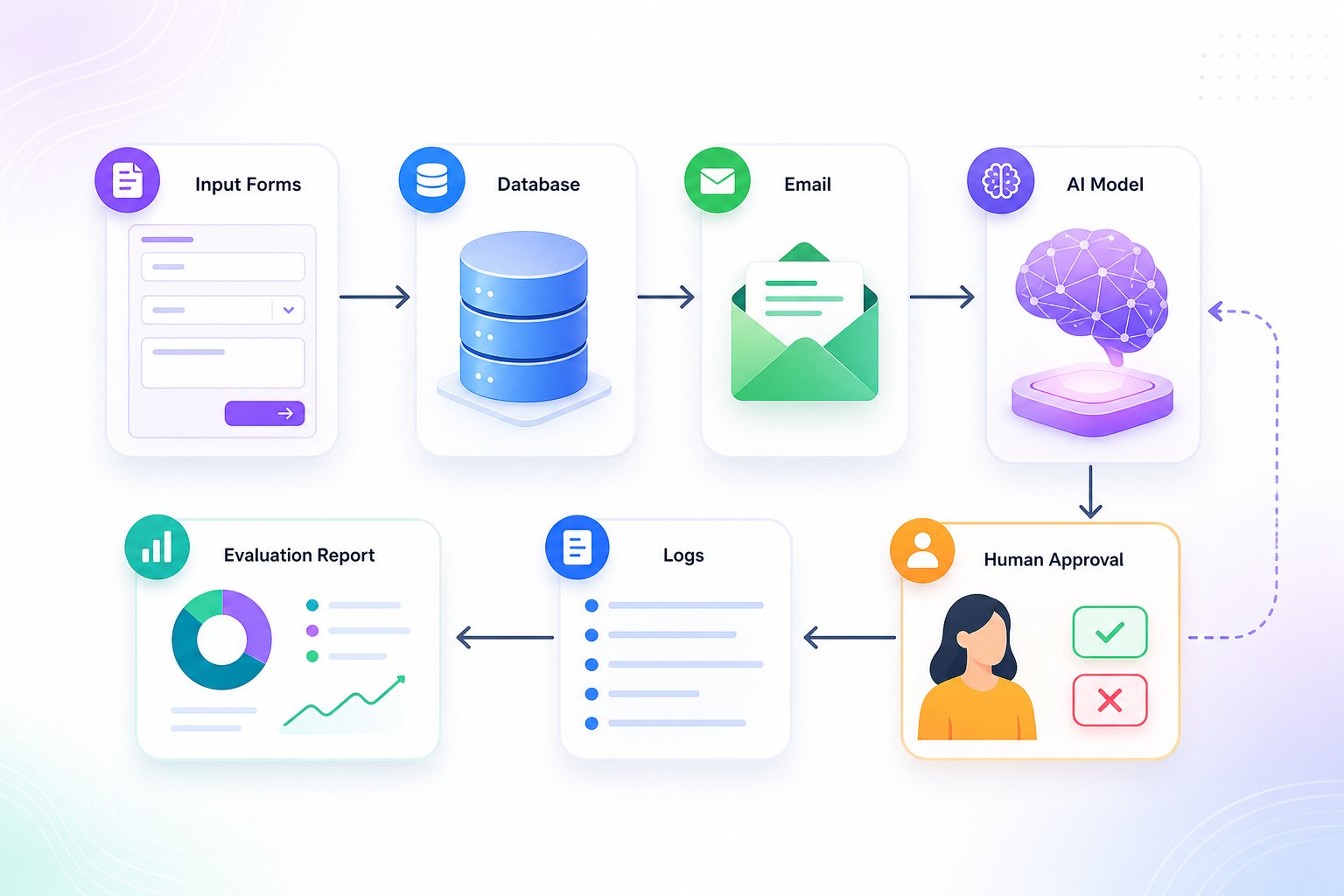
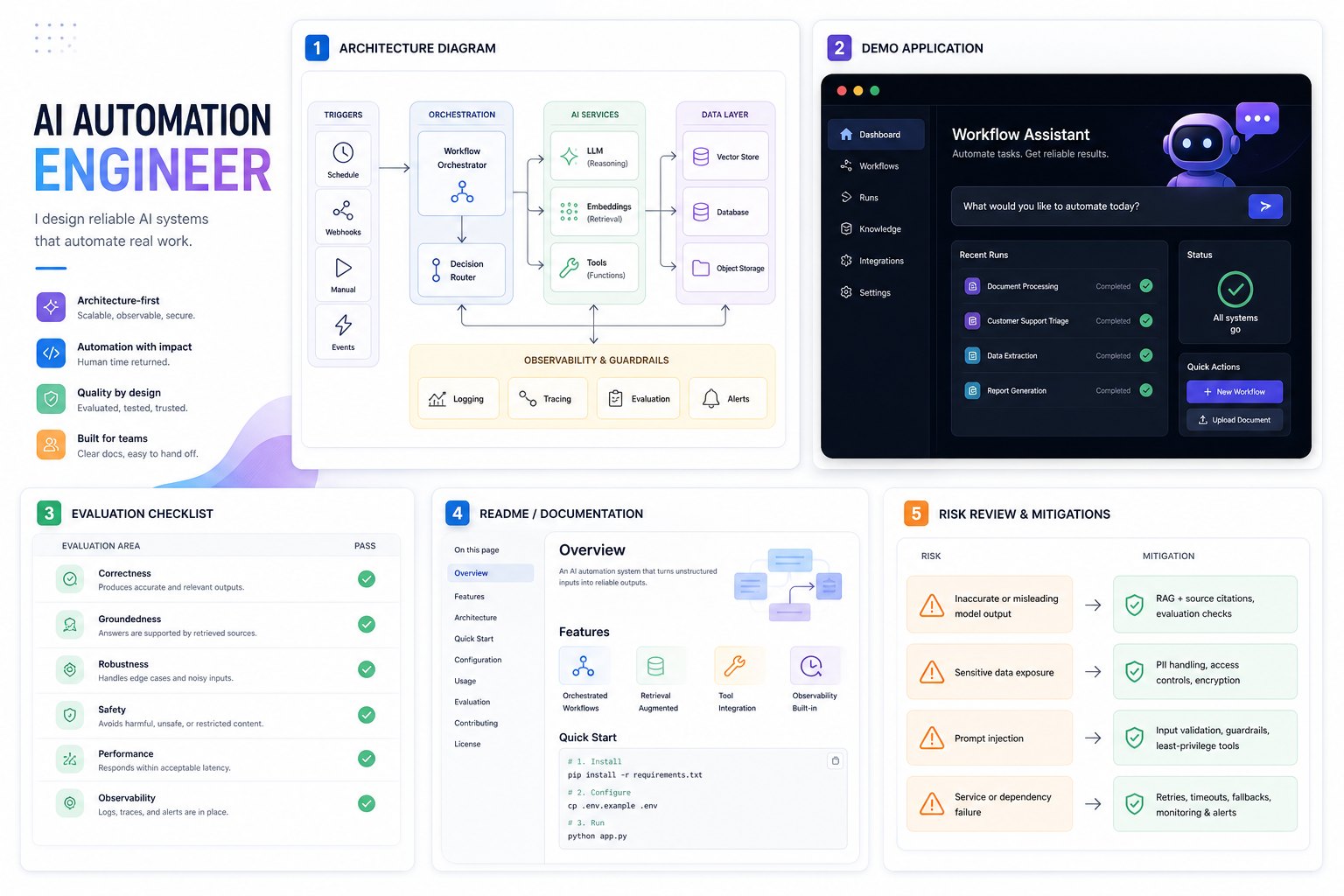
Proof Artifacts Every AI Workflow Portfolio Should Include
A case study becomes stronger when it includes inspectable proof. Screenshots are useful, but screenshots alone are not enough. A hiring manager or client should be able to see the workflow shape, understand the tradeoffs, and verify that you thought about quality and safety. The best proof artifacts are simple, concrete, and safe to share publicly.
Architecture diagram
Show the data path from trigger to output. Include where the model is called, where data is stored, where a human approves output, and where logs are captured.
Sample input and output
Use synthetic or redacted data. Show at least one normal case, one edge case, and one case where the system should refuse, escalate, or ask for review.
Evaluation note
Describe your small test set, expected behavior, pass/fail criteria, and the most common errors. Even ten thoughtful test cases are better than no evaluation.
README or case-study page
Explain setup, environment variables, assumptions, limitations, security notes, and how to run or inspect the project without exposing secrets.
You can also include a short demo video, but make it concise. A two-minute walkthrough with a realistic input, a model response, a validation step, and a human approval step often teaches more than a polished ten-minute tour. If your project is no-code or low-code, do not apologize for that. Instead, show the workflow logic, branching rules, error handling, data mapping, and logs. The goal is proof of automation thinking, not proof that every project must be custom code.
How to Explain the Workflow Without Drowning the Reader
The simplest workflow explanation follows a trigger-decision-action pattern. Start with the trigger: a form submission, new email, uploaded document, ticket update, scheduled job, or webhook. Then describe the data: what fields arrive, what documents are attached, what context is retrieved, and what must be validated. Then describe the decision: what the AI classifies, extracts, drafts, summarizes, or recommends. Finally, describe the action: update a database, create a draft, send a notification, route to a queue, or ask a human to approve.
For example, a support ticket triage case study might say: “When a new support email arrives, the workflow extracts sender, product, urgency, and issue type. The model classifies the ticket into billing, bug, access, or general question, then writes a short summary. If urgency is high or confidence is low, the ticket goes to human review. Otherwise, it is routed to the correct queue with a suggested response draft. The workflow logs the classification, model output, reviewer edits, and final route.” That paragraph proves more than “built an AI support bot.”
If your project uses agents, be even more explicit. Agents can sound vague unless you explain tool boundaries. What tools can the agent call? Are they read-only or can they change state? What permissions are required? What happens if a tool call fails? How do you prevent the agent from repeating an action? For more technical readers, connect this to Singularity Journey’s guides on AI agent evaluation, human approval for AI agents, and how to build AI agents.
Evaluation, Risk, and Human Review Make the Case Study Serious
AI automation projects need evaluation because model output is probabilistic. That does not mean every portfolio project needs a formal benchmark. It means you should show a reasonable method for checking whether the workflow works. Create a small set of realistic examples. Define expected outputs. Test normal cases, ambiguous cases, missing-data cases, adversarial wording, and cases where the correct behavior is “send to a human.” Then describe what failed and what you changed.
Evaluation also helps you avoid exaggeration. Instead of claiming “the workflow reduces support time by 70%” without real operational data, say “In a 20-case sample, the workflow routed 16 cases correctly, flagged three for review, and misclassified one billing/access edge case. The next improvement is a clearer taxonomy and a confidence threshold.” That style is honest, useful, and more credible than unsupported productivity claims.
Human review is not a weakness. In many AI automation projects, it is the feature that makes the workflow usable. A project that drafts responses for approval is often more realistic than one that sends messages automatically. A document extraction workflow that routes uncertain cases to review is more responsible than one that pretends every field is correct. A sales research workflow that prepares a CRM update draft is safer than one that edits records without approval. These details show professional judgment.
Interactive Portfolio Credibility Checker
Use this quick checker before publishing your project. It is not a certification; it is a way to spot missing evidence.
Case study proof check
Select every item your portfolio case study includes.
Three Case-Study Angles You Can Use
If you already have a project but do not know how to frame it, choose one of these angles. The angle should match what the project proves, not what sounds most impressive.
| Angle | Best for | What to emphasize |
|---|---|---|
| Workflow reliability case study | Projects that connect forms, email, spreadsheets, databases, task trackers, or CRMs. | Triggers, retries, validation, logs, duplicate prevention, and exception handling. |
| AI evaluation case study | Projects that classify, summarize, extract, or answer from documents. | Test cases, expected outputs, error analysis, confidence thresholds, and human review. |
| Human-in-the-loop automation case study | Projects that draft responses, recommend actions, or prepare updates that humans approve. | Approval criteria, reviewer interface, audit trail, blocked actions, and rollback notes. |
A good portfolio can include all three over time. One project might prove workflow reliability. Another might prove retrieval and evaluation. A third might prove safe tool use with approval gates. This creates a stronger career narrative than five generic AI chatbots. It also aligns with the broader AI automation portfolio projects cluster: build projects that show applied judgment, not just model access.
Common Mistakes That Make AI Automation Portfolios Look Weak
The first mistake is leading with tools instead of outcomes. “Built with n8n, LangChain, OpenAI, Airtable, and Slack” is not a case study. It is a stack list. Start with the workflow pain, then explain why each tool was necessary. A reviewer should know what changed for the user, not only what you installed.
The second mistake is hiding failure. AI automation work has edge cases. Model output can be malformed. APIs can rate-limit. A spreadsheet column can change. A user can upload a strange document. A confident answer can be wrong. A serious case study names these issues and shows how you handled them. The phrase “what broke” can be one of the strongest sections in your portfolio.
The third mistake is publishing private data. If you built something at work, do not expose internal tickets, customer names, proprietary documents, API keys, or screenshots of private systems. Rebuild the example with synthetic data or describe the system at a higher level. Privacy discipline is part of the skill you are trying to prove.
The fourth mistake is pretending every workflow should be fully autonomous. In career portfolios, safe constraints often make the project look stronger. A draft-only email assistant with approval, logs, and rollback is more credible than an autonomous sender with no controls. A read-only research agent is a better first project than an agent that can change production records. The reviewer is looking for judgment.
Final Template: What to Publish
Your final case-study page can be simple. Use this order: title, one-sentence problem, short demo or screenshot, workflow map, architecture, AI role, evaluation notes, risk controls, results, limitations, and next improvements. Add a link to the repo or a short private-demo note if the project cannot be fully public. Keep the writing direct. You are not trying to sound like a startup pitch deck; you are trying to prove you can build useful AI automation responsibly.
If you are using this for job search, convert the case study into a resume bullet only after the page is ready. A strong bullet might say: “Built an AI-assisted support triage workflow with email parsing, ticket classification, human review for uncertain cases, structured logs, and a 20-case evaluation set.” That is specific, inspectable, and more credible than “AI automation expert.”
FAQ: AI Automation Case Study Template
What is an AI automation case study?
It is a portfolio write-up that explains a workflow problem, the automation design, the AI component, the evaluation method, risk controls, results, limitations, and proof artifacts. It shows how you think, not only what you built.
Do I need a live demo for every AI automation portfolio project?
No. A live demo helps, but a strong README, architecture diagram, synthetic examples, screenshots, and evaluation notes can also be credible. Do not expose private systems just to create a demo.
Can no-code AI automation projects be portfolio-worthy?
Yes, if they show real workflow thinking: branching, data mapping, validation, error handling, logs, human approval, and business context. A no-code screenshot alone is weak; a well-documented workflow case study can be strong.
Should I include metrics in my case study?
Include metrics only when you can support them. For portfolio projects, a small evaluation set, error analysis, or before-and-after process comparison is often safer than unsupported productivity claims.
How do I protect private data in a public portfolio?
Use synthetic data, redact screenshots, remove credentials, avoid real customer records, and describe sensitive architecture at a safe level of detail. Privacy discipline strengthens your credibility.
What is the most important proof artifact?
The most important artifact is usually the combination of workflow map plus evaluation note. Together, they show that you understood the process and checked whether the AI-enabled workflow actually behaved as expected.
